

In Development
Last Updated: 29 Oct 2026 07:54 by ADMIN
Scheduled for 2026 Q4 (Nov)
Doug
Created on: 27 Aug 2025 17:46
Category: Spreadsheet
Type: Bug Report
2
Spreadsheet decrements the day if the year has only two digits

Entering dates in the Blazor spreadsheet act weird if you enter a 2 digit year. It seems to subtract a day when you remove focus from the cell.

Start by entering a date like 2/2/25:
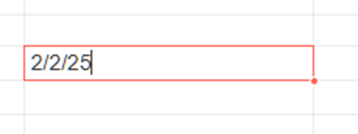
Then hit enter or otherwise remove focus from the cell and this is what it changes it to. Notice it subtracts a day:

Then put focus back on the cell:
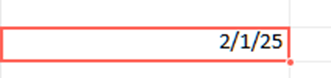
Now look at the editor at the top:

I note that when you enter a two digit year in Excel it defaults the century to 20 when you enter a year less than 30. It defaults a century of 19 when you enter a year >= 30. It appears that with the Telerik Blazor spreadsheet it always defaults the century to 19. You can make arguments on either side of that but the real issue here is that it subtracts a day when you enter a two digit year. It doesn't do that when you enter a 4 digit year.

The related thing that becomes an issue is when you export the spreadsheet to a byte array and evaluate the cell RawValue. When you enter a 4 digit year, you get a raw value that is a positive number and you can use FormatHelper.ConvertDoubleToDateTime to get the date value. When you enter a 2 digit year and get the raw value, it is a negative number, and when you call FormatHelper.ConvertDoubleToDateTime it returns null.

Can you please comment on the rhyme or reason the spreadsheet behaves this way? Or is this a bug(s)?

Thanks.

3 comments
ADMIN
Dimo
Posted on: 16 Oct 2026 08:28

Hello Erik,

The update is that I used your post as an opportunity to escalate the issue to the product team. I must admit that there is no set time frame for a resolution yet. Once we plan it, the public status here will change.

Regards,
Dimo
Progress Telerik

Love the Telerik and Kendo UI products and believe more people should try them? Invite a fellow developer to become a Progress customer and each of you can get a $50 Amazon gift voucher.

Erik
Posted on: 12 Oct 2026 18:14
Hi, 

any updates on this. We observed this exact behavior in our Angular component as well.
ADMIN
Dimo
Posted on: 01 Sep 2025 13:26

Hello Doug,

Thanks for the screenshots and detailed description.

I must confirm that the observed behavior is a bug. The worse news is that I can't suggest a meaningful workaround. Please accept my apologies.

I am converting this forum thread to a public bug report. I also logged a task to research about how to assume the century from a two-digit year. Generally, such inconsistencies with Microsoft Excel are not a good thing and we aim to avoid them.

I also awarded you some Telerik points for bringing these issues to our attention.

Regards,
Dimo
Progress Telerik

Love the Telerik and Kendo UI products and believe more people should try them? Invite a fellow developer to become a Progress customer and each of you can get a $50 Amazon gift voucher.