

Grid headers are misaligned if they are navigated in a scrolling scenario with a Frozen column.
===
ADMIN EDIT
===
The behavior affects the TreeList as well in a similar fashion. The misalignment is bigger when there is a frozen column but it is also reproducible without it in this demo.

Hi Michał,
You've also submitted a private ticket on the matter and I am adding my response here as well for visibility.
I confirm I've tested the scenario using the latest UI for Blazor (currently 5.1.1) but I am not reproducing the discussed headers misalignment issue.
Can you please share a runnable sample where the problem is reproducible, so I can revise it?
Regards,
Nadezhda Tacheva
Progress Telerik
Hi Brett,
This is indeed a very unpleasant bug and there is unfortunately no workaround for it. I can confirm that it is in our backlog with high priority and our development team will target it for fixing as soon as possible.
At this stage, I cannot provide a specific release number that the fix will be included in but you may follow this post, so you can get status updates.
Regards,
Nadezhda Tacheva
Progress Telerik

This is EXTREMELY annoying and our users are complaining about it constantly. It's not just a hit-or-miss thing, I can get it to happen on all grids in our application. It's so easy to reproduce, it happens a lot. Please see the screenshot of why this isn't very pleasant for our users.
Can you all please try to fix this one? I remember using Telerik for ASP.NET many years ago; this was a problem in that product and never got fixed.
Don't let the Blazor grid component carry this bug, please :)
Can confirm the bug is there and it's very annoying.
No need for the Frozen columns, as Ron said. There is also no need for resizable columns - just place a few columns with fixed width, so they go over the width of the container.
In both 3.5.0 and 4.3.0 versions the bug persists, and from the answers I got, there is currently no workaround whatsoever.
Version 3.5.0:
Version 4.3.0:
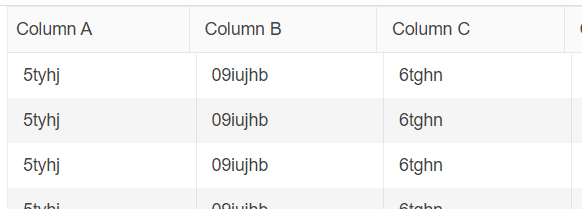
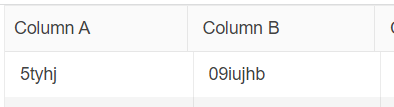

No need of frozen column at all
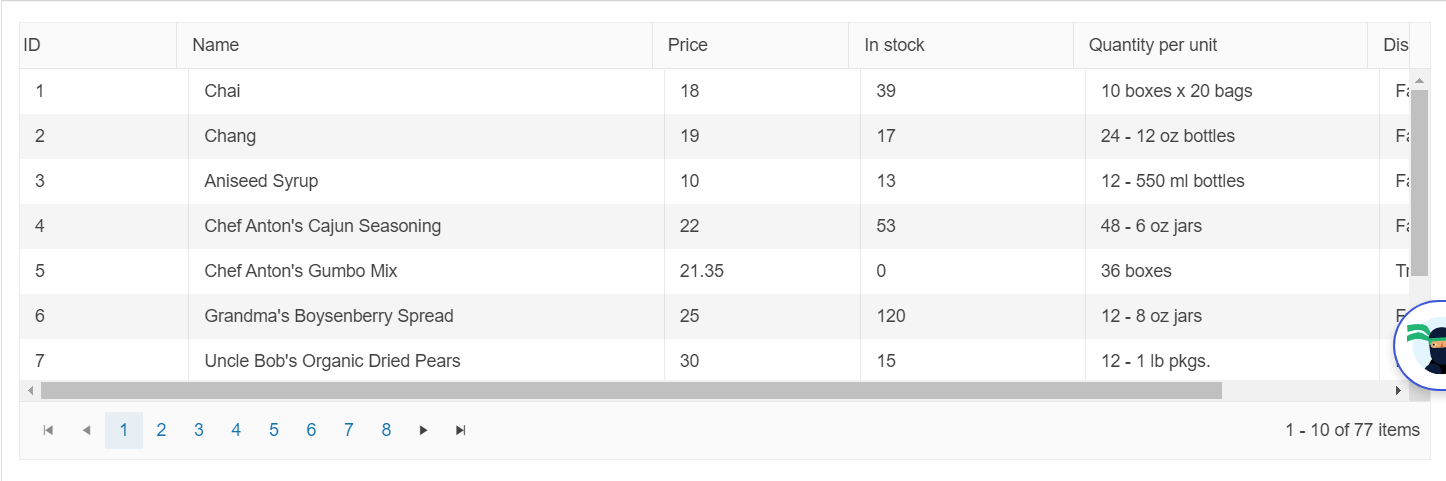
In this demo page, resize the Name column to create a horizontal scrollbar... Scroll to the and and than back to the beginning sing the thumb...
Not in all cases but most you will get this image, where the header and the content of the column are not aligned
- All
- Completed (1539)
- Declined (372)
- Duplicated (415)
- In Development (7)
- Need More Info (14)
- Planned (7)
- Unplanned (1075)
- Won't Fix (22)
- All
- UI for Blazor
- Agentic UI Generator
- AIPrompt
- AnimationContainer
- AppBar
- ArcGauge
- AutoComplete
- Avatar
- Badge
- Barcode
- Breadcrumb
- BrowserExtension
- Button
- ButtonGroup
- Calendar
- Card
- Carousel
- Charts
- Chat
- Checkbox
- Chip
- ChipList
- ChunkProgressBar
- CircularGauge
- ColorGradient
- ColorPalette
- ColorPicker
- ComboBox
- ContextMenu
- DateInput
- DatePicker
- DateRangePicker
- DateTimePicker
- Diagram
- Dialog
- DockManager
- Drawer
- DropDownButton
- DropDownList
- DropDownTree
- DropZone
- Editor
- ExpansionPanel
- FileManager
- FileSelect
- Filter
- FlatColorPicker
- FloatingActionButton
- FloatingLabel
- FloatingToolBar
- Form
- Gantt
- Grid
- GridLayout
- InlineAIPrompt
- Installer and VS Extensions
- Licensing
- LinearGauge
- ListBox
- ListView
- Loader
- LoaderContainer
- Map
- MaskedTextBox
- MediaQuery
- Menu
- MultiColumnComboBox
- MultiSelect
- Notification
- NumericTextBox
- Page Templates / Building Blocks
- Pager
- PanelBar
- PDFViewer
- PivotGrid
- Popover
- Popup
- ProgressBar
- PromptBox
- QRCode
- RadialGauge
- RadioGroup
- RangeSlider
- Rating
- Scheduler
- SegmentedControl
- Signature
- Skeleton
- Slider
- SmartPasteButton
- SpeechToTextButton
- SplitButton
- Splitter
- Spreadsheet
- StackLayout
- Stepper
- StockChart
- Switch
- TabStrip
- TaskBoard
- TextArea
- TextBox
- TileLayout
- TimePicker
- ToggleButton
- ToolBar
- Tooltip
- TreeList
- TreeView
- Upload
- ValidationMessage
- ValidationSummary
- ValidationTooltip
- VS Code Extension
- WebMCP
- Window
- Wizard