
Completed
Last Updated:
27 Feb 2026 12:50
by ADMIN

Alex
Created on:
24 Jul 2025 13:46
Category:
TabStrip
Type:
Bug Report
Tab index for header is not updated correctly
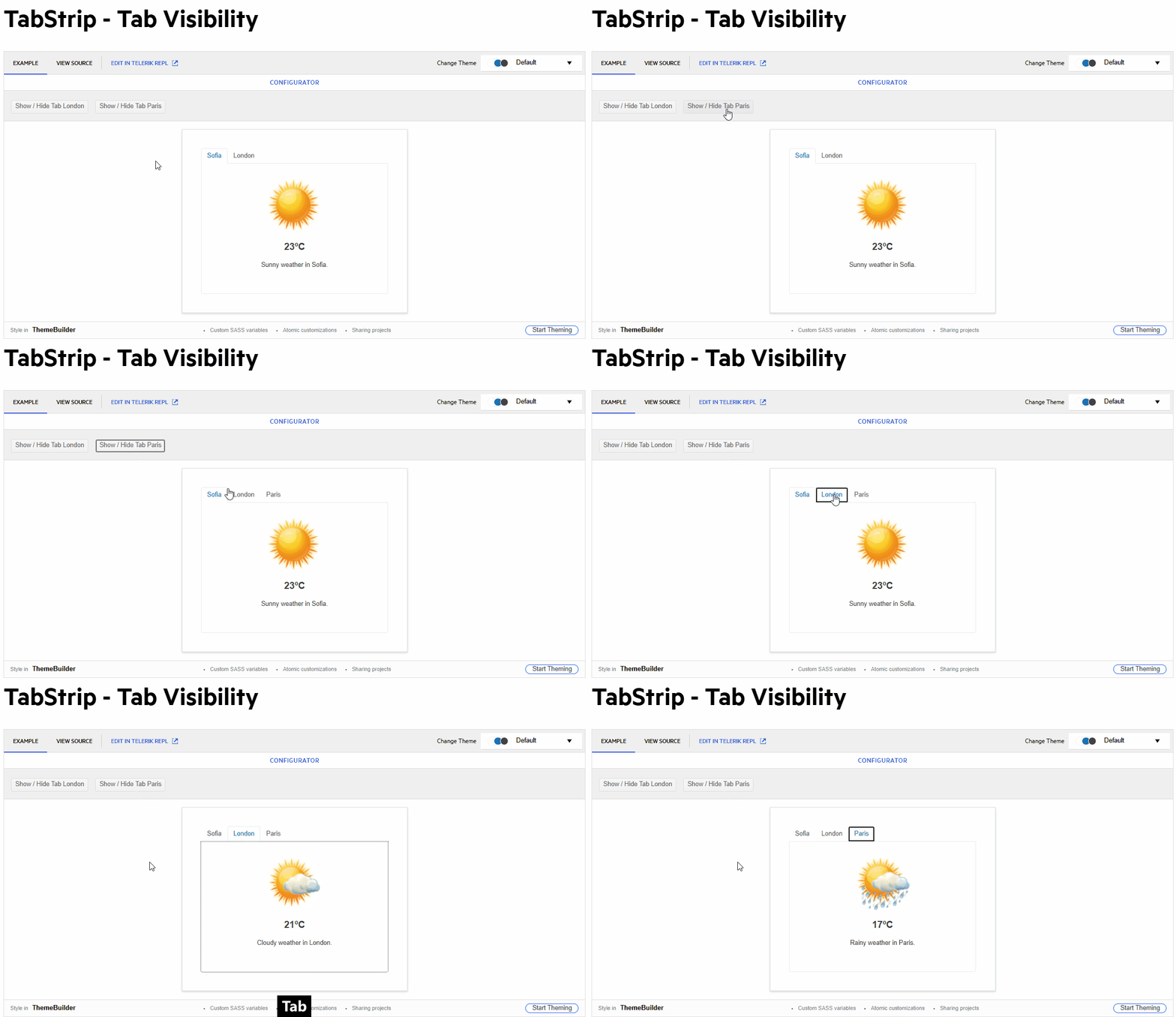
- Activating the second tab leads to its header having the focus (correct).
- Using the tab key, the focus changes to the second tabs content (correct).
- Using "Shift + Tab", the focus changes back to the header row, but to the first tab header (incorrect, the second tab header should be focused).
- Using the right arrow key, the focus changes to the third tab header and this tab gets activated (actually correct, but confusing considering the previous point).
The problem is caused by the tab index of the tab headers not being updated properly. The first one seems to have 0 at all times, while all others stay at -1. Instead, the active tab header should have tab index 0, while all others get -1.
1 comment
Alex
Posted on:
27 Feb 2026 12:40
Hello all,
I tried to reproduce this just now on the mentioned page https://demos.telerik.com/blazor-ui/tabstrip/tab-visibility, but could no longer do so. It seems this has been fixed, either purposely or as a side effect of something else. So I think you can close this one.
Regards,
Alex
Type
Status
- All
- Completed (1526)
- Declined (386)
- Duplicated (414)
- In Development (8)
- Need More Info (14)
- Planned (3)
- Unplanned (1070)
- Won't Fix (23)
Category
- All
- UI for Blazor
- Agentic UI Generator
- AIPrompt
- AnimationContainer
- AppBar
- ArcGauge
- AutoComplete
- Avatar
- Badge
- Barcode
- Breadcrumb
- BrowserExtension
- Button
- ButtonGroup
- Calendar
- Card
- Carousel
- Charts
- Chat
- Checkbox
- Chip
- ChipList
- ChunkProgressBar
- CircularGauge
- ColorGradient
- ColorPalette
- ColorPicker
- ComboBox
- ContextMenu
- DateInput
- DatePicker
- DateRangePicker
- DateTimePicker
- Diagram
- Dialog
- DockManager
- Drawer
- DropDownButton
- DropDownList
- DropDownTree
- DropZone
- Editor
- ExpansionPanel
- FileManager
- FileSelect
- Filter
- FlatColorPicker
- FloatingActionButton
- FloatingLabel
- Form
- Gantt
- Grid
- GridLayout
- InlineAIPrompt
- Installer and VS Extensions
- Licensing
- LinearGauge
- ListBox
- ListView
- Loader
- LoaderContainer
- Map
- MaskedTextBox
- MediaQuery
- Menu
- MultiColumnComboBox
- MultiSelect
- Notification
- NumericTextBox
- Page Templates / Building Blocks
- Pager
- PanelBar
- PDFViewer
- PivotGrid
- Popover
- Popup
- ProgressBar
- PromptBox
- QRCode
- RadialGauge
- RadioGroup
- RangeSlider
- Rating
- Scheduler
- SegmentedControl
- Signature
- Skeleton
- Slider
- SmartPasteButton
- SpeechToTextButton
- SplitButton
- Splitter
- Spreadsheet
- StackLayout
- Stepper
- StockChart
- Switch
- TabStrip
- TaskBoard
- TextArea
- TextBox
- TileLayout
- TimePicker
- ToggleButton
- ToolBar
- Tooltip
- TreeList
- TreeView
- Upload
- ValidationMessage
- ValidationSummary
- ValidationTooltip
- VS Code Extension
- WebMCP
- Window
- Wizard