

Setting the FilterDirector directly:
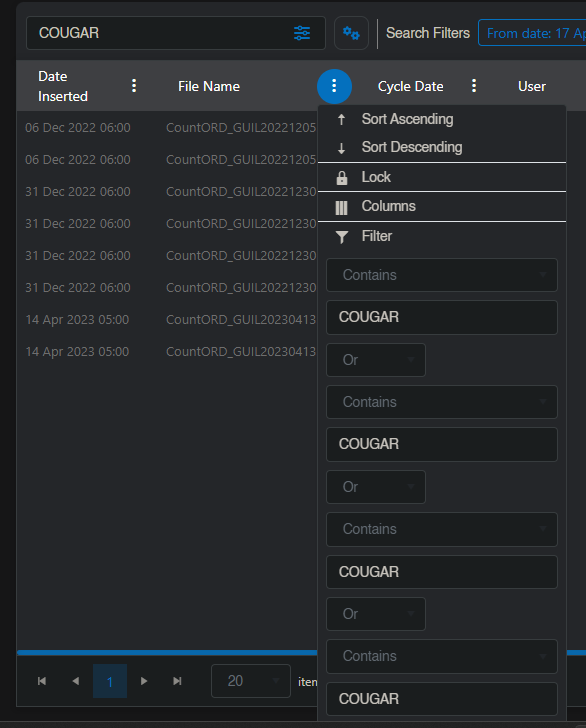
Setting FilterDescriptor via SearchText:
Our search box is a custom TelerikTextbox not part of the grid, but essentially the same functionality as the built-in search box.
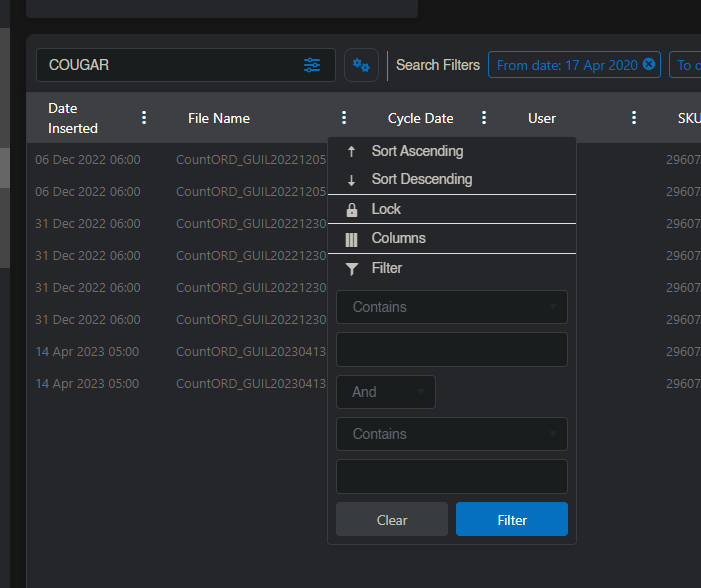
To test, use this code:
https://docs.telerik.com/blazor-ui/components/grid/filter/searchbox#customize-the-searchbox
But add it to FilterDescriptor immediately rather than setting SearchFilter like on the link.
This is the only instance of this on our site, and all of our grids use the exact same code via a generic method, on our object that controls the grid we have a custom empty attribute to dictate whether a column should be filterable via our textbox.

Hello Benjamin,
OK, if you want to show the search string in the FilterMenu and this leads to repetitive textboxes, this means that the filter descriptor structure is wrong. For example, GridState.FilterDescriptors has a single parent descriptor, while it should have multiple ones - one for each filtered Field (Member). However, if you do this, the Grid will stop showing data, because the component applies all filter descriptors at root level with an AND logical operator, while you need OR.
So, my advice is to show the search string somewhere outside the FilterMenu and use the SearchFilter property of the Grid state.
Regards,
Dimo
Progress Telerik
Hi Dimo,
That is exactly as I said.
We are making use of the Search Text now yes but we wanted to have it show up in the FilterMenu's text field which as we see is the FilterDecriptor, which caused a bug on the grid showing a bunch of duplicated filters.
Regards,
Hello Benjamin,
It looks like your app is adding FilterDescriptors to the Filter state. Instead, it should add descriptors to the Search state.
Note this code in our example. If you enable the FilterMenu for it, it will still work.
        GridState<SampleData> desiredState = new GridState<SampleData>()
        {
            SearchFilter = CreateSearchFilter()
        };

        await Grid.SetStateAsync(desiredState);
Regards,
Dimo
Progress Telerik
- All
- Completed (1527)
- Declined (386)
- Duplicated (414)
- In Development (7)
- Need More Info (14)
- Planned (4)
- Unplanned (1069)
- Won't Fix (23)
- All
- UI for Blazor
- Agentic UI Generator
- AIPrompt
- AnimationContainer
- AppBar
- ArcGauge
- AutoComplete
- Avatar
- Badge
- Barcode
- Breadcrumb
- BrowserExtension
- Button
- ButtonGroup
- Calendar
- Card
- Carousel
- Charts
- Chat
- Checkbox
- Chip
- ChipList
- ChunkProgressBar
- CircularGauge
- ColorGradient
- ColorPalette
- ColorPicker
- ComboBox
- ContextMenu
- DateInput
- DatePicker
- DateRangePicker
- DateTimePicker
- Diagram
- Dialog
- DockManager
- Drawer
- DropDownButton
- DropDownList
- DropDownTree
- DropZone
- Editor
- ExpansionPanel
- FileManager
- FileSelect
- Filter
- FlatColorPicker
- FloatingActionButton
- FloatingLabel
- Form
- Gantt
- Grid
- GridLayout
- InlineAIPrompt
- Installer and VS Extensions
- Licensing
- LinearGauge
- ListBox
- ListView
- Loader
- LoaderContainer
- Map
- MaskedTextBox
- MediaQuery
- Menu
- MultiColumnComboBox
- MultiSelect
- Notification
- NumericTextBox
- Page Templates / Building Blocks
- Pager
- PanelBar
- PDFViewer
- PivotGrid
- Popover
- Popup
- ProgressBar
- PromptBox
- QRCode
- RadialGauge
- RadioGroup
- RangeSlider
- Rating
- Scheduler
- SegmentedControl
- Signature
- Skeleton
- Slider
- SmartPasteButton
- SpeechToTextButton
- SplitButton
- Splitter
- Spreadsheet
- StackLayout
- Stepper
- StockChart
- Switch
- TabStrip
- TaskBoard
- TextArea
- TextBox
- TileLayout
- TimePicker
- ToggleButton
- ToolBar
- Tooltip
- TreeList
- TreeView
- Upload
- ValidationMessage
- ValidationSummary
- ValidationTooltip
- VS Code Extension
- WebMCP
- Window
- Wizard