
Unplanned
Last Updated:
07 Jan 2026 14:02
by ADMIN

Isaac
Created on:
05 Jan 2026 14:33
Category:
UI for Blazor
Type:
Feature Request
Magnifiable Image Component
Magnifiable Image Component
A Blazor component designed to provide an interactive image magnification experience, similar to popular eCommerce websites.
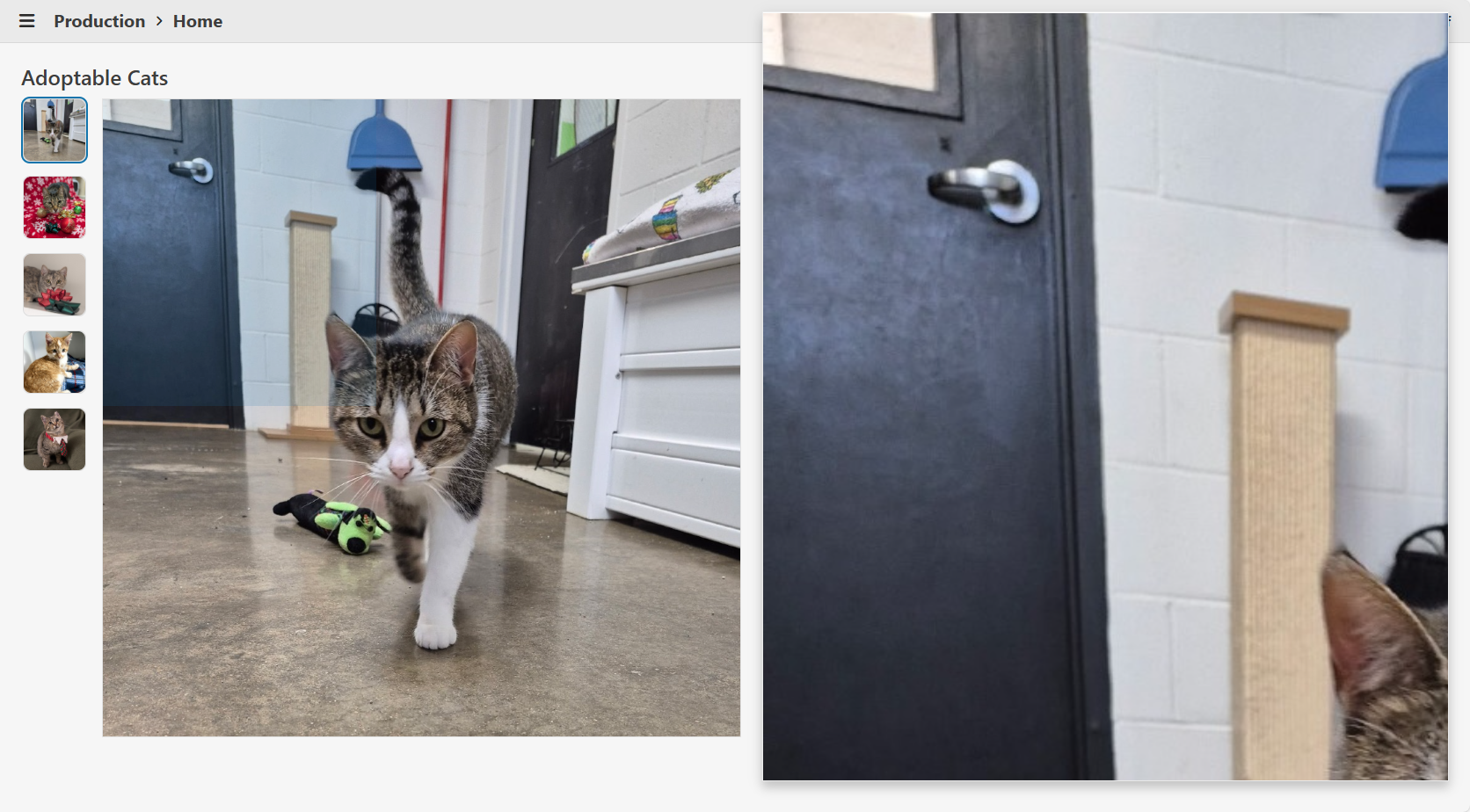
Features
- Interactive Magnifier: On mouse hover, a magnifier appears beside the image, following the cursor and displaying a zoomed-in portion of the image. At the same time an overlay appears on the image indicating the zoomed-in portion of the image.
- Screen Space Awareness: The magnifier dynamically stretches to fill the available space to the right or left of the image, ensuring optimal use of the viewport and consistent margins.
- Popover Integration: Utilizes Telerik's Popover for the magnifier, ensuring it appears above all other UI elements and avoids clipping or stacking issues.
- Configurable Magnification: The magnification scale is configurable via the
MagnifyScaleparameter. - Accessibility: The image is wrapped in a button for keyboard accessibility, and all images support alt text.
- Full-Size View: Clicking the image opens a modal window displaying the image at its actual size.
Sample Code
MagnifiableImage.razor
@inject IJSRuntime JS
@using Microsoft.JSInterop

@* Container *@
<div @ref="_containerRef" class="@($"magnifiable-image-container {Class}")" style="height: @Height;  width: @Width;">

    @* Image *@
    <button @onclick="@OnClick" class="magnifiable-image-button">
        <img src="@Image.Src" alt="@Image.Alt" style="height: 100%; width: 100%;"
             @onmousemove="@OnMouseMove" @onmouseenter="@OnMouseEnterAsync" @onmouseleave="@OnMouseLeave"/>
    </button>

    @* Magnifier *@
    <TelerikPopover @ref="_popoverRef" AnchorSelector=".magnifiable-image-container" Position="@(_showOnRight ? PopoverPosition.Right : PopoverPosition.Left)" Offset="@MagnifierMargin"
                    Width="@($"{_magnifierWidth}px")" Height="@($"{_magnifierHeight}px")" Class="popover-magnifier" Collision="PopoverCollision.Fit">
        <PopoverContent>

            @* Magnified Image *@
            <img src="@Image.Src" alt="@Image.Alt" class="magnified-image"
                 style="@($"width: {_magnifiedImageWidth}px; height: {_magnifiedImageHeight}px; transform: translateX({_magnifiedImageTransformX}px) translateY({_magnifiedImageTransformY}px); left: {_magnifiedImageLeft}px; top: {_magnifiedImageTop}px;")"/>

        </PopoverContent>
    </TelerikPopover>

    @* Magnifier Overlay *@
    @if (_isMouseOver)
    {
        <div class="magnifier-overlay"
             style="@($"width: {_magnifierOverlayWidth}px; height: {_magnifierOverlayHeight}px; transform: translateX({_magnifierOverlayTransformX}px) translateY({_magnifierOverlayTransformY}px);  left: {_magnifierOverlayLeft}px; top: {_magnifierOverlayTop}px;")))">
        </div>
    }

    @* Actual Image *@
    <TelerikWindow @bind-Visible="@_isClicked" Modal="true" CloseOnOverlayClick="true" Draggable="false" Resizable="false" Class="window-rounded">
        <WindowActions>
            <WindowAction Name="Close"/>
        </WindowActions>
        <WindowContent>
            <img src="@Image.Src" alt="@Image.Alt"/>
        </WindowContent>
    </TelerikWindow>

</div>

<style>
    .magnifiable-image-container {
        position: relative;
        display: inline-block;
        cursor: zoom-in;
    }

    .magnifiable-image-button {
        background: none;
        border: none;
        padding: 0;
        margin: 0;
        font: inherit;
        color: inherit;
        cursor: inherit !important;
        outline: none;
        box-shadow: none;
        appearance: none;
        -webkit-appearance: none;
        -moz-appearance: none;
        display: block;
        width: 100%;
        height: 100%;
    }
        .magnifiable-image-button:focus-visible {
            outline: none;
            box-shadow: 0 0 0 2px color-mix(in srgb, var(--kendo-color-on-app-surface, #424242) 50%, transparent);
        }

    .popover-magnifier {
        overflow: hidden;
        border-radius: 0;
        position: relative;
        top: @(_adjustForTelerikFit ? $"{(_showOnBottom ? "" : "-")}{MagnifierMargin/4}px" : $"{(_showOnBottom ? "" : "-")}{MagnifierMargin}px");
    }

    .magnified-image {
        position: absolute;
    }

    .magnifier-overlay {
        position: absolute;
        background: color-mix(in srgb, var(--kendo-color-primary, #1274AC) 15%, transparent);
        pointer-events: none;
        z-index: 5;
        box-sizing: border-box;
        display: block;
    }
</style>

@code
{
    [Parameter] public required ImageInfo Image { get; set; }

    /// <summary>
    /// The height of the image (e.g., "200px", "100%", or "auto"). Default is "auto".
    /// </summary>
    [Parameter]
    public string Height { get; set; } = "auto";

    /// <summary>
    /// The width of the image (e.g., "200px", "100%", or "auto"). Default is "auto".
    /// </summary>
    [Parameter]
    public string Width { get; set; } = "auto";

    /// <summary>
    /// The magnification scale for the magnifier. Default is 3 (3x magnification).
    /// </summary>
    [Parameter]
    public double MagnifyScale { get; set; } = 3;

    /// <summary>
    /// Applies additional CSS classes to the MagnifiableImage's root element for custom styling and visual modifications.
    /// </summary>
    [Parameter]
    public string Class { get; set; } = string.Empty;

    private const int MagnifierMargin = 24;

    // State for magnifier visibility and container reference
    private bool _isMouseOver;
    private bool _isClicked;
    private ElementReference _containerRef;
    private TelerikPopover? _popoverRef;

    // Image and magnified image dimensions
    private double _imageWidth;
    private double _imageHeight;
    private double _magnifiedImageWidth;
    private double _magnifiedImageHeight;

    // Magnifier position and size
    private bool _showOnRight = true;
    private bool _showOnBottom = true;
    private bool _adjustForTelerikFit;
    private double _magnifierWidth;
    private double _magnifierHeight;

    // Magnified image offset within the magnifier
    private double _magnifiedImageLeft;
    private double _magnifiedImageTop;

    // Mouse position clamping bounds
    private double _minMouseX;
    private double _minMouseY;
    private double _maxMouseX;
    private double _maxMouseY;

    // Mouse position and transform for magnified image
    private double _mouseX;
    private double _mouseY;
    private double _magnifiedImageTransformX;
    private double _magnifiedImageTransformY;

    // Magnifier overlay size and transform
    private double _magnifierOverlayWidth;
    private double _magnifierOverlayHeight;
    private double _magnifierOverlayLeft;
    private double _magnifierOverlayTop;
    private double _magnifierOverlayTransformX;
    private double _magnifierOverlayTransformY;

    private void OnClick()
    {
        _isClicked = true;
    }

    private async Task OnMouseEnterAsync()
    {
        _isMouseOver = true;
        _popoverRef?.Show();

        // Get layout info about the image container using getElementLayoutInfo from wwwroot/js/magnifiable-image.js
        var containerLayoutInfo = await JS.InvokeAsync<ElementLayoutInfo>("getElementLayoutInfo", _containerRef);

        // Store image size
        _imageWidth = containerLayoutInfo.Width;
        _imageHeight = containerLayoutInfo.Height;
        _magnifiedImageWidth = _imageWidth * MagnifyScale;
        _magnifiedImageHeight = _imageHeight * MagnifyScale;

        // Determine magnifier position based on available space
        _showOnRight = containerLayoutInfo.DistanceFromViewportRight >= containerLayoutInfo.DistanceFromViewportLeft;
        _adjustForTelerikFit = Math.Abs(containerLayoutInfo.DistanceFromViewportBottom - containerLayoutInfo.DistanceFromViewportTop) < 20;
        _showOnBottom = containerLayoutInfo.DistanceFromViewportBottom >= containerLayoutInfo.DistanceFromViewportTop;

        // Calculate magnifier size based on available space
        _magnifierWidth = _showOnRight
            ? containerLayoutInfo.DistanceFromViewportRight - MagnifierMargin*2
            : containerLayoutInfo.DistanceFromViewportLeft - MagnifierMargin*2;
        _magnifierHeight = containerLayoutInfo.ViewportHeight - MagnifierMargin*2;

        // Center the magnified image in the magnifier
        _magnifiedImageLeft = (_magnifierWidth / 2) - (_imageWidth / 2);
        _magnifiedImageTop = (_magnifierHeight / 2) - (_imageHeight / 2);

        // Calculate min and max mouse X/Y to prevent showing empty space in the magnifier
        _minMouseX = Math.Floor((_magnifierWidth / MagnifyScale) / 2);
        _minMouseY = Math.Floor((_magnifierHeight / MagnifyScale) / 2);
        _maxMouseX = Math.Ceiling(_imageWidth - ((_magnifierWidth / MagnifyScale) / 2));
        _maxMouseY = Math.Ceiling(_imageHeight - ((_magnifierHeight / MagnifyScale) / 2));

        // Calculate magnifier overlay size and position
        _magnifierOverlayWidth = Math.Floor(Math.Clamp(_magnifierWidth / MagnifyScale, 0, _imageWidth)) - 1;
        _magnifierOverlayHeight = Math.Floor(Math.Clamp(_magnifierHeight / MagnifyScale, 0, _imageHeight)) - 1;
        _magnifierOverlayLeft = -((_magnifierOverlayWidth / 2) + 1);
        _magnifierOverlayTop = -((_magnifierOverlayHeight / 2) + 1);
    }

    private void OnMouseLeave()
    {
        _isMouseOver = false;
        _popoverRef?.Hide();
    }

    private void OnMouseMove(MouseEventArgs e)
    {
        // Clamp mouse X/Y to prevent showing empty space in the magnifier
        if (_minMouseX > _maxMouseX) _mouseX = _imageWidth / 2;
        else _mouseX = Math.Clamp(e.OffsetX, _minMouseX, _maxMouseX);
        if (_minMouseY > _maxMouseY) _mouseY = _imageHeight / 2;
        else _mouseY = Math.Clamp(e.OffsetY, _minMouseY, _maxMouseY);

        // Calculate the transform for the magnified image
        _magnifiedImageTransformX = -Math.Round((_mouseX * MagnifyScale) - (_imageWidth / 2));
        _magnifiedImageTransformY = -Math.Round((_mouseY * MagnifyScale) - (_imageHeight / 2));

        // Calculate the transform for the magnifier overlay
        _magnifierOverlayTransformX = Math.Round(_mouseX);
        _magnifierOverlayTransformY = Math.Round(_mouseY);

        _popoverRef?.Refresh();
    }

    private record ElementLayoutInfo(
        double Width,
        double Height,
        double ViewportHeight,
        double DistanceFromViewportLeft, // distance from viewport's left edge to element's left edge
        double DistanceFromViewportRight, // distance from element's right edge to viewport's right edge
        double DistanceFromViewportTop, // distance from viewport's top edge to element's top edge
        double DistanceFromViewportBottom); // distance from element's bottom edge to viewport's bottom edge
}
magnifiable-image.js
// Returns width, height, and the space to the left and right of the element relative to the viewport
window.getElementLayoutInfo = (element) => {
    if (!element) return null;
    const elementRect = element.getBoundingClientRect();
    return {
        width: elementRect.width,
        height: elementRect.height,
        viewportHeight: window.innerHeight,
        distanceFromViewportLeft: elementRect.left, // distance from viewport's left edge to element's left edge
        distanceFromViewportRight: window.innerWidth - elementRect.right, // distance from element's right edge to viewport's right edge
        distanceFromViewportTop: elementRect.top, // distance from viewport's top edge to element's top edge
        distanceFromViewportBottom: window.innerHeight - elementRect.bottom // distance from element's bottom edge to viewport's bottom edge
    };
};
Note
Only tested in Blazor WebAssembly. The component may see performance issues in Blazor Server.
3 comments

ADMIN
Hristian Stefanov
Posted on:
07 Jan 2026 14:02
Isaac
Posted on:
06 Jan 2026 16:01
ADMIN
Hristian Stefanov
Posted on:
06 Jan 2026 14:43