

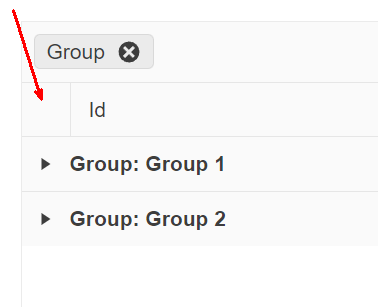
On a grid grouped by one or more fields, provide an option for end users to expand/collapse all rows at will. The following image is a suggestion of where this option (most likely a button) should appear:

Hello Kees,
I must confirm that the header cell of the group column is not accessible in any way via public Telerik API.
A possible workaround is to render a button above the Grid and position it with CSS, so that it looks inside that cell. Depending on the overall page layout and Grid configuration, this may not be a robust solution, so a button in the Grid ToolBar may be a simpler and more reliable approach.
Regards,
Dimo
Progress Telerik
Love the Telerik and Kendo UI products and believe more people should try them? Invite a fellow developer to become a Progress customer and each of you can get a $50 Amazon gift voucher.

Is there a way to add a button to that space programmatically? I can't find anything to access that th/tr element.
The issue in the feedback portal has been in an unplanned state for 3 years, so I don't expect an update soon and want to create a workaround.
Kind regards,
Kees Alderliesten
Hello Enzo,
Thank you for the provided screenshot.
A feature request for the desired functionality is already been logged in our public feedback portal: blazor Grid Grouping Expand/Collapse All. With that in mind, I'm changing this item status to "Duplicated".
In the meantime, a possible alternative is to control collapse/expand groups through the Grid State. An example of the approach you can see in our KB article: Collapse Grid Groups by Default.
Also, you can subscribe to the item to get notified via email for any status changes.
Regards,
Tsvetomir
Progress Telerik
Love the Telerik and Kendo UI products and believe more people should try them? Invite a fellow developer to become a Progress customer and each of you can get a $50 Amazon gift voucher.
- All
- Completed (1526)
- Declined (386)
- Duplicated (414)
- In Development (8)
- Need More Info (14)
- Planned (3)
- Unplanned (1070)
- Won't Fix (23)
- All
- UI for Blazor
- Agentic UI Generator
- AIPrompt
- AnimationContainer
- AppBar
- ArcGauge
- AutoComplete
- Avatar
- Badge
- Barcode
- Breadcrumb
- BrowserExtension
- Button
- ButtonGroup
- Calendar
- Card
- Carousel
- Charts
- Chat
- Checkbox
- Chip
- ChipList
- ChunkProgressBar
- CircularGauge
- ColorGradient
- ColorPalette
- ColorPicker
- ComboBox
- ContextMenu
- DateInput
- DatePicker
- DateRangePicker
- DateTimePicker
- Diagram
- Dialog
- DockManager
- Drawer
- DropDownButton
- DropDownList
- DropDownTree
- DropZone
- Editor
- ExpansionPanel
- FileManager
- FileSelect
- Filter
- FlatColorPicker
- FloatingActionButton
- FloatingLabel
- Form
- Gantt
- Grid
- GridLayout
- InlineAIPrompt
- Installer and VS Extensions
- Licensing
- LinearGauge
- ListBox
- ListView
- Loader
- LoaderContainer
- Map
- MaskedTextBox
- MediaQuery
- Menu
- MultiColumnComboBox
- MultiSelect
- Notification
- NumericTextBox
- Page Templates / Building Blocks
- Pager
- PanelBar
- PDFViewer
- PivotGrid
- Popover
- Popup
- ProgressBar
- PromptBox
- QRCode
- RadialGauge
- RadioGroup
- RangeSlider
- Rating
- Scheduler
- SegmentedControl
- Signature
- Skeleton
- Slider
- SmartPasteButton
- SpeechToTextButton
- SplitButton
- Splitter
- Spreadsheet
- StackLayout
- Stepper
- StockChart
- Switch
- TabStrip
- TaskBoard
- TextArea
- TextBox
- TileLayout
- TimePicker
- ToggleButton
- ToolBar
- Tooltip
- TreeList
- TreeView
- Upload
- ValidationMessage
- ValidationSummary
- ValidationTooltip
- VS Code Extension
- WebMCP
- Window
- Wizard