

When is the Microsoft.Web.Webview2 issue expected to be resolved?
Even after adding in the Microsoft.Web.WebView2 1.0.4078.44 nuget dependency to my project, as suggested here: https://feedback.telerik.com/winforms/1714837-radpdfviewer-could-not-load-microsoft-web-webview2-winforms-in-q2-2026, I get a runtime exception because WebView2 is targeting .NET 10 10.0.0.17763.10 and my .NET 10 version is 10.0.201.
Should I downgrade to earlier version of Telerik UI for WPF or is there another workaround?
The Telerik dependencies I'm using are as follows:
Telerik.Windows.Controls.for.Wpf.Xaml.2026.2.701
Telerik.Windows.Controls.Data.for.Wpf.Xaml.2026.2.701
Telerik.Windows.Controls.Diagrams.for.Wpf.Xaml.2026.2.701
Telerik.Windows.Controls.Docking.for.Wpf.Xaml.2026.2.701
Telerik.Windows.Controls.FileDialogs.for.Wpf.Xaml.2026.2.701
Telerik.Windows.Controls.GridView.for.Wpf.Xaml.2026.2.701
Telerik.Windows.Controls.Navigation.for.Wpf.Xaml.2026.2.701

Hello Andrew,
I appreciate you sharing more details regarding the reported scenario. I also want to thank you for sharing your workaround. Your findings are quite interesting. We are not aware of such an error or why it is happening. In my previous post, the reference item was related to WinForms. I overlooked your first reply as the share feedback item and the Product for the ticket was marked for WInForms, however, you are using WPF. Please excuse me for that.
The latest WPF version is 2026.2.701, as you have already found. However, errors with the WebView2 version are not reported in our WPF components. I see that you have found a workaround; however, I would appreciate it if you could help isolate this error so that we can consider updating our controls that use the WebView2 DLL.
From what I understand, a newer version of .NET 10 is installed on your machine. On my machine, I have .NET 10 10.0.300 version:
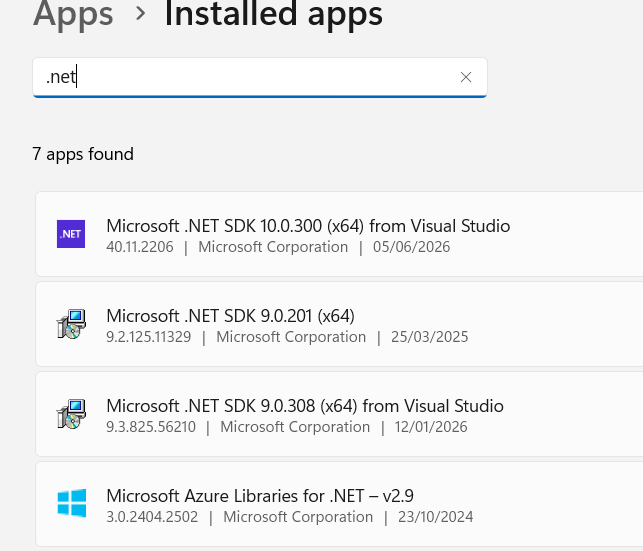
In my test project, I added the RadSpeechToTextButton control that requires the WebView2 NuGet. When I run the project, no errors appear. Could I ask you to check the project and share what I need to modify to reproduce this error?
Regards,
Dinko | Tech Support Engineer
Progress Telerik
I was able to resolve my issue. Due to the Telerik dependency on Microsoft.Web.WebView2, I needed to explicitly set the WindowsSdkPackageVersion to 10.0.26100.84 and TargetFramework to net10.0-windows10.026100.
Maybe if Telerik UI for WPF does need to continue to use Webview2, you can make it a compile time dependency instead of a runtime dependency so we won't have to explicitly set the TargetFramework and WindowsSdkPackageVersion when using MEF.
As I noted in the original submission, these are only Telerik nupkg's I'm directly referencing in my application:
Telerik.Windows.Controls.for.Wpf.Xaml.2026.2.701
Telerik.Windows.Controls.Data.for.Wpf.Xaml.2026.2.701
Telerik.Windows.Controls.Diagrams.for.Wpf.Xaml.2026.2.701
Telerik.Windows.Controls.Docking.for.Wpf.Xaml.2026.2.701
Telerik.Windows.Controls.FileDialogs.for.Wpf.Xaml.2026.2.701
Telerik.Windows.Controls.GridView.for.Wpf.Xaml.2026.2.701
Telerik.Windows.Controls.Navigation.for.Wpf.Xaml.2026.2.701
Because one or more of these packages has a dependency on Microsoft.Web.WebView2, when my application attempts to load DLLs at runtime via MEF I get a runtime exception, as shown as below:
- $exception {"Unable to load one or more of the requested types.\r\nCould not load file or assembly 'Microsoft.Web.WebView2.Core, Version=1.0.3650.58, Culture=neutral, PublicKeyToken=2a8ab48044d2601e'. The system cannot find the file specified."} System.Reflection.ReflectionTypeLoadException
When I add Microsoft.Web.WebView2.Core as a dependency, it is still unable to load it because it is specifically targeting .NET SDK 10.0.17763.10 and my application is using .NET SDK 10.0.301.
- $exception {"Unable to load one or more of the requested types.\r\nCould not load file or assembly 'Microsoft.Windows.SDK.NET, Version=10.0.17763.10, Culture=neutral, PublicKeyToken=31bf3856ad364e35'. The system cannot find the file specified."} System.Reflection.ReflectionTypeLoadException
The Telerik UI for WPF version I'm using 2026.2.702.
As I noted in the original submission, these are only Telerik nupkg's I'm directly referencing:
Telerik.Windows.Controls.for.Wpf.Xaml.2026.2.701
Telerik.Windows.Controls.Data.for.Wpf.Xaml.2026.2.701
Telerik.Windows.Controls.Diagrams.for.Wpf.Xaml.2026.2.701
Telerik.Windows.Controls.Docking.for.Wpf.Xaml.2026.2.701
Telerik.Windows.Controls.FileDialogs.for.Wpf.Xaml.2026.2.701
Telerik.Windows.Controls.GridView.for.Wpf.Xaml.2026.2.701
Telerik.Windows.Controls.Navigation.for.Wpf.Xaml.2026.2.701
Hello Andrew,
Thank you for reaching out to us.
The reported behavior in this feedback item: RadPDFViewer: Could not load Microsoft.Web.WebView2.WinForms in Q2 2026 is already fixed. In the upper-left corner, the item status is set to Complete. Below the status, it specifies which version of our controls contains the fix. In this case, the 2026.2.702 version. You can download the version from your account. The Download Product Files help article lists the steps to navigate to the download page of your account.
May I ask you to check this version of our assemblies and let me know if the reported behavior is still observed on your side?
Regards,
Dinko | Tech Support Engineer
Progress Telerik
- All
- Completed (5979)
- Declined (581)
- Duplicated (42)
- In Development (6)
- Need More Info (3)
- Planned (4)
- Unplanned (1811)
- All
- UI for WinForms
- AI Coding Assistant
- AIPrompt
- ApplicationMenu
- AutoCompleteBox
- Barcode (Obsolete)
- BarcodeView
- BindingNavigator
- BreadCrumb
- BrowseEditor
- Buttons
- ButtonTextBox
- Calculator
- CalculatorDropDown
- Calendar
- Callout
- CardView
- Carousel
- ChartView
- Chat
- CheckedDropDownList
- CheckedListBox
- CollapsiblePanel
- ColorBox
- ColorDialog
- CommandBar
- ContextMenu
- DataEntry
- DataFilter
- DataLayout
- DateOnlyPicker
- DateTimePicker
- DesktopAlert
- Diagram, DiagramRibbonBar, DiagramToolBox
- Dock
- DomainUpDown
- DropDownList
- Editors
- FileDialogs
- FilterView
- Flyout
- FontDropDownList
- Form
- Forms/Dialogs/Templates
- GanttView
- GridView
- GroupBox
- HeatMap
- ImageEditor
- Installer and VS Extensions
- Label
- LayoutControl
- Licensing
- ListControl
- ListView
- Map
- MaskedEditBox
- Menu
- MessageBox
- MultiColumnCombo
- NavigationView
- NotifyIcon
- OfficeNavigationBar
- Overlay
- PageView
- Panel
- Panorama
- PdfViewer
- PictureBox
- PipsPager
- PivotGrid
- PopupEditor
- ProgressBar
- PropertyGrid
- RadialGauge, LinearGauge, BulletGraph
- RangeSelector
- Rating
- RibbonBar
- RibbonForm
- RichTextEditor
- Rotator
- Scheduler/Reminder
- ScrollablePanel
- ScrollBar
- Separator
- ShapedForm
- SlideView
- SmartPasteButton
- SparkLine
- SpeechToTextButton
- SpellChecker
- SpinEditor
- SplashScreen
- SplitContainer
- Spreadsheet
- StatusStrip
- StepProgressBar
- SyntaxEditor
- TabbedForm
- TaskbarButton
- TaskBoard
- TaskDialog
- TextBox
- TextBoxControl
- TimeOnlyPicker
- TimePicker
- TimeSpanPicker
- TitleBar
- ToastNotificationManager
- ToolbarForm
- Tools for WinForms: Visual Style Builder, Control Spy, Shape Editor, Element Hierarchy Editor
- TrackBar
- TreeMap
- TreeView
- UI Framework
- ValidationProvider
- VirtualGrid
- VirtualKeyboard
- WaitingBar
- WebCam
- Wizard