Completed
Last Updated:
07 Oct 2026 13:43
by ADMIN
Release 2026.3.1007

Martin
Created on:
27 Feb 2023 11:36
Category:
VirtualGrid
Type:
Feature Request
RadVirtualGrid: Allow the NewRow to be moved to the bottom of a RadVirtualGrid
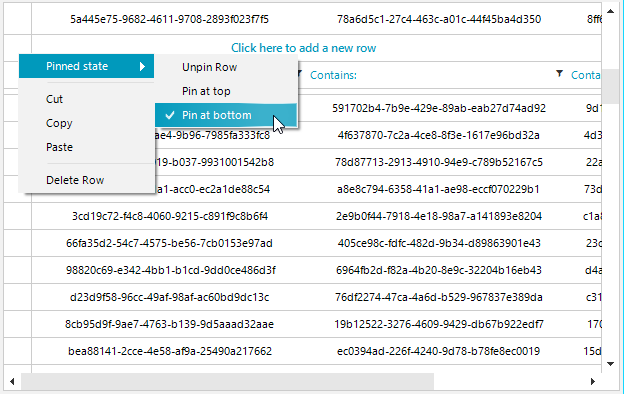
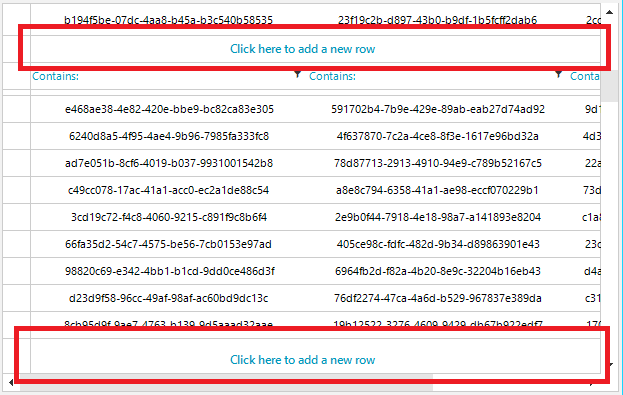
I was trying to move the NewRow to the bottom of the RadVirtualGrid. This is also supported by its big brother RadGridView. I have now learned that this is not supported by RadVirtualGrid.
Hereby my request: Please support this!
I've created a Harmony patch (which works for me); it might help you if you decide to support it:
	static class MoveNewRowToBottom
	{
		[HarmonyPatch(typeof(VirtualGridTableElement), "InvalidatePinnedRows")]
		static class VirtualGridTableElement_InvalidatePinnedRows
		{
			static private bool _isInvalidating;

			static private bool Prefix(VirtualGridTableElement __instance)
			{
				if (_isInvalidating)
					return false;
				_isInvalidating = true;

				__instance.ViewElement.TopPinnedRows.DisposeChildren();
				__instance.ViewElement.BottomPinnedRows.DisposeChildren();

				var viewInfo = __instance.ViewInfo;
				var rowsViewState = __instance.RowsViewState;
				var topPinnedItems = rowsViewState.TopPinnedItems;
				var bottomPinnedItems = rowsViewState.BottomPinnedItems;

				if (viewInfo.ShowFilterRow)
					if (!topPinnedItems.Contains(RadVirtualGrid.FilterRowIndex) && !bottomPinnedItems.Contains(RadVirtualGrid.FilterRowIndex))
						rowsViewState.SetPinPosition(RadVirtualGrid.FilterRowIndex, PinnedRowPosition.Top);

				if (viewInfo.ShowNewRow)
					if (!topPinnedItems.Contains(RadVirtualGrid.NewRowIndex) && !bottomPinnedItems.Contains(RadVirtualGrid.NewRowIndex))
						rowsViewState.SetPinPosition(RadVirtualGrid.NewRowIndex, PinnedRowPosition.Top);

				if (viewInfo.ShowHeaderRow)
					if (!topPinnedItems.Contains(RadVirtualGrid.HeaderRowIndex) && !bottomPinnedItems.Contains(RadVirtualGrid.HeaderRowIndex))
						rowsViewState.SetPinPosition(RadVirtualGrid.HeaderRowIndex, PinnedRowPosition.Top);

				var elementProvider = __instance.RowScroller.ElementProvider;

				var topPinnedRows = __instance.ViewElement.TopPinnedRows;
				foreach (int topPinnedRow in topPinnedItems.SortTopRowIndexes())
				{
					VirtualGridRowElement pinnedRow = (VirtualGridRowElement)elementProvider.GetElement(topPinnedRow, null);
					topPinnedRows.Children.Add(pinnedRow);
					pinnedRow.Attach(topPinnedRow, null);
				}

				var bottomPinnedRows = __instance.ViewElement.BottomPinnedRows;
				foreach (int bottomPinnedRow in bottomPinnedItems.SortBottomRowIndexes())
				{
					VirtualGridRowElement pinnedRow = (VirtualGridRowElement)elementProvider.GetElement(bottomPinnedRow, null);
					bottomPinnedRows.Children.Add(pinnedRow);
					pinnedRow.Attach(bottomPinnedRow, null);
				}

				_isInvalidating = false;
				return false;
            }
		}

		static private IEnumerable<int> SortTopRowIndexes(this ReadOnlyCollection<int> topRowIndexes)
		{
			var specialRowIndex = topRowIndexes.Where(index => index < 0).ToList();
			if (specialRowIndex.Contains(RadVirtualGrid.HeaderRowIndex))
				yield return RadVirtualGrid.HeaderRowIndex;
			if (specialRowIndex.Contains(RadVirtualGrid.NewRowIndex))
				yield return RadVirtualGrid.NewRowIndex;
			if (specialRowIndex.Contains(RadVirtualGrid.FilterRowIndex))
				yield return RadVirtualGrid.FilterRowIndex;
			foreach (var index in topRowIndexes.Where(index => index >= 0))
				yield return index;
		}

		static private IEnumerable<int> SortBottomRowIndexes(this ReadOnlyCollection<int> bottomRowIndexes)
		{
			foreach (var index in bottomRowIndexes.Where(index => index >= 0))
				yield return index;
			var specialRowIndex = bottomRowIndexes.Where(index => index < 0).ToList();
			if (specialRowIndex.Contains(RadVirtualGrid.FilterRowIndex))
				yield return RadVirtualGrid.FilterRowIndex;
			if (specialRowIndex.Contains(RadVirtualGrid.NewRowIndex))
				yield return RadVirtualGrid.NewRowIndex;
			if (specialRowIndex.Contains(RadVirtualGrid.HeaderRowIndex))
				yield return RadVirtualGrid.HeaderRowIndex;
		}
	}
3 comments

ADMIN
Nadya | Tech Support Engineer
Posted on:
30 Apr 2026 18:35
Martin
Posted on:
24 Apr 2026 09:50

ADMIN
Dess | Tech Support Engineer, Principal
Posted on:
06 Mar 2023 08:06