

1. Create clean WinForms .NET Framework project.
2. Add Telerik UI for WinForms 2026.2.520.462.
3. Create BaseForm : RadForm.
4. Add RadStatusStrip to BaseForm.
5. Create inherited form RadForm1 : BaseForm.
6. Open inherited form in Visual Studio designer.
7. Designer crashes with NullReferenceException in Telerik.WinControls.UI.Design.RadControlDesigner.OnSetCursor.
8. Remove/comment RadStatusStrip from BaseForm.Designer.cs.
9. Designer opens successfully.
Sample project attached.

Hello, Jakub,
Since there has been no activity on this report for the past month and I have not been able to reproduce the described behavior with the latest version, I will proceed with closing this bug report.If you have any other questions or need further assistance, please do not hesitate to contact us.
Regards,
Nadya | Tech Support Engineer
Progress Telerik
Hi, Jakub,
Thank you for providing a project. However, when I open the RadForm1 at design time using the specified 2026.2.520 version, I am not able to receive any issues. The VS designer opens successfully, see the image below:
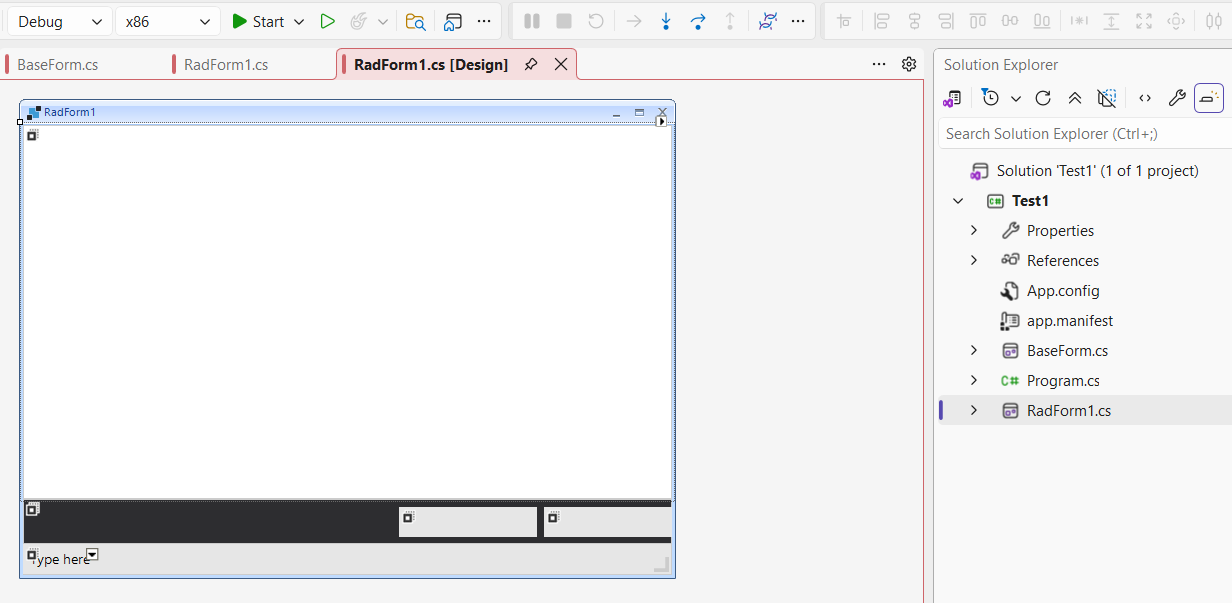
Here is the BaseForm as well:
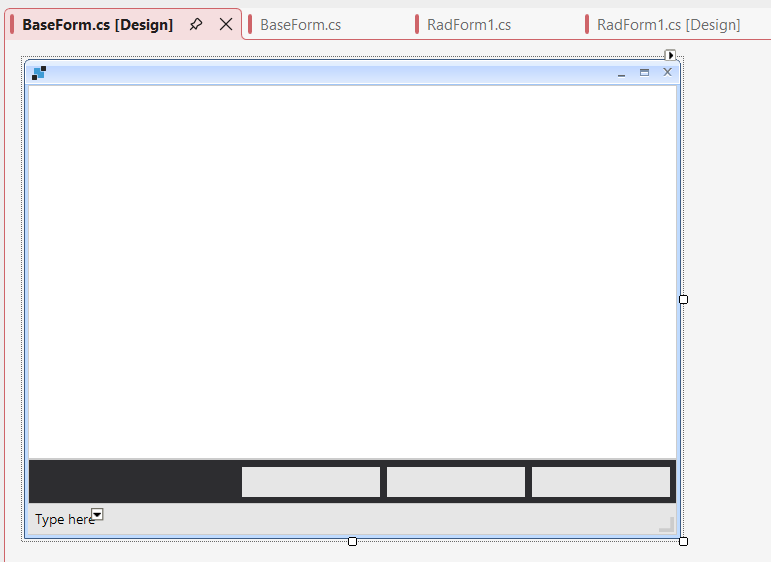
The form also shows normally when I run the project. I removed the commented code for the StatusStrip so that it appears on the form.
Am I missing something in reproducing the issue? On my side, I am using Visual Studio 2026.
Regards,
Nadya | Tech Support Engineer
Progress Telerik
- All
- Completed (5969)
- Declined (582)
- Duplicated (42)
- In Development (6)
- Need More Info (3)
- Planned (4)
- Unplanned (1811)
- All
- UI for WinForms
- AI Coding Assistant
- AIPrompt
- ApplicationMenu
- AutoCompleteBox
- Barcode (Obsolete)
- BarcodeView
- BindingNavigator
- BreadCrumb
- BrowseEditor
- Buttons
- ButtonTextBox
- Calculator
- CalculatorDropDown
- Calendar
- Callout
- CardView
- Carousel
- ChartView
- Chat
- CheckedDropDownList
- CheckedListBox
- CollapsiblePanel
- ColorBox
- ColorDialog
- CommandBar
- ContextMenu
- DataEntry
- DataFilter
- DataLayout
- DateOnlyPicker
- DateTimePicker
- DesktopAlert
- Diagram, DiagramRibbonBar, DiagramToolBox
- Dock
- DomainUpDown
- DropDownList
- Editors
- FileDialogs
- FilterView
- Flyout
- FontDropDownList
- Form
- Forms/Dialogs/Templates
- GanttView
- GridView
- GroupBox
- HeatMap
- ImageEditor
- Installer and VS Extensions
- Label
- LayoutControl
- Licensing
- ListControl
- ListView
- Map
- MaskedEditBox
- Menu
- MessageBox
- MultiColumnCombo
- NavigationView
- NotifyIcon
- OfficeNavigationBar
- Overlay
- PageView
- Panel
- Panorama
- PdfViewer
- PictureBox
- PipsPager
- PivotGrid
- PopupEditor
- ProgressBar
- PropertyGrid
- RadialGauge, LinearGauge, BulletGraph
- RangeSelector
- Rating
- RibbonBar
- RibbonForm
- RichTextEditor
- Rotator
- Scheduler/Reminder
- ScrollablePanel
- ScrollBar
- Separator
- ShapedForm
- SlideView
- SmartPasteButton
- SparkLine
- SpeechToTextButton
- SpellChecker
- SpinEditor
- SplashScreen
- SplitContainer
- Spreadsheet
- StatusStrip
- StepProgressBar
- SyntaxEditor
- TabbedForm
- TaskbarButton
- TaskBoard
- TaskDialog
- TextBox
- TextBoxControl
- TimeOnlyPicker
- TimePicker
- TimeSpanPicker
- TitleBar
- ToastNotificationManager
- ToolbarForm
- Tools for WinForms: Visual Style Builder, Control Spy, Shape Editor, Element Hierarchy Editor
- TrackBar
- TreeMap
- TreeView
- UI Framework
- ValidationProvider
- VirtualGrid
- VirtualKeyboard
- WaitingBar
- WebCam
- Wizard