

Hi,
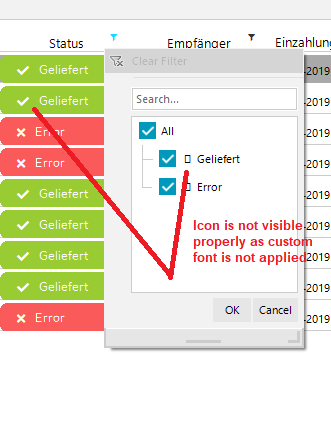
I am working with the RadGridView in my c# winform application. I am using the custom font ("Font Awesome 5 Free Solid") for the RadGridView using the "CellFormatting" event to view the icons along with the text. Here i am able to see the proper icons with text but when i open the filter menu to filter out the rows, i am unable to see the icons (icons shown as the box) as in filterbox we don't have any custom font.
I tried to working out the properties of the RadTreeNodeCollection but here we dont have any Custom font property for the same.
i want to show the text as it is in the filterbox along with the text and the icon.
so can you suggest what i can do to view the icons in the filterbox?
Check the attachment for reference.

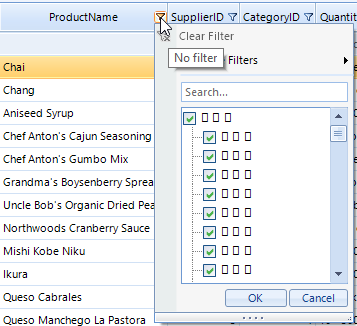
In order to apply a custom font to the node elements in the filter popup, you can handle the NodeFormatting event of the hosted tree-view in the popup. You can find below a sample code snippet how to handle the NodeFormatting and apply the custom font you need:
FontFamily font1 = ThemeResolutionService.GetCustomFont("Font Awesome 5 Free Solid");public RadForm1(){ InitializeComponent(); this.radGridView1.EnableFiltering = true; this.radGridView1.ShowFilteringRow = false; this.radGridView1.ShowHeaderCellButtons = true; this.radGridView1.FilterPopupInitialized += radGridView1_FilterPopupInitialized;}private void radGridView1_FilterPopupInitialized(object sender, FilterPopupInitializedEventArgs e){ RadListFilterPopup popup = e.FilterPopup as RadListFilterPopup; if (popup != null) { popup.MenuTreeElement.TreeView.NodeFormatting -= TreeView_NodeFormatting; popup.MenuTreeElement.TreeView.NodeFormatting += TreeView_NodeFormatting; }}private void TreeView_NodeFormatting(object sender, TreeNodeFormattingEventArgs e){ e.NodeElement.ContentElement.CustomFont = font1.Name; e.NodeElement.ContentElement.CustomFontSize = 14; e.NodeElement.ContentElement.Text = "\uF1EB \uF0AD \uF19C";}However, the custom font doesn't seem to be properly applied to the node elements:
I have logged it in our feedback portal by making this thread public. You can track its progress, subscribe for status changes and add your comments on the following link - feedback item.
I have also updated your Telerik points.
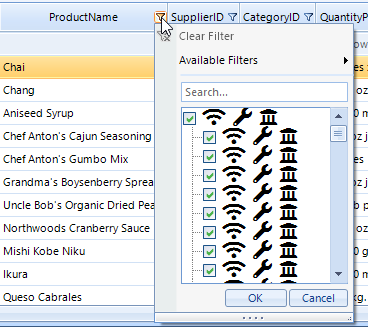
Currently, the possible solution that I can suggest is to set the Font property which has a higher priority than the CustomFont:
Font f;private void TreeView_NodeFormatting(object sender, TreeNodeFormattingEventArgs e){ if (f == null) { f = new Font(font1, 14f); } e.NodeElement.ContentElement.Font = f; e.NodeElement.ContentElement.Text = "\uF1EB \uF0AD \uF19C";}
I hope this information helps. If you need any further assistance please don't hesitate to contact me.
Regards,
Dess | Tech Support Engineer, Sr.
Progress Telerik
- All
- Completed (5969)
- Declined (582)
- Duplicated (42)
- In Development (6)
- Need More Info (3)
- Planned (4)
- Unplanned (1811)
- All
- UI for WinForms
- AI Coding Assistant
- AIPrompt
- ApplicationMenu
- AutoCompleteBox
- Barcode (Obsolete)
- BarcodeView
- BindingNavigator
- BreadCrumb
- BrowseEditor
- Buttons
- ButtonTextBox
- Calculator
- CalculatorDropDown
- Calendar
- Callout
- CardView
- Carousel
- ChartView
- Chat
- CheckedDropDownList
- CheckedListBox
- CollapsiblePanel
- ColorBox
- ColorDialog
- CommandBar
- ContextMenu
- DataEntry
- DataFilter
- DataLayout
- DateOnlyPicker
- DateTimePicker
- DesktopAlert
- Diagram, DiagramRibbonBar, DiagramToolBox
- Dock
- DomainUpDown
- DropDownList
- Editors
- FileDialogs
- FilterView
- Flyout
- FontDropDownList
- Form
- Forms/Dialogs/Templates
- GanttView
- GridView
- GroupBox
- HeatMap
- ImageEditor
- Installer and VS Extensions
- Label
- LayoutControl
- Licensing
- ListControl
- ListView
- Map
- MaskedEditBox
- Menu
- MessageBox
- MultiColumnCombo
- NavigationView
- NotifyIcon
- OfficeNavigationBar
- Overlay
- PageView
- Panel
- Panorama
- PdfViewer
- PictureBox
- PipsPager
- PivotGrid
- PopupEditor
- ProgressBar
- PropertyGrid
- RadialGauge, LinearGauge, BulletGraph
- RangeSelector
- Rating
- RibbonBar
- RibbonForm
- RichTextEditor
- Rotator
- Scheduler/Reminder
- ScrollablePanel
- ScrollBar
- Separator
- ShapedForm
- SlideView
- SmartPasteButton
- SparkLine
- SpeechToTextButton
- SpellChecker
- SpinEditor
- SplashScreen
- SplitContainer
- Spreadsheet
- StatusStrip
- StepProgressBar
- SyntaxEditor
- TabbedForm
- TaskbarButton
- TaskBoard
- TaskDialog
- TextBox
- TextBoxControl
- TimeOnlyPicker
- TimePicker
- TimeSpanPicker
- TitleBar
- ToastNotificationManager
- ToolbarForm
- Tools for WinForms: Visual Style Builder, Control Spy, Shape Editor, Element Hierarchy Editor
- TrackBar
- TreeMap
- TreeView
- UI Framework
- ValidationProvider
- VirtualGrid
- VirtualKeyboard
- WaitingBar
- WebCam
- Wizard