
Unplanned
Last Updated:
27 Jan 2026 21:34
by Joseph

Gemma
Created on:
06 Nov 2025 22:06
Category:
UI for WinForms
Type:
Bug Report
RadListView: Missing Borders when scaled at 150% and higher
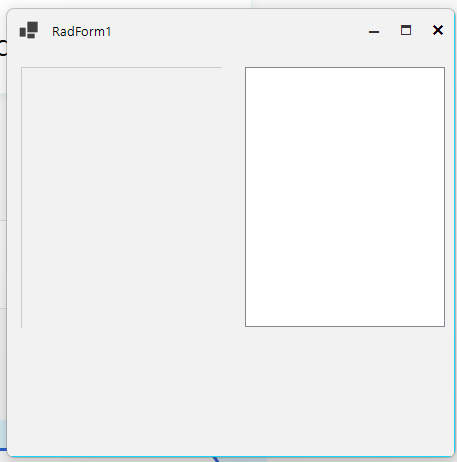
I am working with the RadListView and noticed that its right and bottom border gets clipped at some (not all) width/heights and some scale factors (most notably 150% and 175%). This problem does not occur with the basic System.Windows.Forms.ListView.
Here is the code that I have wrote to replicate this problem with both the WinForms list view and the RadListView.
      private void InitializeComponent()
      {
              this.listView1 = new System.Windows.Forms.ListView();
              this.radListView1 = new Telerik.WinControls.UI.RadListView();
              ((System.ComponentModel.ISupportInitialize)(this)).BeginInit();
              this.SuspendLayout();

              this.listView1.HideSelection = false;
              this.listView1.Location = new System.Drawing.Point(155, 10);
              this.listView1.Name = "listView1";
              this.listView1.Size = new System.Drawing.Size(135, 175);

              this.radListView1.Location = new System.Drawing.Point(5, 10);
              this.radListView1.Name = "radListView1";
              this.radListView1.Size = new System.Drawing.Size(135, 175);
              this.radListView1.UseCompatibleTextRendering = true;

              this.Controls.Add(this.radListView1);
this.Controls.Add(this.listView1);

              this.Name = "RadForm1";
              this.Text = "RadForm1";
              ((System.ComponentModel.ISupportInitialize)(this)).EndInit();
              this.ResumeLayout(false);
      }
Here is a screenshot of the dialog when the scale factor is at 100% (left is the RadListView component):
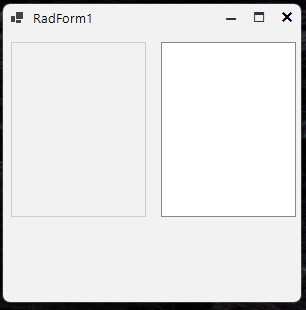
and here is a screenshot of when my display is scaled at 150% (left is the RadListView component):
To replicate: run the project attached, both at 100% scaling and 150% scaling.
Thanks!
Attached Files:
4 comments
Joseph
Posted on:
27 Jan 2026 21:34

ADMIN
Nadya | Tech Support Engineer
Posted on:
26 Jan 2026 10:54
Joseph
Posted on:
23 Jan 2026 17:57
ADMIN
Nadya | Tech Support Engineer
Posted on:
13 Nov 2025 09:13