

Steps to reproduce:
1. Click filter icon in column
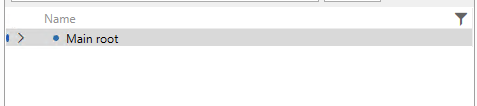
2. Enter invalid value in filter input
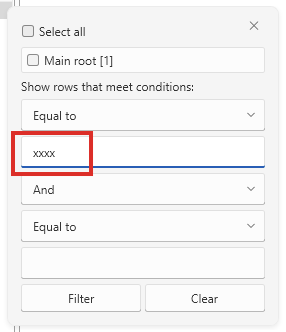
3. Press Filter, the value gets underlined, suggesting some kind of error.

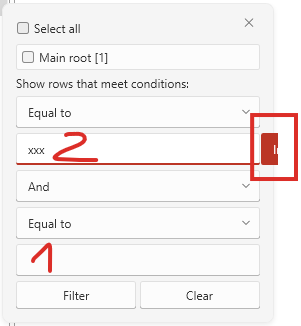
4. Click the place marked 1 and then 2.
This time, it seems a message appears about the cause of the error, but it doesn’t fit inside the control.


Hello Svitlana,
Thank you for the extra images.
Indeed, the described behavior is not very pleasant when it comes the visualization. Based on your feedback I've updated the status of this report.
The issue happens because of the default validation error display mode in the Windows11 theme, which is StaticOnFocus. You can avoid this behavior by using one of the following approaches:
- Set the ValidationErrorTemplateHelper.DisplayMode property on the TextBox elements in RadTreeListView to ToolTip.
<telerik:RadTreeListView ItemsSource="{Binding}" AutoGenerateColumns="False"> <telerik:RadTreeListView.Resources> <Style TargetType="TextBox"> <Setter Property="telerik:ValidationErrorTemplateHelper.DisplayMode" Value="ToolTip" /> </Style> </telerik:RadTreeListView.Resources> </telerik:RadTreeListView> - Or modifying the Validation.ErrorTemplate and implement your own validation visual.
<telerik:RadTreeListView ItemsSource="{Binding}"
                         AutoGenerateColumns="False">
    <telerik:RadTreeListView.Resources>
        <Style TargetType="TextBox">
            <Setter Property="Validation.ErrorTemplate">
                <Setter.Value>
                    <ControlTemplate>
                      <!-- custom validation error visual template here -->
                    </ControlTemplate>
                </Setter.Value>
            </Setter>
        </Style>
    </telerik:RadTreeListView.Resources>
</telerik:RadTreeListView>
Can you try these and let me know how it goes?
Regards,
Martin Ivanov
Progress Telerik
Love the Telerik and Kendo UI products and believe more people should try them? Invite a fellow developer to become a Progress customer and each of you can get a $50 Amazon gift voucher.
The images for 3 and 4 steps:
3.
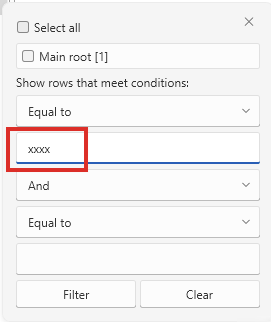
4.
Thanks for the replay, I'll check if it works and let you know.
Hello Svitlana,
It seems that there are placeholders for pictures for steps 3 and 4, but images are missing. Can you send these again?
Also, I've tested the listed steps, but couldn't recreate the described behavior. Can you check the attached project and let me know if I am missing anything?
If your "Main root" object is not a string (which is the most intuitive guess based on the screenshots), and you mean that there is a validation error and the TextBox in the filtering control which is presented with a red underline, then you can check the following article. More specifically, the DisplayMode setting. You may want to change this to ToolTip.
Regards,
Martin Ivanov
Progress Telerik
Love the Telerik and Kendo UI products and believe more people should try them? Invite a fellow developer to become a Progress customer and each of you can get a $50 Amazon gift voucher.
- All
- Completed (3587)
- Declined (794)
- Duplicated (58)
- In Development (6)
- Under Review (1)
- Unplanned (3179)
- Won't Fix (151)
- All
- UI for WPF
- AI Coding Assistant
- AIPrompt
- AutoCompleteBox
- AutoSuggestBox
- Badge
- Barcode
- BarcodeReader
- Book
- BreadCrumb
- BulletGraph
- BusyIndicator
- Buttons
- Calculator
- Calendar
- Callout
- CardView
- Carousel
- ChartView
- ChartView3D
- Chat
- CircularProgressBar
- CloudUpload
- CollectionNavigator
- ColorEditor
- ColorPicker
- ComboBox
- ContextMenu
- Data Virtualization
- DataBar
- DataFilter
- DataForm
- DataPager
- DataServiceDataSource
- DatePicker
- DateRangePicker
- DateTimePicker
- DesktopAlert
- Diagram
- Docking
- DragAndDropManager
- DragDropManager
- EntityFrameworkCoreDataSource
- EntityFrameworkDataSource
- Expander
- ExpressionEditor
- ExpressionParser
- FileDialogs
- FilePathPicker
- GanttView
- Gauge
- GridView
- HeatMap
- HighlightTextBlock
- ImageEditor
- InlineAIAssistant
- Installer and VS Extensions
- LayoutControl
- Licensing
- ListBox
- Map
- MaskedInput
- Menu
- MultiColumnComboBox
- NavigationView
- NotifyIcon
- NumericUpDown
- OfficeNavigationBar
- OutlookBar
- PanelBar
- PasswordBox
- PDFViewer
- PersistenceFramework
- PipsPager
- PivotGrid
- ProgressBar
- PropertyGrid
- RadialMenu
- Rating
- RibbonView
- RichTextBox
- ScheduleView
- Slider
- SlideView
- Sparkline
- SpellChecker
- SplashScreen
- Spreadsheet
- StepProgressBar
- SvgImage
- SyntaxEditor
- TabbedWindow
- TabControl
- TaskBoard
- TileList
- TileView
- TimeBar
- TimeLine
- TimePicker
- TimeSpanPicker
- ToolBar
- ToolTip
- TouchManager
- TransitionControl
- TreeListView
- TreeMap and PivotMap
- TreeView
- VirtualGrid
- VirtualizingWrapPanel
- VirtualKeyboard
- WatermarkTextBox
- WebCam
- Window
- Wizard