Duplicated
Last Updated: 10 Nov 2025 17:55 by ADMIN

Marco
Created on: 14 Oct 2025 05:51
Category: ScheduleView
Type: Bug Report
0
In the daily and weekly view, the last appointments of daily appointments that span several days are not displayed

Hello Support,

In the daily and weekly view from the ScheduleVies, the last appointments of daily appointments that span several days are not displayed.

Our customers often have daily appointments that span several days. When they switch to the daily or weekly view, the last day of these appointments is missing. We are now receiving daily complaints that the daily and weekly views are unusable. Please fix this bug as soon as possible. This error did not exist in the old Telerik library, but unfortunately we cannot reinstall the old library.

Thank you for your efforts.

Greetings marco

Duplicated
This item is a duplicate of an already existing item. You can find the original item here:
7 comments
Marco
Posted on: 04 Nov 2025 09:26

Hello Stenly,

I have opened another ticket; I hope it will show what is going wrong.

Regards marco

ADMIN
Stenly
Posted on: 04 Nov 2025 09:03

Hello Marco,

Thank you for your replies.

I tested these changes, and actually, the observed behavior is expected due to the duration of each appointment. Additionally, I tested this setup with both the 2025.3.813 and 2023.2.718 versions of our product, however, I did not see any differences in the behavior.

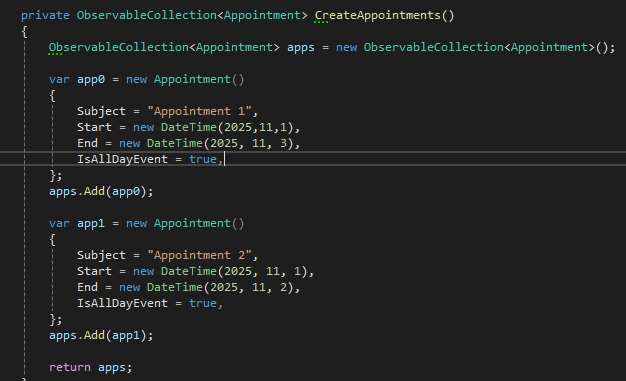
For example, the Appointment instance with Start = new DateTime(2025, 11, 1) and End = new DateTime(2025, 11, 3) that is present in the modified MainWindow.xaml.cs file that you provided will have a duration of 48 hours since the time part of the created DateTime instances will be equal to 00:00:00. Essentially, the full dates will be 2025-11-01 00:00:00 and 2025-11-03 00:00:00, which, when subtracted, will result in 2 days (48 hours).

With this being said, it is the expected behavior of the RadScheduleView control not to draw the appointment on the 3rd day, since its duration is 2 days. You could test this by extending the duration of the appointment by modifying the constructor of the DateTime instance set to its End property to contain hours (mainly extending the 48-hour span).

In conclusion, I hope the provided information will be of help to you.

Regards,
Stenly
Progress Telerik

Your perspective matters! Join other professionals in the State of Designer-Developer Collaboration 2025: Workflows, Trends and AI survey to share how AI and new workflows are impacting collaboration, and be among the first to see the key findings.
Start the 2025 Survey
Marco
Posted on: 30 Oct 2025 07:02

Hello Stenly,

Have you been able to figure out what's wrong?
Were you able to reproduce the error with my customized workspace?

Thank you for your Help

regards marco

Marco
Posted on: 28 Oct 2025 08:19
Hello Stenly,

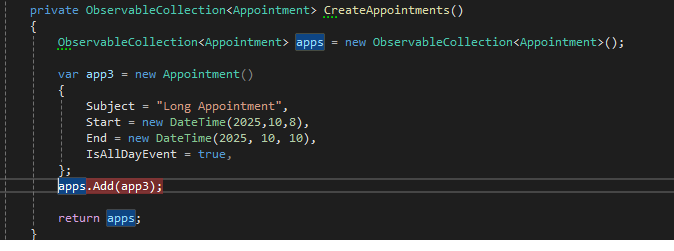
That's very strange. When I adjust the data in your project as follows, the last day is missing. I could fix that in the code, since the error always occurs:

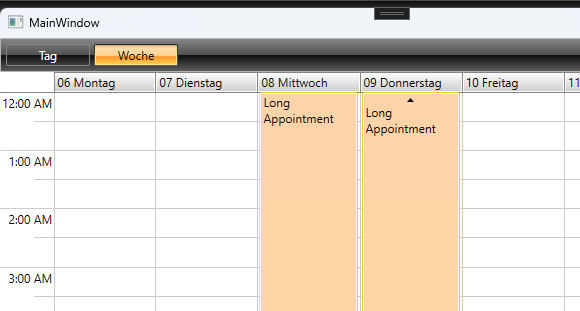
The appointment should now run from October 8 to October 10, but it only shows up to October 9:

For me, October 10 is missing.

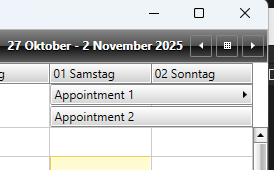
But in my project I have a different effect, namely that the date is correct for the week, but if it falls on the next week, then that day is missing. I was able to adjust your project accordingly to achieve the same effect:

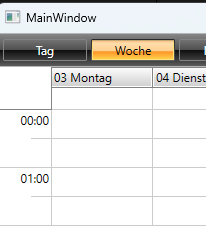
When I change the week, the Monday is missing for Appointment 1:

Here my changes:


Thank you for your help
recards marco


Attached Files:
ADMIN
Stenly
Posted on: 27 Oct 2025 12:10

Hello Marco,

I tested this in a sample project, however, I was unable to reproduce this. I attached the test application, so, would it be possible to give it a try?

Regards,
Stenly
Progress Telerik

Your perspective matters! Join other professionals in the State of Designer-Developer Collaboration 2025: Workflows, Trends and AI survey to share how AI and new workflows are impacting collaboration, and be among the first to see the key findings.
Start the 2025 Survey
Attached Files:
Marco
Posted on: 20 Oct 2025 13:50

Everything was still correct in version 2023.2.718 :-)

Greetings

ADMIN
Stenly
Posted on: 20 Oct 2025 12:12

Hello Marco,

Thank you for reaching out to us.

Could you share the previous version of the Telerik UI for WPF product, in which the reported behavior is not present?

Regards,
Stenly
Progress Telerik

Your perspective matters! Join other professionals in the State of Designer-Developer Collaboration 2025: Workflows, Trends and AI survey to share how AI and new workflows are impacting collaboration, and be among the first to see the key findings.
Start the 2025 Survey