

Hi Team,
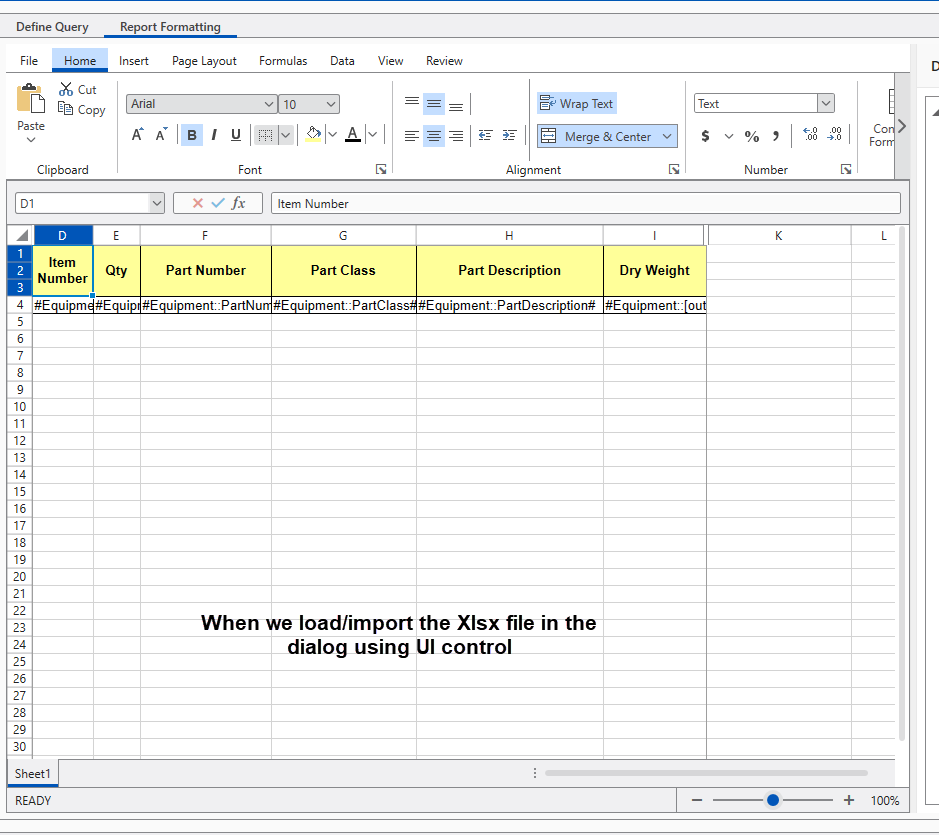
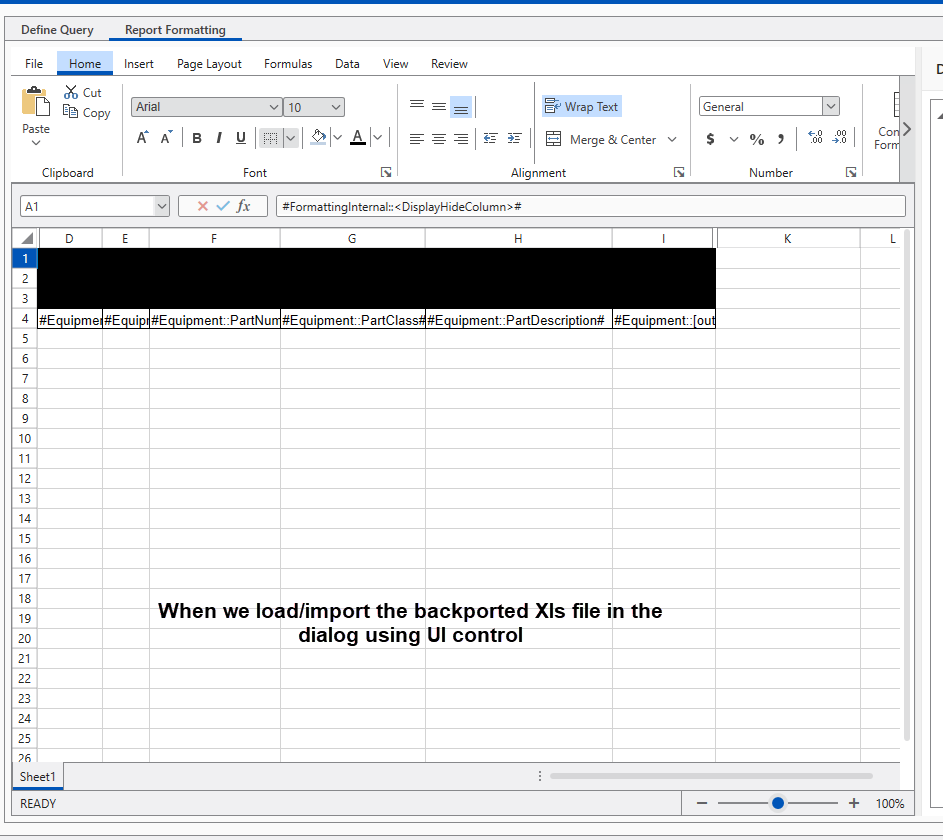
I have backported the Xlsx file to Xls format. When I am trying to import the backported file using the Radspreadsheet UI control, I find that it has lost the color formatting which was existing in the original Xlsx file. Where as when we open the back ported file with Excel application we find that all the data and formatting is maintained.
So the request is that after backporting and while importing the file, it should not loose the minimal xls supported features which Excel is able to support.
Attached is the InitialFile.xlsx and BackPorted.xls file
Note that Xlsx file if imported it maintains the data and formatting information of the workbbok when loaded via UI control.
Let us know in case of any more details or queries.
Exepct this to work
Regards,
Manish.

Hello, Manish,
I have provided a reply in the support ticket with more information on this case. However, I am posting here the answer as well in order the community to benefit from it.
After performing some tests, it seems that if the Backported.xls is opened with MS Excel and just saved back to XLS (without making any changes), the document then is successfully opened in RadSpreadsheet. This indicates that there is some invalid part of the document produced by GemBox that is fixed by MS Excel during the saving process.
While the specific yellow cell formats are the same, the files differ structurally:
1. Number of XF (cell format) records
- Backported.xls: 34 XF records.
- BackportedSavedbyExcel.xls: 73 XF records.
Re‑saving in Excel essentially rebuilds/expands the style table (more XF records). This kind of normalization is common when Excel touches a workbook produced by another tool.
2. Palette indices referenced overall
- Backported.xls: only references index 43 for fills (plus Automatic 64/65).
- BackportedSavedbyExcel.xls: references many palette entries (11, 21, 22, 25–27, 40, 42–49, 53, 55, 57, etc.), not just 43.
Both files still map index 43 - (255,255,153) identically, but the “Saved by Excel” file uses a richer set of palette references and a larger style/XF set.
Some Spreadsheet renderers can misapply the background color when the workbook is very minimal, they render a Solid fill using the background_colour_index instead of the foreground/pattern color. In Backported.xls the background is Automatic (64); some parsers resolve that to black under certain conditions. Re‑saving in Excel “normalizes” the style table and palette references; the control then picks up the foreground properly and the cells render yellow as intended.
The possible solution that I can suggest is to open Backported.xls in Excel and re‑save it. This regenerates the style table and fixes rendering in RadSpreadsheet.
Off topic, I would recommend you to use the SpreadProcessing library for converting the file from Xlsx to Xls. I have already tested converting the InitialFile.xlsx to XLS format and it is successfully rendered in the Spreadsheet component.
Since the issue is related to the SpreadProcessing library, I am creating a new public bug report with the proper product and marking this item is duplicated. You can cast your vote for the item, track its progress, subscribe for status changes, and add your comments on the following link:
I hope this information helps.
Regards,
Dess | Tech Support Engineer, Principal
Progress Telerik
Love the Telerik and Kendo UI products and believe more people should try them? Invite a fellow developer to become a Progress customer and each of you can get a $50 Amazon gift voucher.
Hi Dess,
The backported document was created using GemBox Save API, where GemBox Save API takes the path of the file as input along with the extension. Thereby it convertes the file from Xls to Xlsx.
Also wanted to know if we have a workbook object which is of type ExcelFile (Gem Box) when saved via GemBox API,
Can a workbook object be converted to workbook object which I can assing to a telerik Spreadsheet control to load that workbook ?
So I wanted to additinally know can a workbook object of GemBox class be converted to workbook object of Telerik RADSpreadhseet control ?
Let me know if you need to know any more information.
Regards,
Manish.
Hello, Manish,
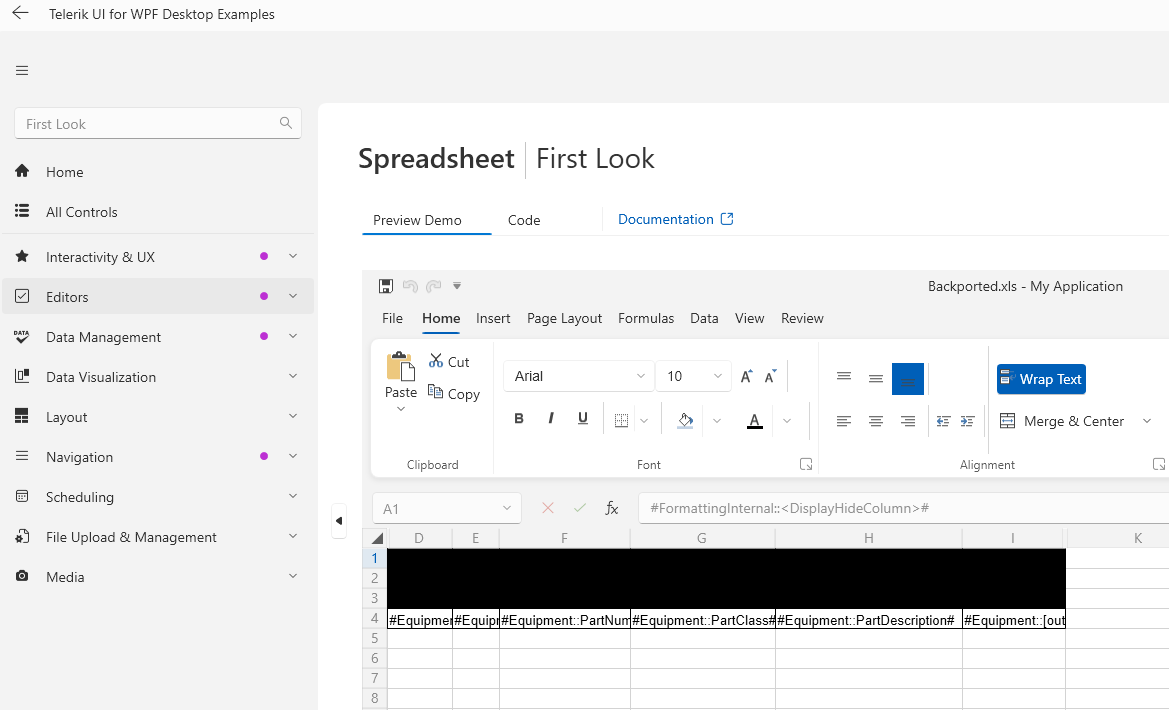
I am sorry to hear that you are facing any difficulties with the Spreadsheet component offered by the UI for WPF suite. The provided documents are greatly appreciated. Indeed, the attached Backported.xls is loaded in a weird way in the UI component:
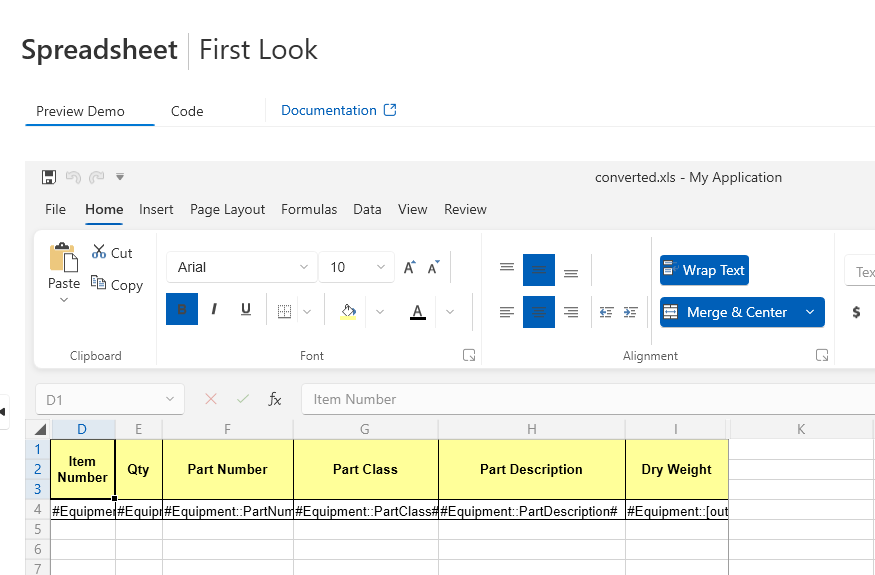
I have tested converting the InitialFile.xlsx document to XLS format using the SpreadProcessing library and the converted document seems to be properly loaded.
Here is the code snippet for your reference:
            string inputFilePath = "InitialFile.xlsx";

            Telerik.Windows.Documents.Spreadsheet.Model.Workbook workbook;
            XlsxFormatProvider xlsx_formatProvider = new Telerik.Windows.Documents.Spreadsheet.FormatProviders.OpenXml.Xlsx.XlsxFormatProvider();

            using (Stream input = new FileStream(inputFilePath, FileMode.Open))
            {
                workbook = xlsx_formatProvider.Import(input, TimeSpan.FromSeconds(10));
            }

            Telerik.Windows.Documents.Spreadsheet.FormatProviders.Xls.XlsFormatProvider formatProvider = new Telerik.Windows.Documents.Spreadsheet.FormatProviders.Xls.XlsFormatProvider();
            string outputFilePath = "converted.xls";
            using (Stream output = new FileStream(outputFilePath, FileMode.Create))
            {
                formatProvider.Export(workbook, output, TimeSpan.FromSeconds(10));
            }
Could you please specify how the Backported.xls document was created? Are you using a third-party library for this purpose or the SpreadProcessing library?
This information would be helpful to proceed with the further troubleshooting of the precise case. Thank you in advance for your cooperation. I am looking forward to your reply.
Regards,
Dess | Tech Support Engineer, Principal
Progress Telerik
Love the Telerik and Kendo UI products and believe more people should try them? Invite a fellow developer to become a Progress customer and each of you can get a $50 Amazon gift voucher.
- All
- Completed (3587)
- Declined (794)
- Duplicated (58)
- In Development (6)
- Pending Review (2)
- Under Review (1)
- Unplanned (3172)
- Won't Fix (151)
- All
- UI for WPF
- AI Coding Assistant
- AIPrompt
- AutoCompleteBox
- AutoSuggestBox
- Badge
- Barcode
- BarcodeReader
- Book
- BreadCrumb
- BulletGraph
- BusyIndicator
- Buttons
- Calculator
- Calendar
- Callout
- CardView
- Carousel
- ChartView
- ChartView3D
- Chat
- CircularProgressBar
- CloudUpload
- CollectionNavigator
- ColorEditor
- ColorPicker
- ComboBox
- ContextMenu
- Data Virtualization
- DataBar
- DataFilter
- DataForm
- DataPager
- DataServiceDataSource
- DatePicker
- DateRangePicker
- DateTimePicker
- DesktopAlert
- Diagram
- Docking
- DragAndDropManager
- DragDropManager
- EntityFrameworkCoreDataSource
- EntityFrameworkDataSource
- Expander
- ExpressionEditor
- ExpressionParser
- FileDialogs
- FilePathPicker
- GanttView
- Gauge
- GridView
- HeatMap
- HighlightTextBlock
- ImageEditor
- InlineAIAssistant
- Installer and VS Extensions
- LayoutControl
- Licensing
- ListBox
- Map
- MaskedInput
- Menu
- MultiColumnComboBox
- NavigationView
- NotifyIcon
- NumericUpDown
- OfficeNavigationBar
- OutlookBar
- PanelBar
- PasswordBox
- PDFViewer
- PersistenceFramework
- PipsPager
- PivotGrid
- ProgressBar
- PropertyGrid
- RadialMenu
- Rating
- RibbonView
- RichTextBox
- ScheduleView
- Slider
- SlideView
- Sparkline
- SpellChecker
- SplashScreen
- Spreadsheet
- StepProgressBar
- SvgImage
- SyntaxEditor
- TabbedWindow
- TabControl
- TaskBoard
- TileList
- TileView
- TimeBar
- TimeLine
- TimePicker
- TimeSpanPicker
- ToolBar
- ToolTip
- TouchManager
- TransitionControl
- TreeListView
- TreeMap and PivotMap
- TreeView
- VirtualGrid
- VirtualizingWrapPanel
- VirtualKeyboard
- WatermarkTextBox
- WebCam
- Window
- Wizard