

Hi,
We're heavily using the Scheduler component, but we've hit a problem with `slotClick` in scenarios involving multiple scheduler instances on the same page.
With two schedulers on one page, slot detection for the second scheduler (used in context-menu flows via slotByPosition) can be wrong.
Detaild repro: Stackblitz
Repro steps:- Right-click any slot in Scheduler #2.
- slotClick gives expected slot, but slotByPosition(...) can resolve incorrectly/undefined, which can cause error in the app when code depends on slotByPosition.
The issue:
- BaseSlotService.calculateScaleX() uses document.querySelector(".k-scheduler"), which always picks the first scheduler in DOM.
- With two schedulers on one page, slot detection for the second scheduler (used in context-menu flows via slotByPosition) can be wrong.
- Relevant code:
const h = document.querySelector(".k-scheduler");
return h.getBoundingClientRect().width / h.offsetWidth;
- Expected: the instance of scheduler used in the calculation should be the one that fired event, not the first one from DOM.

Hi Svitlana,
Thank you for the follow-up. I managed to reproduce the reported case and confirm it's a genuine bug.
I log it in our GitHub issue tracker here:
https://github.com/telerik/kendo-angular/issues/4946
As a token of gratitude for reporting this, I updated your Telerik point.
Please accept our appologies for the inconvenience caused. Once the issue is fixed, we will update the status of the issue and the bug report request.
As a temporary workaround, replace the transform with a CSS property that achieves the same visual effect without affecting geometry — use opacity: 0 alone (or visibility: hidden).
Regards,
Martin Bechev
Progress Telerik
Love the Telerik and Kendo UI products and believe more people should try them? Invite a fellow developer to become a Progress customer and each of you can get a $50 Amazon gift voucher.
Hi Martin,
Thanks for the reply. Just try to resize a slot in Scheduler #2. I've attached a GIF showing the reproduction steps.
--
Svitlana
Hi Svitlana,
Thank you for the feedback and for sharing the demo. To help us assist you further, could you provide some more details on how the Scheduler is being used in this scenario?
We reviewed the demo, but couldn't identify how the slotClick event or the slotByPosition method is being used. You also mentioned that the context menu is involved, but it's not yet clear to us how these pieces fit together or what the overall flow looks like.
The slotByPosition method expects x and y coordinates as arguments, while the slotClick event does not return such coordinates. For reference, here are the arguments returned by the slotClick event:
https://www.telerik.com/kendo-angular-ui/components/scheduler/api/slotclickevent
If a generic HTML contextmenu event is used to obtain the x and y coordinates, slotByPosition can return undefined even when only a single Scheduler is present. To reproduce this, scroll down within the Scheduler in the demo below and click on the slots near the top (as shown in the screenshot below):
https://stackblitz.com/edit/angular-gvdbb3ge-ylmd1wfb
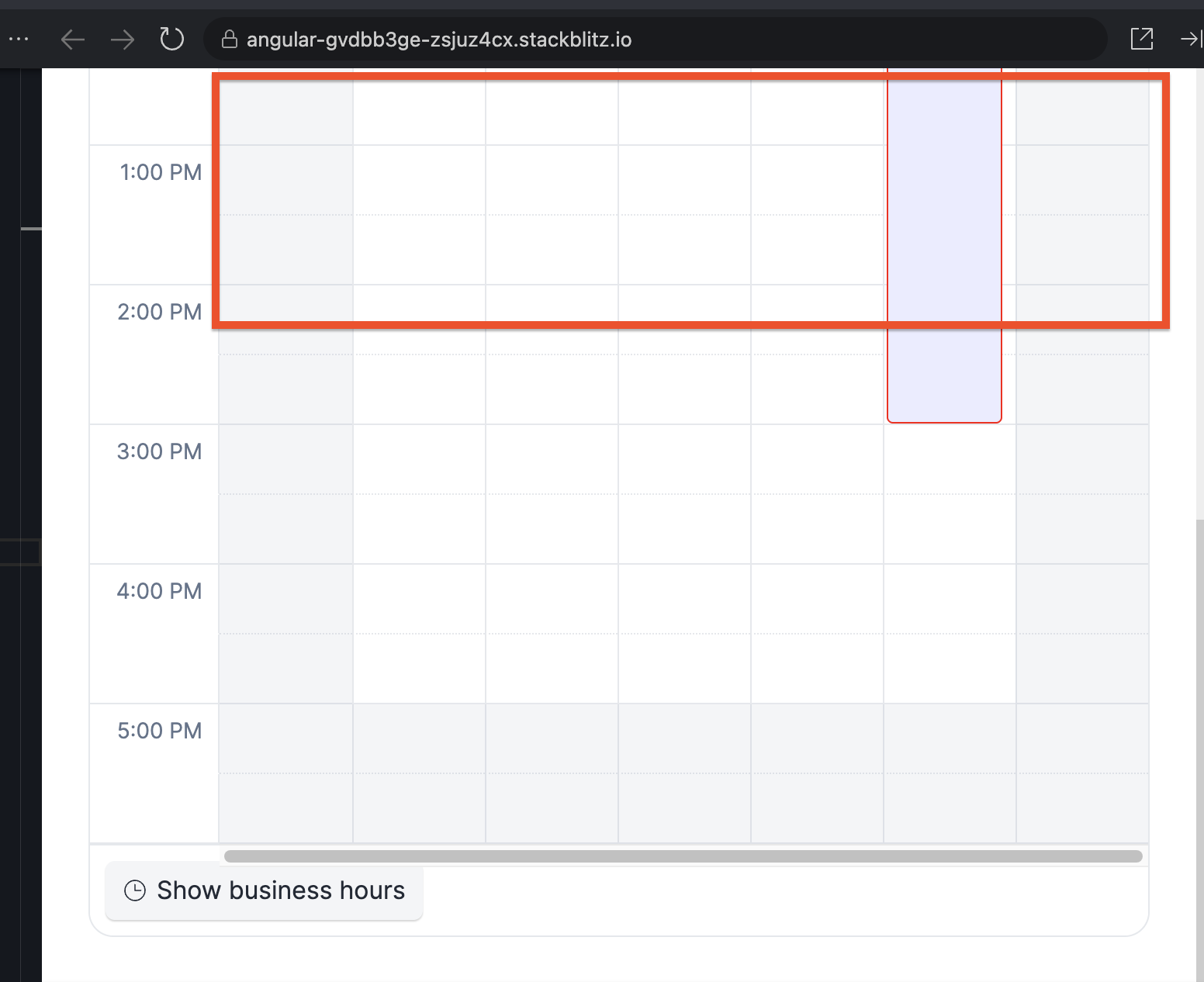
For this reason, it's generally recommended to use slotClick as a more reliable way to retrieve slot details. However, since I don't have the full context of your scenario, this approach may not be the best fit for your needs.
With that in mind, I'd like to better understand how the Scheduler is being used on your end, so we can provide the most suitable recommendation.
Regards,
Martin Bechev
Progress Telerik
Love the Telerik and Kendo UI products and believe more people should try them? Invite a fellow developer to become a Progress customer and each of you can get a $50 Amazon gift voucher.
- All
- Completed (460)
- Declined (462)
- Duplicated (88)
- In Development (1)
- Need More Info (1)
- Unplanned (751)
- All
- Kendo UI for Angular
- ActionSheet
- Agentic UI Generator
- AIPrompt
- AppBar
- ArcGauge
- AutoComplete
- Avatar
- Badge
- Barcode
- BottomNavigation
- BreadCrumb
- BrowserExtension
- Button
- ButtonGroup
- Calendar
- Card
- Chart Wizard
- Charts
- Chat
- CheckBox
- Chip
- ChipList
- ChunkProgressBar
- CircularGauge
- CircularProgressBar
- ColorGradient
- ColorPalette
- ColorPicker
- ComboBox
- ContextMenu
- DataQuery
- DateInput
- DateMath
- DatePicker
- DateRange
- DateTimePicker
- Diagram
- Dialog
- Drag and Drop
- Drawer
- Drawing
- DropDownButton
- DropDownList
- DropDownTree
- Editor
- ExcelExport
- ExpansionPanel
- FileSaver
- FileSelect
- Filter
- FlatColorPicker
- FloatingActionButton
- FloatingLabel
- FloatingToolbar
- FormField
- Forms
- Gantt
- Grid
- GridLayout
- Icon
- InlineAIPrompt
- Label
- Licensing
- LinearGauge
- ListBox
- ListView
- LLM Kit
- Loader
- Map
- MaskedTextBox
- Menu
- MultiColumnComboBox
- MultiSelect
- MultiSelectTree
- MultiViewCalendar
- Notification
- NumericTextBox
- OTP Input
- Page Templates / Building Blocks
- Pager
- PanelBar
- PDFExport
- PDFViewer
- PivotGrid
- Popover
- Popup
- ProgressBar
- PromptBox
- QRCode
- RadialGauge
- RadioButton
- RangeSlider
- Rating
- Ripple
- Sankey
- Scheduler
- ScrollView
- SegmentedControl
- Signature
- Skeleton
- Slider
- SmartPasteButton
- Sortable
- Sparkline
- SpeechToTextButton
- SplitButton
- Splitter
- Spreadsheet
- StackLayout
- Stepper
- StockChart
- SVGIcon
- Switch
- TabStrip
- TextArea
- TextBox
- TileLayout
- Timeline
- TimePicker
- ToolBar
- Tooltip
- TreeList
- TreeView
- Typography
- Upload
- VS Code Extension
- WebMCP
- Window