

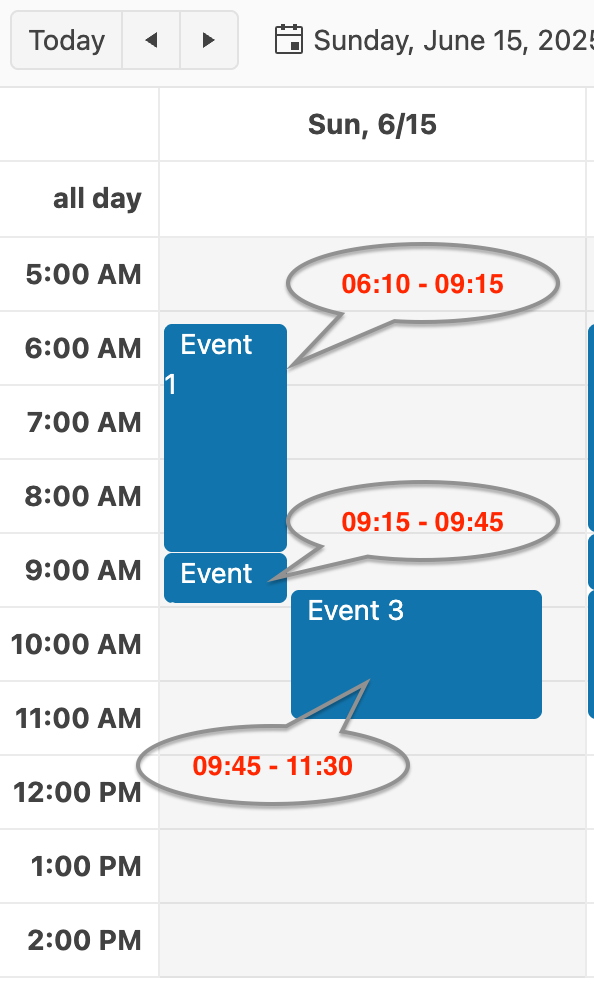
Due to the internal mechanism by which the Scheduler displays events per day, some events are shrunk without reason, because others are shrunk due to overlap.
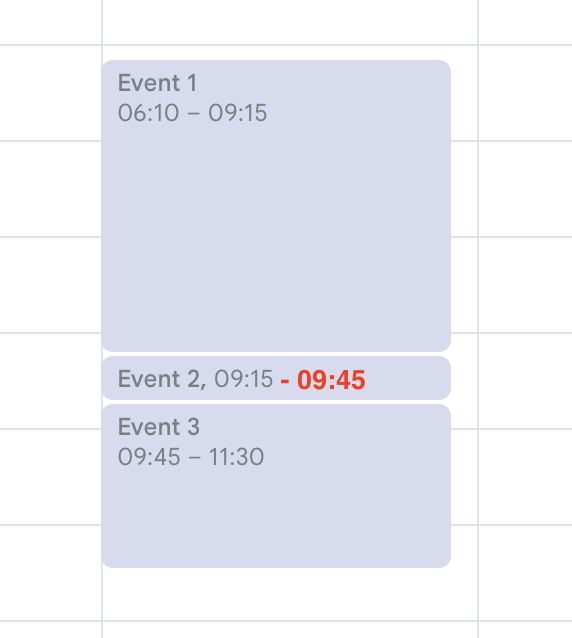
In the following screenshot, the Scheduler Event 1 has enough space to occupy the entire column, but is shrunk the same as Event 2 (which is shrunk due to the overlap with Event 3). Internally, each day use column separation logic to distribute the events. Since all three events fall into the same slot, the entire column is divided by 3 and events are distributed among them. Since Event 1 is the first event, it has been shown in the first 1/3. This isn't optimal, as this case proves it.
Here is how Kendo Scheduler behaves compared to Google Calendar in this case
Google Calendar

Hi Paolo,
Thank you for the provided feedback.
You are absolutely right—there is room for improvement in the way overlapping events are handled. We recognize that this is an important scenario, which is why we are tracking customer demand for this enhancement as we evaluate future development priorities.
If this functionality is critical for your project, you may want to consider our Feature Acceleration program. This option is designed for scenarios where a particular feature or enhancement is essential to an application's success but is not currently planned within the required project timeline.
If you're interested in exploring this option, please let me know, and I'd be happy to provide more information.
Regards,
Martin Bechev
Progress Telerik
Love the Telerik and Kendo UI products and believe more people should try them? Invite a fellow developer to become a Progress customer and each of you can get a $50 Amazon gift voucher.

- All
- Completed (460)
- Declined (462)
- Duplicated (88)
- In Development (1)
- Need More Info (1)
- Unplanned (751)
- All
- Kendo UI for Angular
- ActionSheet
- Agentic UI Generator
- AIPrompt
- AppBar
- ArcGauge
- AutoComplete
- Avatar
- Badge
- Barcode
- BottomNavigation
- BreadCrumb
- BrowserExtension
- Button
- ButtonGroup
- Calendar
- Card
- Chart Wizard
- Charts
- Chat
- CheckBox
- Chip
- ChipList
- ChunkProgressBar
- CircularGauge
- CircularProgressBar
- ColorGradient
- ColorPalette
- ColorPicker
- ComboBox
- ContextMenu
- DataQuery
- DateInput
- DateMath
- DatePicker
- DateRange
- DateTimePicker
- Diagram
- Dialog
- Drag and Drop
- Drawer
- Drawing
- DropDownButton
- DropDownList
- DropDownTree
- Editor
- ExcelExport
- ExpansionPanel
- FileSaver
- FileSelect
- Filter
- FlatColorPicker
- FloatingActionButton
- FloatingLabel
- FloatingToolbar
- FormField
- Forms
- Gantt
- Grid
- GridLayout
- Icon
- InlineAIPrompt
- Label
- Licensing
- LinearGauge
- ListBox
- ListView
- LLM Kit
- Loader
- Map
- MaskedTextBox
- Menu
- MultiColumnComboBox
- MultiSelect
- MultiSelectTree
- MultiViewCalendar
- Notification
- NumericTextBox
- OTP Input
- Page Templates / Building Blocks
- Pager
- PanelBar
- PDFExport
- PDFViewer
- PivotGrid
- Popover
- Popup
- ProgressBar
- PromptBox
- QRCode
- RadialGauge
- RadioButton
- RangeSlider
- Rating
- Ripple
- Sankey
- Scheduler
- ScrollView
- SegmentedControl
- Signature
- Skeleton
- Slider
- SmartPasteButton
- Sortable
- Sparkline
- SpeechToTextButton
- SplitButton
- Splitter
- Spreadsheet
- StackLayout
- Stepper
- StockChart
- SVGIcon
- Switch
- TabStrip
- TextArea
- TextBox
- TileLayout
- Timeline
- TimePicker
- ToolBar
- Tooltip
- TreeList
- TreeView
- Typography
- Upload
- VS Code Extension
- WebMCP
- Window