
Declined
Last Updated:
27 Apr 2026 11:17
by ADMIN

Hakon
Created on:
21 Jan 2026 09:51
Category:
Installer and VS Extensions
Type:
Bug Report
The upgrade wizard fails with an XML error when trying to upgrade a project
We have a WebForms application with Telerik AJAX components which we have successfully upgraded using the wizard for years. Starting with product version 2025.4.1210 and persisting in the latest version, 2025.4.1321, the upgrade wizard fails with the following error message.
The Telerik extension to VS is up to date, and it doesn't seem to help to run this in VS 2022.
An error occurred while running the wizard.

Error executing custom action Telerik.Web.UI.VSX.Actions.MultiProjectUpdateReferencesAction: System.InvalidOperationException: There is an error in XML document (3, 2). ---> System.Xml.XmlException: Name cannot begin with the '<' character, hexadecimal value 0x3C. Line 3, position 2.
   at System.Xml.XmlTextReaderImpl.Throw(Exception e)
   at System.Xml.XmlTextReaderImpl.ParseQName(Boolean isQName, Int32 startOffset, Int32& colonPos)
   at System.Xml.XmlTextReaderImpl.ParseElement()
   at System.Xml.XmlTextReaderImpl.ParseElementContent()
   at System.Xml.XmlReader.ReadStartElement()
   at Microsoft.Xml.Serialization.GeneratedAssembly.XmlSerializationReaderSolutionDistributionDefinition.Read2_SolutionDistributionDefinition(Boolean isNullable, Boolean checkType)
   at Microsoft.Xml.Serialization.GeneratedAssembly.XmlSerializationReaderSolutionDistributionDefinition.Read3_Distribution()
   --- End of inner exception stack trace ---
   at System.Xml.Serialization.XmlSerializer.Deserialize(XmlReader xmlReader, String encodingStyle, XmlDeserializationEvents events)
   at System.Xml.Serialization.XmlSerializer.Deserialize(TextReader textReader)
   at Telerik.VSX.Helpers.Serializer`1.Deserialize(String filePath)
   at Telerik.VSX.SolutionManagement.SolutionDistributionOperator.<>c__DisplayClass11_0.<DeserializeSolutionDistributionDefinition>b__0()
   at Telerik.VSX.SolutionManagement.SolutionDistributionOperator.HandleUnauthorizedAccessException(Action action)
   at Telerik.VSX.SolutionManagement.SolutionDistributionOperator.DeserializeSolutionDistributionDefinition(String distributionFilePath)
   at Telerik.VSX.SolutionManagement.SolutionDistributionOperator.<>c__DisplayClass10_0.<CreateSolutionDistribution>b__0()
   at Telerik.VSX.SolutionManagement.SolutionDistributionOperator.HandleUnauthorizedAccessException(Action action)
   at Telerik.VSX.SolutionManagement.SolutionDistributionOperator.CreateSolutionDistribution(String distributionFilePath, DistributionInfo distributionInfo)
   at Telerik.VSX.SolutionManagement.SolutionDistributionsContext.LoadSolutionDistributionDefinitions(DistributionInfo distributionInfo)
   at Telerik.VSX.Actions.MultiProjectUpdateReferencesActionBase`1.CreateSolutionDistributionsContext(WizardContext context)
   at Telerik.VSX.Actions.MultiProjectUpdateReferencesActionBase`1.Execute(WizardContext wizardContext, IPropertyDataDictionary arguments)
   at Telerik.VSX.WizardEngine.ActionManager.ExecActions()
10 comments

ADMIN
Rumen
Posted on:
27 Apr 2026 11:17
ADMIN
Maria
Posted on:
17 Mar 2026 15:33
Hakon
Posted on:
17 Mar 2026 10:20
ADMIN
Maria
Posted on:
17 Mar 2026 09:10
Hakon
Posted on:
10 Mar 2026 21:50
ADMIN
Maria
Posted on:
25 Feb 2026 14:45
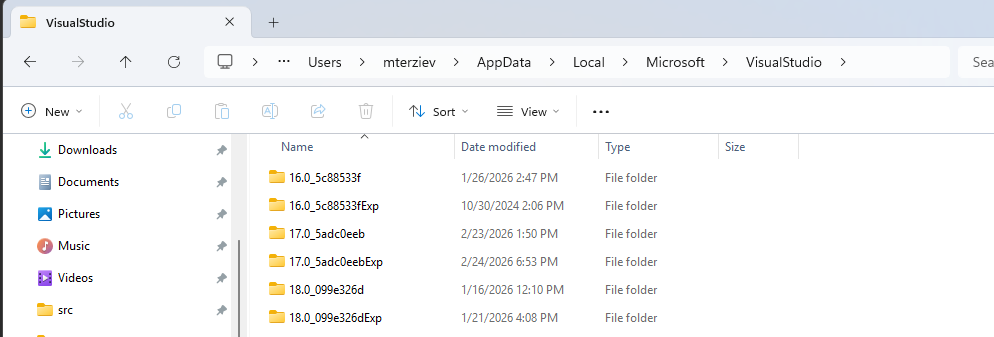
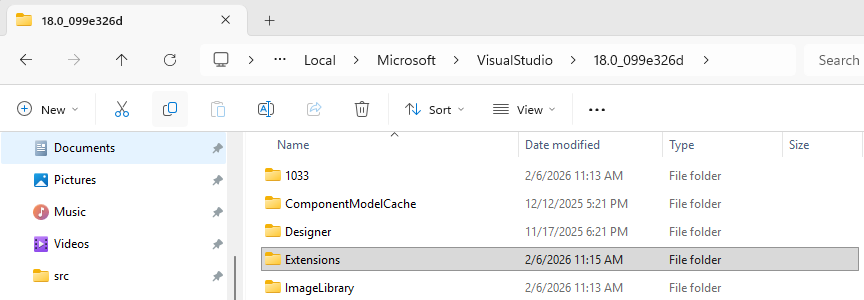
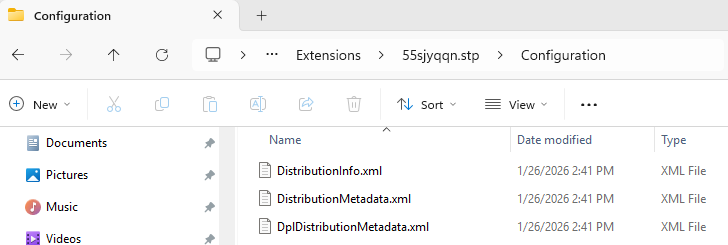
Hakon
Posted on:
25 Feb 2026 06:35
ADMIN
Maria
Posted on:
16 Feb 2026 17:16
Hakon
Posted on:
10 Feb 2026 06:48
ADMIN
Maria
Posted on:
26 Jan 2026 14:19