

I am struggling with setting the BackgroundImage on a series item in RadChart control. The problem i am having is, the background image works fine in my local environment, and on our Dev and QA server. Note the down arrow background images below.
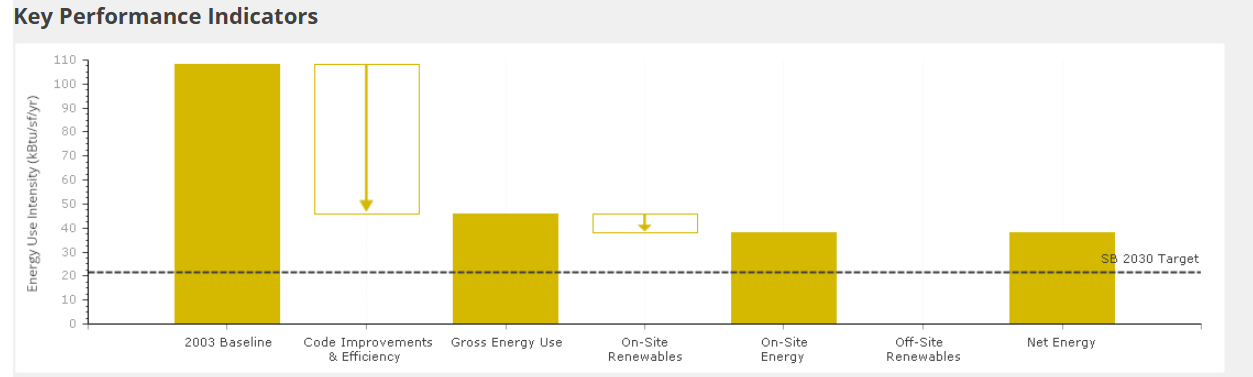
It does not, however work in our demo or production environments. It is running the same code in the a very similar environment. I ensured that the files are present on the server. It just doesn't seem to want to load them.
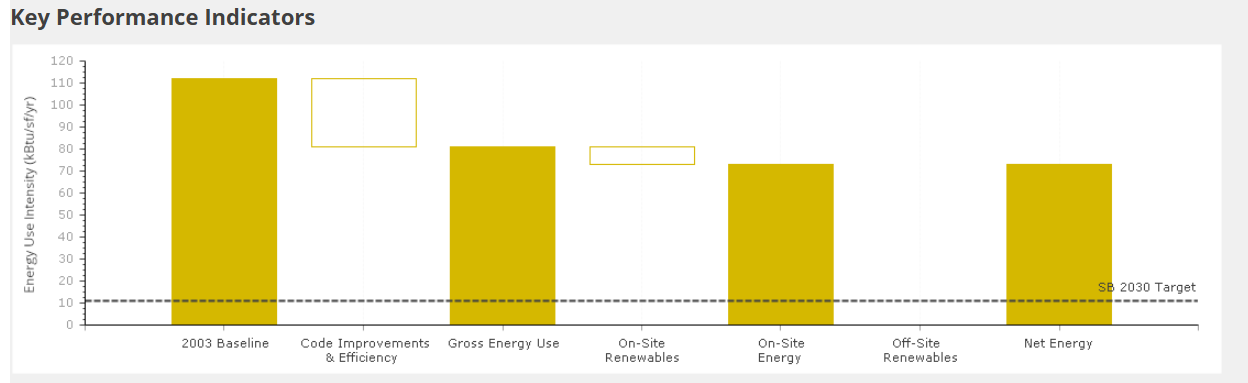
Hoping you can provide some insights.
Thanks

Hi Craig,
Thanks for the additional details! The difference you found (lower envs using a physical D:\ path vs Demo/Prod using a UNC share like \\fs01\...) is very likely the root cause.
When RadChart runs in IIS, image loading is done under the Application Pool identity, not under your interactive Windows user. So even if the share works when you browse it manually, it can still fail for the worker process due to missing permissions or how UNC resources are accessed by service accounts.
To move this forward, please check the following:
- Confirm the Application Pool identity
In IIS - Application Pools - (your pool) - Advanced Settings - Identity.
Ensure this exact account has Read permissions on the share (both Share Permissions and NTFS). In some environments, granting permissions to both the App Pool identity and the web server machine account may be needed. - Recommended: Configure an IIS Virtual Directory to the share
This avoids relying on file system paths in the chart configuration and lets IIS handle access to the share.
Once configured, point RadChart to a URL path instead:item.Appearance.FillStyle.FillSettings.BackgroundImage = "/SharedImages/bkgSavingsXLarge.png"; - Quick verification
Try opening the image directly in a browser through that virtual directory URL.
If it prompts for credentials or returns 403/404, that confirms the issue is IIS/share access rather than RadChart itself.
Mapped drives plus registry workarounds (EnableLinkedConnections) can sometimes bypass this, but it is typically not recommended for production IIS applications.
Regards,
Rumen
Progress Telerik
I discovered the problem. The problem is, in the lower environments, the site is hosted on a physical D: drive. In the higher environments, it is on a file share. \\fs01.
After some googling found this thread. Unfortunately, none of the proposed solutions in this thread have solved the problem yet. Still working on it. We may end up assigning a drive letter to the file share to get beyond.
The issue with using a network file path (UNC path like
\\server\share\) instead of a mapped drive (like M:\) in Telerik chart image locations is typically due to permission differences and how Windows User Account Control (UAC) handles different types of paths. The web application's underlying process often runs with different credentials than your interactive user session, which impacts how network resources are accessed.
Key Reasons for the Issue
- User Account Control (UAC) Virtualization: When UAC is enabled, an administrator actually runs in two sessions: one with standard user rights and one with elevated administrator rights. Mapped drives are often created in one session but not visible in the other.
- Application Pool Identity: The web application (e.g., in IIS) typically runs under a service account (like NETWORK SERVICE or an application pool identity), not your specific user account. This service account might not have the necessary permissions on the network share unless explicitly granted.
- Path Handling Differences: Mapped drives are local shortcuts, while UNC paths require the underlying system to negotiate network access directly for the specific user/service account running the process.
Solutions and Troubleshooting Steps
Here are the primary ways to fix this issue:
1. Use UNC Paths with Proper Permissions (Recommended)
Using UNC paths (\\server\share\) is generally more reliable for server-side applications than mapped drives.
- Grant Permissions to the Service Account:
- Determine the identity of your web application's application pool in IIS (e.g., NETWORK SERVICE, IIS_IUSRS, or a custom domain account).
- On the machine hosting the network share, grant Read/Write (or Full Control, depending on your needs) permissions on the shared folder to that specific service account.
- Configure Telerik Chart: Ensure the path specified in your Telerik chart configuration uses the full UNC format.
2. Configure a Virtual Directory in IIS
Instead of relying on direct file system access for the client browser, you can configure IIS to handle the mapping.
- In IIS Manager, create a Virtual Directory within your web application.
- Point the physical path of this virtual directory to the network share using its UNC path (e.g., \\server\share\images).
- Configure the Telerik chart to use this virtual path (e.g., /VirtualDirectoryName/image.png). The web server handles the underlying physical access, which is often more stable.
3. Modify Windows Registry (Workaround for Mapped Drives)
If you must use a mapped drive for some reason, you can adjust a Windows registry setting to make mapped drives available across both elevated and non-elevated sessions.
- Open the Registry Editor (regedit.exe).
- Navigate to HKEY_LOCAL_MACHINE\SOFTWARE\Microsoft\Windows\CurrentVersion\Policies\System.
- Create a new DWORD (32-bit) Value named EnableLinkedConnections.
- Set its value data to 1.
- Restart your computer for the changes to take effect.
4. Ensure Proper URL Handling
The path used by the server to save the image and the URL used by the client browser to display the image must be correctly handled. Telerik charts often use an HTTP handler (ChartImage.axd or similar) to serve the images. Ensure the path configured for the handler correctly resolves the network location so the browser can access it.
By implementing the correct permissions on the network share for the application pool identity and consistently using UNC paths or IIS virtual directories, you can resolve the access issue
Hi Craig,
Thanks for the RadChart snippet - that helps.
Since RadChart can resolve background images differently depending on how the chart is rendered
(on-page vs export/print), there are a couple of ways to set BackgroundImage.
Please try the options below to see which one matches your scenario.
Option 1 - Client-accessible URL (on-page rendering)
If the chart is rendered directly on the page and the browser is responsible for loading the image, use a resolved URL (this also handles deployments under a virtual directory):
item.Appearance.FillStyle.FillSettings.BackgroundImage = ResolveClientUrl("~/images/bkgSavingsXLarge.png");Option 2 - Physical file path (export / print scenarios)
If the issue occurs only in printed or exported output, RadChart may need a physical file path so it can load the image server-side:
item.Appearance.FillStyle.FillSettings.BackgroundImage = Server.MapPath("~/images/bkgSavingsXLarge.png");Additional notes
- Avoid using backslashes (for example
~\Images\...) - use forward slashes and resolve the path explicitly. - Hard-coded absolute paths (for example
C:\...) are not recommended for production deployments. - If the image is expected to load via URL, please verify it is accessible directly in the browser and not blocked
by IIS or
web.configrules:https://<your-domain>/<your-app-if-any>/images/bkgSavingsXLarge.png
Please try both options and let us know:
- whether the background image is missing in the on-page chart, exported/printed output, or both
- which of the two approaches works in your Production environment
I understand your point, RadChart can be a good fit for scenarios where the end goal is a static PNG image for printed reports, which is why the above steps focus on making it work reliably in your current setup. That said, for completeness, RadHtmlChart also supports server-side export to PNG and PDF, which can cover similar reporting scenarios while using a newer rendering pipeline:
Regards,
Rumen
Progress Telerik
I am using RadChart, NOT RadHtmlChart. I realize RadChart has been deprecated, but the original RadChart is much more appropriate for my needs - a png graphic for a printed report.
Here’s the snippet of code where I am setting the background image on the ChartSeriesItem.
item.Appearance.FillStyle.MainColor = Color.Transparent;
item.Appearance.FillStyle.SecondColor = Color.Transparent;
item.Appearance.FillStyle.FillType = Telerik.Charting.Styles.FillType.Image;
item.Appearance.FillStyle.FillSettings.BackgroundImage = "~/images/bkgSavingsXLarge.png";
Hi Craig,
Thank you for reaching out. Based on your screenshots, it appears you're using RadHtmlChart (not the deprecated RadChart). Since the background images work in your local, Dev, and QA environments but not in Production, this suggests an environment-specific configuration or resource access issue.
Troubleshooting Steps:
- Browser Developer Tools - Network Tab
- Open DevTools (F12) and check the Network tab when the chart loads
- Look for failed requests (404, 403 errors) for your down-arrow image files
- Check if the image paths are being blocked or returning errors
- Browser Console - JavaScript Errors
- Check the Console tab in DevTools for any JavaScript errors
- RadHtmlChart renders client-side, so JS errors could prevent proper rendering
- Image Path Configuration
- Use application-relative paths:
~/Images/down-arrow.png - Avoid absolute paths or hard-coded server names that may differ between environments
- Verify the path resolves correctly in production
- Use application-relative paths:
- File Existence and Accessibility
- Confirm the down-arrow.png files are deployed to the Demo/Production servers
- Verify they're in the correct folder location
- Check the files aren't corrupted or blocked
- IIS Permissions
- Ensure the IIS application pool identity has read permissions for the image folder and files
- Permission issues often differ between Dev and Production environments
- Case Sensitivity
- "down-arrow.png" vs "Down-Arrow.png" matters on case-sensitive systems
- Web.config Review
- Check for request filtering rules that might block image requests
- Verify MIME types are configured for .png files
- Look for any custom HTTP handlers that might interfere
- Direct Image Access Test
- Try accessing the image directly in your browser:
https://yourdomain.com/Images/down-arrow.png - If this fails, the issue is with file deployment or server configuration, not the chart
- Try accessing the image directly in your browser:
Could you please provide a code example showing how you're setting the BackgroundImage on the series items along with a screenshot of your DevTools Console and Network tab? This will help us provide more specific guidance if the above troubleshooting steps don't resolve the issue.
Regards,
Rumen
Progress Telerik
- All
- Completed (3329)
- Declined (933)
- Duplicated (31)
- In Development (2)
- Pending Review (3)
- Unplanned (924)
- Won't Fix (289)
- All
- UI for ASP.NET AJAX
- AIPrompt
- Ajax
- AjaxLoadingPanel
- AjaxPanel
- AsyncUpload
- AutoCompleteBox
- Avatar
- Badge
- Barcode
- BinaryImage
- Breadcrumb
- Button
- Calendar
- Captcha
- Card
- Chat
- CheckBox
- Chip
- ChipList
- ClientDataSource
- ClientExportManager
- CloudUpload
- ColorPicker
- ComboBox
- Compression
- DataForm
- DataPager
- DateInput
- DatePicker
- DateRangePicker
- DateTimePicker
- DeviceDetectionFramework
- Diagram
- Dock
- DragDropManager
- Drawer
- DropDownList
- DropDownTree
- Editor
- FileExplorer
- Filter
- FloatingActionButton
- FormDecorator
- Gantt
- Gauge
- Grid
- HtmlChart
- ImageButton
- ImageEditor
- ImageGallery
- Input
- InputManager
- Installer and VS Extensions
- Label
- Licensing
- LightBox
- LinkButton
- ListBox
- ListView
- Map
- MaskedTextBox
- MediaPlayer
- Menu
- MonthYearPicker
- MultiColumnComboBox
- MultiSelect
- Navigation
- Notification
- NuGet feed
- NumericTextBox
- ODataDataSource
- OrgChart
- OTPInput
- PageLayout
- PanelBar
- PdfViewer
- PersistenceFramework
- PivotGrid
- ProgressArea
- ProgressBar
- PushButton
- Rating
- RibbonBar
- Rotator
- Scheduler
- ScriptManager
- SearchBox
- SegmentedControl
- Signature
- SiteMap
- SkinManager
- Slider
- SmartPasteButton
- SocialShare
- SpeechToTextButton
- Spell
- SplitButton
- Splitter
- Spreadsheet
- Stepper
- StyleSheetManager
- Switch
- TabStrip
- TagCloud
- Theme Builder
- Ticker
- TileList
- TimeLine
- TimePicker
- ToggleButton
- ToolBar
- ToolTip
- TreeList
- TreeMap
- TreeView
- Visual Style Builder
- Window
- Wizard
- XmlHttpPanel