

ChatGPT recommended "Turn off Telerik’s “old” ARIA settings (they are overly strict and often invalid):"
i removed it and it worked. WTH?
What i supposed to do now? I added these settings in all our products
<telerik:RadGrid ID="grdImpacts" runat="server" EnableAriaSupport="true"style="margin-top:10px;margin-right:25px;margin-left:15px;"
ShowStatusBar="true" AutoGenerateColumns="False"
Width="650px" skin="WebBlue"
AllowSorting="False" AllowMultiRowSelection="False" AllowPaging="false"
OnNeedDataSource="grdMain_OnNeedDataSource">

Hi David,
I understand your frustration with the issue, and after reviewing the problem together with the team, we can confirm that your investigation is correct. The ARIA role assignment applied by the Grid is indeed incorrect in this case.
Specifically, the logic that assigns role="group" to the parent <td> element of a detail table is misplaced. That cell should retain its natural role as a gridcell, and overriding it leads directly to the accessibility violations reported by axe DevTools.
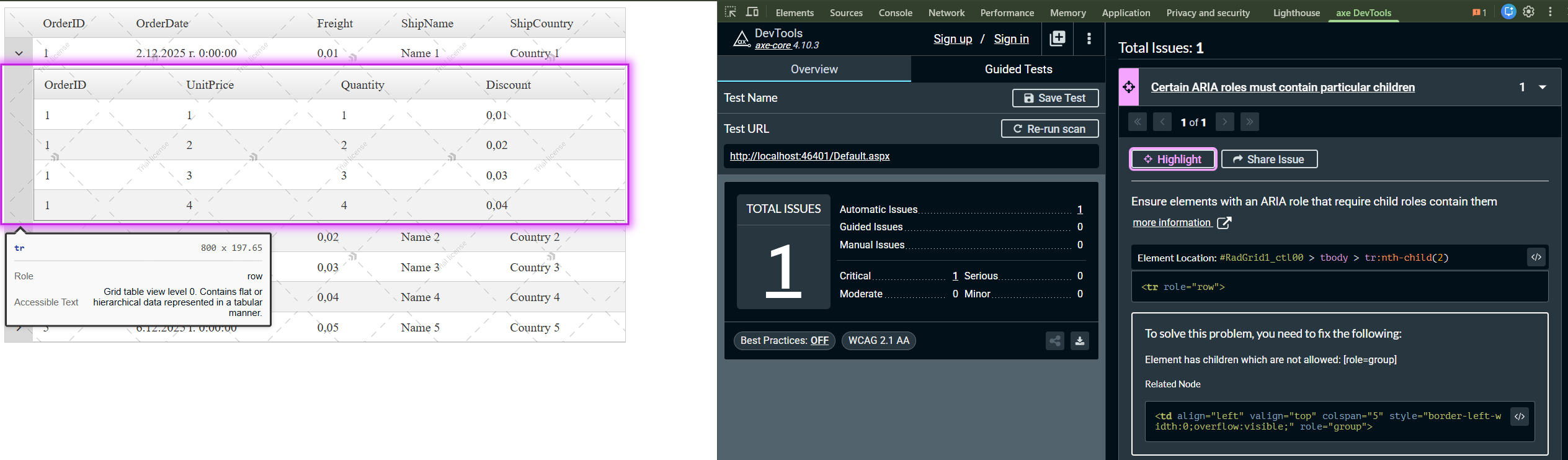

We have classified this as a WAI-ARIA implementation bug in the Grid’s internal ARIA initialization code. I suggest you use the below override, until an official fix is released, by overriding the _initializeAriaSupport function and correcting the role assignment:
let $T = Telerik.Web.UI;

if ($T && $T.GridTableView) {
    $T.GridTableView.prototype._initializeAriaSupport = function () {
        var tableElement = this.get_element();

        if (tableElement.id && tableElement.id.indexOf('Detail') != -1) {
            tableElement.setAttribute('role', 'listitem');
            var parentNode = tableElement.parentNode;

            if (parentNode && parentNode.tagName.toLowerCase() == 'td') {
                // parentNode.setAttribute('role', 'group'); - Original wrong assignment
                parentNode.setAttribute('role', 'gridcell'); // Parent node is a cell containing the detail table
            }

            var items = this.get_dataItems();

            if (items.length > 0) {
                var level = items[0].get_element().id.split(':').length;

                tableElement.setAttribute('aria-level', level.toString());
            }
        }

        var filterRow = this.get_tableFilterRow();

        if (filterRow) {
            var inputs = filterRow.getElementsByTagName('input');

            for (var i = 0; i < inputs.length; i++) {
                var input = inputs[i];
                var isVisible = input.style.display != 'none' && input.style.visibility != 'hidden';

                if (isVisible) {
                    var type = input.type.toLowerCase();

                    if (type == 'text') {
                        input.setAttribute('role', 'textbox');
                    }

                    if (type == 'submit' || type == 'button') {
                        input.setAttribute('role', 'button');
                    }

                    if (type == 'checkbox') {
                        input.setAttribute('role', 'checkbox');
                    }
                }
            }
        }

        var tableView = this;
        setTimeout(function () {
            tableView._initializeTableViewAriaSupport();
        })
    };
}

Furthermore, the fix will be included in the next official release of the AJAX suite, until then, please use the above override. Finally, as a Token of gratitude, I have updated your Telerik Points for reporting this issue.
I hope this change temporarily is of use to you while an official fix is implemented, if you happen to find more issues with AXE DevTools related to aria/role mismatches, please share with us your findings.
Regards,
Vasko
Progress Telerik
I updated to the latest controls and situation is the same.
I am getting tired of Telrik's "quirks"
Hello David,
I hope you're doing well!
if enabling ARIA support causes accessibility validation errors with your tools, the AJAX controls aim for accessibility compliance, but full alignment with all ADA or WCAG requirements, especially when tools interpret ARIA rules strictly, is not guaranteed in every scenario. Disabling ARIA support is a valid workaround when it leads to better compliance with your chosen accessibility validation tools.
If you need ARIA support for specific controls or user groups, consider enabling it only on those controls or pages that pass validation. This allows you to benefit from ARIA where possible without introducing errors globally. Alternatively, you can manually add or adjust ARIA attributes using JavaScript after page load, allowing you to fine-tune the markup for your accessibility requirements. For example:
// Example: Add custom ARIA attributes to RadGrid after initialization
document.getElementById('grdImpacts').setAttribute('aria-label', 'Impact Grid');
Since the controls render ARIA attributes via JavaScript, inspect the final HTML in the browser’s developer tools to verify how ARIA is applied and adjust as needed.
Furthermore, the AJAX suite is tested against Section 508 and WCAG standards using tools like Compliance Sheriff and WAVE, but not specifically with axe DevTools (which is particularly newer compared to others):
- https://www.telerik.com/aspnet-ajax/tech-sheets/accessibility-support
- https://docs.telerik.com/devtools/aspnet-ajax/controls/grid/accessibility-and-internationalization/wai-aria-support
- Telerik Web Forms WAI-ARIA Support and Screen Readers - Telerik UI for ASP.NET AJAX
Additionally, I noticed that you are using an older version of the AJAX controls (2023.1.323), which is vulnerable to CVE-2025-3600. We strongly recommend upgrading to the latest version 2025.4.1111 to receive the latest security improvements and browser support.
Regards,
Vasko
Progress Telerik
- All
- Completed (3316)
- Declined (937)
- Duplicated (31)
- In Development (3)
- Pending Review (3)
- Unplanned (922)
- Won't Fix (298)
- All
- UI for ASP.NET AJAX
- AIPrompt
- Ajax
- AjaxLoadingPanel
- AjaxPanel
- AsyncUpload
- AutoCompleteBox
- Avatar
- Badge
- Barcode
- BinaryImage
- Breadcrumb
- Button
- Calendar
- Captcha
- Card
- Chat
- CheckBox
- Chip
- ChipList
- ClientDataSource
- ClientExportManager
- CloudUpload
- ColorPicker
- ComboBox
- Compression
- DataForm
- DataPager
- DateInput
- DatePicker
- DateRangePicker
- DateTimePicker
- DeviceDetectionFramework
- Diagram
- Dock
- DragDropManager
- Drawer
- DropDownList
- DropDownTree
- Editor
- FileExplorer
- Filter
- FloatingActionButton
- FormDecorator
- Gantt
- Gauge
- Grid
- HtmlChart
- ImageButton
- ImageEditor
- ImageGallery
- Input
- InputManager
- Installer and VS Extensions
- Label
- Licensing
- LightBox
- LinkButton
- ListBox
- ListView
- Map
- MaskedTextBox
- MediaPlayer
- Menu
- MonthYearPicker
- MultiColumnComboBox
- MultiSelect
- Navigation
- Notification
- NuGet feed
- NumericTextBox
- ODataDataSource
- OrgChart
- OTPInput
- PageLayout
- PanelBar
- PdfViewer
- PersistenceFramework
- PivotGrid
- ProgressArea
- ProgressBar
- PushButton
- Rating
- RibbonBar
- Rotator
- Scheduler
- ScriptManager
- SearchBox
- SegmentedControl
- Signature
- SiteMap
- SkinManager
- Slider
- SmartPasteButton
- SocialShare
- SpeechToTextButton
- Spell
- SplitButton
- Splitter
- Spreadsheet
- Stepper
- StyleSheetManager
- Switch
- TabStrip
- TagCloud
- Theme Builder
- Ticker
- TileList
- TimeLine
- TimePicker
- ToggleButton
- ToolBar
- ToolTip
- TreeList
- TreeMap
- TreeView
- Visual Style Builder
- Window
- Wizard
- XmlHttpPanel