
Completed
Last Updated:
20 May 2026 10:59
by ADMIN
Release 14.0.0 (2026 Q2)

Greg
Created on:
27 Mar 2026 08:34
Category:
PDFViewer
Type:
Bug Report
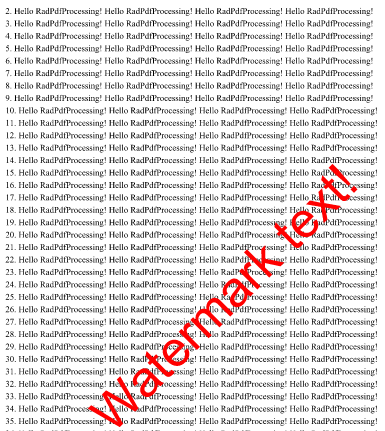
PDF Viewer: Transparency in text fragment is not respected
when having a document with a text fragment with a transparency, the transparency is not respected. the full color is displayed.
1 comment

ADMIN
Didi
Posted on:
27 Mar 2026 08:45
Workaround:
1. Subscribe to the PdfViewer.PageElementsLoaded event.
2. Enumerate the page's content elements.
3. Find TextFragment objects whose text matches "Watermak text!".
4. Set the fill color to the fragment with transparency
    <telerik:RadPdfViewer x:Name="pdfViewer"
                          PageElementsLoaded="pdfViewer_PageElementsLoaded"/>
and the page element loaded event with the workaround implemented.
private void pdfViewer_PageElementsLoaded(object sender, Telerik.Maui.Controls.PdfViewer.PageElementsLoadedEventArgs e)
{
    UpdateWatermarkTransparency(e.Page);
}

private static void UpdateWatermarkTransparency(RadFixedPage fixedPage)
{
    foreach (var contentElement in fixedPage.Content)
    {
        if (contentElement is Telerik.Windows.Documents.Fixed.Model.Text.TextFragment textBlock)
        {
            if(textBlock.Text.Contains("Watermark text!"))
            {
                textBlock.Fill = new RgbColor(60, 255, 0, 0);
            }
        }
    }
}
Regards,
Didi
Progress Telerik
Type
Status
- All
- Completed (489)
- Declined (77)
- Duplicated (36)
- In Development (15)
- Planned (1)
- Under Review (1)
- Unplanned (516)
- Won't Fix (18)
Category
- All
- UI for .NET MAUI
- Accordion
- AI Coding Assistant
- AIPrompt
- AutoComplete
- BadgeView
- Barcode
- Border
- BottomSheet
- BusyIndicator
- Button
- Calendar
- Chart
- Charts (New)
- Chat (Conversational UI)
- CheckBox
- CircularSlider
- CollectionView
- ComboBox
- DataForm
- DataGrid
- DataPager
- DatePicker
- DateTimePicker
- DockLayout
- DropDownButton
- Editor
- Entry
- Expander
- Gauge
- GridSplitter
- ImageEditor
- Installer and VS Extensions
- ItemsControl
- Licensing
- ListPicker
- Map
- MaskedEntry
- NavigationView
- NumericInput
- Path
- PDFViewer
- Popup
- ProgressBar
- PromptInput
- RangeSlider
- Rating
- RichTextEditor
- Scheduler
- SegmentedControl
- SideDrawer
- SignaturePad
- Skeleton
- Slider
- SlideView
- SmartPasteButton
- SpeechToTextButton
- TabView
- TemplatedButton
- TemplatedPicker
- TimePicker
- TimeSpanPicker
- ToggleButton
- Toolbar
- TreeDataGrid
- TreeView
- VS Code Extension
- WrapLayout