
Completed
Last Updated:
22 Sep 2026 14:23
by ADMIN

Speedy
Created on:
10 Apr 2025 09:26
Category:
KendoReact
Type:
Bug Report
Removing the line on Scrollable TabStrip
We have recently added the scrollable prop to our tabStrip component but we are noticing that now on the active tabs there is a line, which is not show when not using the scrollable property. Is there anyway to remove this line? It makes it more difficult in terms of affordance and UX to see that this element is the active tab when there is this line. It somehow breaks the connection between the tab and the content.
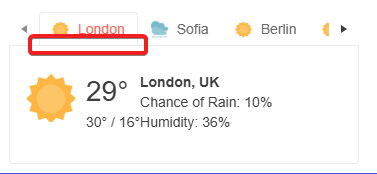
Any help would be appreciated.
Any help would be appreciated.
2 comments

ADMIN
Vessy
Posted on:
22 Sep 2026 14:22
Hi,
The issue discussed in this thread is fixed in v13.0.0 of the kendo-themes packages.
Regards,
Vessy
Progress Telerik
Love the Telerik and Kendo UI products and believe more people should try them? Invite a fellow developer to become a Progress customer and each of you can get a $50 Amazon gift voucher.
ADMIN
Vessy
Posted on:
14 Apr 2025 12:37
Hi, Karsten,
Thanks a lot for bringing this issue to our attention. I compared the original design of the scrollable tabs and the reported behaviour seems to be a bug in the component. I have logged it here:
Please, accept our apologies for the faced inconveniences.
Regards,
Vessy
Progress Telerik
Enjoyed our products? Share your experience on G2 and receive a $25 Amazon gift card for a limited time!
Type
Status
Category
- All
- KendoReact
- ActionSheet
- Agentic UI Generator
- AIPrompt
- Animation
- AppBar
- ArcGauge
- AutoComplete
- Avatar
- Badge
- Barcode
- BottomNavigation
- Breadcrumb
- BrowserExtension
- Button
- ButtonGroup
- Calendar
- Card
- Chart
- Chart Wizard
- Chat
- Checkbox
- Chip
- ChipList
- ChunkProgressBar
- CircularGauge
- ColorGradient
- ColorPalette
- ColorPicker
- ComboBox
- ContextMenu
- Conversational UI
- Data Query
- Date Math
- DateInput
- DatePicker
- DateRangePicker
- DateTimePicker
- Dialog
- Drag & Drop
- Drawer
- Drawing
- DropDownButton
- DropDownList
- DropDownTree
- Editor
- Error
- Excel Export
- ExpansionPanel
- ExternalDropZone
- File Saver
- FileManager
- Filter
- FlatColorPicker
- FloatingActionButton
- FloatingLabel
- FloatingToolbar
- FontIcon
- Form
- Gantt
- Gauge
- Grid
- GridLayout
- Hint
- InlineAIPrompt
- Input
- Label
- Licensing
- LinearGauge
- ListBox
- ListView
- LLM Kit
- Loader
- Map
- MaskedTextBox
- Menu
- MultiColumnComboBox
- MultiSelect
- MultiSelectTree
- MultiViewCalendar
- Notification
- NumericTextBox
- OrgChart
- OTP Input
- Page Templates / Building Blocks
- Pager
- PanelBar
- PDF Processing
- PDF Viewer
- PivotGrid
- Popover
- Popup
- ProgressBar
- PromptBox
- QR Code
- RadialGauge
- RadioButton
- RadioGroup
- RangeSlider
- Rating
- Ripple
- Sankey
- Scheduler
- ScrollView
- SegmentedControl
- Signature
- Skeleton
- Slider
- SmartPasteButton
- Sortable
- Sparkline
- SpeechToTextButton
- SplitButton
- Splitter
- Spreadsheet
- StackLayout
- Stepper
- StockChart
- SVGIcon
- Switch
- TabStrip
- TaskBoard
- TextArea
- TextBox
- TileLayout
- Timeline
- TimePicker
- Toolbar
- Tooltip
- TreeList
- TreeView
- Typography
- Upload
- VS Code Extension
- WebMCP
- Window