

When recording test steps within Test Studio, elements which are interacted with are recorded within the Elements Panel and are organised by the Window Title.
If a Window has a dynamic title i.e. "PRODUCT - LOGGED IN USER J.SMITH", when we record clicking a button, the element appears in the Window "PRODUCT - LOGGED IN USER J.SMITH". So long as the test runs against this user, and therefore the window title this works ok.
Im aware you can ask Test Studio to do partial window matching as described here: https://docs.telerik.com/teststudio/troubleshooting-guide/test-execution-problems-tg/window-partial-match, however, this only works for elements already known.
If I create a test, record the steps and set the window title to use partial matching i.e. "~PRODUCT - LOGGED IN", this works, but if you record the use of another button, Test Studio recreates the original window "PRODUCT - LOGGED IN USER J.SMITH", and you have to repeat the step again to use partial matching.
This request is to allow a drag/drop from one window into another, and to therefore avoid recreating the window title over and over again for each control you add into the element window.
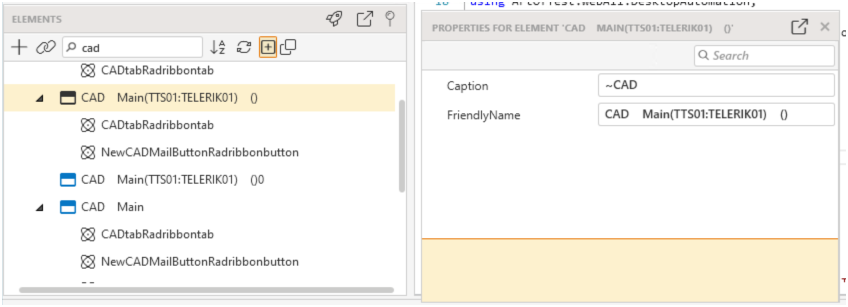
In this Example, 'CAD' can be prefixed by the database name (MAIN), then the user and workstation (TTS01:TELERIK01). CAD is always there, so i use "~CAD" which works. But if interact with a control again as part of another test, its recreated in its own window folder again.