
Unplanned
Last Updated: 16 Oct 2026 10:58 by ADMIN
Ed
Created on: 16 Oct 2026 10:39
Category: Reporting
Type: Bug Report
1
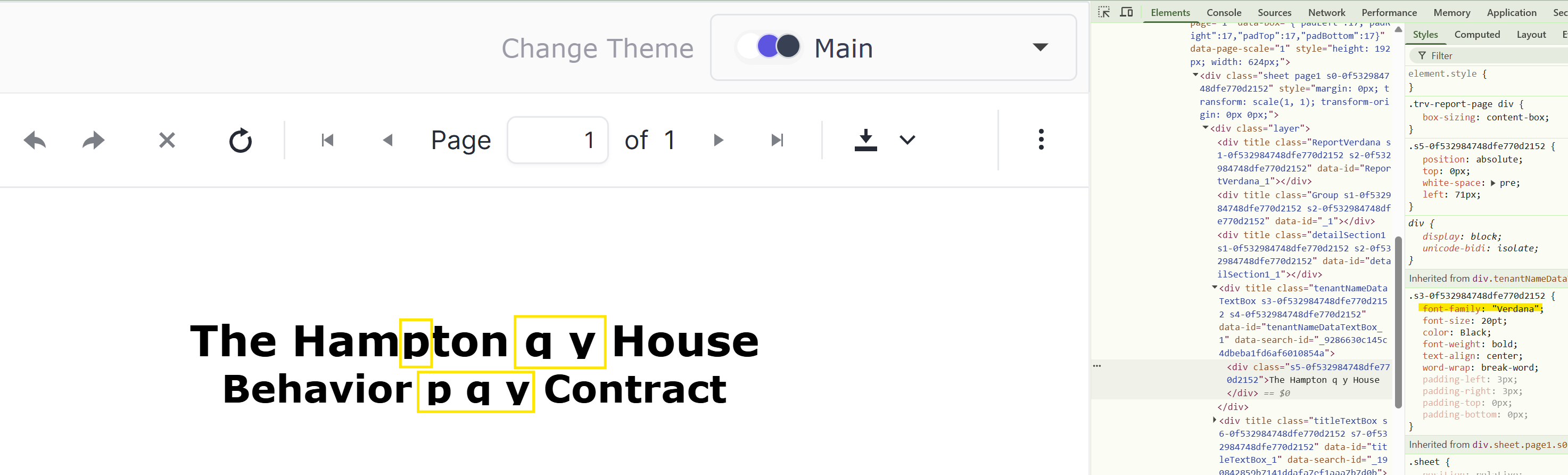
The text styled with fonts like Verdana may appear cut off in Web Report Viewers

I use the Verdana font in my report titles. In the desktop designer and PDF documents, the text appears as expected.

In HTML5 and Blazor Report Viewers, though, the characters like 'p', 'q ', and 'y' appear cut off:
 

1 comment

ADMIN
Todor
Posted on: 16 Oct 2026 10:58

Here is a temporary workaround while we investigate and fix the issue.

Add a global style rule to your report’s StyleSheet so all TextBox/HtmlTestBox items get consistent padding automatically. Example:

<StyleRule>
  <Style>
    <Padding Left="2pt" Right="2pt" Top="2pt" Bottom="2pt" />
  </Style>
  <Selectors>
    <TypeSelector Type="TextItemBase" />
    <TypeSelector Type="HtmlTextBox" />
  </Selectors>
</StyleRule>

This will apply the padding to all text boxes across your report.

Regards,
Todor
Progress Telerik

Love the Telerik and Kendo UI products and believe more people should try them? Invite a fellow developer to become a Progress customer and each of you can get a $50 Amazon gift voucher.
