

My use case is a multi-select parameter that is based on a dataset; and the dataset is filtered by 2 other parameters.
The dependent parameter editor is shown as a SpinButton rather than a multi-select editor in the Blazor Native Report Viewer:

When my application is hosted on Windows, Arabic date values appear reversed in the day part during PDF export with the Skia graphics engine. For example, 2025/01/01 is displayed as /01/10 when Arabic digits are used.
With the GDI graphics engine, the Date values are rendered as expected.

As of now the Reporting team provides only part of the source code - mostly the code that targets .NET Framework 4.6.2.
Please expose more of the code to your customers, like Telerik Reporting engine for .NET 6+ and corresponding REST WebAPI.
I use an approved government font for the reports. I have specified it in the `privateFonts` option of the report engine configuration. However, on Linux, it is not picked up during rendering. In FontForge, the font shows the following warning:
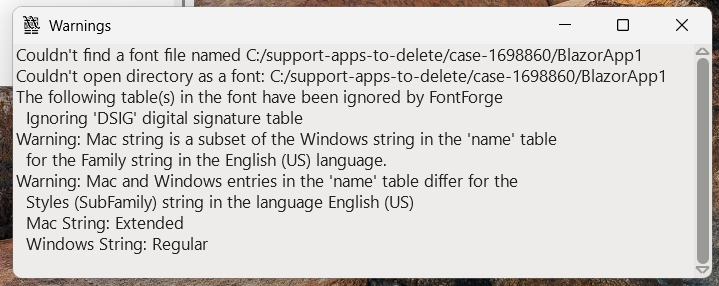
On Windows, it causes no issues.
This works fine in the Report Designer, e.g., when the Start Date is changed in preview mode, the End Date value is recalculated.
However, this behavior does not work in the Blazor Native Report Viewer. When the page first renders, the two dates are shown correctly, but if the Start Date is changed, the End Date is not recalculated.
My application uses RadDocking. When the WPF Report Viewer is hosted in RadDocking, some Graph labels appear cut.
The problem is related to the property UseLayoutRounding="True" in the RadDocking.
The workaround is to use the following setting:
RadPane pane = new RadDocumentPane();
pane.UseLayoutRounding = false;
pane.Header = "Report";
pane.Content = reportViewer;
DocumentPaneGroup.AddItem(pane, Telerik.Windows.Controls.Docking.DockPosition.Center);
As soon as I reference a .NET 10 assembly containing models, there is a null reference exception that does not appear in EventViewer or Fusion logging at the opening of the Standalone Report Designer for .NET.
Here is a link to a muted video demonstrating how adding assembly references using the UI successfully adds the custom assembly to the designer, as well as the bug when removing the assembly version.
Hello Team Support,
I work with the ReportViewer in WPF. I modified the description of some format in my App.config.
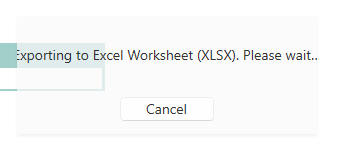
When I export my report, if the description is too long, it does not fit the message window anymore.
Here is a screenshot of my issue:
Thank you in advance.
Best regards,
Jonas


Some of the Web Report Designer pop-up messages are not localizable. For example, the message about trying to access a report that does not exist on the server:

Related to:
Also affects Telerik.Reporting.Processing and Configuration: Attempt by security transparent method 'Telerik.Reporting.Processing.AssemblyRefManager.LoadAssembliesCore()' to access security critical method 'Telerik.Reporting.Configuration.ReportingConfiguration.get_Current()' failed.

Some special characters, such as "🍁", break reports that are rendered with the Skia graphics engine in a Linux environment.
When the Gdi graphics engine is used on Linux, the reports are generated successfully. However, the Gdi graphics engine cannot be used on Linux with projects that target .NET 7 and later.
Using Blazor native reporting component. Our underlying email sending service requires that Subject is not blank, however the UI does not validate the Subject field.
Need to be able to validate that Subject is not blank when user attempts to submit email form.
We are experiencing issues with Telerik Reporting related to RTL text (culture 'ar-JO') rendering, as outlined below:
- Text wrapping is not working correctly within the HTML5 Report Viewer. The text seems to overflow the TextBox.
- When exporting to PDF, the text exceeds its boundaries, does not wrap as expected, and in some cases is cut off.
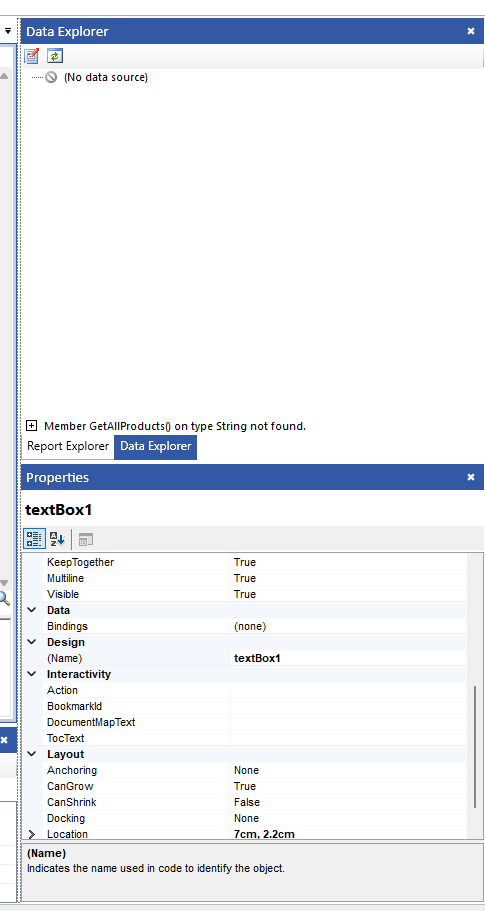
I'm getting an error in Telerik Report Designer (Data Explorer): "Member x on type String not found"
The version is: 19.3.25.1119
Steps to Reproduce:
- Open SRD.NET.
- Configure the Assembly References through the SRD.NET UI to include a DLL.
- Open an existing report file.
- Observation: The Data Explorer tool window is populated correctly, showing all fields and methods as expected.
- Close Telerik Report Designer.
- Re-open Telerik Report Designer.
- Verify that the Assembly References are still correctly configured (they are).
- Open the same report file.
- The Data Explorer is not populated. Instead, it throws an error:
I just recently updated to the latest reporting release 2025 Q1 in addition to updating to the newest Visual Studio Community 2022 (64-bit) - Current
Version 17.13.2
I installed the newest reporting update and updated my VS project.
I must have at least 50 different reports which I have previously designed and have been working fine. The DataSource is set to the object exposing all the key fields using gets. Works fine when running the program but after all the updates, all of a sudden I can see, in the designer, the fields in the fields list when editing an element value reference or in the the Data Explorer.
Played with a sample element in the detail panel. The form has the data source set correctly. The toolbox also shows the reporting tools. No go.
I verified the new reporting DLL is intact.
Same situation with all my reports. All work fine running, just the designer interface is not working.
I even tried on another computer, also updated, and experienced the same problem.
Again, now all my reports don't show the list - something intrinsically has changed. with the setup and recognition of the DS.
Eric
This also triggers multiple requests without an instance ID and document ID, resulting in 404 Not Found responses.
When my application runs in full trust permissions set, the following error is thrown if I have used the Telerik.Reporting.OpenXmlRendering NuGet package and try exporting to any of the OpenXML formats :
ERROR: Attempt by security transparent method 'Telerik.Reporting.OpenXmlRendering.Spreadsheet.Workbook..ctor()' to access security critical method 'DocumentFormat.OpenXml.Packaging.SpreadsheetDocument.Create(System.IO.Stream, DocumentFormat.OpenXml.SpreadsheetDocumentType)' failed.
I am using the obsolete `Telerik.Reporting.Chart` type for a chart in a report. When I attempt to preview the report, an error is thrown:
The type "Telerik.Reporting.Chart" contained in assembly "Telerik.Reporting, Version=19.2.25.1001, Culture=neutral, PublicKeyToken=a9d7983dfcc261be" cannot be loaded.
To help improve the application's security, the reporting engine prevents loading types that are not essentially needed or listed as trusted by the user. If you consider particular types or assemblies as trusted include them in the corresponding TypeReferences or AssemblyReferences element of the 'Telerik.Reporting' configuration section in the application's configuration file.