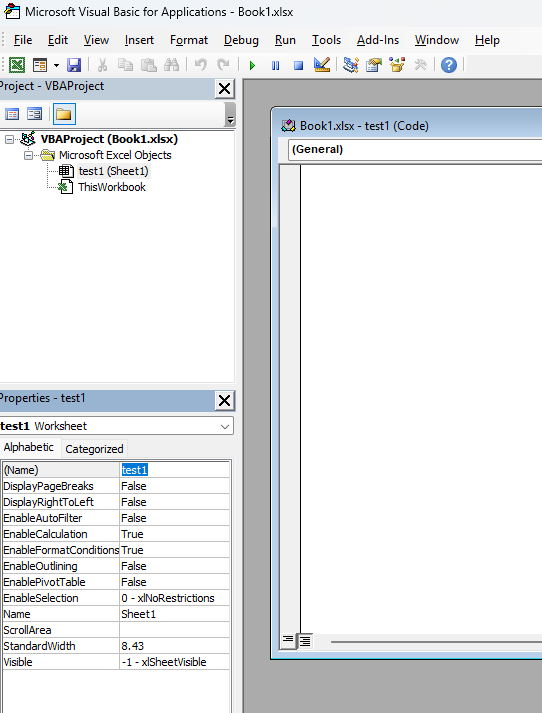
SpreadProcessing: Add pubic API for getting and setting the CodeName of a Worksheet
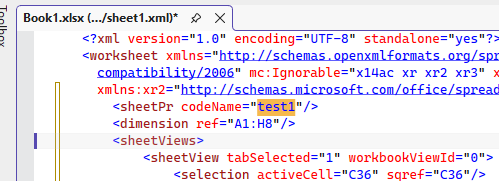
This is preserved in the xml once saved from MS Excel:
4 comments

ADMIN
Dess | Tech Support Engineer, Principal
Posted on:20 Mar 2026 11:00
Hi, Manish,
Thank you for sharing this additional input. We understand your point regarding the CodeName property and agree that, similar to Excel’s native behavior, any worksheet newly created by the user should automatically receive a default, non-empty CodeName value. We also acknowledge the importance of maintaining uniqueness of the CodeName across the workbook, so that fetching this property for a newly added sheet does not return an empty string. We will certainly take this into account during the implementation of the feature and evaluate how best to align the behavior with the Excel application’s default handling of worksheet CodeNames.
Regards,
Dess | Tech Support Engineer, Principal
Progress Telerik
Just wanted to add a new point that if a new sheet is created by the user then that specific worksheet should have CodeName property value set by itself as equivalent to that of Excel application.
Since Codename property value has to be unique across the workbook, hence if a new sheet is created and if we try to fetch the CodeName property value of the new sheet, then it should give some default value rather than just givihng empty string.
ADMIN
Dess | Tech Support Engineer, Principal
Posted on:06 Mar 2026 09:33
Hello, Manish,
This is valuable input, and I want to assure you that your suggestion will be considered as we plan future improvements to our SpreadProcessing library. Your feedback plays an important role in shaping our roadmap, so please don’t hesitate to share any additional ideas or scenarios that would help us better support your use cases.
Regards,
Dess | Tech Support Engineer, Principal
Progress Telerik