


I am using the stand alone report designer, connected to a report server.
In the report I am designing, I have several cross tabs. We now want to create the same crosstabs, with additional filtering for the data.
- I copy the existing crosstab, then paste it.
Both cross tabs now reference the SAME row groups. Because of this, when I edit the filters, it just doesn't work. Looks like there are reference issues when the copy / paste is done, not all the objects within the cross tab are getting a new copy.
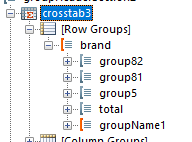
Original crosstab - it has a row group called "groupName1" :
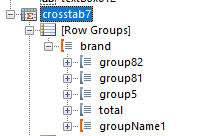
Copied crosstab - same "groupName1" row group - it shouldn't be the same row group object.

I have a table with all of my columns sortable.
When I add the sorting button using the Interactivity feature, the buttons are all left aligned. It is confusing when trying to figure out which button sorts a column. See the attachment.
I'd like to be able to move the sorting button left or right.
I put a ReportViewer in an application and VisualStudio inserted the required MergedDictionaries. I updated them to the Green theme and added the Green reference, now I get a XAML error stating Cannot find resource named 'RepeatButtonStyle.' I comment out this line in my App.xaml file:
<!--<ResourceDictionary Source="/Telerik.ReportViewer.Wpf.Themes;component/Themes/Green/Telerik.Windows.Controls.Navigation.xaml" />-->the error goes away and my XAML designer works again, but the navigation section of the report viewer has the incorrect theme applied.
I looked in the copy of the file that is on my computer located at:
C:\Program Files (x86)\Progress\Telerik Reporting R2 2019\Wpf\Themes\Green\Telerik.Windows.Controls.Navigation.xaml
On line 8831 there is a reference to a Static Resource named RepeatButtonStyle.
<Style x:Key="TabbedWindowScrollButtonStyle" TargetType="RepeatButton" BasedOn="{StaticResource RepeatButtonStyle}">I assume this the culprit?
There was a similar issue in February.

Currently the Web Report Designer (WRD) can only work with reports stored on the server where the WRD Web API service is hosted.
A nice addition would be the option to select a local TRDX/TRDP file from the client file system and upload it to the server, when opening a new report for edit.
When saving such report there should be an option to download it to the client's file system as well.
With this approach the open/save operations will more closely resemble those of the standalone report designer.
Hi admin/team,
we are using HTMLTextBox to display big paragraph text using panel. The paragraph text is having numbered list [Ordered list and Unordered list] content. The report rendering PDF format, the paragrah text has auto corrected number list. We dont want auto corrected number list and should display as we have in paragraph.
Could you please help on this. Do we have any specific properties ? Thanks
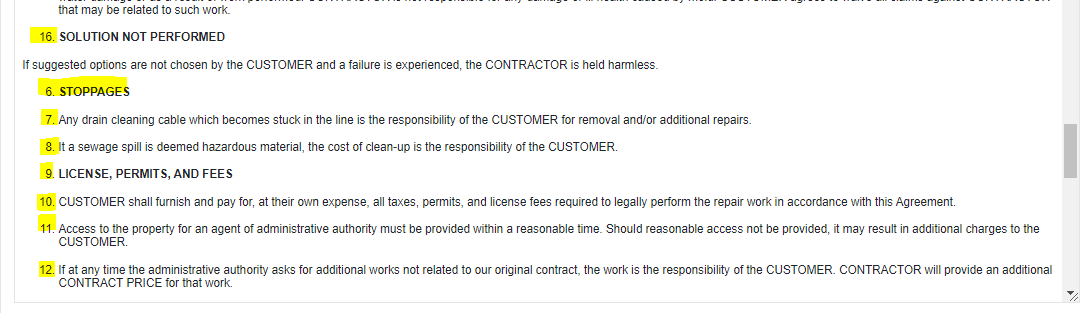
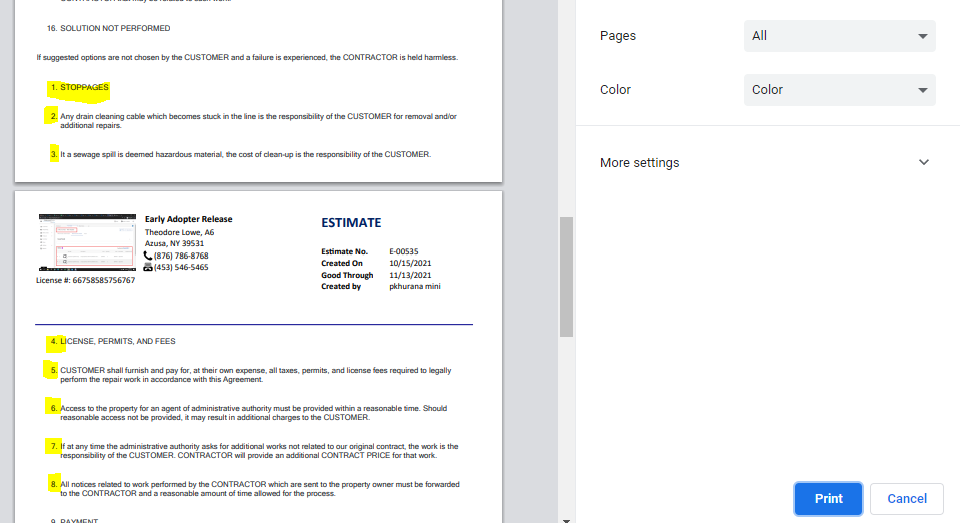
For your reference: Highlighted color -> Expected: some points are start with '6.' numbered list
Actual-> Auto corrected numbered list and start from '1.'
in website Chrome Browser (Expected)
in Report Viewer PDF format(Actual)
I've noticed an issue with the web service data source configuration window when using jQuery version 3.5.1 or higher.
When you use the click on the Web Service Data Source from the left side menu it will open the configuration window in which Responding encoding and Data selector fields will be there for the jQuery version 3.3.1.
Now try the same steps with the 3.5.1 jQuery version or higher and those 2 fields won't be there.


The Could not retrieve Expression schema. error can be experienced while trying to set a value of textbox by using the expression editor.
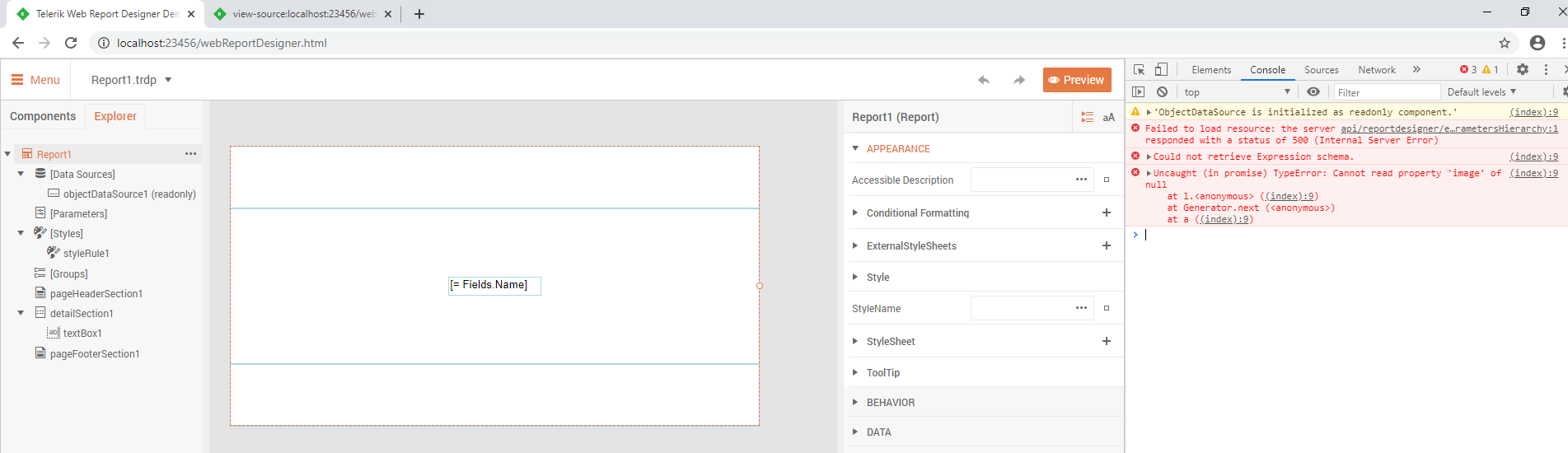

Hi,
It would be very practical to have a component that could display HTML and CSS code from a data source.
Thank you
Bernard
Hello Telerik team!
In the attachment, there are two PDFs, generated by the same template (also in attachment): one built under Windows, another one - under Linux (Docker). See red boxes as defects on the screenshot:
Dockerfile fragment:
# MS TrueTypeFonts install
RUN wget http://ftp.de.debian.org/debian/pool/contrib/m/msttcorefonts/ttf-mscorefonts-installer_3.6_all.deb -P ~/Downloads
RUN apt install -y ~/Downloads/ttf-mscorefonts-installer_3.6_all.deb
RUN apt-get install -y libc6-dev
RUN apt-get install -y libgdiplus
RUN apt-get install -y libx11-dev
RUN rm -rf /var/lib/apt/lists/*
Please help us to resolve these issues in Linux.
Currently, the row/record delimiter when exporting to CSV is taken from the environment. This way, the same CSV document will have different line separators when exported from Windows and Linux.
It will be very useful if the row delimiter can be specified in the device information settings the same way the field delimiter can.


Currently, the MsSqlServerStorage CommandTimeout is with the default value that is 30 s. In some scenarios, like when the Search functionality is enabled and the report is very big, the generated ClientSearchItemsResource may be too big, and when attempting to save it in the storage the latter may throw the exception 'System.Data.SqlClient.SqlException (0x80131904): Execution Timeout Expired. The timeout period elapsed prior to completion of the operation or the server is not responding.'
The error may be avoided if the CommandTimeout can be increased.