

Hi,
We have today updated our docker reporting container to improve security, and at the same time upgraded to ,NET 8 from .NET 7 (Which worked fine). The error we're getting from Kubernetes is as shown below.....
   at Telerik.Reporting.Processing.ReportProcessor.RenderReportSafe(Func`2 renderCallback, String format, IRenderingContext renderingContext)
   at Telerik.Reporting.Processing.ReportProcessor.RenderReport(String format, ReportSource reportSource, Hashtable deviceInfo, CancellationToken cancellationToken)
   at Telerik.Reporting.Processing.ReportProcessor.RenderReport(String format, ReportSource reportSource, Hashtable deviceInfo)
   at ReportService.UI.Controllers.API.ReportExportController.GenerateReportPDFBase64(ReportRequestDTO reportRequest) in /src/ReportService.UI/Controllers/API/ReportExportController.cs:line 35
   at lambda_method492(Closure, Object, Object[])
   at Microsoft.AspNetCore.Mvc.Infrastructure.ActionMethodExecutor.SyncObjectResultExecutor.Execute(ActionContext actionContext, IActionResultTypeMapper mapper, ObjectMethodExecutor executor, Object controller, Object[] arguments)
   at Microsoft.AspNetCore.Mvc.Infrastructure.ControllerActionInvoker.InvokeActionMethodAsync()
   at Microsoft.AspNetCore.Mvc.Infrastructure.ControllerActionInvoker.Next(State& next, Scope& scope, Object& state, Boolean& isCompleted)
   at Microsoft.AspNetCore.Mvc.Infrastructure.ControllerActionInvoker.InvokeNextActionFilterAsync()
--- End of stack trace from previous location ---
   at Microsoft.AspNetCore.Mvc.Infrastructure.ControllerActionInvoker.Rethrow(ActionExecutedContextSealed context)
   at Microsoft.AspNetCore.Mvc.Infrastructure.ControllerActionInvoker.Next(State& next, Scope& scope, Object& state, Boolean& isCompleted)
   at Microsoft.AspNetCore.Mvc.Infrastructure.ControllerActionInvoker.InvokeInnerFilterAsync()
--- End of stack trace from previous location ---
   at Microsoft.AspNetCore.Mvc.Infrastructure.ResourceInvoker.<InvokeNextResourceFilter>g__Awaited|25_0(ResourceInvoker invoker, Task lastTask, State next, Scope scope, Object state, Boolean isCompleted)
   at Microsoft.AspNetCore.Mvc.Infrastructure.ResourceInvoker.Rethrow(ResourceExecutedContextSealed context)
   at Microsoft.AspNetCore.Mvc.Infrastructure.ResourceInvoker.Next(State& next, Scope& scope, Object& state, Boolean& isCompleted)
   at Microsoft.AspNetCore.Mvc.Infrastructure.ResourceInvoker.InvokeFilterPipelineAsync()
--- End of stack trace from previous location ---
   at Microsoft.AspNetCore.Mvc.Infrastructure.ResourceInvoker.<InvokeAsync>g__Awaited|17_0(ResourceInvoker invoker, Task task, IDisposable scope)
   at Microsoft.AspNetCore.Mvc.Infrastructure.ResourceInvoker.<InvokeAsync>g__Awaited|17_0(ResourceInvoker invoker, Task task, IDisposable scope)
   at Microsoft.AspNetCore.Authorization.AuthorizationMiddleware.Invoke(HttpContext context)
   at Microsoft.AspNetCore.Builder.Extensions.UsePathBaseMiddleware.InvokeCore(HttpContext context, PathString matchedPath, PathString remainingPath)
   at Microsoft.AspNetCore.Diagnostics.ExceptionHandlerMiddlewareImpl.<Invoke>g__Awaited|10_0(ExceptionHandlerMiddlewareImpl middleware, HttpContext context, Task task)
   --- End of inner exception stack trace ---
   at Microsoft.AspNetCore.Diagnostics.ExceptionHandlerMiddlewareImpl.HandleException(HttpContext context, ExceptionDispatchInfo edi)
   at Microsoft.AspNetCore.Diagnostics.ExceptionHandlerMiddlewareImpl.<Invoke>g__Awaited|10_0(ExceptionHandlerMiddlewareImpl middleware, HttpContext context, Task task)
   at Microsoft.AspNetCore.Localization.RequestLocalizationMiddleware.Invoke(HttpContext context)
   at Serilog.AspNetCore.RequestLoggingMiddleware.Invoke(HttpContext httpContext)
   at Microsoft.AspNetCore.Authentication.AuthenticationMiddleware.Invoke(HttpContext context)
   at Microsoft.AspNetCore.Server.Kestrel.Core.Internal.Http.HttpProtocol.ProcessRequests[TContext](IHttpApplication`1 application)
[18:05:37 INF] HTTP GET /ready responded 200 in 0.1777 ms
[18:05:47 INF] HTTP GET /ready responded 200 in 0.1380 ms
[18:05:57 INF] HTTP GET /ready responded 200 in 0.1588 ms
Logs from 12/29/2023, 5:54:22 PM
Our dockerfile is as shown below....
#See https://aka.ms/customizecontainer to learn how to customize your debug container and how Visual Studio uses this Dockerfile to build your images for faster debugging.

FROM mcr.microsoft.com/dotnet/aspnet:8.0 AS base
WORKDIR /app
EXPOSE 80
ENV ASPNETCORE_HTTP_PORTS=80

# Creates a non-root user with an explicit UID and adds permission to access the /app folder
# For more info, please refer to https://aka.ms/vscode-docker-dotnet-configure-containers
RUN adduser -u 5678 --disabled-password --gecos "" appuser && chown -R appuser /app
USER appuser

FROM mcr.microsoft.com/dotnet/sdk:8.0 AS build
WORKDIR /src
COPY ["AppointmentService.Api/NuGet.config", "./"]
COPY ["AppointmentService.Api/AppointmentService.Api.csproj", "AppointmentService.Api/"]
COPY ["AppointmentService.Domain/AppointmentService.Domain.csproj", "AppointmentService.Domain/"]
COPY ["AppointmentService.Infrastructure/AppointmentService.Infrastructure.csproj", "AppointmentService.Infrastructure/"]
COPY ["AppointmentService.Data/AppointmentService.Data.csproj", "AppointmentService.Data/"]

# Set the PAT for the IQHT NuGet feed
ARG IQHTNugetPAT=localhost
RUN sed -i "s|</configuration>|<packageSourceCredentials><iQHealthTech><add key=\"Username\" value=\"IQHTNuget\" /><add key=\"ClearTextPassword\" value=\"${IQHTNugetPAT}\" /></iQHealthTech></packageSourceCredentials></configuration>|g" ./NuGet.config

RUN dotnet restore "AppointmentService.Api/AppointmentService.Api.csproj"
COPY . .
WORKDIR "/src/AppointmentService.Api"
RUN dotnet build "AppointmentService.Api.csproj" -c Release -o /app/build

FROM build AS publish
RUN dotnet publish "AppointmentService.Api.csproj" -c Release -o /app/publish /p:UseAppHost=false

FROM base AS final
WORKDIR /app
COPY --from=publish /app/publish .
ENTRYPOINT ["dotnet", "AppointmentService.Api.dll"]
Our Kubernetes deployment manifest is as below...
apiVersion: apps/v1
kind: Deployment
metadata:
  labels:
    service: appointmentservice
  name: appointmentservice
spec:
  replicas: 1
  selector:
    matchLabels:
      service: appointmentservice
  strategy: {}
  template:
    metadata:
      labels:
        service: appointmentservice
      annotations:
        dapr.io/enabled: "true"
        dapr.io/app-id: "iqht-dev-appointmentservice"
        dapr.io/app-port: "80"
    spec:
      containers:
        - image: acriqemodevuks01.azurecr.io/appointmentservice:v$(Build.BuildNumber)
          securityContext:
            runAsUser: 5678
            allowPrivilegeEscalation: false
            readOnlyRootFilesystem: true
            runAsNonRoot: true
          imagePullPolicy: IfNotPresent
          name: appointmentservice
          startupProbe:
            httpGet:
             path: /health/startup
             port: 80
            failureThreshold: 30
            periodSeconds: 10
          readinessProbe:
            httpGet:
              path: /ready
              port: 80
            successThreshold: 3
          ports:
            - containerPort: 80
          env:
          - name: "ASPNETCORE_ENVIRONMENT"
            value: "iqemov2-development"
          volumeMounts:
            - name: secrets
              mountPath: /app/secrets
              readOnly: true
          resources:
            limits:
              cpu: 75m
              memory: 100Mi
            requests:
              cpu: 50m
              memory: 50Mi
      restartPolicy: Always
      volumes:
        - name: secrets
          secret:
            secretName: secret-appsettings
status: {}
...
apiVersion: v1
kind: Service
metadata:
  labels:
    service: appointmentservice
  name: appointmentservice
  namespace: iqemov2-development
spec:
  type: ClusterIP
  ports:
    - port: 80
      protocol: TCP
  selector:
    service: appointmentservice
status:
  loadBalancer: {}
I wonder whether you are able to provide us with some guidance on how we can resolve this issue so that we can deploy it to the customer.
Thanks in advance for any help you can provide to help us resolve this issue.
Regards,
Damian

The format of a cell, textbox, can only be set using the predefined options for a number or date time. I want to be able to set the formatting of a textbox in an expression. i.e. `=Fields.Formatting`, which would equate to`{0:##,#0.00 "kW"}`. This is because the cell could be any type of unit, i.e. "kW", "Amps", "kWh"
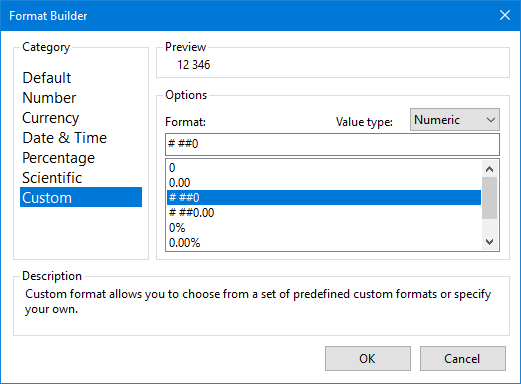
Using a format would allow the cell content to still be output as a number and when exporting to Excel, the displayed value would be in a user-recognised format but then would allow them to click on the cell and view the full, unrounded, number.
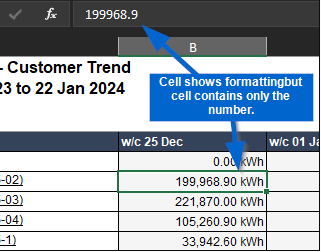
The above functionality is available in SSRS reporting using the formula `=IIf(Globals!RenderFormat.Name = "CSV", "0.00","#,0.00 '" & MAX(Fields!ReadingTypeUnit.Value) & "'")`, which allows for exporting to CSV to round the number.
We are trying to upgrade our front end to Angular 17. When we set the telerik version to 17.2.23.1114, none of the reports open and we are getting the method not found error.
This is the configuration in our telerik report project which runs .NET 6.
<PackageReference Include="Telerik.Drawing.Skia" Version="17.2.23.1114" />
<PackageReference Include="Telerik.Reporting.Cache.StackExchangeRedis.2" Version="17.2.23.1114" />
<PackageReference Include="Telerik.Reporting.Services.AspNetCore" Version="17.2.23.1114" />
Using the November 2023 Report Designer, when a resize a Panel and then press Ctrl-Z to undo the resize, all objects within the Panel are lost.
I was able to confirm this by saving as a second copy and then comparing the XML between them.
The current htmltextbox on the telerik reporter designer does not support html tags for <table>
There is a work around which creates the html text to an image but the quality is not great but more importantly the word wrap functionality is lost.
https://docs.telerik.com/reporting/report-items/htmltextbox/overview#supported-html-tags
Peter
DockerBlazorApp Error: 0 : An error has occurred while rendering the report: System.InvalidOperationException: Operations that change non-concurrent collections must have exclusive access. A concurrent update was performed on this collection and corrupted its state. The collection's state is no longer correct.
at System.Collections.Generic.Dictionary`2.TryInsert(TKey key, TValue value, InsertionBehavior behavior)
at System.Collections.Generic.Dictionary`2.set_Item(TKey key, TValue value)
at Telerik.Drawing.SKIA.Text.FontMapper.LoadPrivateFont(SKTypeface typeface, String familyName)
at Telerik.Drawing.Skia.Graphics.MeasureTextBlock(String text, Single widthConstraint, Single heightConstraint, StringFormatBase stringFormat, IFont font)
at Telerik.Drawing.Skia.Graphics.MeasureString(String text, IFont font, SizeF layoutArea, StringFormatBase stringFormat, Int32& charactersFitted, Int32& linesFilled)
at Telerik.Reporting.Processing.WindowsTextMeasureProvider.MeasureString(IGraphics graphics, String text, GdiFontInfo fontInfo, SizeF layoutArea, StringFormatBase stringFormat, Int32& charactersFitted, Int32& linesFilled)
at Telerik.Reporting.Processing.MeasureContext.MeasureString(String text, IFont font, SizeF layoutArea, TextFormat textFormat, Int32& charactersFitted, Int32& linesFilled)
at Telerik.Reporting.Processing.TextRenderer.MeasureText(IMeasureContext context, String text, IFont font, RectangleF layoutRectangle, TextFormat textFormat, Boolean multiline, Int32& charactersFitted)
at Telerik.Reporting.Processing.TextBoxUtil.MeasureTextContainer(ITextContainer textContainer, RectangleF layoutBounds, IMeasureContext context)
at Telerik.Reporting.Processing.TextBox.MeasureItem(IMeasureContext context, SizeLU availableClientSize, Boolean canGrow)
at Telerik.Reporting.Processing.TextBox.MeasureItem(IMeasureContext context, SizeLU availableClientSize)
at Telerik.Reporting.Processing.TextBox.MeasureContent(IMeasureContext context, SizeLU availableClientSize)
at Telerik.Reporting.Processing.LayoutElement.MeasureCore(IMeasureContext context, SizeLU availableSize)
at Telerik.Reporting.Processing.VisualElement.MeasureCore(IMeasureContext context, SizeLU availableSize)
at Telerik.Reporting.Processing.ProcessingElement.MeasureCore(IMeasureContext context, SizeLU availableSize)
at Telerik.Reporting.Processing.LayoutElement.Measure(IMeasureContext context, SizeLU availableSize)
at Telerik.Reporting.Processing.AbsolutePositionLayout.MeasureChildItems(IMeasureContext context, SizeLU availableClientSize)
at Telerik.Reporting.Processing.AbsolutePositionLayout.MeasureContent(IMeasureContext context, SizeLU availableClientSize)
at Telerik.Reporting.Processing.ReportSectionBase.MeasureContent(IMeasureContext context, SizeLU availableClientSize)
at Telerik.Reporting.Processing.PageSection.MeasureContent(IMeasureContext context, SizeLU availableClientSize)
at Telerik.Reporting.Processing.LayoutElement.MeasureCore(IMeasureContext context, SizeLU availableSize)
at Telerik.Reporting.Processing.VisualElement.MeasureCore(IMeasureContext context, SizeLU availableSize)
at Telerik.Reporting.Processing.ProcessingElement.MeasureCore(IMeasureContext context, SizeLU availableSize)
at Telerik.Reporting.Processing.LayoutElement.Measure(IMeasureContext context, SizeLU availableSize)
at Telerik.Reporting.Paging.PageCompositionBase.MeasurePageSection(PageSection section)
at Telerik.Reporting.Paging.PageCompositionBase.ProcessPageSectionsForPaging()
at Telerik.Reporting.Paging.PageCompositionBase.MoveToNextPageArea()
at Telerik.Reporting.Paging.PageCompositionBase.NextVerticalPage()
at Telerik.Reporting.Paging.PageCompositionBase.CreatePages()
at Telerik.Reporting.Paging.PagerBase.Telerik.Reporting.Paging.IPager.CreatePages(IPageHandler handler, LayoutElement root)
at Telerik.Reporting.BaseRendering.RenderingExtensionBase.Render(LayoutElement root, Hashtable renderingContext, Hashtable deviceInfo, CreateStream createStreamCallback, EvaluateHeaderFooterExpressions evalHeaderFooterCallback, PageSettings pageSettings

Hi Team,
I would like to put in a request for PPT export option for Telerik reports. Our end users want the ppt file to be editable. One of your team members suggested that there is an existing ppt export format, but it is not editable at the moment. Having an editable option is preferable.
Thanks
Samyutha Ravindran
My scenario is that I am exporting a report to Excel, and I need to format one of my columns that display numerical data with a specific culture.
I can achieve this with the FormatWithCulture text function but then Excel does not treat the values in that column as numbers which is why I have to use the Format property of the item, and return a number in the Value of the textbox.
Unfortunately, the Format property does not allow specifying a culture that will be used for the formatting so the culture on the server is always used. I need to change that dynamically with a report parameter.
We work in a project with more than 100 parameters. The parameters are sorted in the order we added them.
It is hard to look for a parameter when we need to do a change. A right click "sort" would be great.
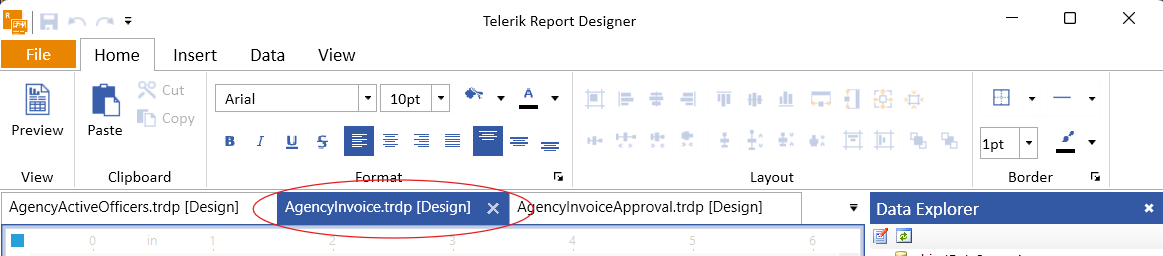
Just a simple quality-of-life improvement, middle-click on the tab should close the report - doing exactly the same thing as clicking the "X" button in the tab. Seems the majority of tabbed UIs follow this convention.
Hi Team,
Is it possible to remove dll version and report designer path from Creator and Producer metadata tags. We got this requirement from our client. I am posting the remediation steps shared by our client below-
Is this possible to remove Telerik Reporting 14.1.20.618 (http://www.telerik.com/products/reporting.aspx) highlighted part and keep Telerik Reporting only?
We have successfully downloaded and installed Google Open Sans fonts (from the URL: https://fonts.google.com/specimen/Open%20Sans#:~:text=Open%20Sans%20is%20a%20humanist%20sans%20serif) to a Linux Ubuntu-based Docker container using the following Dockerfile script to install the dependencies and the fonts:
RUN apt-get update && apt-get install -y libfreetype6 libfontconfig1 fontconfig unzip

#Google Fonts
RUN mkdir -p /usr/share/fonts/truetype/googlefonts && cd /usr/share/fonts/truetype/googlefonts
COPY ["Open_Sans.zip", "/usr/share/fonts/truetype/googlefonts"]
RUN unzip -d /usr/share/fonts/truetype/googlefonts /usr/share/fonts/truetype/googlefonts/Open_Sans.zip
RUN rm -f Open_Sans.zip
RUN ls -al /usr/share/fonts/truetype/googlefonts
RUN fc-cache -fv
RUN fc-match OpenSans
Open_Sans.zip file should be in the solution folder when running the Docker from Visual Studio.
The fonts are displayed as expected when previewing in the browser. When exporting to PDF though, the Reporting engine throws the following exception when Open Sans font is used:
CSharp.Net8.Html5IntegrationDemo Error: 0 : System.IndexOutOfRangeException: Index was outside the bounds of the array.
   at Telerik.Reporting.Pdf.Fonts.TrueType.TrueTypeCollectionHeader.Read(FontReader fontReader)
   at Telerik.Reporting.Pdf.Fonts.TrueType.TrueTypeCollectionHeaderVersion2.Read(FontReader fontReader)
   at Telerik.Reporting.Pdf.Fonts.TrueType.FontCollectionProgram.Decompile()
   at Telerik.Reporting.Pdf.Fonts.TrueType.FontCollectionProgram.EnsureFonts()
   at Telerik.Reporting.Pdf.Fonts.TrueType.FontCollectionProgram.get_Fonts()
   at Telerik.Reporting.Pdf.Fonts.TrueType.FontCollectionProgram.SelectFontProgram(String fontName, String fontFamily, Boolean bold, Boolean italic, Boolean underline, Boolean strikeout)
   at Telerik.Reporting.Pdf.Fonts.TrueType.TrueTypeDescriptor..ctor(IFont engineFont)
   at Telerik.Reporting.Pdf.Fonts.TrueType.TrueTypeDescriptor..ctor(PdfFont font)
   at Telerik.Reporting.Pdf.PdfFontTable.GetDescriptor(PdfFont font)
   at Telerik.Reporting.Pdf.PdfFontDictionary..ctor(PdfDocument document, PdfFont drawingFont)
   at Telerik.Reporting.Pdf.PdfFontType0Dictionary..ctor(PdfDocument document, PdfFont font)
   at Telerik.Reporting.Pdf.PdfFontTable.GetFont(PdfFont font)
   at Telerik.Reporting.Pdf.PdfPageDictionary.GetFontName(PdfFont font, PdfFontDictionary& fontDictionary)
   at Telerik.Reporting.Pdf.Rendering.PdfRenderer.GetFontName(PdfFont font, PdfFontDictionary& fontDictionary)
   at Telerik.Reporting.Pdf.Rendering.PdfRendererGraphicsState.Update(PdfFont font, IBrush brush, Int32 renderMode)
   at Telerik.Reporting.Pdf.Rendering.PdfRenderer.Update(PdfFont pdfFont, IBrush brush, Int32 renderMode)
   at Telerik.Reporting.Pdf.Rendering.PdfRenderer.DrawString(String text, PdfFont pdfFont, IBrush brush, RectangleF rect, Boolean rightToLeft)
   at Telerik.Reporting.Pdf.Drawing.PdfGraphics.DrawString(String s, IFont font, IBrush brush, RectangleF rect, StringFormatBase format)
   at Telerik.Reporting.ImageRendering.CanvasPdf.DrawRegularChunk(String text, StringChunkContext context)
   at Telerik.Reporting.ImageRendering.CanvasBase.DrawStringChunk(String s, StringChunkContext context)
   at Telerik.Reporting.ImageRendering.CanvasBase.DrawStringMultiline(String s, StringChunkContext context, Boolean isFinalTextChunk)
   at Telerik.Reporting.ImageRendering.DocumentBase.WriteText(String text, RectangleF bounds, IFont font, Color foreground, TextFormat format, MatrixBase transform, Boolean isFinalTextChunk)
   at Telerik.Reporting.Writing.TextBoxWriter.WriteContent(DocumentWriter writer, TextBox textBox, ElementPageInfo pageInfo)
   at Telerik.Reporting.Writing.ProcessingContentElementWriter`1.WriteElement(T element, ElementPageInfo pageInfo, DocumentWriter writer)
   at Telerik.Reporting.Writing.ProcessingElementWriter`1.Write(T element, ElementPageInfo pageInfo, DocumentWriter writer)
   at Telerik.Reporting.Writing.ElementWriter`1.Telerik.Reporting.Writing.IElementWriter.StartWrite(LayoutElement element, ElementPageInfo pageInfo, DocumentWriter writer)
   at Telerik.Reporting.Writing.WriteStartOperationsDispatcher.Write(IElementWriter writer, LayoutElement element, ElementPageInfo pageInfo, DocumentWriter documentWriter)
   at Telerik.Reporting.Writing.WriteOperationsDispatcher.Write(IElementWriter writer, LayoutElement element)
   at Telerik.Reporting.Writing.WriteOperationsDispatcher.Visit(TextBox textBox)
   at Telerik.Reporting.Processing.TextBox.Accept(ProcessingElementVisitor visitor)
   at Telerik.Reporting.Processing.ProcessingElementVisitor.Visit(LayoutElement element)
   at Telerik.Reporting.Writing.WriteOperationsDispatcher.DispatchWriteOperation(LayoutElement element, ElementPageInfo pageInfo)
   at Telerik.Reporting.Writing.DocumentWriter.Telerik.Reporting.BaseRendering.IWriter.WriteStartElement(LayoutElement element, ElementPageInfo pageInfo)
   at Telerik.Reporting.BaseRendering.PageHandler.Telerik.Reporting.Paging.IPageHandler.StartElement(LayoutElement element, ElementPageInfo info)
   at Telerik.Reporting.Paging.PageStartElement.OutputToPage(IPageHandler handler)
   at Telerik.Reporting.Paging.PageElementsLayer.OutputToPage(IPageHandler handler)
   at Telerik.Reporting.Paging.PageContent.Output(IPageHandler handler)
   at Telerik.Reporting.Paging.PageCompositionBase.OutputPageContent(Stopwatch stopwatchOutputContent, PageContent pageContent)
   at Telerik.Reporting.Paging.PageCompositionBase.<>c__DisplayClass124_0.<CreatePageContentOutputTask>b__0()
CSharp.Net8.Html5IntegrationDemo Error: 0 : An error has occurred while rendering the report: System.OperationCanceledException: The operation was canceled.
   at System.Threading.CancellationToken.ThrowOperationCanceledException()
   at System.Threading.ManualResetEventSlim.Wait(Int32 millisecondsTimeout, CancellationToken cancellationToken)
   at System.Threading.Tasks.Task.SpinThenBlockingWait(Int32 millisecondsTimeout, CancellationToken cancellationToken)
   at System.Threading.Tasks.Task.InternalWaitCore(Int32 millisecondsTimeout, CancellationToken cancellationToken)
   at System.Threading.Tasks.Task.Wait(Int32 millisecondsTimeout, CancellationToken cancellationToken)
   at System.Threading.Tasks.Task.Wait(CancellationToken cancellationToken)
   at Telerik.Reporting.Paging.PageCompositionBase.SeparateThreadOutputBehavior.Finish()
   at Telerik.Reporting.Paging.PageCompositionBase.CreatePages()
   at Telerik.Reporting.Paging.PagerBase.Telerik.Reporting.Paging.IPager.CreatePages(IPageHandler handler, LayoutElement root)
   at Telerik.Reporting.BaseRendering.RenderingExtensionBase.Render(LayoutElement root, Hashtable renderingContext, Hashtable deviceInfo, CreateStream createStreamCallback, EvaluateHeaderFooterExpressions evalHeaderFooterCallback, PageSettings pageSettings)
The same report with the same fonts is rendered successfully on Windows with the Standalone Report Designer for .NET 8 with both GDI and Skia graphics engines.
I have been forcing my webservice data source into a workable solution for making GraphQL requests. Right now in order for us to use GraphQL, we have to build out the request manually with a string such as the following:
{"query: "query GetSomeResult($input: Int!) {result {id name}}",
"variables": "{"input": @parameter}"
}
While this is a normal way to hand craft a GraphQL request, the issue I have is that it shouldn't need to be that hard. Also I get no intellisense or suggestion in regards to the data returning. This means that when I try to bind data to a text box, I have to visually validate that the [=Fields....] is actually correct by looking at the GraphQL query and at the code base. I would love to see the ability to to just say have a set of standard api technologies we could implement from such as GraphQL queries, GRPc queries, or any other contract style request. I would expect that the data source logic would be smart enough to parse the query (at least for GQL) and be able to provide reccomendations.
Also a major issue we have had is in being able to pass that data source to subReports, or dealing with any nested objects such as a user.address.addressLine1 would not be able to be found if address is a nested values like the following
user: {
  address: {
    addressLine1
  }
}
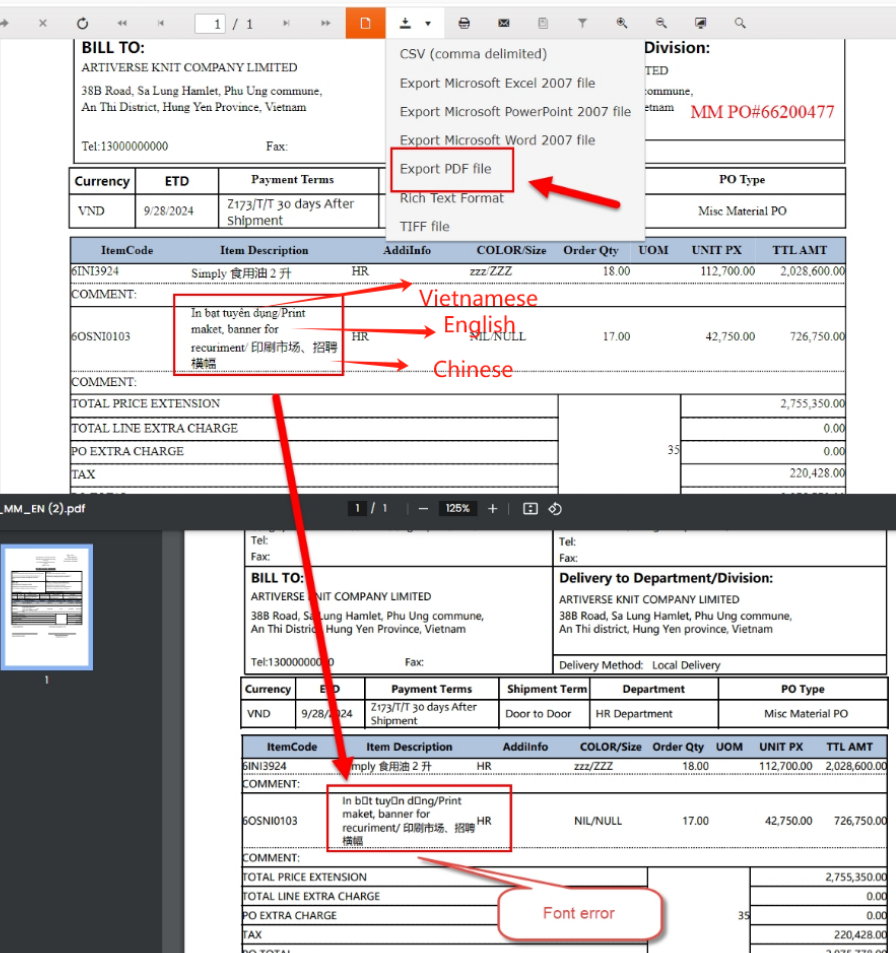
in this page, there are 3 languages. Vietnamese, English, Chinese, it display Vietnamese Messy code when download PDF.
pls hlep, thanks.
Reproducible in version: 18.2.24.924 +
Not reproducible in version: 18.2.24.806
Description
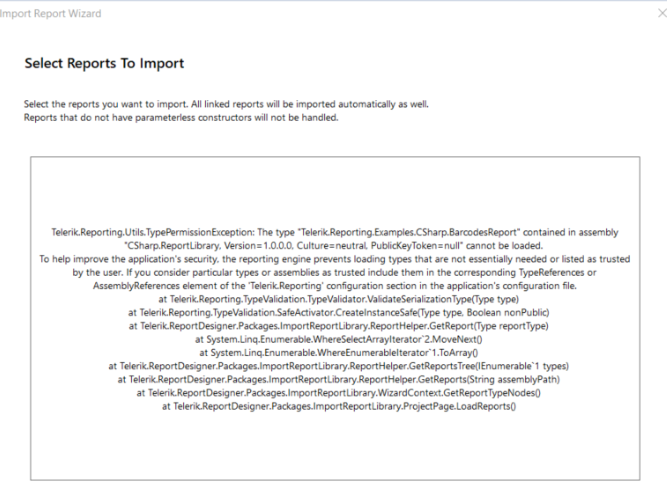
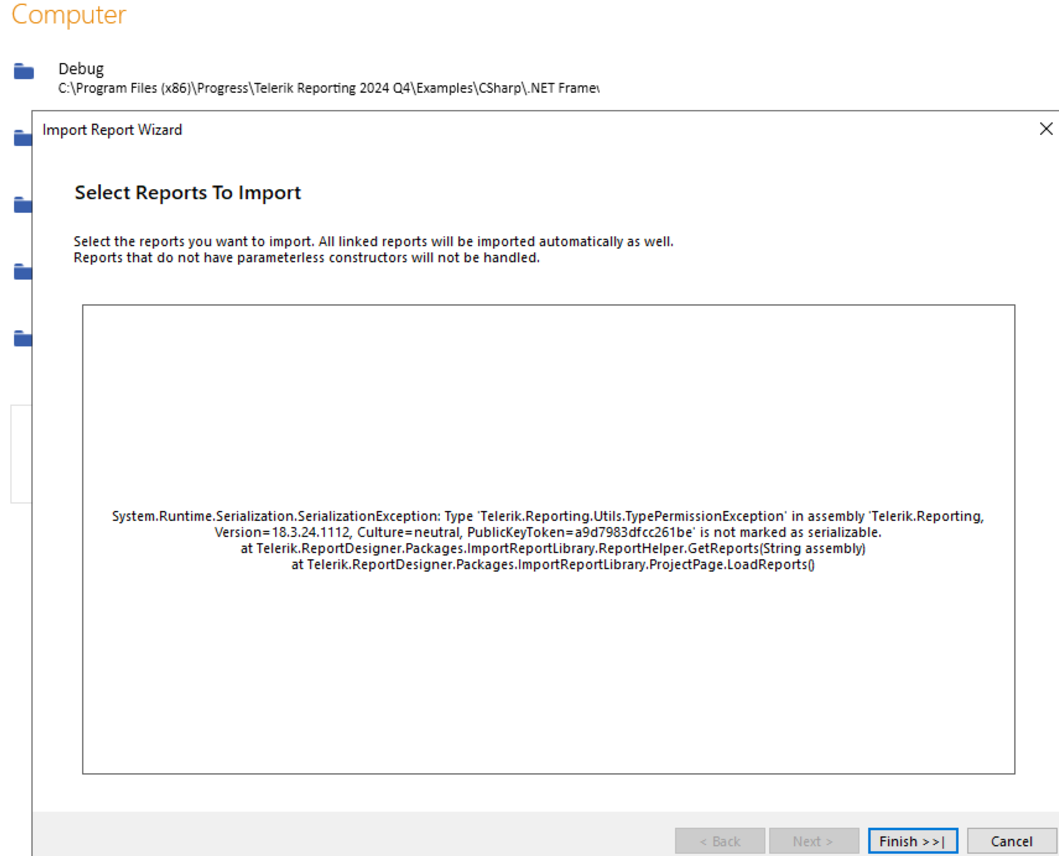
In releases before 18.2.24.924 it was enough to open dll with types from SRD in order to be able to import the type reports. Currently, this is possible only if you copy the dll next to SRD exe file and add entry in Assembly References for the dll.
Steps To Reproduce
Build the project CSharp.ReportLibrary.csproj in C:\Program Files (x86)\Progress\Telerik Reporting 2024 Q4\Examples\CSharp.NET Framework\ReportLibrary
Start SRD FF and from Open menu select the CSharp.ReportLibrary.dll dll in C:\Program Files (x86)\Progress\Telerik Reporting 2024 Q4\Examples\CSharp.NET Framework\ReportLibrary\bin\Debug
Expected behavior
Something like "Please add first Assembly reference to the dll... from ...". Or even better. Do you allow the assembly ... to be loaded? And we can add the assembly reference instead of the customer.
Actual behavior
TypeReference error.
Hello,
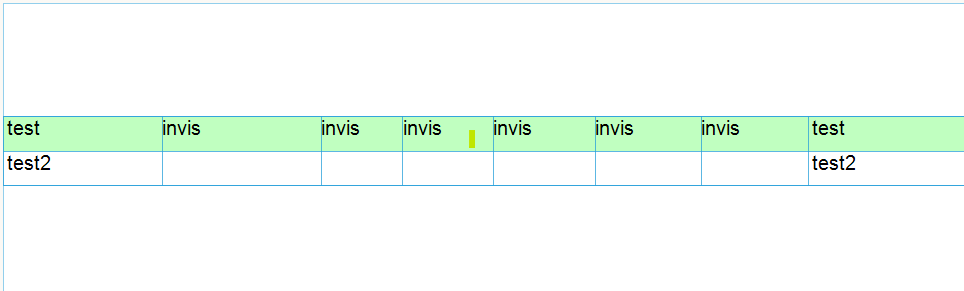
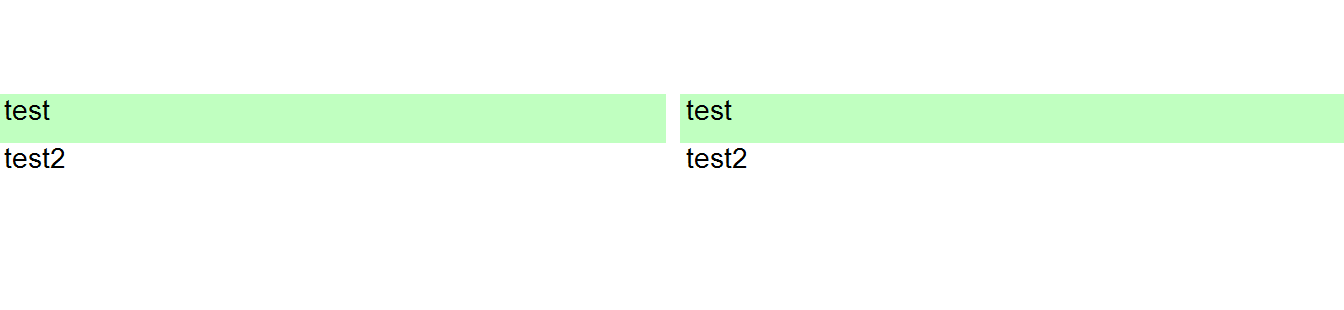
when i set Visible=false for some columns in a table, there is a white space between this columns.
How can i prevent that?
Designer (Standalone):
Preview:
Thanks in advance
I'm using Angular 15 LTS
core.mjs:8400 ERROR Error: Uncaught (in promise): TypeError: perspectiveManager.dispose is not a function
TypeError: perspectiveManager.dispose is not a function
at Object.dispose (telerikReportViewer.js:8692:32)
at TelerikReportViewerComponent.ngOnDestroy (telerik-report-viewer.component.js:60:27)
at executeOnDestroys (core.mjs:5976:32)
at cleanUpView (core.mjs:5886:9)
at destroyViewTree (core.mjs:5712:21)
at destroyLView (core.mjs:5864:9)
at RootViewRef.destroy (core.mjs:11804:9)
at ComponentRef.destroy (core.mjs:12226:23)
at RouterOutlet.deactivate (router.mjs:2624:28)
at ActivateRoutes.deactivateRouteAndOutlet (router.mjs:2999:32)
at Object.dispose (telerikReportViewer.js:8692:32)
at TelerikReportViewerComponent.ngOnDestroy (telerik-report-viewer.component.js:60:27)
at executeOnDestroys (core.mjs:5976:32)
at cleanUpView (core.mjs:5886:9)
at destroyViewTree (core.mjs:5712:21)
at destroyLView (core.mjs:5864:9)
at RootViewRef.destroy (core.mjs:11804:9)
at ComponentRef.destroy (core.mjs:12226:23)
at RouterOutlet.deactivate (router.mjs:2624:28)
at ActivateRoutes.deactivateRouteAndOutlet (router.mjs:2999:32)
at resolvePromise (zone.js:1255:35)
at resolvePromise (zone.js:1209:21)
at zone.js:1322:21
at _ZoneDelegate.invokeTask (zone.js:450:35)
at Object.onInvokeTask (core.mjs:24197:33)
at _ZoneDelegate.invokeTask (zone.js:449:64)
at Zone.runTask (zone.js:218:51)
at drainMicroTaskQueue (zone.js:639:39)
at ZoneTask.invokeTask [as invoke] (zone.js:536:25)
at invokeTask (zone.js:1710:22)
This needs to be fixed ASAP, it's causing isues when the report page is being destroyed.

Combining the two would be ideal.
This way I will have a better control on how and when the user functions are resolved at runtime.