

Workaround:

private void radTreeView1_NodeFormatting(object sender, Telerik.WinControls.UI.TreeNodeFormattingEventArgs e)
        {
            e.NodeElement.UseDefaultDisabledPaint = true;
        }
Please refer to the attached gif file and sample project. The screen tip position is not the same each time. Hence, the issue may not be reproducible every time.

Workaround: use the TooltiptextNeeded event.

To reproduce:

Add some notes to RadTreeView. Set the Font as follows in the NodeFormatting event:

Font font = new Font("Tahoma", 13f);
void tree_NodeFormatting(object sender, TreeNodeFormattingEventArgs e)
{
    e.NodeElement.ContentElement.Font = font;
}

Start the project on Windows 7 or Vista with ClearType off and you will see that the font is thick.

Workaround:

Use the following node element:

public class MyTreeNodeElement : TreeNodeElement
{
    protected override TreeNodeContentElement CreateContentElement()
    {
        return new MyTreeNodeContentElement();
    }

    protected override Type ThemeEffectiveType
    {
        get
        {
            return typeof(TreeNodeElement);
        }
    }
}

public class MyTreeNodeContentElement : TreeNodeContentElement
{
    protected override void PrePaintElement(Telerik.WinControls.Paint.IGraphics graphics)
    {
        base.PrePaintElement(graphics);

        Graphics g = graphics.UnderlayGraphics as Graphics;

        if (g == null)
        {
            return;
        }

        if (this.Enabled)
        {
            g.TextRenderingHint = this.TextRenderingHint;
        }
        else
        {
            g.TextRenderingHint = System.Drawing.Text.TextRenderingHint.AntiAliasGridFit;
        }
    }
}

void tree_CreateNodeElement(object sender, CreateTreeNodeElementEventArgs e)
{
    e.NodeElement = new MyTreeNodeElement();
}

And set the TextRenderingHint of the ContentElement:

Font font = new Font("Tahoma", 13f);
void tree_NodeFormatting(object sender, TreeNodeFormattingEventArgs e)
{
    e.NodeElement.ContentElement.Font = font;
    e.NodeElement.ContentElement.TextRenderingHint = System.Drawing.Text.TextRenderingHint.ClearTypeGridFit;
}

Workaround:
private void radTreeView1_NodeFormatting(object sender, TreeNodeFormattingEventArgs e)
{
    e.NodeElement.ContentElement.TextAlignment = ContentAlignment.MiddleCenter;
}
The Enabled property cannot be set in PropertyBuild if the RadTreeView is already data-binded via Property builder

Workaround:

Set the property at run-time.
To reproduce:


Add nodes to RadTreeView with at least 3 levels hierarchy. Set some of the last level nodes Visible property to false. Start the application. Expand some nodes and scroll. You will notice that the last item will change sometimes.


Workaround:
Set this.radTreeView1.TreeViewElement.AllowArbitraryItemHeight = true;
Use ItemHeight = 1, instead of Visible = false
The child nodes are aligned to the root nodes when ShowRootLines property is set to false.
To reproduce:
  radTreeView1.Filter = "new";
            radTreeView1.Nodes.Add("new Node");
            for (int i = 0; i < 1000; i++)
            {
                radTreeView1.Nodes.Add(new RadTreeNode("test"));
            }

Workaround:
            radTreeView1.TreeViewElement.Update(RadTreeViewElement.UpdateActions.Reset);
We are experiencing a significant issue with the latest version of Telerik components for WinForms.
The RadTreeView control is affected.
The tree view is populated with nodes.
When nodes are expanded and then scrolled, the +/- indicators are no longer displayed correctly and the elements are also no longer displayed correctly. It even goes so far that no elements are displayed at all (only the root element always seems to remain).
It happens only on environments that we access by remote desktop connection. Never on the local environment till now.
In this particular case, the control is in Self-Referencing binding mode. When we perform drag-and-drop operations multiple times, the application enters an invalid state and hangs. Additionally, during drag-and-drop operations, moving several nodes can lead to collapsing and hiding the parent or other nodes randomly.

Repro-steps:
- Create a RadTreeView
- Set the TreeViewElement.ExpandTimerInterval to 5 seconds.
- Enable drag/drop.
- Fill the tree with random nodes and childnodes
- Drag a node over other nodes. Make sure you do not hover longer than 5 seconds over a single node. So just move around.
Observed behavior:
- After 5 seconds the node you are just hovering over, is expanding.
Expected behavior:
- No node will automatically expand. Every time a new node is hovered over, the timer will reset.
In this particular case, the control is populated with 100 000. When all items are selected and we click on a single note all other items will be de-selected. This operation takes more time than expected. The de-selection process must be improved.
Repro-steps:
- Create a RadTreeView
- Set the TreeViewElement.ExpandTimerInterval to forever (so never auto expand by the timer).
- Enable drag/drop.
- Create an event handler for RadTreeView.DragEnding and make it cancel the drop operation.
- Fill the tree with random nodes and childnodes
- Drag and drop a node to collapsed node with children.
Observed behavior:
- The node is not dropped but the target node is expanded..
Expected behavior:
- The node is not dropped but the target node is NOT expanded, since the operation is cancelled.
Hi All,
I have made User control for custom node, in this user control i have used following controls
1 RadLabel (no of control - 3)
2 RadPanel (no of control -1)
3 PictureBox (no of Control - 4 )
4 TableLayoutPanel (no of control -3)
Means i have used total 11 controls within my user control.
Height of usercontrol = 146
Width of Usercontrol = 595
I have taken RadTreeView and above UserControl added as Node,following properties of treeview is set
this.radTreeView1.DataSource = Staff.GetStaff();
this.radTreeView1.ParentMember = "ParentID";
this.radTreeView1.ChildMember = "ID";
this.radTreeView1.DisplayMember = "Department";
this.radTreeView1.CreateNodeElement += this.OnCreateNodeElement;
this.radTreeView1.TreeViewElement.AutoSizeItems = true;
this.radTreeView1.ShowRootLines = false;
this.radTreeView1.FullRowSelect = false;
this.radTreeView1.ShowLines = true;
this.radTreeView1.LineStyle = TreeLineStyle.Solid;
this.radTreeView1.LineColor = Color.FromArgb(110, 153, 210);
this.radTreeView1.TreeIndent = 50;
this.radTreeView1.ExpandAll();
But when i run the code it shows like this means my control is not displaying and the property "AutoSizeItems" is not working.
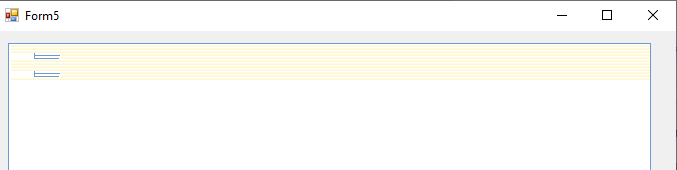
hope for quick reply
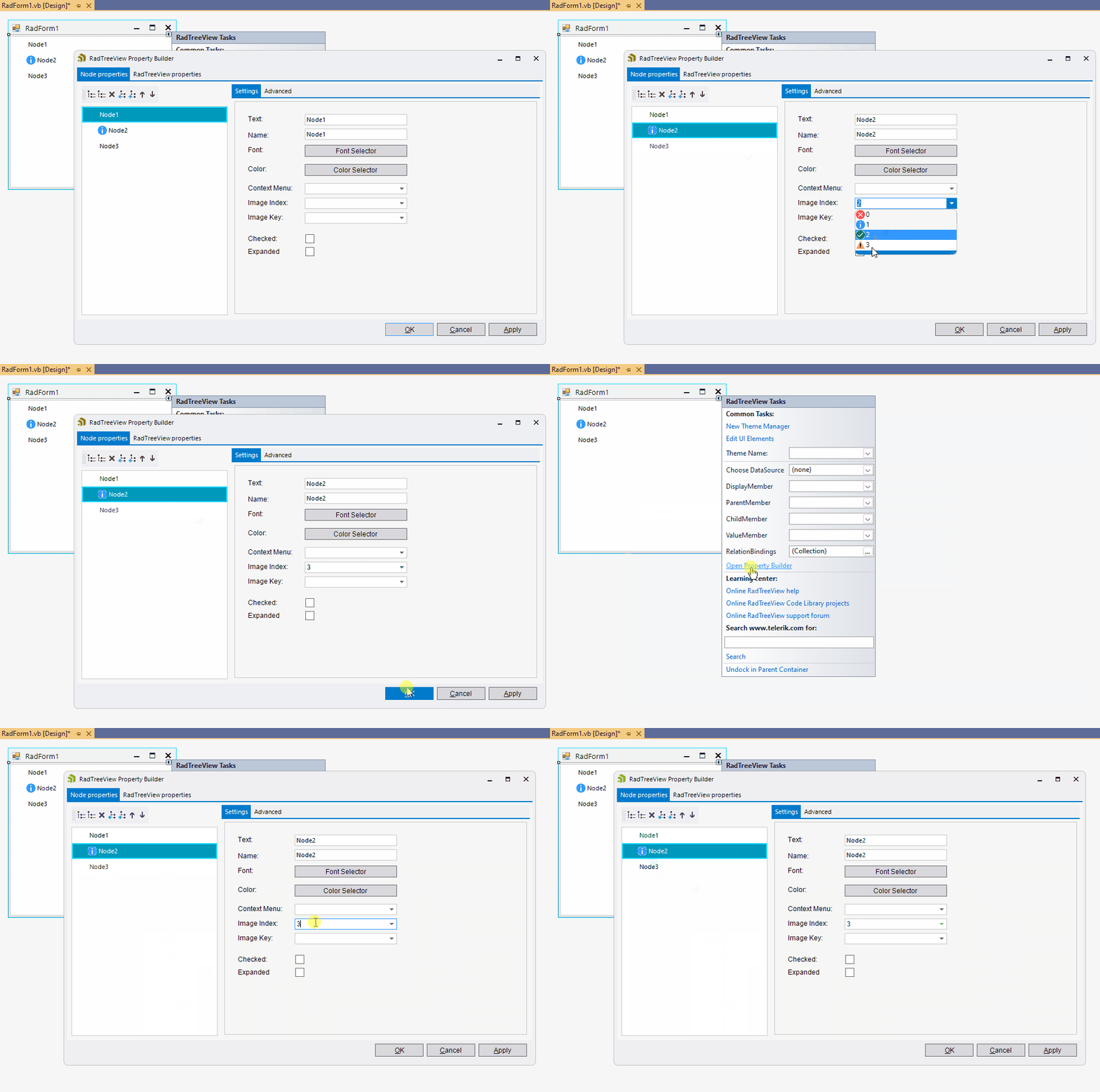
To reproduce:
1.Create new RadTreeView
2.Create new ImageList and populate
3.Assign ImageList to RadTreeView
4.Open Property Builder
5.Assign Image to a Node, Apply, Close
6.Re-Open, change Node to a different Image, the previous image remains
Expected: the new image is successfully updated.
Actual: the old image remains:
Workaround: add RadTreeNodes at run time.