
If you set the WinUI viewer's ViewMode to PrintPreivew in the XAML or the code, the toolbar button's state and value don't change. Hence, even though the report is displayed in PrintPreview, the button for switching the ViewMode is still showing 'Switch to PrintPreview' and is not highlighted. When you click it, the report is displayed in Interactive View, the button becomes highlighted and the tooltip states 'Switch to Interactive mode'.
If cells grow or shrink, if there are hidden cells, any time a report section grows vertically, the next section/table is not respecting the growing of the previous item and text prints in the wrong spot or the table overlaps the previous table.
A potential workaround is to manually convert the troublesome tables to lists where possible.

Adding the "Telerik.ReportViewer.WinUI.Themes/Themes/Generic.xaml" theme to a WinUI project causes existing AppBarButtons to grow in size because it overrides the AppBarButtonContentHeight setting.
The report viewer theme should not override the styles of the default WinUI controls.
I have denied the permission to use the Asset Manager in the configuration of the service of the Web Report Designer. This is generally respected and I do not see the option to open the asset manager from the main menu but when I try to set an image to a PictureBox item, I still see the option to add it from the assets and the button is also clickable.
With that being said, the permission is respected on the server and I get an error about not having permission to use the Asset Manager when I click on the button. Still, it will be better if the button is removed from the UI altogether when I have disabled the assets.
The RTF rendering automatically switches to the Tables rendering mode whenever a Crosstab/Table/List is detected in a report. This rendering mode throws an exception whenever the report contains PictureBox with one of the following sizing options.
- Center
- Normal
- Stretch
- ScaleProportional
The RTF export should work with all PictureBox sizing options regardless of the rendering mode.
To work around the issue currently, one can either force the rendering engine to use the Frames rendering mode using the RenderingMode device information property or set the Sizing property of all picture boxes in the report to AutoSize.
Password-protected PDF documents generated with Telerik Reporting have blank pages when opened with an iPhone.
When I deploy the Angular HTML5 Report Viewer demo on Docker and build for production I receive the next error:
main.fa32b7794d384513.js:1 Uncaught Error: Invalid template:'<td class="#=data.cssClass#" role="gridcell"><a tabindex="-1" class="k-link" href="\#" data-#=data.ns#value="#=data.dateString#">#=data.value#</a></td>' Generated code:'var $kendoOutput, $kendoHtmlEncode = kendo.htmlEncode;$kendoOutput='<td class="'+(data.cssClass)+'" role="gridcell"><a tabindex="-1" class="k-link" href="#" data-'+(data.ns)+'value="'+(data.dateString)+'">'+(data.value)+'</a></td>';return $kendoOutput;'
    at Object.compile (main.fa32b7794d384513.js:1:269410)
    at main.fa32b7794d384513.js:1:565164
    at Object.dt (main.fa32b7794d384513.js:1:598166)
    at 961 (main.fa32b7794d384513.js:1:1411020)
    at n (runtime.142728358b17fb3f.js:1:128)
    at 735 (main.fa32b7794d384513.js:1:117899)
    at n (runtime.142728358b17fb3f.js:1:128)
    at 158 (main.fa32b7794d384513.js:1:110372)
    at n (runtime.142728358b17fb3f.js:1:128)
    at main.fa32b7794d384513.js:1:1503100
When I remove the viewer from the project the problem disappears.
With the same 'Dockerfile' and 'nginx.conf' the Native Angular Report Viewer works as expected.
To preview/export localized reports in different languages, I change the thread's current culture in the report viewer's ExportBegin/RenderingBegin events and reset it back to the original culture in the ExportEnd/RenderingEnd events.
This approach works well in .NET Framework projects but in .NET Core projects, the culture is not reset properly.
Changing the culture in the events of the desktop report viewers should work both in .NET Framework and .NET Core projects.
The Upgrade Wizard for Visual Studio backs up all files, including those in the '.vs' folder. In Visual Studio 2017 this may cause errors when upgrading due to the locked file 'db.lock':
System.IO.IOException: The process cannot access the file 'C:\Users\reportingagentuser\Desktop\reportlibrary1\ReportLibrary1\.vs\ReportLibrary1\v15\Server\sqlite3\db.lock' because it is being used by another process.
   at System.IO.__Error.WinIOError(Int32 errorCode, String maybeFullPath)
   at System.IO.File.InternalCopy(String sourceFileName, String destFileName, Boolean overwrite, Boolean checkHost)
   at System.IO.File.Copy(String sourceFileName, String destFileName, Boolean overwrite)
   at Telerik.Reporting.UpgradeWizard.Engine.Services.BackupService.BackupDirectory(String directoryName)
   at Telerik.Reporting.UpgradeWizard.Engine.Services.BackupService.BackupDirectory(String directoryName)
   at Telerik.Reporting.UpgradeWizard.Engine.Services.BackupService.BackupDirectory(String directoryName)
   at Telerik.Reporting.UpgradeWizard.Engine.Services.BackupService.BackupDirectory(String directoryName)
   at Telerik.Reporting.UpgradeWizard.Engine.Services.BackupService.BackupDirectory(String directoryName)
   at Telerik.Reporting.UpgradeWizard.Engine.Services.BackupService.BackupDirectory(String directoryName)
   at Telerik.Reporting.UpgradeWizard.Engine.ProjectItem.BackupInternal()
   at Telerik.Reporting.UpgradeWizard.Engine.UpgradeItem.Backup()</event>
The Preview button of the HTML5 Report Viewer is not styled appropriately when using Kendo SASS themes:

.NET applications do not support rendering extensions like the XPS and MHTML rendering but the Reporting engine attempts to resolve them in such applications regardless.
There should be no attempts to resolve unsupported rendering extensions in .NET applications.

Dear Telerik
Please see thread on Report does not bring byte[] image through to PictureBox when rendered programmatically. | View Ticket | Your Account (telerik.com)
KR
David
I use HTML content like the below in an HtmlTextBox:
<a style="color: red" href="some link here">some text</a>The color is not respected when I export to PPTX. The output color of the generated link is always the default blue. In the rest of the formats that support hyperlinks, the color is correct.
I tried to wrap the <a> tag also with <p> and <span> with the same color setting, to no avail.
I am using the Blazor Web Report Designer widget which when initialized, loads its theme based on the @progress/kendo-theme-default - npm (npmjs.com) theme and overrides the styles in my Blazor application. There is no way to disable the loading of the designer's theme and the application looks inconsistent as a result.

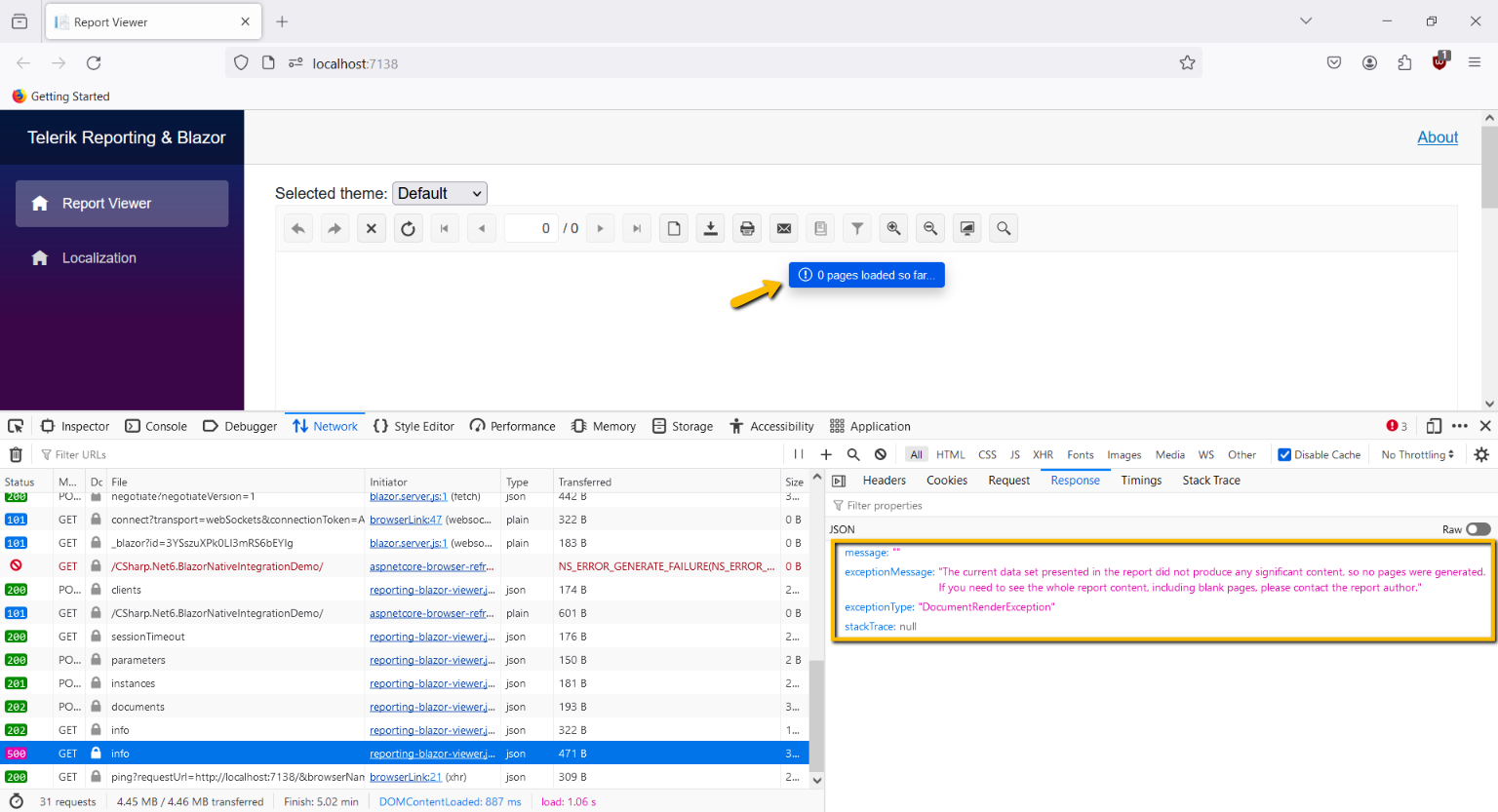
When the reporting service fails to generate a report document, the Get Document Info request returns a 500 response with the error message thrown from within the reporting engine. However, instead of displaying the error message in the viewport, the Native Blazor Report Viewer displays a message falsely suggesting that the report is still being rendered when the rendering has, in fact, failed.
When the non-native Excel page header and footer are used (the UseNativePageHeader and UseNativePageFooter XLSX options are set to False) and the SplitWorksheetOnPageBreak property is set to True, the page header section of the report is rendered only on the first sheet, while the page footer section of the report is rendered only on the last sheet.
All Excel sheets should have the page sections present.

If you trigger the 'Clear selection' button of the HTML5 Report Viewer parameter's area, there is no request for a report document with the updated parameter values and the viewer shows the previous report waiting for the user to select parameter values. This problem occurs with both Single and MultiValue parameters with AvailableValues that are non-nullable.
In the Standalone Designer and desktop viewers, in the same scenario, the preview displays a message indicating that the user needs to select valid parameter values.

Some special characters, such as "🍁", break reports that are rendered with the Skia graphics engine in a Linux environment.
When the Gdi graphics engine is used on Linux, the reports are generated successfully. However, the Gdi graphics engine cannot be used on Linux with projects that target .NET 7 and later.
I have a table with a detailed group with PageBreak set to 'After' and a crosstab inside the table with a row group that also has PageBreak set to 'After'. The pagination is respected in the preview of the designer, however, when exported to XLSX, there is only one worksheet generated.
If I remove only the PageBreak of the detailed table group, there is no pagination and the generated worksheet is only one.
If I remove only the PageBreak of the crosstab row group, there is pagination and the generated worksheet is correct in number. However, the content is not split as expected among the sheets.
If I make the detail table group static and remove its PageBreak, the pagination and the worksheets of the Excel document are as expected.