

I have implemented heatmaps from the site:https://www.patrick-wied.at/static/heatmapjs/
They allow me to zoom in at different levels in a map to see where the greatest sales are, for example, and puts a hotspot where the highest sales are.
It would be awesome if I could put this in a Telerik report as an alternative from the choropleth heatmap.

Hello Team,
Greeting from ECPL,
Currently am working on telerik xamarin forms and telerik reporting.Most of my client requirement is to print user defined report in telerik xamarin forms application. Telerik has good feature that user can modify and publish the report.When client modify the report and requesting report print from xamarin form application.Modified report needs to be print.Please make a priority as high level on this requirement.
Thanks & regards
Uday Raj
Additional information:
- Visual Studio 2015,
- Telerik Reporting version 12.2.18.1017,
- Reproducible only in Visual Studio Report Designer
While processing, if Barcode item throws an exception (for example "Barcode is too large to fit!"), the report's Error event is not fired.

In Standalone designer, when the Localizable of the Report is set to True and a new Language is selected, there is an "Object reference not set to an instance of an object" error.
Workaround: save the document after changing the culture/language, close the report, and then re-opening the saved report in the designer.
Telerik.ReportViewer.Mvc.SendEmail class in Telerik Reporting ASP.NET MVC does not contain fields "Cc", "Subject", "Body" (https://docs.telerik.com/reporting/t-telerik-reportviewer-mvc-sendemail)
But JS documentation dontains such fields (https://docs.telerik.com/reporting/html5-report-viewer-jquery-fn-telerik-reportviewer#sendEmailOption).
I'm using the latest version of kendo ui and telerik reporting.
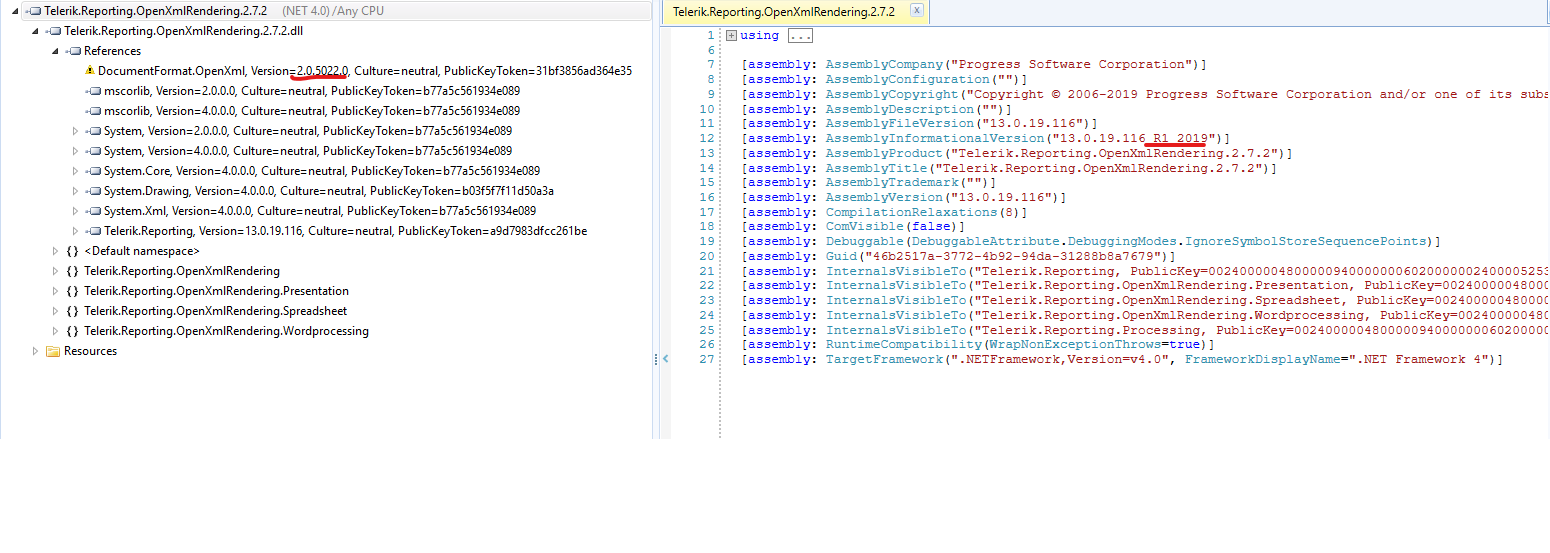
Telerik.Reporting.OpenXmlRendering.2.7.2.dll from the latest release (R1 2009) references the from version of DocumentFormat.OpenXml. See the screenshot:
Here the screenshot for the prev version (R3 2018 SP2):
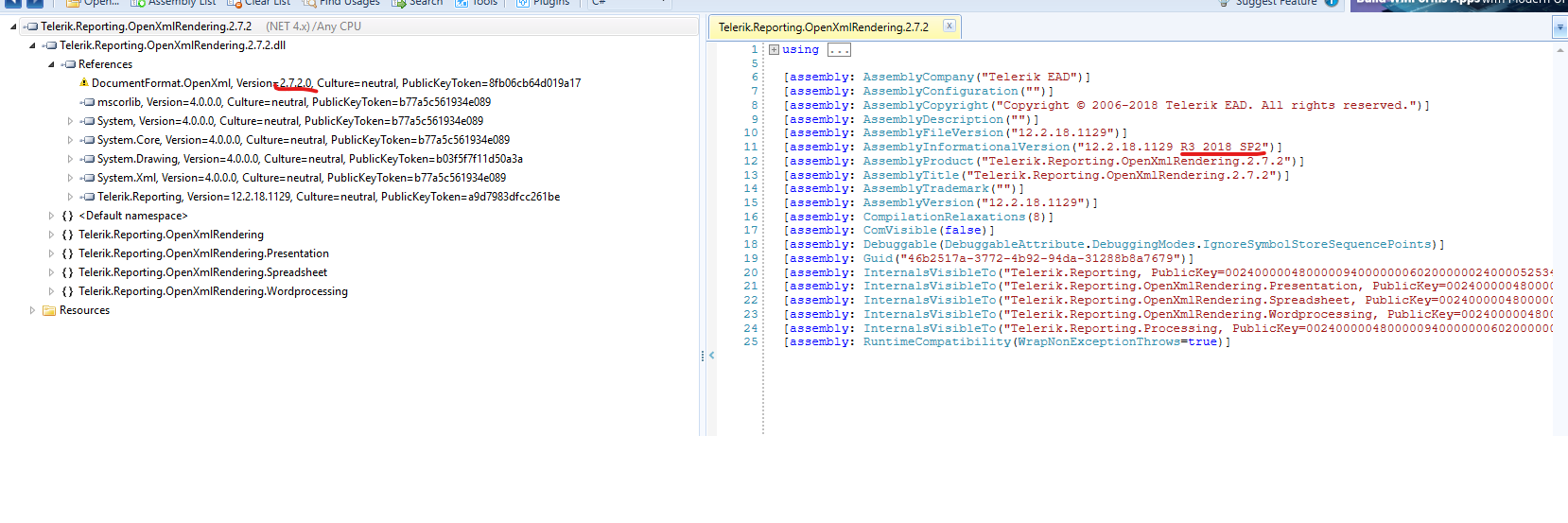
Because of this our projects referencing DocumentFormat.OpenXml 2.8.1 (the latest version) are all broken. Xlsx rendering simply does not work anymore.
In general, the Page sections do not collapse or expand based on their content. Also the report header and group header sections span the width of the column.
It would be nice if, for example, have another section that either could expand/collapse based on the content and do not be affected by the report's page settings.


Add the new Crystal theme to the theme ResourceDictionaries available for the WPF and Silverlight ReportViewers.
I would like the end user to be able to resize the DocumentMap and if possible the Parameters Area.
Many times when the names are long they are cut off.
Many of my user will have clients will have similar names like law firms with a particular attorney name appended.

Example:
LAW FIRM OF DOUCHE AND BAG - JAMES SMITH ESQ
LAW FIRM OF DOUCHE AND BAG - KIM JONES

With the current implementation it would be cut off before you could see the end of the name.
LAW FIRM OF DOUCHE AN
LAW FIRM OF DOUCHE AN

This requires them to use the scroll bar back and forth instead of resizing the area like the old webforms viewer.
Please see picture for references.
Also if there was an option for the names to have tooltips so they could just hover that would be helpful.

The parameter map at least will wrap the names that are long it’s the DocumentMap that is the bigger problem.
Thanks John
When in Print Preview, allow the user to view more than one page at a time. Maybe using the zoom out or mouse wheel to show more and zoom in to show less.

Thanks!
As for now, from the supported rendering extensions, only the PDF renders a document map as Bookmarks pane. All other rendering extensions ignore document maps.
It would be nice to have Document Map in Word documents too.
Currently the query builder (in the Report Designer) cannot automatically build queries if there are multiple separate relationships connecting two tables.
Here's an example:
Table A: Orders
- OrderID
- ShippingAddressID (FK => AddressID)
- BillingAddressID (FK => AddressID)
- ...
Table B: Addresses
- AddressID
- AddressLine1
- ...
If both tables are selected in the query builder, you will get the following columns:
- OrderID
- ShippingAddressID
- BillingAddressID
- AddressID
- AddressLine1
- ...
In other words, only one copy of the address data is pulled in, despite the two separate FK relationships. I would expect something like the following:
- OrderID
- ShippingAddressID
- BillingAddressID
- ShippingAddressID_AddressID
- ShippingAddressID_AddressLine1
- BillingAddressID_AddressID
- BillingAddressID_AddressLine1
- ...
We ran into this issue because we are using Telerik Reports to provide reporting for a data warehouse, and we have multiple relationships in our "table A" pointing to a date dimension (our "table B"). The current workaround for this is to write your own SQL queries instead of relying on the query builder, but we would like for our business users to be able to create reports on their own, and they don't know SQL.
Allow the WPF viewer theme to be set using resources for the current window instead of setting resources on application level. Now the theme can be set using <Window, but this approach will not work for the Search window, which is a separate window and therefore fails to resolve its styles.
Several community members asked about a Report Viewer suitable for Vue.js applications.

We will appreciate your feedback in this feature request. You can leave a comment with details about functionality requirements for a Vue.js Report Viewer e.g. initial setup, updates of the displayed report and ways of passing report parameters' values.

Thank you.
Hello,
A ReportViewer control compatible with the Kendo Angular UI Framework (not the Kendo Jquery..).
When importing the css files into a project using the new Kendo angular UI framework (ngx) a lot of the components
of kendo are getting broken.
Or is there some workaround?
Best regards
Marc