

If I use Microsoft.AnalysisServices.AdomdClient assembly with version 13 or higher, I receive the following exception:
An error has occurred while processing Report 'Report1':
Unable to establish a connection to the database. Please verify that your connection string is valid. In case you use a named connection string from the application configuration file, make sure the name is
correct and the connection string settings are present in the configuration file of your application.
------------- InnerException -------------
Attempt by security transparent method 'Telerik.Reporting.Adomd.AdomdProviderFactory.CreateConnection()' to access security critical method 'Microsoft.AnalysisServices.AdomdClient.AdomdConnection..ctor()'
failed.

Assembly 'Telerik.Reporting.Adomd, Version=16.0.22.119, Culture=neutral, PublicKeyToken=a9d7983dfcc261be' is marked with the AllowPartiallyTrustedCallersAttribute, and uses the level 2 security
transparency model.  Level 2 transparency causes all methods in AllowPartiallyTrustedCallers assemblies to become security transparent by default, which may be the cause of this exception
With earlier versions, the data source works as expected.
To have a better performance would be nice to cancel report rendering automatically or manually.
If I am asking for a big report and after I change parameters and request new report, the previous request is still in progress and it is not going to be cancelled. Therefore I see high memory consumption on continuously refreshing a reports with a big data and after some time I see complete slow down of the Reporting Service and of course slow down of the server itself. The memory in this case is not released and Reporting Service crashes sometimes.
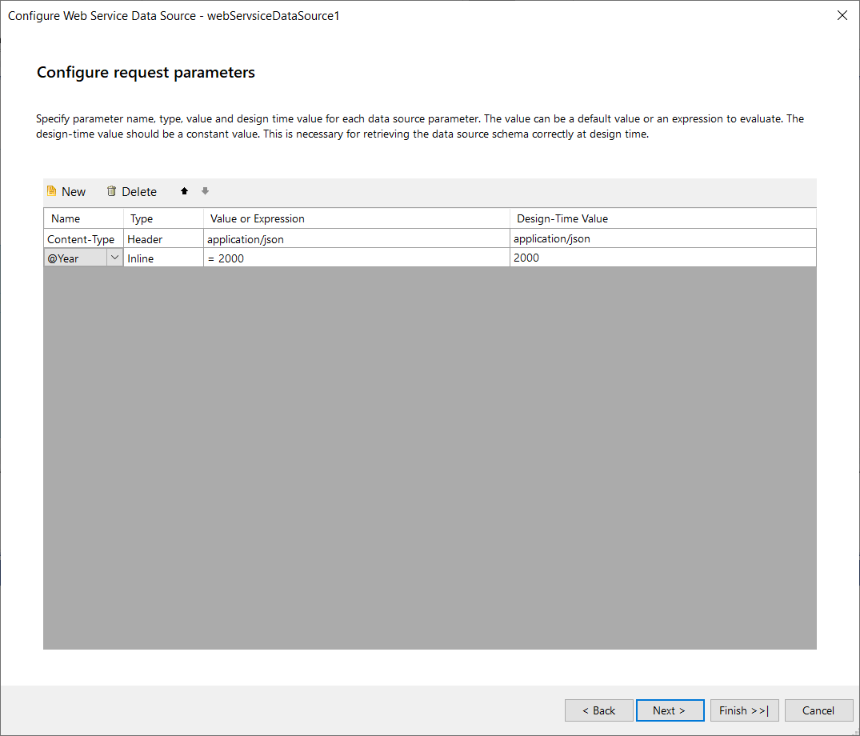
Setting values to the request body in the WebServiceDataSource component via inline parameters turns the values of the string regardless of what is passed in the design/runtime parameter expression.
For example, in the following image, I set the runtime expression to be =2000 which should embed that value as a number to my request's body on previewing the report. Instead, the value is sent as the string "2000":

When Kendo version 2023.1.314 is used, the tooltips of the HTML5 Report Viewer and its wrappers flicker when the cursor hovers above them.
Telerik Reporting Version: 17.0.23.315
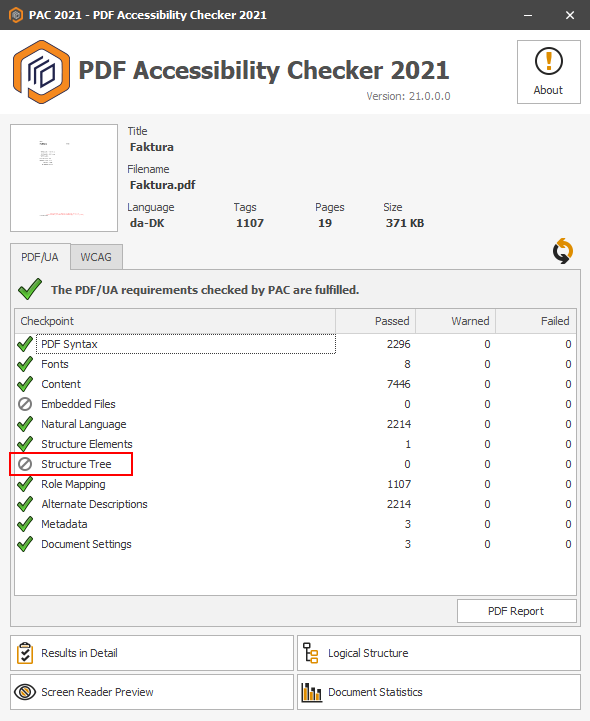
Currently the generated accessible PDF documents contain tagged elements, but lack information about the logical structure of the PDF document. This prevents screen readers of correctly reading the PDF document contents. The tools like PAC (PDF Accessibility Checker) do not display correctly the document structure.
Hi Team,
Currently, the Angular Report View doesn't appear to support the Ivy rendering. As of Angular 16 (released 4 days ago), the legacy rendering mode is fully removed. Which means the ReportViewer will no longer work in ng16 or later.
So this feature request is to move the ReportViewer to support Ivy (which will support Angular v9 to v16 and later).
Thank you,
Maks
We have many reports that contain grids using Table controls. We are using the HTML Report Viewer with the enableAccessibility option set to “true” to display these reports to application users.
Using this configuration, the report when run in a browser generates markup using absolutely positioned DIVs instead of TABLE tags for the grids in the report. The accessibility company provided documentation that the generated report content is in violation of WCAG 2.1 A, 4.1.2, Name Value Role since the generated report content is neither a semantic HTML table nor adheres to the ARIA table pattern.
Since Reporting Tables are rendered as DIV elements, you need to ensure they implement the following ARIA Design Pattern specifications:
- The table container needs role="table".
- Each row container needs role="row" and to be either a DOM descendant of or owned by the table element or an element with role="rowgroup".
- Each cell must be either a DOM descendant of or owned by a row element and to have one of the following roles:
- columnheader if the cell contains a title or header information for the column.
- rowheader if the cell contains the title or header information for the row.
- cell if the cell does not contain column or row header information.
- Remove the aria-label from each cell. Following this design pattern, only the element with role="table" should have an aria-label or aria-labelledby value to provide an accessible name.
- If there is an element in the user interface that serves as a label for the table, the table element needs an aria-labelledby property with the value as the ID of the labeling element. Otherwise, a label must be specified for the table element using aria-label.
- If the table has a caption or description, the table element needs an aria-describedby property with the value as the ID of the element containing the description.
- After these remediations, it should no longer be necessary for the cells to be focusable unless they have an interactive function. Removing the tabindex from the cells will also reduce the number of unnecessary tab stops.
The value '姓名:' is rendered on two lines in a TextBox under Linux. The colon symbol at the end ':' appears on the second line no matter how wide is the TextBox. The colon character itself is a special Unicode Character “:” (U+FF1A).
There are other symbols that may be used instead of the colon to reproduce the issue in Linux rendering. Under Windows, the text is rendered as expected.
It will be nice to have a proper (Official) TypeScript definition for the HTML5 Report Viewer.
When exporting a graph that has multiple line series and a category scale to CSV, the error "object reference not set to an instance of an object" is thrown.
More specifically, the issue occurs when one or more of the series do not have a corresponding non-null value for every category.
Hello Support-Team,
in the WebReportDesigner, the Edit-Window shows "undefined" for the FieldNames, when selected a second Time.
This is also reproduceable in the demo application: https://demos.telerik.com/reporting/designer.
(see Screenshot in attached Files)
Steps to repoduce:
1. Open the Edit-Window for a TextBox (with a DataSource)
2. Select the DataSource-Entry.
3. Select some other Entry, e.g. "Report Parameters"
4. Select the DataSource-Entry.
Best regards
Alexander Schneider
System Development | Loy & Hutz Solutions GmbH

Currently, the ReportDesignerControllerBase class does not enforce its own JsonSerializerSettings, rather it uses the ones set globally, on the application level. This could potentially lead to errors since the Web Report Designer requires the data to be serialized in camelCase. When PascalCase is used, certain functionalities get broken.
A way to avoid this would be to explicitly define JsonSerializerSetting in the ReportDesignerControllerBase class so that the Report Designer service does not break regardless of the setting defined on the application level.

As a developer
I would like to have a built-in support for rendering various gauges in the report content
So that I can represent numeric values in a visually appealing way.
If you add two Bindings for the same property in the designer when you click OK, an error "Index must be within the bounds of the List. Parameter name: index" occurs and the Bindings are ignored.
I have a JsonDataSource that contains a Base64 string field I want to use in a PictureBox.
When I drag the field from the Data Explorer in the Report Designer, it creates a TextBox with the text content. When I run the report, there is an error "A generic error occurred in GDI+'.
Consider creating PictureBox when dragging a Base64 string instead of TextBox.