

I have a Multivalue Report Parameter in the report that gets fed by a data source and may have more than 1000 selectable values. It is a ComboBox.
When I search and select a value from the dropdown, the selected value may not be passed with the reportSource of the viewer if I click directly the Preview button, without clicking outside the selection popup first. The issue occurs randomly. If I click outside the popup first, the values are passed correctly. I cannot reproduce the issue with less selectable items.

On .Net 6, exporting html5 produces multiple html files including a single report having multiple pages are split into multiples. Could we please have the feature similar to MHTML export in the previous .net versions supported. This is a breaking change when upgrading to .Net 6.
Thanks!
It would be nice if we could subscribe to events such as
- When web report designer UI is Completely loaded
- When Report is done loading
- When Report is saved
I had a report book with only a TOC report and when I previewed it, I was met with an "Object reference not set to an instance of an object" exception which did not make it clear what was causing the issue losing me a lot of time in debugging.
Once I added a report to my ReportBook the issue was resolved, however, the error message should be more meaningful.
Need to allow Excel Export with 10.1.16.615 version on FIPs enbled
Hi Team,
I had tried with the provided post as below with DocumentFormat.openXML.dll verison (2.5) but not working .
please help to resolve this ASAP.
===
Based on what you described and the ticket info, I am assuming that you are getting this error when you render a report in the Excel 97-2003 (XLS) format. Is that correct?
Unfortunately, this is a known limitation of the Excel 97-2003 rendering, and exporting a report to XLS in FIPS-enabled environments will fail. Considering this, I suggest choosing one of the following options for exporting reports to Excel:
- Exporting the report to the newer XLSX format. (See exporting in XLSX)
- Disabling FIPS.
If choose the first option, you can disable the older Excel rendering format so that it is not available as an option when the report is displayed in a report viewer. For example, the following code can be put into the web.config/app.config of the project:
<configuration>

  <configSections>
    <section
        name="Telerik.Reporting"
        type="Telerik.Reporting.Configuration.ReportingConfigurationSection, Telerik.Reporting"
        allowLocation="true"
        allowDefinition="Everywhere"/>
  </configSections>

    ...

  <Telerik.Reporting>
    <extensions>
      <render>
        <extension name="XLS" visible="false">
        </extension>
      </render>
    </extensions>
  </Telerik.Reporting>

   ...

</configuration>
I hope this helps, please let me know if you have any additional questions. Thank you for trying Telerik Reporting!
Regards,
Dimitar
Progress Telerik
When the service of the Web Report Designer is running in a .NET Framework application, the preview page of the WebServiceDataSource component displays [object Object] instead of the data string.
The WRD front end expects the ReportDesignerController's PreviewWebServiceData(DataSourceInfo) method to return stringified JSON but instead, it currently(R3 2023) returns a JSON.
As a workaround, the method can be overridden so that the string result is returned instead:
        public override IHttpActionResult PreviewWebServiceData(DataSourceInfo dataSourceInfo)
        {
            var baseResult = (ResponseMessageResult)base.PreviewWebServiceData(dataSourceInfo);
            var jsonString = baseResult.Response.Content.ReadAsStringAsync().Result;

            return Ok(jsonString);
        }

When using the HTML5 Report Viewers, if I override the GetDocumentFormats() method of the ReportsController and return a localized list, the export dropdown in the toolbar is still populated with the default values.
On the other hand, the available export formats list is respected in the email dialog.
In both scenarios, the dropdown with the rendering formats should respect the overridden method's return value.
For my Object Data Source, I am using a nuget package that has a dependency on Microsoft.Extension.Primitives. The custom assembly is correctly registered in the designer's configuration file and the DLLs are copied to the Report Designer (.NET version) directory. I get this error:
Telerik.Reporting.Expressions.InvalidExpressionException: An error has occurred while executing function UsePrimitives(). Check the InnerException for more information.
 ---> System.Reflection.TargetInvocationException: Exception has been thrown by the target of an invocation.
 ---> System.IO.FileLoadException: Could not load file or assembly 'Microsoft.Extensions.Primitives, Version=3.1.18.0, Culture=neutral, PublicKeyToken=adb9793829ddae60'. Could not find or load a specific file. (0x80131621)
File name: 'Microsoft.Extensions.Primitives, Version=3.1.18.0, Culture=neutral, PublicKeyToken=adb9793829ddae60'
 ---> System.IO.FileLoadException: Could not load file or assembly 'Microsoft.Extensions.Primitives, Version=3.1.18.0, Culture=neutral, PublicKeyToken=adb9793829ddae60'.
   at System.Runtime.Loader.AssemblyLoadContext.LoadFromPath(IntPtr ptrNativeAssemblyLoadContext, String ilPath, String niPath, ObjectHandleOnStack retAssembly)
   at System.Runtime.Loader.AssemblyLoadContext.LoadFromAssemblyPath(String assemblyPath)
   at System.Reflection.Assembly.LoadFrom(String assemblyFile)
   at System.Reflection.Assembly.LoadFromResolveHandler(Object sender, ResolveEventArgs args)
   at System.Runtime.Loader.AssemblyLoadContext.InvokeResolveEvent(ResolveEventHandler eventHandler, RuntimeAssembly assembly, String name)
   at System.Runtime.Loader.AssemblyLoadContext.OnAssemblyResolve(RuntimeAssembly assembly, String assemblyFullName)
   at ClassLibrary1.Class1.UsePrimitives()
   --- End of inner exception stack trace ---
   at System.RuntimeMethodHandle.InvokeMethod(Object target, Span`1& arguments, Signature sig, Boolean constructor, Boolean wrapExceptions)
   at System.Reflection.RuntimeMethodInfo.Invoke(Object obj, BindingFlags invokeAttr, Binder binder, Object[] parameters, CultureInfo culture)
   at System.Reflection.MethodBase.Invoke(Object obj, Object[] parameters)
   at Telerik.Reporting.Expressions.FunctionNodeEval.Eval(Object row, Object context)
   --- End of inner exception stack trace ---
   at Telerik.Reporting.Expressions.FunctionNodeEval.Eval(Object row, Object context)
   at Telerik.Reporting.Expressions.EvalObject.Eval(ExpressionNode expressionNode, Object data, Object context)
   at Telerik.Reporting.Processing.ProcessingElement.Evaluate(Object value, Object data, EvalObject evalObject)
   at Telerik.Reporting.Processing.ProcessingElement.Evaluate(Object value)
   at Telerik.Reporting.Processing.TextBox.ProcessItem()
   at Telerik.Reporting.Processing.ReportItemBase.ProcessElement()
   at Telerik.Reporting.Processing.ProcessingElement.Process(IDataMember dataContext)
It would be very useful if the report parameters of all the HTML5-based report viewers become accessible from the report viewer widgets.
For example, we are currently working on a report that has a custom button that sends the current parameters to an API and "signs" the current report (e.g. saves a string in the database and displays it afterward in the report).
We would like to validate if the currently shown report matches the report parameters but are unable to find a valid solution for this scenario.
So there is an Angular report viewer of sorts, but the report viewer web api component doesn't work with .net core (must target 4.6.1) and the angular component doesn't work with universal/server side rendering. It would be great if this could get fixed!
Use only components from KendoUI for Angular. It would be understandable that such report viewer would provide less features, but it would remove dependency from jQuery and KendoUI for jQuery.
To help troubleshoot and solve many of my positioning issues I've viewed and edited a report's XML file.
The process requires us to download the report, change the report file to [*.zip], extract [definition.xml], open and edit the file, replace the XML file in the ZIP file, rename the file, upload the new file into Telerik reporting to see one edit.
Being able to view and edit the [.xml] directly in our Telerik Web Designer would be greatly appreciated.
As a developer, I need to be able to align an image that is scaled proportionally in top-left for example, so that it looks more aesthetic and as required from the clients who use for example logos of various sizes. I.e., my expectation is that I should be able to specify both "Scale Proportional" AND Image Alignment, both horizontal and vertical.
The attached 'Test.svg' image markup file contains 'use' statements that lead to duplicating part of the image parts when rendering the report in PDF.
The other file in the archive, 'Test-noUsings.svg' is the same image without 'use' statements and doesn't have this problem.
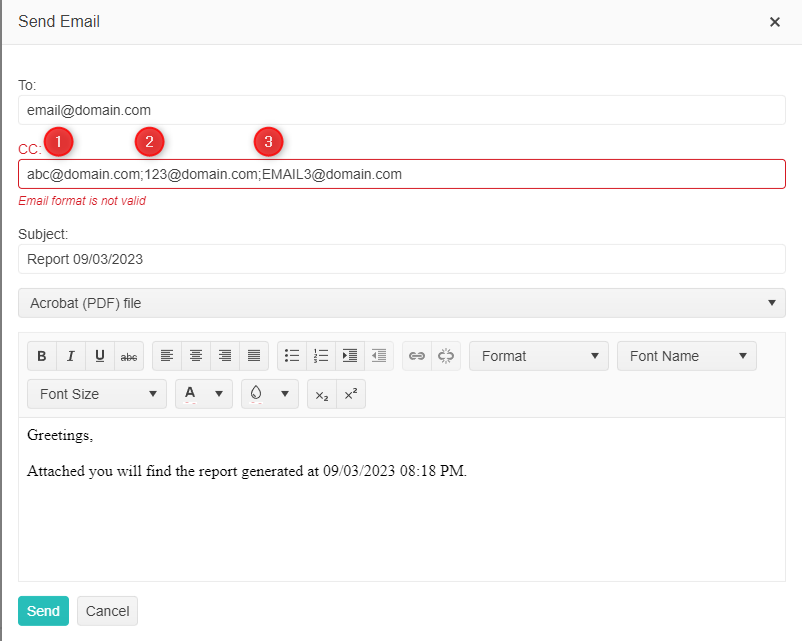
It would be lovely to be able to string multiple emails in the "To" and "CC" fields so users could email a batch of users at once. In my scenario there is an email distro group that needs to get a report when printed. I could write logic to pass multiple email accounts into the "CC" field, however, the functionality doesn't exist. Below is a visual example of what I'd like to achieve.

If I do not have any report opened in the Web Report Designer, and then open the Asset Manager, I am not able to close the Asset Manager afterward.
Instead, when I click on the 'X' button to close the Asset Manager screen, I get the following error:
Uncaught TypeError: this.designSurfaceManager.ActiveDesignSurface is null
    updatePreviewButtonState http://localhost:51864/api/reportdesigner/designerresources/js/webReportDesigner-17.1.23.718.min.js/:9
    restoreMainMenu http://localhost:51864/api/reportdesigner/designerresources/js/webReportDesigner-17.1.23.718.min.js/:9
    createAssetManagerOverlay http://localhost:51864/api/reportdesigner/designerresources/js/webReportDesigner-17.1.23.718.min.js/:9
The 'Workspace Preferences' view also cannot be loaded in this scenario(no report).
