

When I render one of my reports I receive the error message “A generic error occurred in GDI+”.
I figured out that one HtmlTextBox receives quite a long HTML from the data source - exceeds 32 768 characters. In my experiments, the error starts appearing if the text is longer than 32 775 chars.
In this case, the Reporting engine shouldn't throw a misleading GDI+ error but instead throw a more specific exception.
If you set the WinUI viewer's ViewMode to PrintPreivew in the XAML or the code, the toolbar button's state and value don't change. Hence, even though the report is displayed in PrintPreview, the button for switching the ViewMode is still showing 'Switch to PrintPreview' and is not highlighted. When you click it, the report is displayed in Interactive View, the button becomes highlighted and the tooltip states 'Switch to Interactive mode'.
The WebServiceDataSource wizard in the Web Designer doesn't let you construct Expressions for the Parameter values. The same functionality is present in the Standalone Report Designer.
The SqlDataSource Wizard of the Web Designer also allows the creation of Expressions for the Parameter values.
It would be convenient if the report creators were allowed to create the Expressions for WebServiceDataSource parameter values directly in the wizard. Currently, you need to type or paste the Expression manually.
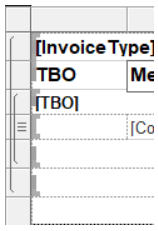
Coming from having developed many SSRS reports one thing I think telerik is missing is a nicer visualisation of row and column grouping in a table. SSRS does this really well as shown in the screenshot below where we can easily see which rows belong to the detail and 2 other groups.
I think this would be a very useful addition to the telerik designers!
Currently, the Map's TileProvider UrlTemplate property may be set only to a hard-coded string. It would be very useful to be configurable as an Expression to allow for dynamic values.
In the non-native angular report viewer we were using a customized template to change the order of the buttons and also to add custom buttons. We want to migrate to the Native Angular Report viewer but it lacks toolbar customization options. We need to be able to change the order and hide existing toolbar functions. Also we need the ability to define custom buttons with custom logic that executes when the button is pressed.
I've tried to create a sub-class of the ReportingAngularViewerComponent and define a custom template for the toolbar, but the problem is that some of the core toolbar buttons (like zoom and pager) use custom local Telerik components that aren't exported from the ReportingAngularViewerModule, so I can't use those directly.
It would be great if you can export all components used in the ReportingAngularViewerModule or provide an alternative way to customize the toolbar (may be similar to how you allow customization of the toolbar for the Editor control where users can define what toolbar commands are available, order them as they like and also define custom commands)
When I deploy the Angular HTML5 Report Viewer demo on Docker and build for production I receive the next error:
main.fa32b7794d384513.js:1 Uncaught Error: Invalid template:'<td class="#=data.cssClass#" role="gridcell"><a tabindex="-1" class="k-link" href="\#" data-#=data.ns#value="#=data.dateString#">#=data.value#</a></td>' Generated code:'var $kendoOutput, $kendoHtmlEncode = kendo.htmlEncode;$kendoOutput='<td class="'+(data.cssClass)+'" role="gridcell"><a tabindex="-1" class="k-link" href="#" data-'+(data.ns)+'value="'+(data.dateString)+'">'+(data.value)+'</a></td>';return $kendoOutput;'
    at Object.compile (main.fa32b7794d384513.js:1:269410)
    at main.fa32b7794d384513.js:1:565164
    at Object.dt (main.fa32b7794d384513.js:1:598166)
    at 961 (main.fa32b7794d384513.js:1:1411020)
    at n (runtime.142728358b17fb3f.js:1:128)
    at 735 (main.fa32b7794d384513.js:1:117899)
    at n (runtime.142728358b17fb3f.js:1:128)
    at 158 (main.fa32b7794d384513.js:1:110372)
    at n (runtime.142728358b17fb3f.js:1:128)
    at main.fa32b7794d384513.js:1:1503100
When I remove the viewer from the project the problem disappears.
With the same 'Dockerfile' and 'nginx.conf' the Native Angular Report Viewer works as expected.
The current htmltextbox on the telerik reporter designer does not support html tags for <table>
There is a work around which creates the html text to an image but the quality is not great but more importantly the word wrap functionality is lost.
https://docs.telerik.com/reporting/report-items/htmltextbox/overview#supported-html-tags
Peter
As an implementer, I sometimes need to trigger the Web Report Designer's commands programmatically. For example, saving the report definition when an external button is clicked.
Exposing an API for invoking the designer's commands would be of great help in implementing such functionality.

Using the November 2023 Report Designer, when a resize a Panel and then press Ctrl-Z to undo the resize, all objects within the Panel are lost.
I was able to confirm this by saving as a second copy and then comparing the XML between them.
To preview/export localized reports in different languages, I change the thread's current culture in the report viewer's ExportBegin/RenderingBegin events and reset it back to the original culture in the ExportEnd/RenderingEnd events.
This approach works well in .NET Framework projects but in .NET Core projects, the culture is not reset properly.
Changing the culture in the events of the desktop report viewers should work both in .NET Framework and .NET Core projects.
The Upgrade Wizard for Visual Studio backs up all files, including those in the '.vs' folder. In Visual Studio 2017 this may cause errors when upgrading due to the locked file 'db.lock':
System.IO.IOException: The process cannot access the file 'C:\Users\reportingagentuser\Desktop\reportlibrary1\ReportLibrary1\.vs\ReportLibrary1\v15\Server\sqlite3\db.lock' because it is being used by another process.
   at System.IO.__Error.WinIOError(Int32 errorCode, String maybeFullPath)
   at System.IO.File.InternalCopy(String sourceFileName, String destFileName, Boolean overwrite, Boolean checkHost)
   at System.IO.File.Copy(String sourceFileName, String destFileName, Boolean overwrite)
   at Telerik.Reporting.UpgradeWizard.Engine.Services.BackupService.BackupDirectory(String directoryName)
   at Telerik.Reporting.UpgradeWizard.Engine.Services.BackupService.BackupDirectory(String directoryName)
   at Telerik.Reporting.UpgradeWizard.Engine.Services.BackupService.BackupDirectory(String directoryName)
   at Telerik.Reporting.UpgradeWizard.Engine.Services.BackupService.BackupDirectory(String directoryName)
   at Telerik.Reporting.UpgradeWizard.Engine.Services.BackupService.BackupDirectory(String directoryName)
   at Telerik.Reporting.UpgradeWizard.Engine.Services.BackupService.BackupDirectory(String directoryName)
   at Telerik.Reporting.UpgradeWizard.Engine.ProjectItem.BackupInternal()
   at Telerik.Reporting.UpgradeWizard.Engine.UpgradeItem.Backup()</event>
It would be great if the expressions were validated before leaving the expression editor rather than only finding out I missed a bracket ')' when running the report.
Currently the Webdesigner makes up to 6(?) and the Standalone Designer as much as it needs without(?) limit.
Especially the latter case can quickly lead to a lot of connections, saturating the max allowed connections of a sql server, which also leads to other services depending on a sql server connection to fail.
As far as I've seen, this only happens with Charts in Design mode.
So there are multiple ways to handle this:
- Being able to specify the max concurrent connections in the designer
- Make the usage of the DataSource more efficient by only loading the data once (like in the report viewer)
- Being able to turn off the chart preview in the Designer (By configuration, not with a user settable option)
See the attached report for a simple example:
It contains a single Datasource, which is a postgres query which simply waits 10s before returning the result.
After updating the DataSource to something which works for you and saving, simply reopen the report and see how many connections are opened in parallel.
With kind regards
Dominik Rothert
I would like to formally request the ability to "sign" in some fashion a trdp/trdx file. Note that if only the new file format is supported then that would be acceptable.
Basically, I would like to apply some signature that we could, if we so chose, read from the report file to verify that it was us that created or last modified the file.
If we need to use a separate tool to apply the signature other than the report designer, that would not be an issue.
The signature could be anything that Telerik/Progress decides we can use such as a code signing certificate, a strong name, etc.
Using the last modified time, or a hash value created from the current contents of the report file would not be a good solution as that would mean we would need to have a list of the hash values for each report and it would need to be updated every time the report is changed.
We are looking for something that could be applied to all reports that we create and that clients could not replicate.
This would need to be something that clients who we deploy the report files to cannot replicate and therefore if they modify the report file using the Telerik designer, it would remove that signature. This way we can easily programmatically determine if the client has modified the report, and therefore prevent using it as if it is ours.
Note that we provide the ability to use custom reports in our application which are treated as separate from our core provided reports. Also, I had posted to the forum asking if this is currently possible (https://www.telerik.com/forums/sign-telerik-reports).
Thank you.

.NET applications do not support rendering extensions like the XPS and MHTML rendering but the Reporting engine attempts to resolve them in such applications regardless.
There should be no attempts to resolve unsupported rendering extensions in .NET applications.
Telerik Reporting supports various Barcodes.
It will be very useful if it also supports out-of-the-box Radio Frequency Identification (RFID).
The blog RFID vs Barcode: Comparison, Advantages & Disadvantages elaborates on the difference between the Barcode and RFID and why the latter is preferred in some scenarios.
Please provide an option to launch a sub report directly from within the main report designer (standalone version).
Example, in Crystal reports, if there is a sub report within a report, a user can double click that sub report and it opens it as a new report tab. This is very convenient rather then having to chase down the path to the subreport and open it manually.