


Under all main categories in the designer, there is a folder called "Sets" that has the exact same content.
It either is mistakingly placed under each "category" or should be something that sits on top of them in a more global fashion.
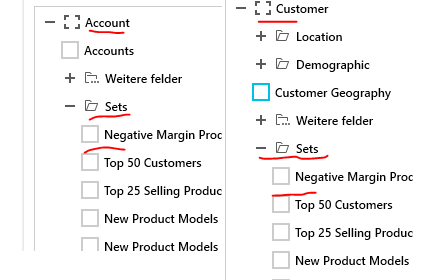
Bug can be observed in Pivot Grid => Olap Sorting example in the most recent demo.
Sadly i do not know what this menu is called in english (and the demo cannot change language) so here is a screenshot
Set it to 'Equal' 'Lisa Cai'
If you hit ok and refresh, all values are gone.
Weirdly if you change it to not equal, you still get zero results


If you open a label filter dialog from the RadPivotFieldList control for a DateTime field and choose the "is between" or "is not between" operator from the combobox, you will notice that the RadDateTimePicker controls used to filter the dates very small. In this case, the empty value placeholder is clipped and if you choose any dates they are clipped too.
To work this around, you can increase the dialog's width when it opens. You can do this with the RoutedDialogEvents.RequestDialog event.
public MainWindow()
{
	InitializeComponent();
	pivotFieldList.AddHandler(RoutedDialogEvents.RequestDialog, new EventHandler<DialogHostingRequestEventArgs>(this.OnDialogHostRequested), true);
}

private void OnDialogHostRequested(object sender, DialogHostingRequestEventArgs e)
{
	var labelDialog = e.DialogInfo.Content as LabelFilterDialog;
	if (labelDialog != null)
	{
		var w = labelDialog.ParentOfType<RadWindow>();
		w.Width = 500;
	}
}
It seems that the option to turn of sums has no effect for hirachie columns.
No matter if this option is checked or not, they do not disappear.
It works on regular columns.
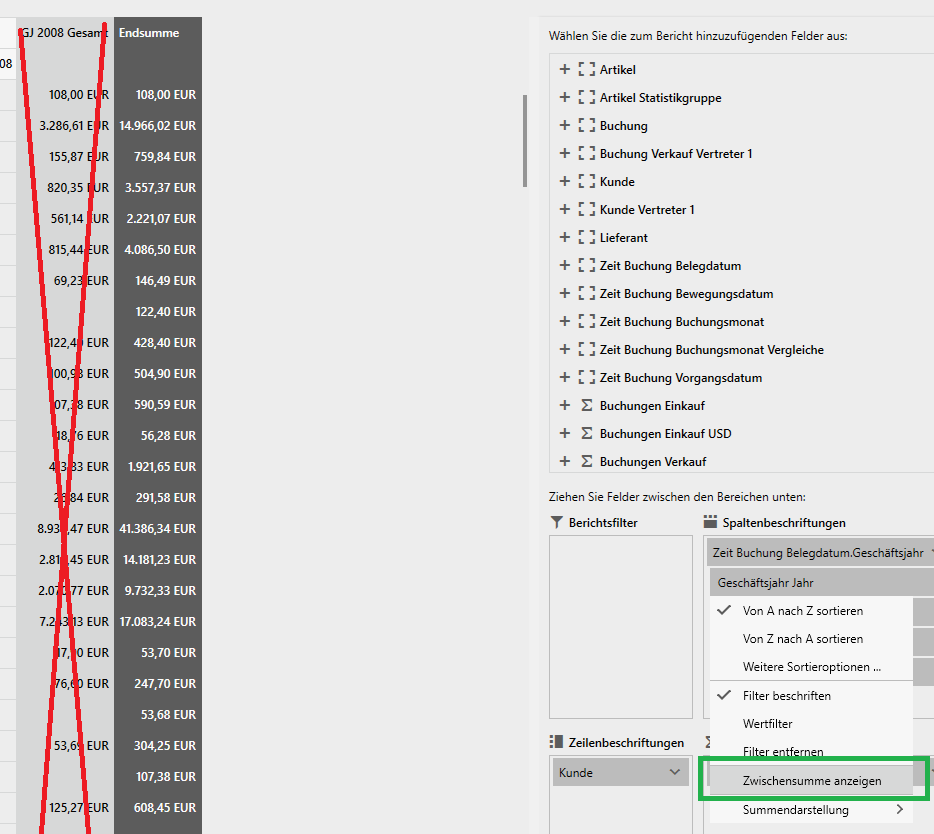
To work this around set the RowSubTotalsPosition to Top.
Or set the IsExpanded property of the corresponding PivotGroupHeader controls manually.
public MainWindow()
{
InitializeComponent();
// the Opacity is used to avoid the flicker that appears because the groups are rendered just before the collapse logic kicks-in.
this.pivotGrid.Opacity = 0;
this.pivotGrid.Loaded += PivotGrid_Loaded;
}
private void PivotGrid_Loaded(object sender, RoutedEventArgs e)
{
Dispatcher.BeginInvoke(new Action(() => {
var headers = this.pivotGrid.ChildrenOfType<PivotGroupHeader>();
foreach (var header in headers)
{
header.IsExpanded = false;
}
this.pivotGrid.Opacity = 1;
}), (DispatcherPriority)3);
}
The fix for this issue will be included in R1 2019, scheduled for the mid of January 2019.