


I want to choose columns by checkboxes, something like this:

I might be missing something, but I have Hyperlinks in a column in my RadDatGridView.
I tried searching for a Support document explaining this, but didn't find any.
When the grid is exported to excel all data is coming across, but the column with hyperlink is not
a hyperlink in Excel.
Below is sample of the code used to make the "HyperLink" column in my grid.
radGridView1.DataSource = dtResults;
radGridView1.Columns.Remove("Path");
GridViewHyperlinkColumn col = new GridViewHyperlinkColumn();
radGridView1.Columns.Insert(5, col);
col.Width = 200;
col.FieldName = "Path";
col.HeaderText = "Path";
col.Name = "Path";
Coded used to do the Export....
GridViewSpreadExport spreadExporter = new GridViewSpreadExport(this.radGridView1);
spreadExporter.ExportVisualSettings = true;
SpreadExportRenderer exportRenderer = new SpreadExportRenderer();
spreadExporter.RunExport(filename, exportRenderer);
Thanks.
Roger




The scenario which should be covered is selecting some data from Excel and pasting in the new row of RadGridView. This is an easy way for inserting data in the grid.
With releasing .NET 6, there are TimeOnly and DateOnly types which would be more appropriate for managing such values:
https://devblogs.microsoft.com/dotnet/date-time-and-time-zone-enhancements-in-net-6/
It would be good to add support for these types in GridViewDateTimeView.
Currently, the following code gives an exception when entering edit mode:
        public RadForm1()
        {
            InitializeComponent();
            DataTable dt = new DataTable();
            dt.Columns.Add("DateOnly", typeof(DateOnly));
            dt.Rows.Add(new DateOnly(2022,3,3));

            this.radGridView1.AutoGenerateColumns = false;
            GridViewDateTimeColumn dateColumn = new GridViewDateTimeColumn();
            dateColumn.FieldName = "DateOnly";
            this.radGridView1.Columns.Add(dateColumn);
            this.radGridView1.DataSource = dt;
            this.radGridView1.AutoSizeColumnsMode = GridViewAutoSizeColumnsMode.Fill;
        }
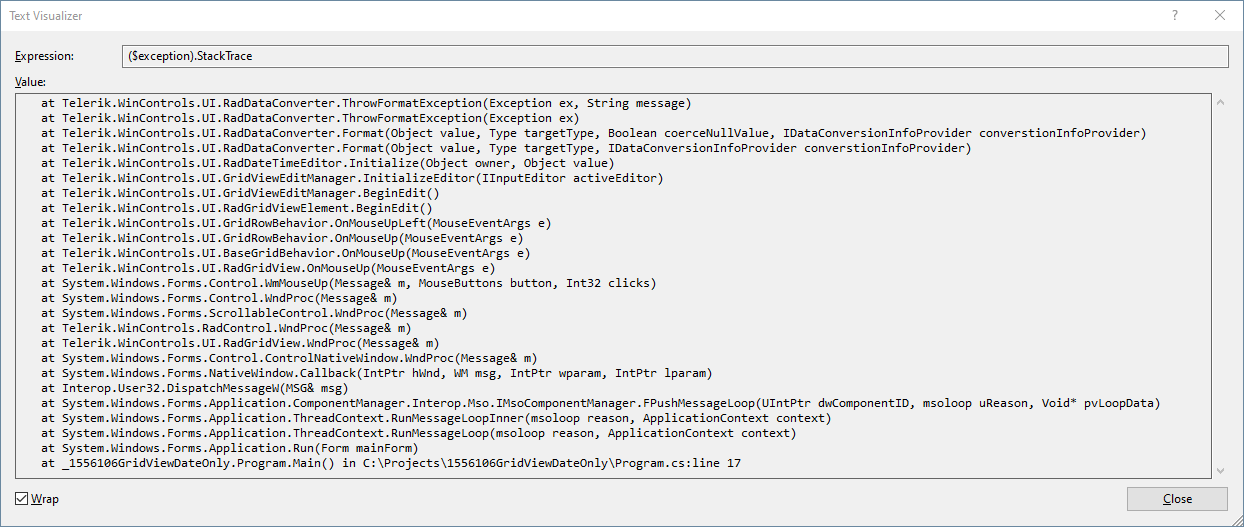
Workaround: you can use the following custom TypeConverter:
        public RadForm1()
        {
            InitializeComponent();
            DataTable dt = new DataTable();
            dt.Columns.Add("DateOnly", typeof(DateOnly));
            dt.Rows.Add(new DateOnly(2022,3,3));

            this.radGridView1.AutoGenerateColumns = false;
            GridViewDateTimeColumn dateColumn = new GridViewDateTimeColumn();
            dateColumn.DataType = typeof(DateTime);
            dateColumn.FieldName = "DateOnly";
            dateColumn.Format = DateTimePickerFormat.Custom;
            dateColumn.CustomFormat = "dd/MM/yyyy";
            dateColumn.FormatString = "{0:dd/MM/yyyy}";
            dateColumn.DataTypeConverter = new DateOnlyConverter();
            this.radGridView1.Columns.Add(dateColumn);
            this.radGridView1.DataSource = dt;
            this.radGridView1.AutoSizeColumnsMode = GridViewAutoSizeColumnsMode.Fill;
        }


        public class DateOnlyConverter : TypeConverter
        {
            public override bool CanConvertTo(ITypeDescriptorContext context, Type destinationType)
            {
                return destinationType == typeof(DateTime);
            }
            public override object ConvertTo(ITypeDescriptorContext context, CultureInfo culture, object value, Type destinationType)
            {
                if (value is DateOnly && destinationType == typeof(DateTime))
                {
                    DateOnly date = (DateOnly)value;
                    return new DateTime(date.Year, date.Month, date.Day);
                }

                return base.ConvertTo(context, culture, value, destinationType);
            }
            public override bool CanConvertFrom(ITypeDescriptorContext context, Type sourceType)
            {
                return sourceType == typeof(DateTime) ;
            }
            public override object ConvertFrom(ITypeDescriptorContext context, CultureInfo culture, object value)
            {
                if (value is DateTime)
                {
                    DateTime date = (DateTime)value;
                    return new DateOnly(date.Year, date.Month, date.Day);
                }

                return base.ConvertFrom(context, culture, value);
            }
        }
Load-On-Demand self-reference hierarchy provider
Enable the ability to MERGE seperate rows (different records), like found in ITunes "Songs" mode where is shows the artwork (then artist,release undernearth) in a custom class, then the related song rows to the right.

Your competitor Dev Express has it already in place.

See youtube video here :

https://www.youtube.com/watch?v=TfPXwE7GcXs

Cheers
When Excel-like filtering is enabled and the user selects an item from the "Available Filters" drop down menu, a CompositeFilterForm is shown.
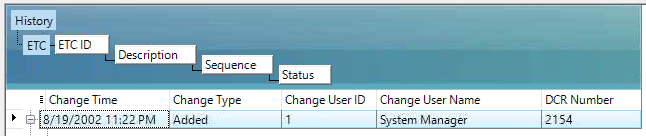
Everithing works fine but is it possible to set the parent row to collapsed, if there are child rows?