

1. RadGridView properties AutoSizeRow set to true.
2. Column Group properties ShowHeader set to false.
2.Then I click the user control in the map view that has a row with value "TASÄ". This time the grid scrolls to an incorrect position. The corresponding row is a lot lower in the child list.

maskBoxColumn.FormatInfo = CultureInfo.CreateSpecificCulture("en-AE");
In this scenario, the Browsable(false) attribute is set to both properties which are used to create the self-referencing hierarchy. When the columns are predefined, running that application will freeze as the RadGridView could not correctly get the parent row. If the columns are auto-generated, this behavior is not observed.
This is not exactly a real solution as setting the Browsable(false) attribute will remove the properties from the source. However, the control should not freeze the application.


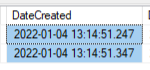
System.ArgumentException: 'An item with the same key has already been added.' when the data source contains DateTime with the same hour, minute, and seconds part (only milliseconds are different):
In this case, the RadGridView AutoSizeRows and ColumnGroupViewDefinition are enabled. The rows will have different heights depending on the cell content. When exporting the RadGridView to PDF, the rows will have equal size and won't respect the current size in the view. Thus longer text in a cell will be cut off.
The same behavior is observed when exporting to PDF or XLSX. In addition, this is also observed when printing the RadGridView.

Steps to recreate:
- click on the button on the top row
- press the down key on the keyboard
- Press Space key to select new button, the button on the top row is clicked