

Good afternoon,
I was wondering if anyone could help me with a GridView export issue I am having.
I am populating a GridView from an SQL query. This table has two DateTime columns that I am formatting after the DataBindingComplete to show the milliseconds portion of the DateTime field like so:
private void dgvTransTable_DataBindingComplete(object sender, GridViewBindingCompleteEventArgs e){ for (int j = 0; j < this.dgvTransTable.Columns.Count; j++) { if (this.dgvTransTable.Columns[j].GetType() == typeof(Telerik.WinControls.UI.GridViewDateTimeColumn)) { ((GridViewDateTimeColumn)this.dgvTransTable.Columns[j]).FormatString = "{0:MM/dd/yyyy hh:mm:ss.fff}"; } }}
Works great. Column displays just like I want. Now the problem is with the Excel Export. Normally with the format cell options, you can use .000 for milliseconds. I just can't seem to get it correct with the GridViewSpreadExport. This is what I am trying, note I've also tried using the .fff but it both cases, all that is written to the Excel cell is the short date/time string, and the formatting looks like I want, except either just the literal .fff or .000 show up in the visual cell.
I'd even be happy if someone knows how to make this field export as a straight text field as long as the string is formatted like the gridview cell.
foreach( GridViewDataColumn col in dgvTransTable.Columns ){ switch( col.DataType.Name ) { case nameof(DateTime): col.ExcelExportType = Telerik.WinControls.UI.Export.DisplayFormatType.Custom; col.ExcelExportFormatString = "MM/dd/yyyy hh:mm:ss.000"; break; }}

Hi,
Please check the attached sample project.
I think CompositeFilter does not respect CaseSensitive property.
Thanks

1. Checking / Unchecking header check box, checks/unchecks checkboxes of current page only. I need to perform the operation for the whole grid.
2. I have got filters on. User can select filters on columns. Once filters are applied, records are displayed according to those filters (other records are hidden). Now, when checking the header check box, it only selects records that are part of current page. For example, if I am on first page and apply filter on one column, grid will hide all rows from the first page that do not match the filter and pull records from 2nd and 3rd pages that match the criteria and show on the first page. But if I select check box in the header, then only records from first page are selected, records that came from 2nd and 3rd page are not selected.

Hi,
Please refer to 2 attached files...
The 'April 2020' file is correct - The yellow color is shown upon setting a filter (Release 2020.1.113.40)
The 'June 2020' file is incorrect - No color is shown indicating filter is set. (Release 2020.2.512.40)
The code sets FilterDescriptor on the 'A PARTY' column.
There is change in the icon of the filter as well :(
Please refer to the attached sample project. When the expander is in the columns that contains long text that has be resize the rows, the AutoSizeRows functionality doesn't work properly:
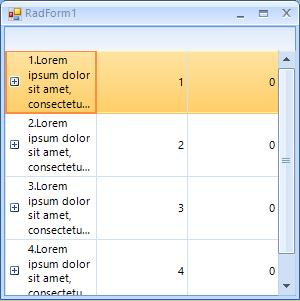
Workaround: set the MasterTemplate.SelfReferenceExpanderColumn property to a column that contains very short content:
Me.RadGridView1.MasterTemplate.SelfReferenceExpanderColumn = Me.RadGridView1.Columns(1)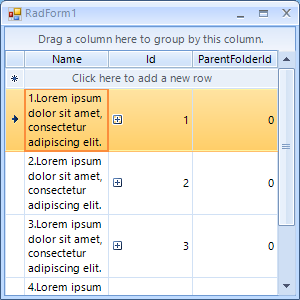
Hi Telerik Teams,
I have a problem,When I filter data in gridview, a RadForm appears. But there are problems with the margins of its 2 buttons. How can I deal with it?
Thanks
Mason Chiu

001.png: On the GridViewComboBoxColumn how do I prevent the drop down from covering the input cell when grid is at the bottom of the screen's viewable area?
I've tried setting the position and location under the CellEditorInitialized event, but had no luck.
private void RadGridARCashReceipt_CellEditorInitialized(object sender, GridViewCellEventArgs e)
{
if (e.ActiveEditor is RadDropDownListEditor)
{
RadDropDownListEditor editor = e.ActiveEditor as RadDropDownListEditor;
if (editor != null)
{
RadDropDownListEditorElement ddlElement = (RadDropDownListEditorElement)editor.EditorElement;
ddlElement.EnableMouseWheel = false;
ddlElement.DropDownMinSize = new Size(200, 200);
ddlElement.AutoCompleteSuggest.DropDownList.DropDownMinSize = new Size(200, 200);
//ddlElement.AutoCompleteSuggest.DropDownList.Location = new Point(1000, 1000);
}
}
}
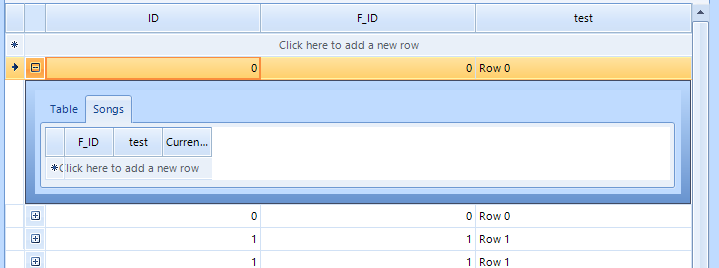
To reproduce:
1. Expand a parent row in hierarchical grid.
2. Click on the second tab
3. If the child grid doesn't have any rows, the CurrentViewChanged event will not fire.
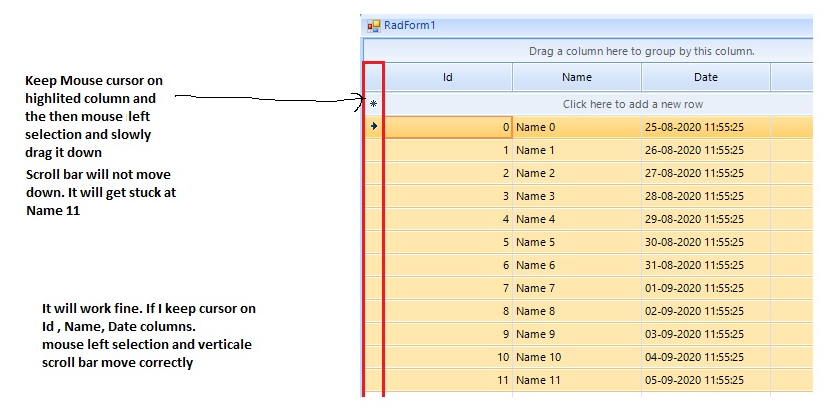
Currently, due to the specificity of the internal implementation for this scrolling behavior, the possible solution that I can suggest is to hide the row header by setting the ShowRowHeaderColumn property to false.
this.radGridView1.ShowRowHeaderColumn = false;
To reproduce:
1. Bind a RadGridView to the Northwind.Products table
2. Enable the header checkbox for the Discontinued column
3. Set the ReadOnly property either for the grid or for the specific column.
The header checkbox is not allowed to be toggled. However, you can toggle/untoggle it which affects all the data rows.
If you define which columns to be printed on separate pages and try to use the Print Settings dialog to change the orientation for example, the multi-page printing gets lost:
Here is the code snippet which result is illustrated in the attached gif file:
    Private Sub RadForm1_Load(sender As Object, e As EventArgs) Handles MyBase.Load
        Me.CustomersTableAdapter.Fill(Me.NwindDataSet.Customers)

        Me.RadGridView1.DataSource = Me.CustomersBindingSource
        Me.RadGridView1.BestFitColumns()
    End Sub

    Private Sub RadButton1_Click(sender As Object, e As EventArgs) Handles RadButton1.Click

        Dim document As New RadPrintDocument()
        document.AssociatedObject = Me.RadGridView1

        Dim printStyle As GridPrintStyle = New GridPrintStyle(RadGridView1)
        Dim renderer As TableViewDefinitionPrintRenderer = New TableViewDefinitionPrintRenderer(RadGridView1)
        renderer.PrintPages.Add(RadGridView1.Columns(0), RadGridView1.Columns(2), RadGridView1.Columns(5))
        renderer.PrintPages.Add(RadGridView1.Columns(0), RadGridView1.Columns(1), RadGridView1.Columns(9))
        renderer.PrintPages.Add(RadGridView1.Columns(8), RadGridView1.Columns(7))
        renderer.PrintPages.Add(RadGridView1.Columns(3), RadGridView1.Columns(4), RadGridView1.Columns(6))
        printStyle.PrintRenderer = renderer
        RadGridView1.PrintStyle = printStyle

        Dim dialog As New RadPrintPreviewDialog(document)
        dialog.ShowDialog()

    End Sub
The main purpose is optimizing memory consumption and performance when generating large pdf documents.
Resource: https://www.telerik.com/blogs/pdf-stream-processing-reliable-and-efficient-processing-of-pdf-files

Hi,
I want to add a MultiComboBoxColumn to a GridView
is it possible to define the columns for this MultiComboBox at design time (in Property Builder editor of Grid) ?
Hi,
I want to extend the RadGridView control, so I do "public class TkGrid : Telerik.WinControls.UI.RadGridView {}"
How do I apply a theme to TkGrid control ? I set "ThemeResolutionService.ApplicationThemeName = "FluentDark" but this doesn't work.
I attached a small project where I have one TkGrid and one RadGridView. On top of form there is a dropdown from where you can change the theme
When I do this, TkGrid is not displayed with the new theme (this works for RadGridView)
p.s. I also added a custom Button, TkButton inherited from RadButton. When I change the theme, the look of TkButton is changed, so this is ok
Two of the grids (B & C) are on the same tab and the other (A) on a different tab.
Only one tab can be visible at any one time, so you can either see and interact with the single grid (A) or the other two grids (B & C).
I need to be able to select a row in C (based on a criteria) when you click on a row in A or B.
Grid C has paging enabled.
I can successfully select the desired row in C when I click on a row in B and see the paging change to show the selected row.
But, when I click on a row in A and find a matching row in C, the row seems to get selected but the paging does not move to where the selected row is.

Please refer to the attached sample project and follow the steps in the gif file.
Workaround: custom filtering to control which rows to be visible or not: https://docs.telerik.com/devtools/winforms/controls/gridview/filtering/custom-filtering
        private void radGridView1_CustomFiltering(object sender, GridViewCustomFilteringEventArgs e)
        {
            e.Handled = true;
            e.Visible =  e.Row.Cells["Value"].Value.Equals( Double.NaN);
        }