

I can't provide a project or even code snippets that would make sense out of context because the code base is too complex for an easy replication to be setup.
We are trying various things like calling Refresh, Update.
Hoping this is something you've encountered before and have some suggestions.
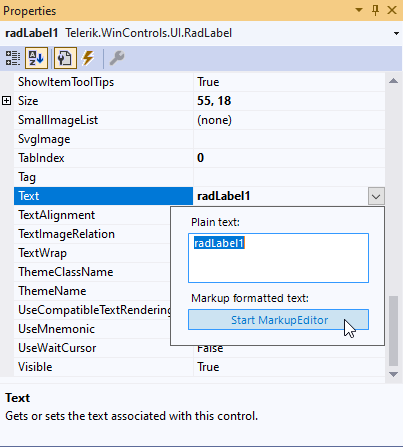
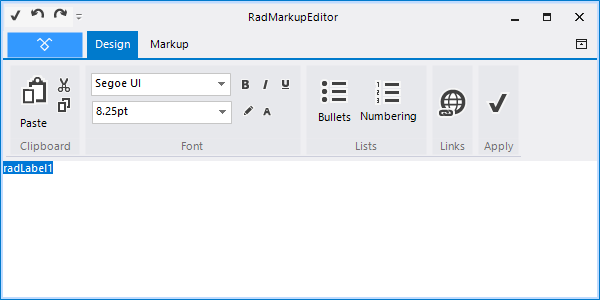
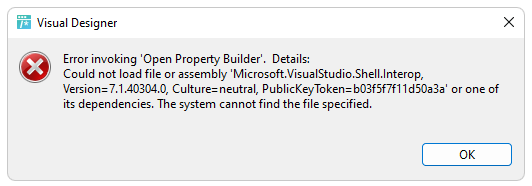
The assembly is required for our RadMarkupEditor using the IE rendering engine. It allows you to specify HTML-like text formatting at design time in the Properties window of Visual studio:

Background: With many people having moved to working remotely, collaboration is a much larger part of any enterprise applications. As such, it would be highly beneficial to add real time collaboration capabilities to editor controls, more specifically the RadRichTextEditor control. It would work similarly to how MS Word works when more than one user is editing a document at the same time.
Scenario: Assume you have and WinForms application where there is a form that contains a RadRichTextEditor. The content for this control is populated from a centralized database. This content is editable by users of the application. Lets say that you have two users (User A and User B) editing this content at the same time. Currently, User A cannot see what User B is doing in real-time, and vice-versa. Each time one of the users saves the content, it will overwrite any changes made by the other user.
Desired outcome: If the users in the above scenario are using MS Word, each user would see that someone else is currently editing the document and the other user's changes would be displayed in real-time. This same outcome should be made more readily available with the Telerik editors, primarily the RadRichTextEditor, so that when two users are editing the same content, they would see each others' changes in real-time.
I know this is possible using SignalR and a bit of code, but I think it would be beneficial for the RadRichTextEditor to have better "out of the box" support for this feature.
I am aware of a web-based control that has this feature. Specifically, the CKEditor (https://ckeditor.com/) control has the features I am requesting. However, I am looking at WinForms as opposed to web.
.jpg)
Presently none of the controls can be navigated to using the TAB key or the shift TAB combination.
For example, in this picture I would like to be able to go from the Verdana font to the size 12 font using TAB key controls. I would like to be able to do this for all controls within the editor. I have asked support and presently this wouldn't be possible.


To reproduce:
            this.radCheckBox1.Text = "Something (in brackets)";
            this.radCheckBox1.RightToLeft = System.Windows.Forms.RightToLeft.Yes;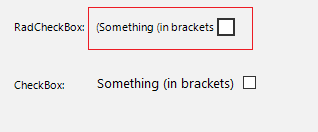

Repro steps:
- Create a RadVirtualGrid with:
- A column with a nullable DateTime
- Another column with a string or number.
- Fill it with one or more rows. The DateTimes remain null.
- Edit a DateTime cell, open the dropdown:
- Click op button [Today], the date/time in the cell changes.
- Click [Tab], the focuses moves to the next cell, but the dropdown remains open:
- Click somewhere else in the grid or form, an Exception is thrown:
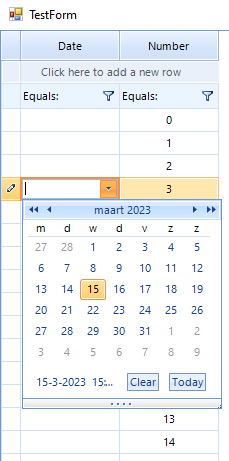
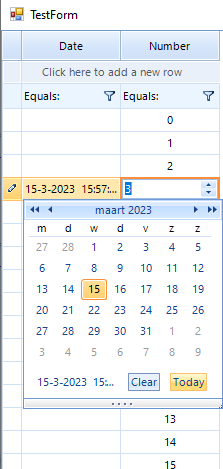
System.NullReferenceException: Object reference not set to an instance of an object.
   at Telerik.WinControls.UI.RadDateTimePickerCalendar.popupControl_Closing(Object sender, RadPopupClosingEventArgs args)
Expected behavior:
- The dropdown closes after moving to another cell.
- No exception occurs.
Just to report a minor typo:
FitlerViewTextCategoryItemCreatedEventArgs, in Telerik.WinControls.UI.FilterView

The designer tries to load the assembly and throws the following error:
Zooming in will throw an Exception that crashes the program.
The ZoomLevel needed to cause the exception is dependent on the area of the RadMap selected.
Provider: BingRestMapProvider
ImagerySet AerialWithLabelsOnDemand
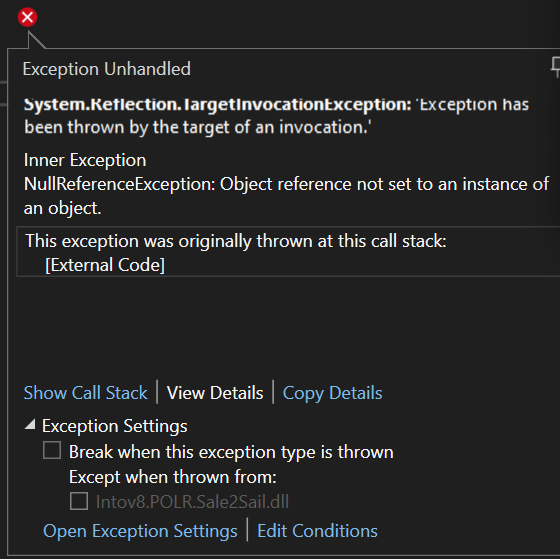
Zooming in over Antarctica, Exception thrown zooming in at MapElement.ZoomLevel 14.
Zooming in over Australia, Exception thrown zooming in at MapElement.ZoomLevel 21.
Our clients can download different product files from their Telerik account:
https://docs.telerik.com/devtools/winforms/installation-and-upgrades/download-product-files
Currently, when Digitally Signed Assemblies are necessary, they submit support tickets and the support engineers provide the signed assemblies. It would be nice to be directly uploaded to the Telerik account like the rest of the product files.

I downloaded the ERP demo from here: https://www.telerik.com/support/code-library/erp-demo-application-for-winforms
After upgrading the projects to .NET 4.8 and running the application, the following exception is observed:
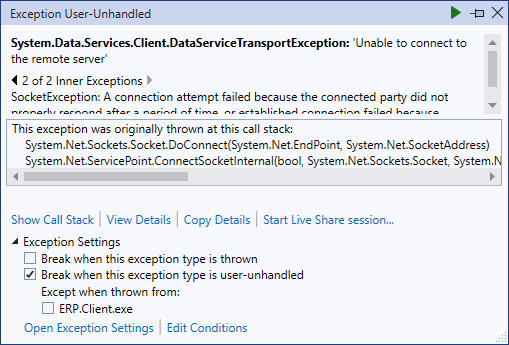
The full stack trace:
System.Data.Services.Client.DataServiceTransportException
  HResult=0x80131509
  Message=Unable to connect to the remote server
  Source=Microsoft.Data.Services.Client
  StackTrace:
   at System.Data.Services.Client.HttpWebRequestMessage.GetResponse()
   at System.Data.Services.Client.DataServiceContext.GetResponseHelper(ODataRequestMessageWrapper request, IAsyncResult asyncResult, Boolean handleWebException)
   at System.Data.Services.Client.QueryResult.ExecuteQuery()
   at System.Data.Services.Client.DataServiceRequest.GetQuerySetCount(DataServiceContext context)
   at System.Data.Services.Client.DataServiceQueryProvider.ReturnSingleton[TElement](Expression expression)
   at ERP.Client.PurchasesControl.Initialize() in C:\Users\dyordano\Downloads\009a20df-21b2-4e64-b129-eaf9e0a686f5_ERP-CS (1)\ERP.Client\CustomControls\Views\PurchasesControl.cs:line 48
   at ERP.Client.BaseGridControl..ctor() in C:\Users\dyordano\Downloads\009a20df-21b2-4e64-b129-eaf9e0a686f5_ERP-CS (1)\ERP.Client\CustomControls\BaseGridControl.cs:line 49
   at ERP.Client.PurchasesControl..ctor() in C:\Users\dyordano\Downloads\009a20df-21b2-4e64-b129-eaf9e0a686f5_ERP-CS (1)\ERP.Client\CustomControls\Views\PurchasesControl.cs:line 29

  This exception was originally thrown at this call stack:
    System.Net.Sockets.Socket.DoConnect(System.Net.EndPoint, System.Net.SocketAddress)
    System.Net.ServicePoint.ConnectSocketInternal(bool, System.Net.Sockets.Socket, System.Net.Sockets.Socket, ref System.Net.Sockets.Socket, ref System.Net.IPAddress, System.Net.ServicePoint.ConnectSocketState, System.IAsyncResult, out System.Exception)

Inner Exception 1:
WebException: Unable to connect to the remote server

Inner Exception 2:
SocketException: A connection attempt failed because the connected party did not properly respond after a period of time, or established connection failed because connected host has failed to respond 65.52.19.99:80
I'd like to have the merge columns mode, for example like TrueDBGrid (desing time)
It's fantastic, and there is the vertical alignment
I've tried all yours codes to emulate it but it's too slow if radgridview has a lot of rows.
Thanks
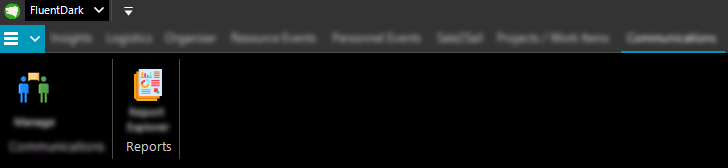
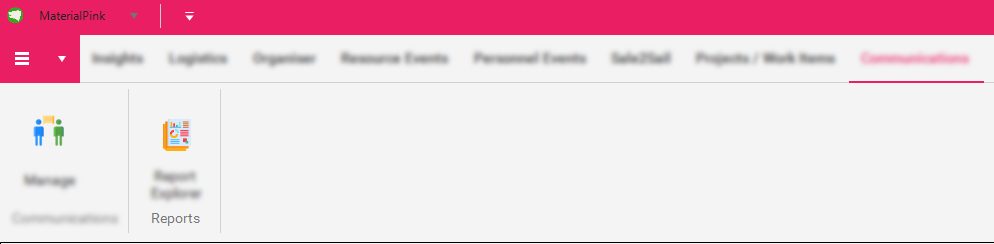
When setting the theme to a "touch/material" theme the padding & RadRibbonBar size increases.
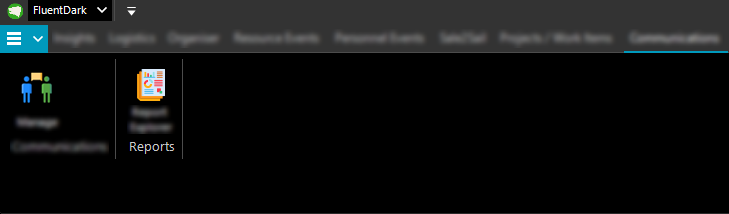
When switching to a theme that isn't this type the spacing remains.
Non "touch/material" theme originally
Switch to "touch/material" theme
Switching back to a non "touch/material" theme
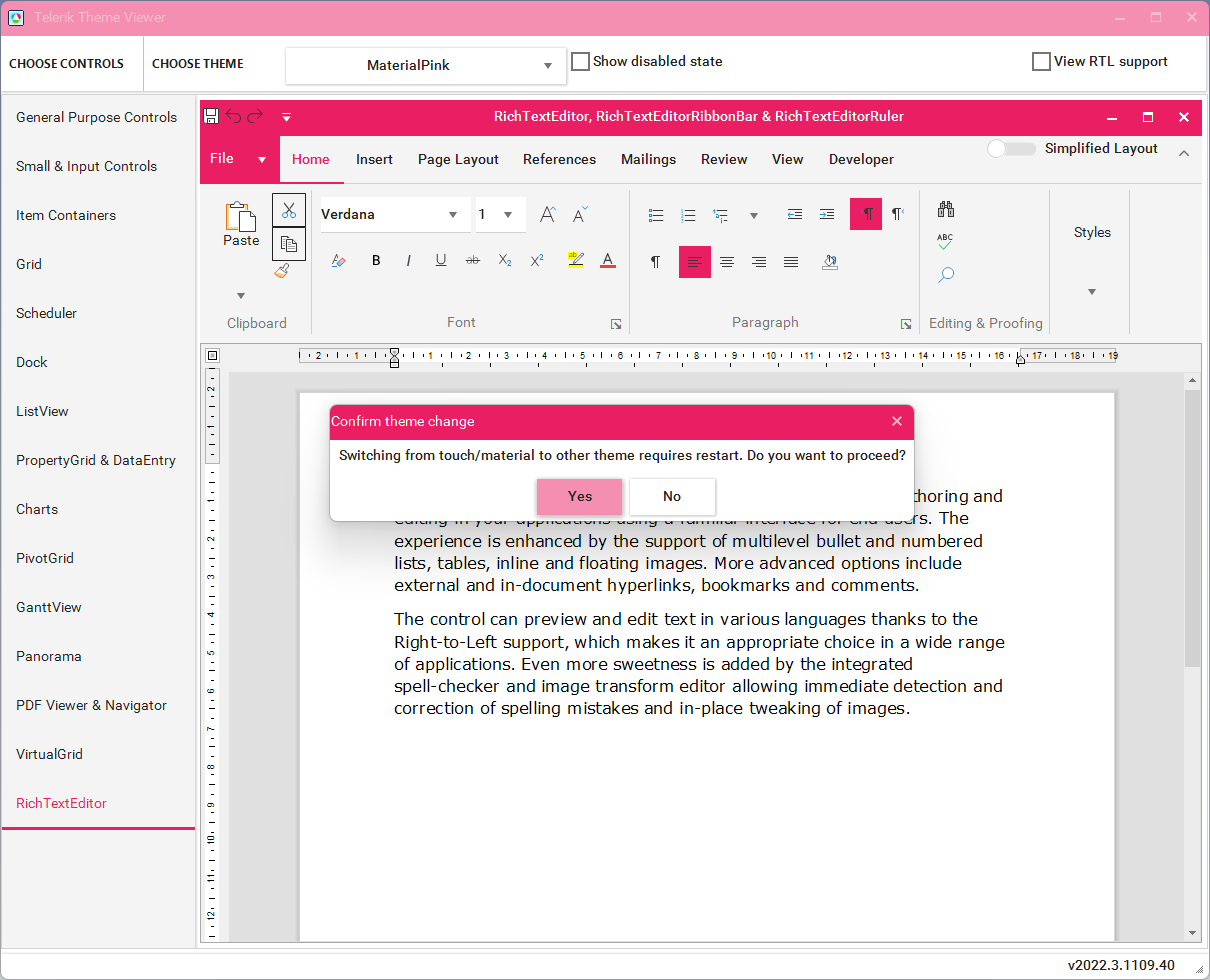
When testing this in the Telerik Theme Viewer when switching from a "touch/material" theme to a non "touch/material" type a message box instructing application restart is required is returned.
We are trying to display read only versions of documents. Some of these documents are of type .docm and have elements like dropdowns and text boxes. Most of the documents are being converted properly but all text within these .docm elements are missing. We have tried loading into the RadRichTextBox control and directly exporting to plain text with no luck. We do not need full support for these elements but in order to use Telerik's library for our document viewer we need to be able to at least extract text from these elements.
Is this currently unsupported or is there some other provider I should be using?

When using the RadChartView Proerty Builder, existing series formatting is lost upon clicking ok.
Steps to replicate.
- Setup a new radchartview.
- Add some line series any way you like.
- Define Series color/dashstyle etc either from chart dropdown or from properties list.
- Close and save series properties and you will see current correct formatting in your design view.
- Open RadCharView property Builder. Click ok.
- Series formatting has been reset to default new series colors/styles.
