

I have a multipage report and my Html5 Viewer is set up in an ASP.NET Core application in .NET 5. The viewer's settings are:
viewMode: "PRINT_PREVIEW",
scaleMode: "FIT_PAGE_WIDTH",
pageMode: "CONTINUOUS_SCROLL",
The problem is that I cannot scroll down to the end of the report.
The issue may not occur in other frameworks with the same report.
The current implementation of the angular / HTML5 report viewer requires a script-src 'unsafe-eval' in a content-security-policy.
This is quite unfortunate in terms of security considerations. Please remove this requirement.
Kind regards
Claudio
Utilizing Native Blazor Report Viewer with Telerik Blazor UI 4.0 results in some toolbar icons appearing blank. The icons are still functional.
Switching to Blazor UI 3.7 fixes the issue.
When the EnableAccessibility PDF device info setting is set to true in the RuntimeSettings of a report, the text set to an item in the AccessibleDescription report item property is not respected.
For example, a PictureBox with AccessibleDescription set to "Text1" will have the "Picture Box" alternate text set in the exported PDF instead of "the Text1" string.

According to the Excel Rendering Design Considerations article:
- The "f" DateTime format string should result in a full date/time pattern with a short time pattern.
- The "F" DateTime format string should result in a full date/time pattern with a long time pattern.
After exporting to XLS/XLSX, the time formats are as follows:
- "f" -> full date/time pattern with a long time pattern.
- "F" -> full date/time pattern with a short time pattern.
Attempting to delete a group section from the Explorer tab in the Web Report Designer leads to the following error being thrown in the browser console:
Uncaught (in promise) Error: Rollback inner transaction
    RollbackTransaction http://localhost:51863/api/reportdesigner/designerresources/js/webReportDesigner-16.2.22.1109.min.js/:9
    Rollback http://localhost:51863/api/reportdesigner/designerresources/js/webReportDesigner-16.2.22.1109.min.js/:9
    execute http://localhost:51863/api/reportdesigner/designerresources/js/webReportDesigner-16.2.22.1109.min.js/:9
As a result, the section is not deleted. However, the section can be deleted by deleting the corresponding report group from the Properties area(Data section) in the Web Report Designer.

I noticed that using the Standalone Report Designer for .NET, I can't open the "ReportSource" dialog for a SubReport. The property cannot be edited from the Properties tab either.
Instead, when using the Standalone Report Designer for .NET Framework everything works fine.
I am trying to add HtmlTextBox to my report. After double-clicking on the HtmlTextBox, instead of opening the HTML editor, an error message appears

And after that, it is not possible to delete any element of the report


In Blazor Web Assembly you cannot host the Reporting REST Services due to technical restrictions related to the System.Drawing assemblies (GDI).
It would be very useful to have a Visual Studio project template creating only the Web Designer's Service in a separate project, so that we may use it in a web designer hosted in Blazor WASM.
Nested OLs do not start with the number of their parent but instead, start counting completely anew.
Offer a solution allowing nested OLs to generate this form of rendering.
1. title1
1.1 subtile11
1.2 subtile12
2. title2
2.1 subtile21
2.2 subtile22
2.2.1 subtile221
2.2.2 subtile222
2.3 subtile23
3. title3

Currently, the fields' names are case-sensitive for those 2 data sources while other data sources, like the CSV for example, will ignore the casing.
For example, if there is a JsonDataSource with a Column1 field, it has to be written exactly as is in the expression while in the CsvDataSource, the field will be resolved even when written like Fields.column1 in an expression.

Currently, the WinUI ReportViewer has a hard dependency on Windows due to the fact that the internals rely on the Win32 print dialog.
This means I cannot define the ReportViewer in a WinUI class library to be shared with multiple front-end WinUI projects. If you attempt to do this, there's an internal crash because the project cannot resolve System.Windows.Forms.
This feature request is ask if you can replace the Win32 print dialog with the WinRT printing API.
Research Note: Here's a GitHub thread where Microsoft is discussing the topic Question: Printing in WinUI 3 Desktop · Issue #4419 · microsoft/microsoft-ui-xaml (github.com). Here's their current recommendation:
var hWnd = WinRT.Interop.WindowNative.GetWindowHandle(App.StartupWindow);
var printMan = PrintManagerInterop.GetForWindow(hWnd);

await PrintManagerInterop.ShowPrintUIForWindowAsync(hWnd)
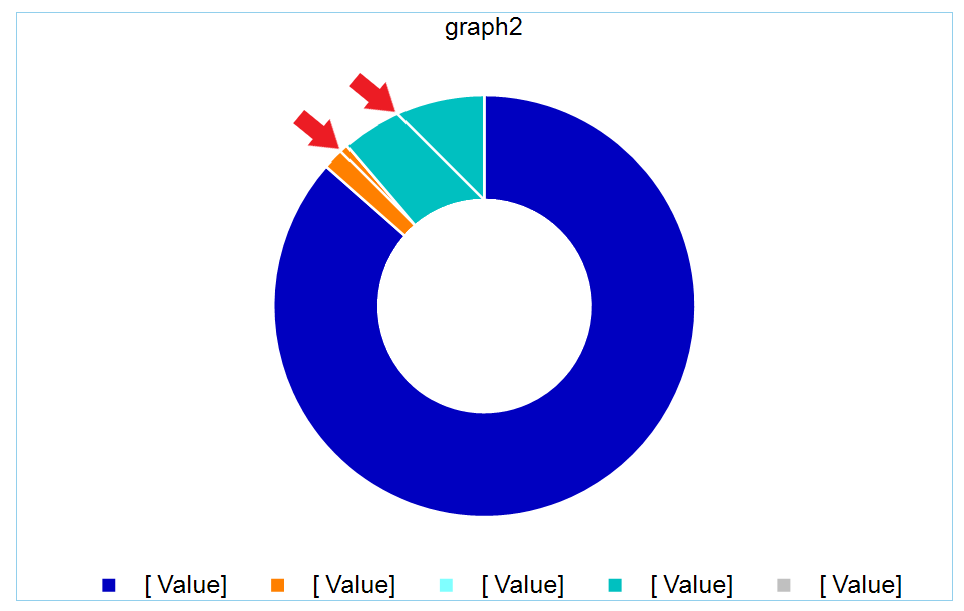
The chart BarSeries has DataPointStyle > LineColor set to white so that there is a white small gap between them. However, this has led to incorrect behavior if the chart contains small values, in relation to other values. The chart shows lines that should not be there:

Hello,
in the WebReportDesigner it is currently only possible to add a TypeSelector to a StyleRule. (see screenShot: "WRD_StyleRule_Add_Selector.png").
Interestingly, when a report already contains a StyleSelector, it is possible to edit and save the changes, this is great :-), (see screenShot: "WRD_StyleRule_Edit_StyleSelector.png").
Would be great if we could add a StyleSelector ;-).
Best regards
Alexander Schneider
In the Explorer tab of the Web Report Designer, when trying to open the context menu of a table(crosstab)'s column(row) group, nothing happens and an error is logged in the browser console.
Steps to reproduce:
- Navigate to a table(crosstab)'s column/row group in the Explorer tab.
- Try to open the context menu with the ellipsis button (...).
When the "Kind" localization property of the Web Report Designer is changed, the ExternalStyleSheets editor breaks, and it cannot be used.
Hardcoded values are used when checking against "LocalizedName" in a few other places as well. Some of which are:
- "Kind" === e.LocalizedName
- "Path" === e.LocalizedName
- "Path" !== e.LocalizedName
- "Width" === this.LocalizedName
- "Height" === this.LocalizedName
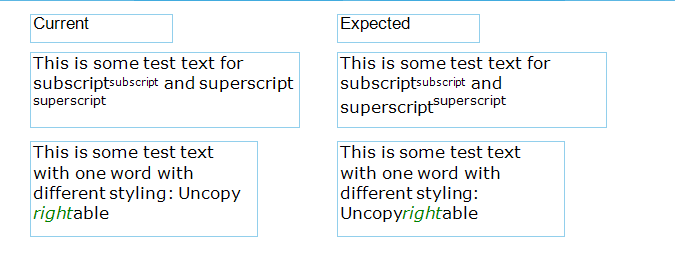
P.S. It seems more logical to me to implement text wrapping using spaces rather than spaces + tags used, as it is now. But the support team have assured me that this is not possible.