

I am using Kendo UI Spreadsheet control in our project to present Tabular contents that end user can easily modify just like a normal spreadsheet operations and I saved it in database using toJSON method provided by kendo spreadsheet.
When I will get the database driven JSON data from kendo spreadsheet as mentioned above, I want to present it in Telerik Reporting using Table (Datasource of that Table will be from JSON data I saved earlier).
Currently there is no such feature available in Telerik Reporting and I would like to request that feature to be included in future release.
Thanks
Recommended workarounds are to set FontEmbedding option to "Full" or to use TrueType fonts.

Dear Telerik
Please see thread on Report does not bring byte[] image through to PictureBox when rendered programmatically. | View Ticket | Your Account (telerik.com)
KR
David
I use HTML content like the below in an HtmlTextBox:
<a style="color: red" href="some link here">some text</a>The color is not respected when I export to PPTX. The output color of the generated link is always the default blue. In the rest of the formats that support hyperlinks, the color is correct.
I tried to wrap the <a> tag also with <p> and <span> with the same color setting, to no avail.
I am using the Blazor Web Report Designer widget which when initialized, loads its theme based on the @progress/kendo-theme-default - npm (npmjs.com) theme and overrides the styles in my Blazor application. There is no way to disable the loading of the designer's theme and the application looks inconsistent as a result.

In the Standalone/Visual Studio Report Designers, the distances from the currently selected report item to the nearest elements can be shown by clicking the Show Dimensions button.
We would like to see this functionality implemented for the Web Report Designer too.
The issue is a known problem for Skia and Skiasharp.
It looks like the function MatchTypeface is deprecated and was removed with this Skiasharp PR.
After installing the latest version, the WebServiceDataSource wizard does not send query parameters.
When the report is previewed, the WebServiceDataSource performs the request correct and the expected result is returned.
I followed How to set up in Blazor application | Telerik Reporting
All done! But when it run i got an error "telerikWebReportDesignerInterop.js 404"
<script src="_content/telerik.webreportdesigner.blazor/telerikWebReportDesignerInterop.js" defer></script>and in console show:
fail: Microsoft.AspNetCore.Components.Server.Circuits.CircuitHost[111]
      Unhandled exception in circuit 'Gyr8E4g_PwQHf7G2UKY2h3obMpujPfFp2x9i7dkB4oQ'.
      Microsoft.JSInterop.JSException: Could not find 'telerikWebReportDesignerInterop.createWebReportDesignerWidget' ('telerikWebReportDesignerInterop' was undefined).
Error: Could not find 'telerikWebReportDesignerInterop.createWebReportDesignerWidget' ('telerikWebReportDesignerInterop' was undefined).
    at https://localhost:5001/_framework/blazor.server.js:1:67713
    at Array.forEach (<anonymous>)
    at e.findFunction (https://localhost:5001/_framework/blazor.server.js:1:67673)
    at v (https://localhost:5001/_framework/blazor.server.js:1:69415)
    at https://localhost:5001/_framework/blazor.server.js:1:70361
    at new Promise (<anonymous>)
    at e.beginInvokeJSFromDotNet (https://localhost:5001/_framework/blazor.server.js:1:70334)
    at https://localhost:5001/_framework/blazor.server.js:1:26441
    at Array.forEach (<anonymous>)
    at e.invokeClientMethod (https://localhost:5001/_framework/blazor.server.js:1:26411)
         at Microsoft.JSInterop.JSRuntime.InvokeAsync[TValue](Int64 targetInstanceId, String identifier, Object[] args)
         at Microsoft.JSInterop.JSRuntimeExtensions.InvokeVoidAsync(IJSRuntime jsRuntime, String identifier, Object[] args)
         at Microsoft.AspNetCore.Components.RenderTree.Renderer.GetErrorHandledTask(Task taskToHandle)
Telerik Reporting 15.1.21.616
<PackageReference Include="Telerik.Reporting.Services.AspNetCore" Version="15.1.21.616" />
<PackageReference Include="Telerik.Reporting.OpenXmlRendering" Version="15.1.21.616" />
<PackageReference Include="Telerik.ReportViewer.Blazor" Version="15.1.21.616" />
<PackageReference Include="Telerik.WebReportDesigner.Blazor" Version="15.1.21.616" />
<PackageReference Include="Telerik.WebReportDesigner.Services" Version="15.1.21.616" />
Startup.cs
namespace CSharp.Net5.BlazorIntegrationDemo
{
    using Microsoft.AspNetCore.Builder;
    using Microsoft.AspNetCore.Hosting;
    using Microsoft.Extensions.Configuration;
    using Microsoft.Extensions.DependencyInjection;
    using Microsoft.Extensions.DependencyInjection.Extensions;
    using Microsoft.Extensions.Hosting;
    using System;
    using Telerik.Reporting.Cache.File;
    using Telerik.Reporting.Services;
    using Telerik.WebReportDesigner.Services;

    public class Startup
    {
        public Startup(IConfiguration configuration)
        {
            this.Configuration = configuration;
        }

        public IConfiguration Configuration { get; }

        // This method gets called by the runtime. Use this method to add services to the container.
        // For more information on how to configure your application, visit https://go.microsoft.com/fwlink/?LinkID=398940
        public void ConfigureServices(IServiceCollection services)
        {
            services.AddControllers();

            services.AddRazorPages()
                .AddNewtonsoftJson();
            services.AddServerSideBlazor();

            // Configure dependencies for ReportsController.
            services.TryAddSingleton<IReportServiceConfiguration>(sp =>
                new ReportServiceConfiguration
                {
                    ReportingEngineConfiguration = sp.GetService<IConfiguration>(),
                    HostAppId = "Net5BlazorDemo",
                    Storage = new FileStorage(),
                    ReportSourceResolver = new UriReportSourceResolver(System.IO.Path.Combine(sp.GetService<IWebHostEnvironment>().ContentRootPath, "..", "..", "..", "..", "Report Designer", "Examples")),
                });

            // Configure dependencies for ReportDesignerController.
            services.TryAddSingleton<IReportDesignerServiceConfiguration>(sp => new ReportDesignerServiceConfiguration
            {
                DefinitionStorage = new FileDefinitionStorage(
                    System.IO.Path.Combine(sp.GetService<IWebHostEnvironment>().ContentRootPath, "..", "..", "..", "..", "Report Designer", "Examples")),
                SettingsStorage = new FileSettingsStorage(
                    System.IO.Path.Combine(Environment.GetFolderPath(Environment.SpecialFolder.ApplicationData), "Telerik Reporting")),
                ResourceStorage = new ResourceStorage(
                    System.IO.Path.Combine(sp.GetService<IWebHostEnvironment>().ContentRootPath, "..", "..", "..", "..", "Report Designer", "Examples", "Resources"))
            });
        }

        // This method gets called by the runtime. Use this method to configure the HTTP request pipeline.
        public void Configure(IApplicationBuilder app, IWebHostEnvironment env)
        {
            if (env.IsDevelopment())
            {
                app.UseDeveloperExceptionPage();
            }
            else
            {
                app.UseExceptionHandler("/Error");
            }

            app.UseStaticFiles();
            app.UseRouting();
            app.UseEndpoints(endpoints =>
            {
                endpoints.MapControllers();
                endpoints.MapBlazorHub();
                endpoints.MapFallbackToPage("/_Host");
            });
        }

        /// <summary>
        /// Loads a reporting configuration from a specific JSON-based configuration file.
        /// </summary>
        /// <param name="environment">The current web hosting environment used to obtain the content root path</param>
        /// <returns>IConfiguration instance used to initialize the Reporting engine</returns>
        static IConfiguration ResolveSpecificReportingConfiguration(IWebHostEnvironment environment)
        {
            // If a specific configuration needs to be passed to the reporting engine, add it through a new IConfiguration instance.
            var reportingConfigFileName = System.IO.Path.Combine(environment.ContentRootPath, "reportingAppSettings.json");
            return new ConfigurationBuilder()
                .AddJsonFile(reportingConfigFileName, true)
                .Build();
        }
    }
}
WebReportDesignerDemo.razor
@page "/webreportdesigner"
@using Telerik.WebReportDesigner.Blazor

<style>
    #wrd1 {
        position: relative;
        height: 880px;
        padding-right: 50px;
    }
</style>

@* Create the WebReportDesignerWidget *@

<p>This Web Report Designer instance works with reports hosted locally using the Reporting REST service. For more information, visit the <a target="_blank" href="https://docs.telerik.com/reporting/web-report-designer">Web Report Designer</a> article.</p>
<WebReportDesigner DesignerId="wrd1"
                   ServiceUrl="/api/reportdesigner"
                   Report="Dashboard.trdp"
                   ToolboxArea="new ToolboxAreaOptions() { Layout = ToolboxAreaLayout.List }"
                   PropertiesArea="new PropertiesAreaOptions() { Layout = PropertiesAreaLayout.Categorized }" />
When the non-native Excel page header and footer are used (the UseNativePageHeader and UseNativePageFooter XLSX options are set to False) and the SplitWorksheetOnPageBreak property is set to True, the page header section of the report is rendered only on the first sheet, while the page footer section of the report is rendered only on the last sheet.
All Excel sheets should have the page sections present.

If you trigger the 'Clear selection' button of the HTML5 Report Viewer parameter's area, there is no request for a report document with the updated parameter values and the viewer shows the previous report waiting for the user to select parameter values. This problem occurs with both Single and MultiValue parameters with AvailableValues that are non-nullable.
In the Standalone Designer and desktop viewers, in the same scenario, the preview displays a message indicating that the user needs to select valid parameter values.
I think navigating over pages by click is boring/complicated, scroll over pages seens to be the standard in the majority of applications.
I know that the HTML5 ReportViewer has the pageMode() property to solve this...
There's a way of implementing the PageModeProperty into the WPF ReportViewer?
I have a table with a detailed group with PageBreak set to 'After' and a crosstab inside the table with a row group that also has PageBreak set to 'After'. The pagination is respected in the preview of the designer, however, when exported to XLSX, there is only one worksheet generated.
If I remove only the PageBreak of the detailed table group, there is no pagination and the generated worksheet is only one.
If I remove only the PageBreak of the crosstab row group, there is pagination and the generated worksheet is correct in number. However, the content is not split as expected among the sheets.
If I make the detail table group static and remove its PageBreak, the pagination and the worksheets of the Excel document are as expected.
I am trying to implement the ISharedDataSourceStorage interface and the SaveAsync method receives a parameter of type SaveResourceModel from which I cannot access the description that the user might have written in the UI.
The support team told me that the FileSharedDataSourceStorage class internally uses a SharedDataSourceDescriptionHelper class for accessing the description.
Please make the helper class public so that we may also use it when implementing the ISharedDataSourceStorage interface.
We are trying to upgrade our front end to Angular 17. When we set the telerik version to 17.2.23.1114, none of the reports open and we are getting the method not found error.
This is the configuration in our telerik report project which runs .NET 6.
<PackageReference Include="Telerik.Drawing.Skia" Version="17.2.23.1114" />
<PackageReference Include="Telerik.Reporting.Cache.StackExchangeRedis.2" Version="17.2.23.1114" />
<PackageReference Include="Telerik.Reporting.Services.AspNetCore" Version="17.2.23.1114" />
.jpg)
When the Visual Studio Report Designer is used in VS 2022, Custom User Functions declared in the project containing the reports do not appear inside the designer's expression editor.
The functions do work when previewing the report but this issue forces users to type the function calls manually.
The CSV renderer ignores the visible state of elements in a report definition (sections, headers, footers, text boxes etc.) with the Visible property to false - either explicity or by binding.
This results in much redundant content in the CSV file, that is often not even the actual output/result data - which should be the primary focus of a format like CSV.
Being able to control the output brings much flexibility to the CSV feature. Though Reporting primarily has a focus on a more rich, visual display of data, having access to the same "raw" result set that a report would evaluate can be very useful, without having to try replicate through other means.
Binding the Visible property of elements to: = RenderingFormat.Name <> "CSV" would allow the choice of including what makes sense in the ouput, even allowing a different "view" of the data, which could contain just detail row fields or additionally, summary fields from group and report headers & footers.
A search feature in the report editor would be very useful - being able to find all report components/items with any property containing input search text. An added bonus would be having a filtered or highlighted view of the properties of result items, indicating matches.
Being able to find expressions and other properties where some name/value is being used is a very helpful benefit.
UI functionality like that of the search in the Solution Explorer of Visual Studio, with a filtered hierarchical tree structure result view could work well, otherwise a separate results list might be good too.
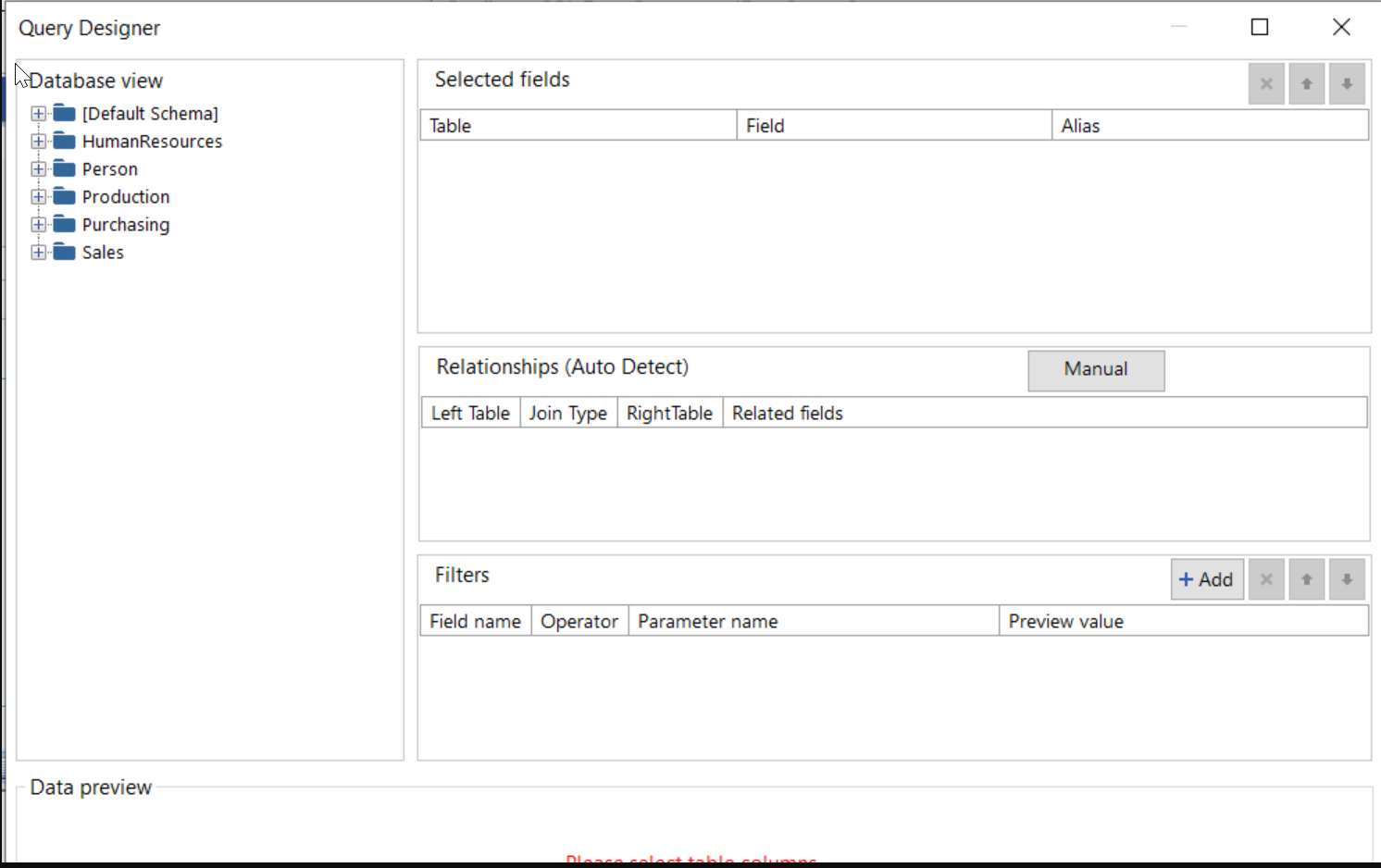
It would be nice to have a query builder in the web report designer like in the stand alone report designer.
This function would allow you to lookup a value from another data source with a value that is in your current data source.  It would return the first matching value for the specified name from a data source that contains name/value pairs.

This would allow the porting of many SSRS reports over to Telerik Reporting.

Example:

I have a report which lists all sales staff in our firm, with other personal information. We have a multi-dimensional data source (Cube) where we have all the financial data stored and calculated.

If I wanted to retrieve the total sales and total revenue that each member of the sales staff had, it would require me to use a sub-report to load the data (using a parameter to pass the staff member's unique ID).

This causes the loading/generating of the report to take longer, as the query against the Cube has to happen for each member of the sales staff, because of the use of a sub-report. With this new LOOKUP() function, it would allow the data source to be loaded and the report would be able to lookup the sales and revenue values for each staff member ID.