

Steps to reproduce the issue:
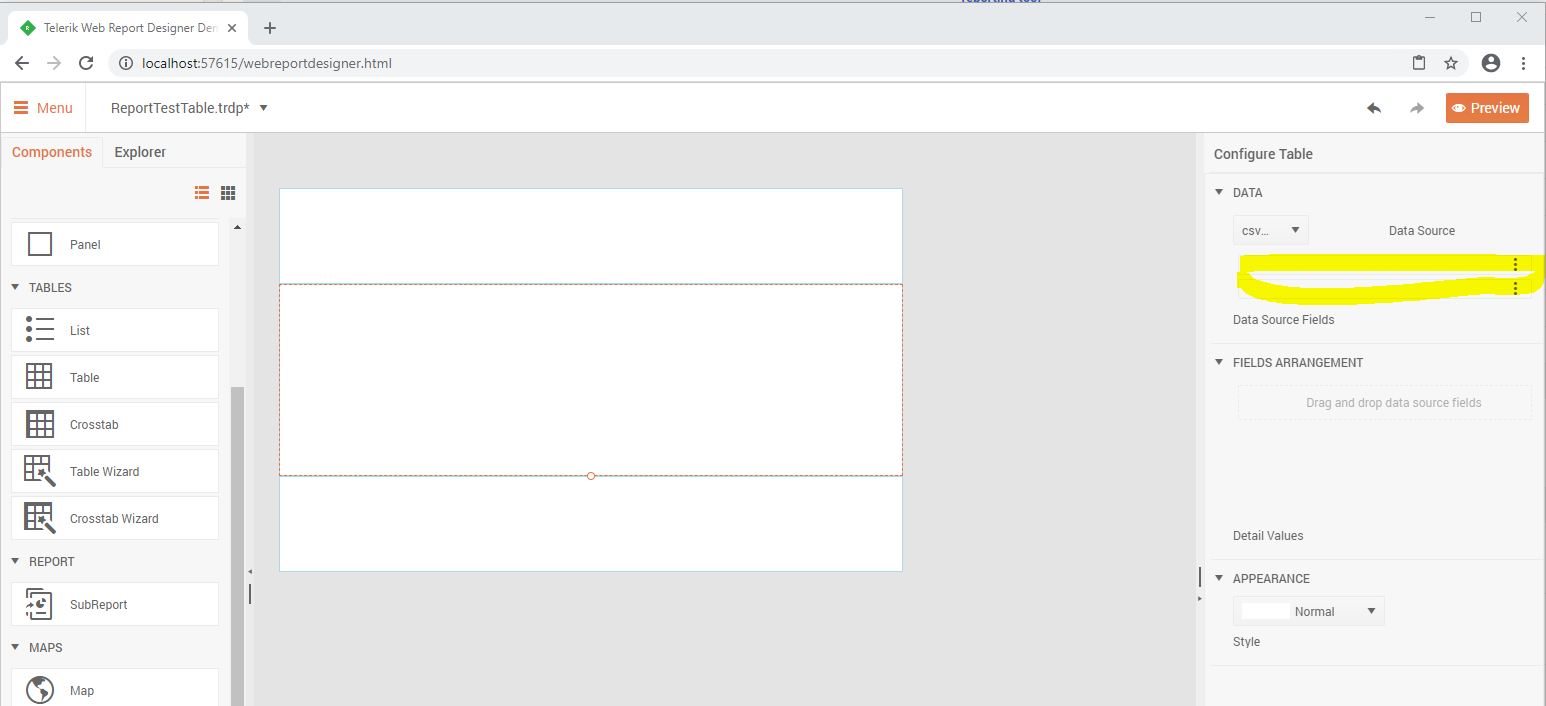
1. Create a new report in the WebReportDesigner;
2. Add a simple CSV DataSource (for example with Item and Value columns);
3. Select the Table Wizard and set the CSV DataSource as a Value of the DataSource property;
You will notice that the names of the columns from the datasource are missing.
Currently, you may aggregate values from a certain scope for a particular page with the Page function PageExec. It would be great to be able to display also the carryover aggregates up to the current page.
For example:
Page 1: Page1 Sum = 10; Total Sum at the end of the page1 = 10Page 2: Page2 Sum = 5; Total Sum at the end of the page2 = 15
Page 3: Page3 Sum = 13; Total Sum at the end of the page3 = 28

The issue occurs when a report contains a subreport with InstanceReportSource set as its ReportSource. If the report definition in this InstanceReportSource contains data sources, they will be serialized as DataSourceRef objects instead of using their actual type names like EntityDataSource, CsvDataSource, etc.
The issue is reproducible only in Standalone Report Designer, i.e. serializing/deserializing the report definition programmatically would work as expected.
The issue is introduced in Telerik Reporting R1 2019.
When configuring a WebServiceDataSource in the Web Report Designer in ASP.NET, upon previewing the data there is an error '404 Not Found". The same web service was successfully resolved by the Standalone designer and in the ASP.NET Core demo.
The data source fields were visible and usable in the designer also under ASP.NET Web Report Designer.

Generate and distribute packages built against .Net 5.0.
Currently .Net 5.0 RC1 and .Net 5.0 RC2 are announced. The official version has been announced on 10th of November.
We use telerik reporting service in ASP.NET Core 3 on CentOS 8 server.
I just confused in spesific kanji is not show in preview and pdf.
"備考" is not shown,but "考備" is shown, reason why?(see attached xslx file)
Private Font settings will be fine(see attached reportsettings.json),because of gothic and mincho font is displayed.
If set double byte space ("備考 ") is displyaed... I dont know reason why.
We install libgdiplus API in cent OS server, but not well.
hiragana is OK, but some types of Kanji is Not OK.
We already running on Windows server is not having same issue(always displayed)
We think some issue in textbox sizing algorythm in Telerik Reporing on Linux ( I used latest version 14.2.20.916)
We look forward to hearing from you.
I have a PictureBox item with a background image and no image value. When rendering in either of the Excel formats from a web application or from the Standalone designer, they throw an "Object reference not set to an instance of an object." exception. Here is the response from Fiddler:
{"message":"","exceptionMessage":"Object reference not set to an instance of an object.","exceptionType":"Telerik.Reporting.Services.Engine.DocumentRenderException","stackTrace":" at Telerik.Reporting.Services.Engine.Document.GetDocumentInfo()\r\n at Telerik.Reporting.Services.WebApi.ReportsControllerBase.GetDocumentInfo(String clientID, String instanceID, String documentID)\r\n at lambda_method(Closure , Object , Object[] )\r\n at System.Web.Http.Controllers.ReflectedHttpActionDescriptor.ActionExecutor.<>c__DisplayClass6_2.<GetExecutor>b__2(Object instance, Object[] methodParameters)\r\n at System.Web.Http.Controllers.ReflectedHttpActionDescriptor.ExecuteAsync(HttpControllerContext controllerContext, IDictionary`2 arguments, CancellationToken cancellationToken)\r\n--- End of stack trace from previous location where exception was thrown ---\r\n at System.Runtime.ExceptionServices.ExceptionDispatchInfo.Throw()\r\n at System.Runtime.CompilerServices.TaskAwaiter.HandleNonSuccessAndDebuggerNotification(Task task)\r\n at System.Web.Http.Controllers.ApiControllerActionInvoker.<InvokeActionAsyncCore>d__1.MoveNext()\r\n--- End of stack trace from previous location where exception was thrown ---\r\n at System.Runtime.ExceptionServices.ExceptionDispatchInfo.Throw()\r\n at System.Runtime.CompilerServices.TaskAwaiter.HandleNonSuccessAndDebuggerNotification(Task task)\r\n at System.Web.Http.Controllers.ActionFilterResult.<ExecuteAsync>d__5.MoveNext()\r\n--- End of stack trace from previous location where exception was thrown ---\r\n at System.Runtime.ExceptionServices.ExceptionDispatchInfo.Throw()\r\n at System.Runtime.CompilerServices.TaskAwaiter.HandleNonSuccessAndDebuggerNotification(Task task)\r\n at System.Web.Http.Controllers.ExceptionFilterResult.<ExecuteAsync>d__6.MoveNext()"}
In my report, there is a Table with one group and PageBreak set to After for the group. If the property ColumnHeadersPrintOnEveryPage is with the default value False, in Interactive view there are three pages generated, one for each group, which is correct.
If I set ColumnHeadersPrintOnEveryPage to True, the number of pages increases to four in the Interactive view mode. There is an additional page break introduced in the last group.
After upgrading from Telerik Reporting 2020 R2 (14.1.20.618) to 2020 R3 (14.2.20.916) my reports can no longer render an image that they have always rendered before.
The images are displayed correctly in Visual Studio Report Designer Preview mode but are not displayed in HtmlPreview mode.