Add functionality that allows the users to configure the Native Grid's Pager in a way it has the "All" option in its page sizes DropDownList.
The "All" option is available in the Kendo UI for jQuery suite(check the second example on the page). When the "all" option is selected, all Grid records are loaded on one page.
Describe the bug
In scenarios when we dynamically add data to the beginning of the Grid, the component re-renders elements whose re-rendering can be skipped.
To Reproduce
- Open this StackBlitz example
- Click on the "add row to beginning" button
Expected behavior
The onUpdated method should not be called when adding a new row to the beginning of the Grid. Instead, if you open the browser's console, the result is that "updating..." is logged three times.
In my project, I always use remote data because the data comes from a backend that aggregates data from several sources in the company and because I want to sort, filter, etc on the server to be able to do it on the entire dataset (and I cannot do it in the frontend because it's a lot of data).
In the Wrapper Grid, we can add a "Refresh" button to the pager of the component using the pageable-refresh property.
Such property is not available in the Native Grid. As the Native Grid doesn't use the DataSource component, I can assume that the Refresh button cannot be fully functional out of the box but still we could be able to pass a method that will be triggered once the button is clicked. Then through this method, we can make an API call and update the data.
Describe the bug
With version 3.0.4 of the Grid component, there is a regression in the way the component displays date fields.
Till version 3.0.3, date fields defined like '2021-05-13T00:00:00' were correctly displayed. From version 3.0.4 fields defined as '2021-05-13T00:00:00' are not displayed in the Grid.
To Reproduce
Steps to reproduce the behavior:
- Open this StackBlitz example
- See the 1st and 3rd row in the Date column
Expected behavior
All dates in the Date column should be visible as in this StackBlitz example.
Scenario: Native Grid with Virtualization + Grouping.
The field for improvement: The expand/collapse is slow if we have a big number of items in the group which is expanded/collapsedExample: https://codesandbox.io/s/smoosh-waterfall-7gebk1?file=/src/App.vue

In this example the 'expanded' prop is set to true by the filter is not expanded - https://stackblitz.com/edit/uquwh8-1e5npd?file=src/ColumnMenu.vue
a possible workaround - uncomment the line in the mounted function.
If a date column has a GridColumnMenuFilter, the filter drop down closes as soon as you attempt to open the date.
Reproduction steps:
Add a GridColumnMenuFilter to a column that is defined as a date. Upon opening the filter and attempting to select a date, the filter immediately closes.
This example has the problem reproduced. https://stackblitz.com/edit/zdmtjk?
Describe the bug
When you use the filterGroupByField method, if there are more than 2 filtered items, the method returns null. If the filtered items are one or two, the method works correctly.
To Reproduce
- Open this StackBlitz example
- Open Browser's console(F12)
- Click on the "ProductName" column menu and select 3 or more checkboxes
- See the output in the console which is "null"
Expected behavior
The result returned from the filterGroupByField method should be with a structure similar to the below one, no matter how many checkboxes have been selected in the column menu.


I'm submitting a...
- Bug report
Current behavior
The user cannot select a filter operator if the filter input doesn't have entered data.
Expected behavior
The user should be able to pre-select a filter operator no matter if there is data entered in the filter input or not.
Minimal reproduction of the problem with instructions
- Open this StackBlitz example
- In the Product Name column, I click the filter operator button
- Select "Ends with"
- Click the filter operator button again and see that "Ends with" is not selected.
- Type "g" in the filter text field. Grid updates but doesn't filter the data by "Ends with" filter.
- Click the filter operator button and see that "Contains" is selected instead of "Ends with"
- Select "Ends with" once more and Grid filters correctly
.png)
The pagination on the jquery grid is responsive by default with the ability to turn off responsiveness if desired. https://docs.telerik.com/kendo-ui/api/javascript/ui/grid/configuration/pageable.responsive
It would be useful to add responsiveness to the pagination on the Vue Native Grid with the same ability to turn it off if desired.
I'm submitting a...
- Bug report
Current behavior
If a column has a value of 0 and there is no editor defined for this column, when editing Grids' data, the input in which 0 should be displayed is actually empty.


Expected behavior
When editing the Native Grid, the data displayed when a row is not in edit mode should be the same as when the same row is in edit mode.
Minimal reproduction of the problem with instructions
- Open this StackBlitz example
- Edit a row whose UnitPrice value is 0
- See the empty input for the UnitPrice field, when the selected row is in the "edit" mode
I'm submitting a...
- Bug report
Current behavior
When a named slot template is used in the Grid, the PDF export functionality will not export the cells that have an applied template.
In the linked below example, after exporting the Grid to PDF, the header cell of the "UnitPrice" column is empty.
If you remove the headerCell: 'headerTemplate' configuration and export the Grid to PDF, everything is exported correctly.
Expected behavior
All Grid cells should be exported to PDF no matter if they have a template applied to their definition.
Minimal reproduction of the problem with instructions
- Open this project.
- Click on the "Export vie PDF component" button
- Check the exported file
I'm submitting a...
- Bug report
Current behavior
The "type" GridColumn prop is not available in the Typescript definitions available in the GridColumnProps.d.ts file.
Expected behavior
The type prop should be available also in the Typescript context as it is available in this Knowledge base article
I'm submitting a...
- Bug report
Current behavior
If the scrollable property of the Grid is set to 'null' the header of the Grid changes its background styles a column width, compared to when the property is not set.
Expected behavior
The styles of the Grid should not be changed when the scrollable property is defined.
Minimal reproduction of the problem with instructions
- Open this StackBlitz example.
- Remove the :scrollable="'none'" property definition from the Grid and see how it changes

I'm submitting a bug report
Current behavior
In a Native Grid that has a multicolumn header which is locked, when the Grid is scrolled horizontally, the upper(shared) part of the multicolumn header is moving based on the scrolling direction.
Expected behavior
When the multicolumn header is locked it should not move along with the horizontal scrolling inside the Grid
Minimal reproduction of the problem with instructions
- Open this example
- Scroll the Grid horizontally
We are currently upgrading the vue-gid-wrapper to the better native-vue-grid. Unfortunately some features, like the keyboard naviagation, don't seem to be included yet.
I assume the features from the wrapper will all be included in the new native grid, but to be sure I'm requesting the feature (naviagation).
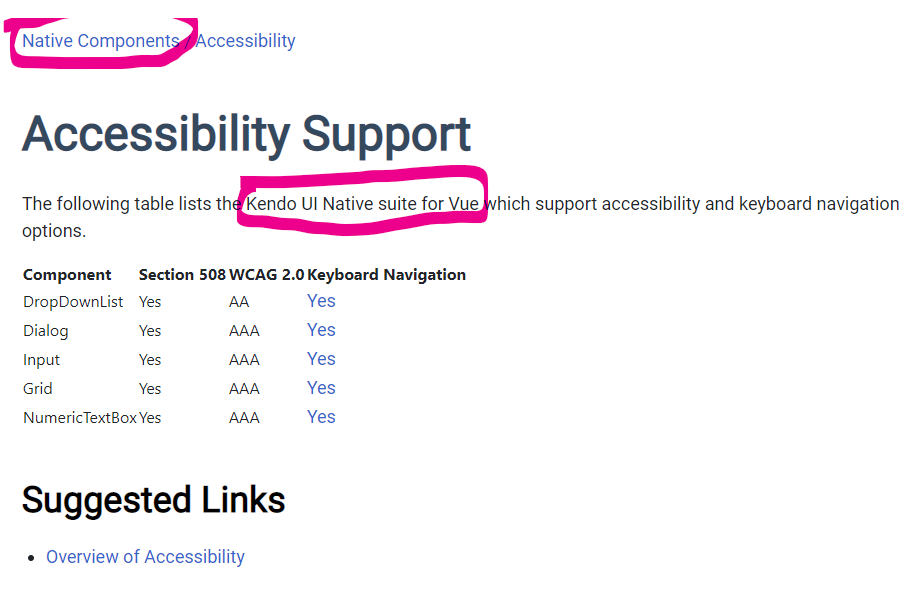
The Accessibility Support page for Kendo UI for Vue Native Components (https://www.telerik.com/kendo-vue-ui/components/accessibility/accessibility-compliance/) incorrectly implies that the Vue Native grid has keyboard navigation support. The page seems to be referring to native components as seen by the breadcrumb and the introduction text.
All of the items in the list except for the grid are linked to the Vue Native component. The "grid" item is linked to the Vue Grid Wrapper (https://www.telerik.com/kendo-vue-ui/components/grid-wrapper/keyboard-navigation/).
I believe there's already a (unplanned) feature request out there to add keyboard navigation features to the native grid, but in the meantime, please remove the grid from this page as it does not currently support full keyboard navigation.