

In current versions of Firefox, scrollbars do not longer reserve any space. In grids with locked columns, this leads to a double border at the right end of the grid's header:
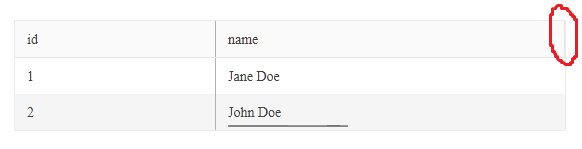
The problem only appears if locked columns are present and scrollbars use zero-width (Firefox-Default). This DOJO contains a minimum reproducible example.

Bug report
When the Add new Record button is clicked multiple times, the newly added row is not saved, when the 'Save' button is clicked.
Reproduction of the problem
- Open the Dojo - https://dojo.telerik.com/@NeliK/adURoNaH
- Click the 'Add new record' button at least twice.
- Try to edit the row and click the 'Save' button.
Current behavior
The row freezes and is not closed. If after clicking the 'Save' button the user clicks again the 'Add new record' the row is saved.
Expected/desired behavior
The row should be saved and closed when the 'Save' button is clicked, even if the 'Add new record' is clicked multiple times.
The issue is a regression starting with 2014.1.319 release
Environment
- Kendo UI version: 2024.2.514
- Browser: [all ]

Bug report
Copy Paste to Search Panel with `allowPaste` set to `true` in the grid is not working
Regression since 2024.1.130
Reproduction of the problem
Dojo: https://dojo.telerik.com/EnUpigUf/2
Try pasting a value in the Search input
Current behavior
The expand arrow disappears.
Expected/desired behavior
User shall be able to paste values to the search panel
Environment
Kendo UI version: 2024.1.130 or newer
jQuery version: 3.4.1
Browser: [all]
Reproduction steps:
Try to expand a group in this dojo:
Workaround:
Appending the following script right after loading the kendo scripts:
- https://dojo.telerik.com/aroxoYeB/6
kendo.ui.Grid.original_groupable = kendo.ui.Grid.prototype._groupable;
kendo.ui.Grid.prototype._groupable = function() {
    let that = this;
    kendo.ui.Grid.original_groupable.call(that);
    if (!kendo.support.isRtl(that.element)) {
        return;
    }

    if (that._isLocked()) {
        that.lockedTable.on("click.kendoGrid", ".k-grouping-row " + "a[class*='-i-caret-alt-right']", that._groupableClickHandler);
    } else {
        that.table.on("click.kendoGrid", ".k-grouping-row " + "a[class*='-i-caret-alt-right']", that._groupableClickHandler);
    }
}

Bug report
When the selectable.dragToSelect option is set to false, you can't assign a dragstart event on the Grid's rows.
Regression introduced with v2024.2.514
Reproduction of the problem
- Open this Dojo example - https://dojo.telerik.com/@martin.tabakov@progress.com/aROGEpaQ/3
- Try to drag a row
Current behavior
The dragstart from the dataBound event is not triggering
Expected/desired behavior
The dragstart event should be triggering
Environment
- Kendo UI version: 2024.3.806
- Browser: [all]
Bug report
When the selectable is set to "multiple, row", the default editable mode is enabled and the user tries to edit a cell, the editable cell is not closing
Reproduction of the problem
- Open the Dojo - https://dojo.telerik.com/@NeliK/IxUgEMUP or https://dojo.telerik.com/@NeliK/uyuhOFIK
- Edit a cell and click on another cell to edit.
Current behavior
The first time the cell is closed as expected. However, every second edited cell is not closing.
Expected/desired behavior
The edited cell should close.
The issue is a regression starting with the 2024.2.514 version
Environment
- Kendo UI version: 2024.3.806
- Browser: [all ]
Bug report
When the Grid has media column configured and the browser is resized an error is thrown.
Reproduction of the problem
- Run the Dojo: https://dojo.telerik.com/UFuJacem
- Resize a column
- Resize the browser window
Current behavior
An error: Uncaught TypeError: Cannot read properties of undefined (reading 'contains') is thrown.
Expected/desired behavior
There should be no error in the browser cosole.
The issue is a regression starting with 2024.3.806
Environment
- Kendo UI version: 2024.3.806
- Browser: [all ]
Have just tripped over an issue with grid checkboxes whereby they cannot be accessed via the keyboard.
To illustrate
- Run the following dojo
https://dojo.telerik.com/ojODosUL
- Select any checkbox then try tabbing to the next ... It doesn't happen.
If you look at the checkboxes using the browser's dev tools you will see the header and cell checkbox inputs have been assigned the attribute tabindex="-1" so it's no wonder they cannot by accessed.
This regression seems to have been introduced with version 2022.2.802
Looking at the release notes for this version I don't see any mention of this breaking change so it looks like its another bug which has been kicking around for a while which your QA accessibility testing hasn't picked up on.
Regards
Alan
Bug report
When the filterable mode is enabled in the Grid and the user has to scroll to the needed column, then the Column Menu autocloses right after a column is selected or deselected in the column list in the ColumnMenu. The issue appears only with 'classic' mode.
Reproduction of the problem
Current behavior
The ColumnMenu immediately closes. The ColumnMenu does not close when it is used for the initially visible columns.
Expected/desired behavior
The ColumnMenu should not close. The behavior should be consistent for all the columns.
The issue is a regression starting with 2022 R1 (2022.1.119) release
Environment
- Kendo UI version: 2024.3.806
- Browser: [all ]
Bug report
Grid row resizing, locked columns, and incell editing breaks row resizing
Reproduction of the problem
Open the Dojo - https://dojo.telerik.com/FxOcPHdy
1. Resize 2nd row2. Click on the second row to edit Ship Country
3. Tab out of the cell and notice the jump that occurs where the enlarged row becomes shorter again.
Expected/desired behavior
The resized row shall retain its height
Environment
Kendo UI version: 2024.3.806
jQuery version: 3.4.1
Browser: [all ]
Bug report
When there is a frozen command column configured in the Grid and the user groups by a column, the frozen column is autoresized and has incorrect width.
Reproduction of the problem
- Open the Dojo - https://dojo.telerik.com/VexIXpkO.
- Group the Grid by a column, for example, 'ProductName'.
- Click the 'Edit' command button.
Current behavior
The frozen column is changing its width, it gets narrower. Thus, in some scenarios, the 'Cancel' button in the edited row may not be entirely visible.
Expected/desired behavior
The frozen column width should remain unchanged.
The issue is a regression starting width 2024.3.806
Environment
- Kendo UI version: 2024.3.1015
- Browser: [all ]
Bug report
Currently, if you focus the command buttons, pressing tab will navigate to the buttons on the next row.
Reproduction of the problem
- Open this dojo example - https://dojo.telerik.com/lmIJIUCH/2
- Click on the cell containing the command buttons on the first row
- Press enter to focus the Edit button
- Press tab multiple times.
Current behavior
The focus will move to the buttons on the next row.
Expected/desired behavior
When the focus is on the Delete button, pressing Tab should return the focus to the current cell so that you can navigate to the remaining cells on the same row.
Environment
- Kendo UI version: 2024.3.1015
- Browser: [all]
Bug report
rowspan and locked columns misaligns rows in non-locked table
Reproduction of the problem
Dojo: https://dojo.telerik.com/BqAphtbF
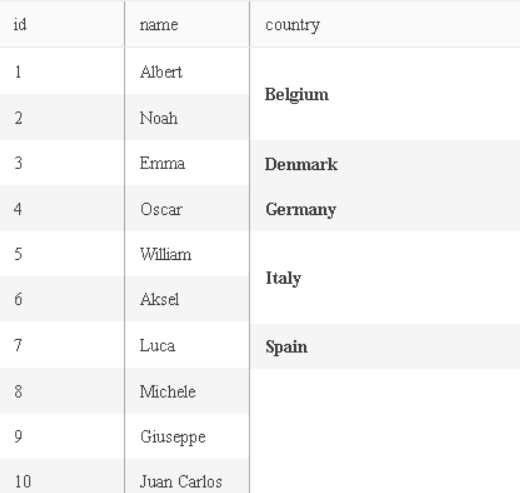
Expected/desired behavior
Rows shall be aligned
Worakround
Define a dummy column
{
  field: "country", width: 0
 }
Dojo: https://dojo.telerik.com/AeYBdQFO
TicketID: 1673441
Environment
jQuery: 3.4.1
Kendo UI version: 2024.4.1112
Browser: [all]
Bug report
The last column of the Grid is darker in color when a hidden column is sorted through the DataSource.
Reproduction of the problem
- Run https://dojo.telerik.com/UhFxSjVc/2
- Inspect the last column
Current behavior
k-sorted class is added to the last col of the colgroup. The issue is triggered by this line of code in the Kendo ColumnSorter
table.find("col:not(.k-group-col):not(.k-hierarchy-col)").eq(headerIndex).toggleClass("k-sorted", dir !== undefined$1);

Expected/desired behavior
The class should not be added if the column that is sorted is hidden.

Environment
- Kendo UI version: 2024.4.1112
- Browser: all
- This issue is observed with (NVDA, JAWS and Narrator) using down arrow key/Tab key.
- Press F12 key to open the developer tool and inspect the code.
- Open URL: https://demos.telerik.com/kendo-ui/grid/filter-menu-customization in Edge browser.
- Navigate to the Filter icon present in the city/Title/Birth date column header.
- Press F12 to open Dev tool and inspect the code for Filter button.
- Observe whether correct role is defined for "Filter" button or not.
Bug report
Regression with 2025.1.211
Reproduction of the problem
More info in Dojo: https://dojo.telerik.com/YLgJCnaL
Environment
jQuery: 3.4.1
Kendo UI version: 2025.1.211
Browser: [all]

Bug report
When you filter a date field in the Grid, picking a date from the first filter component will result in the value being passed to the second filter component when you open the filter menu again.
Regression introduced with 2024.4.1112
Reproduction of the problem
- Open this Dojo - https://dojo.telerik.com/JJFYjYcw/5
- Open the Filter Menu and pick a date from the first filter component
- Press Filter, and then open the filter menu again to check the value of the second filter component
Current behavior
The value picked for the first filter component is being passed to the second as well.
Expected behavior
The value of the second filter should remain empty
Environment
- Kendo UI version: 2025.1.211
- Browser: [all]
Bug report
Reordering using clickMoveClick in the Grid is very inconsistent.
Reproduction of the problem
- Open the Drag and Drop Grid demo - https://demos.telerik.com/kendo-ui/grid/drag-drop
- Try reordering a row using click-move-click
Current behavior
The targeted row is not being reordered
Expected behavior
The targeted row should be reordered
Environment
- Kendo UI version: 2025.1.211
- Browser: [all]
Bug report
Grid's loader gets lost in the scrollable area height is greater than the viewport height
Reproduction of the problem
Dojo: https://dojo.telerik.com/hqknEyYx/2
Run and click on Export to Excel button
Worakround: https://dojo.telerik.com/gSsYgQpZ
excelExport: function (e) {
          let gridHeight = $("#grid").height();
          if (gridHeight < 700) {
            $("div.k-loader-container-inner").addClass("smallHeight");

          } else {
            $("div.k-loader-container-inner").addClass("biggerHeight");
          }
        }
...
<style>
        div.loaderPosition {
          position: absolute;
          top: 50%;
          left: 50%;
          transform: translate(-50%, -50%);
        }
      div.biggerHeight {
        position: absolute;
          top: 50vh;
          left: 50%;
          transform: translate(-50%, -50%);
      }
    </style>
Environment
Kendo UI version: [all[
jQuery version: 3.4.1
Browser: [all]
Bug report
When the Grid is in RTL mode and has horizontal scroll it does not autoscroll when the user try to reorder columns.
Reproduction of the problem
- Open the Dojo - https://dojo.telerik.com/kmwtfkRd
- Try to reorder the columns.
Current behavior
The horizotnal scroll does not move when dragging. In non-rtl mode the horizontal scroll autoscrolls while dragging a column.
Expected/desired behavior
The behavior in RTL mdoe should be consistent with non-rtl. The horizontal scroll should move when dragging a column.
Environment
- Kendo UI version: 2025.1.227