

Hi,
The current behavior allows adding of additional content, but the checkbox is always rendered inside. The behavior should be similar to the Grid as when the checkbox column is used with a cell template it doesn't render the checkbox inside the column. Example in Grid component:
https://stackblitz.com/edit/angular-44syd7?file=src%2Fapp%2Fapp.component.ts
<kendo-grid-checkbox-column>
    <ng-template kendoGridCellTemplate let-dataItem let-rowIndex="rowIndex">
        My content
    </ng-template>
</kendo-grid-checkbox-column>
Thank you for your consideration.

The drag selection is enabled immediately after dragging the cursor a little (1-2px). This causes issues when a row is expanded/collapsed first then clicking the checkbox as sometimes, the cursor is dragged in the checkbox. Then drag selection resets the previously selected rows. Here is a screencast of the issue:
https://screenrec.com/share/y6pPGWjUZH
- Expand a row
- Click and drag the cursor in the checkbox (1-2px)
https://stackblitz.com/edit/angular-qnaphv-2nszye
The drag selection should not be enabled.
The Grid has a logic for enabling the drag selection after N-pixels of dragging. Could be reused in TreeList as well.
Dear Telerik Support Team,
would it be possible to add Constrained Mode support for the TreeList, given that it already exists for the Grid?
The Grid's resizable input accepts "boolean | ResizeMode", so resizable="constrained" keeps the overall table width fixed while resizing. The TreeList's resizable input is boolean only, and we could not find an equivalent option.
In our application, Grid and TreeList are wrapped by two components that are supposed to look and behave identically. Without constrained mode, shrinking a TreeList column leaves empty space to the right of the table whenever no horizontal scroll bar is present; the table stops filling the available width, whereas a grid next to it still does.
We are currently working around this issue by adding an additional spacer column, but that relies on internal DOM details of the TreeList and is likely to break with future updates. Native support would allow us to remove the workaround.
Tested with version 23.4.0; the public API docs suggest this is still the case in the latest release.
Thanks a lot in advance!
Hi Telerik Support Team,
I would like to request a feature enhancement for the Kendo UI for Angular TreeList component, specifically regarding the selection mechanisms.
Feature Request:
Please consider adding a (selectAllChange) event emitter to the <kendo-treelist-checkbox-column> component, similar to how selection events are handled or how other advanced components expose header checkbox interactions.
Use Case / Motivation:
Currently, when a user clicks the "Select-All" checkbox in the header, it is difficult to intercept this specific action efficiently to run custom business logic, perform secondary async operations, or manually update external states that depend strictly on the "all selected/unselected" toggle.
While we can listen to general selection changes on the TreeList, having a dedicated (selectAllChange) event that emits the current state (e.g., true, false, or even a custom event object) would provide much cleaner control over the application state, especially in complex data-binding scenarios.
Proposed Syntax:
<kendo-treelist-checkbox-column
    [showSelectAll]="true"
    (selectAllChange)="onSelectAllChange($event)">
</kendo-treelist-checkbox-column>
When enabling the showSelectAll option in a checkbox column on the TreeList component, a checkbox is rendered with the TreeListSelectAllCheckboxDirective. In its constructor, this directive includes some logic that causes the TreeList to instantiate a new ViewCollection every time a selection change occurs. However, the call to ViewCollection.loadView() does not pass the service responsible for determining expanded nodes, so the default fallback (which returns true for all nodes) is used.
Problem
As a result, every checkbox interaction triggers fetchChildren() for all nodes, even those that were never expanded or loaded. This leads to:Unnecessary and potentially expensive backend calls
Performance degradation, especially with large datasets
Inefficient "select all" logic that does not respect the current loaded/visible state
This behavior appears to ignore the fact that TreeList is configured for remote data binding with lazy-loaded children.
Expected Behavior
showSelectAll should only evaluate the currently loaded and visible itemsfetchChildren() should not be called for every nodeIntegration with remote/lazy-loaded data should be respected
Suggested Solutions
Update TreeListSelectAllCheckboxDirective to properly integrate with the expanded node detection logic or allow injection of a custom service.
Provide an override or callback to control the behavior of the "select all" checkbox manually in remote scenarios.
Steps to Reproduce
Configure a TreeList with hasChildren and children to fetch child nodes lazily.
Enable selection with checkbox column and showSelectAll: true.
Click any checkbox inside the TreeList.
Observe that fetchChildren() is triggered for all nodes, not just expanded ones.
StackBlitz repro:
Open console and click on the first cell.
https://stackblitz.com/edit/angular-e2ai4pjx?file=src%2Fapp%2Fapp.component.ts,angular.json
Hello,
It would be great to have the same state management functionality in the TreeList component as provided for the Grid component.
https://www.telerik.com/kendo-angular-ui/components/grid/persist-state
As a minimum saving and restoring columns state (visibility, width, order, sort, ...) should be provided.
Best regards,
Holger
Provide sticky rows functionality for the TreeList, just like the one available for the Grid:
https://www.telerik.com/kendo-angular-ui/components/grid/rows/sticky#setup
It would be useful to see the parent row when scrolling through its child rows.
Provide the ability to customize the drag handle for the row reordering of the TreeList, similar to the available Grid feature:
Hi,
We've noticed a significant difference in how the "Select All" checkbox functions in the Grid and TreeList when paging is enabled.
Our application uses both components, and users expect them to behave consistently. However, we’ve identified several issues:
1. Inconsistent User Expectations
In the Grid, "Select All" applies only to the current page.
In the TreeList, "Select All" applies to all pages, including hidden rows.
This inconsistency can confuse users who switch between these components, leading to unexpected behavior and frustration.
2. Confusing Bulk Actions
In the Grid, users understand that selections are limited to the visible page.
In the TreeList, users might unknowingly select thousands of records, potentially causing unintended bulk updates or performance issues.
3. Risk of Data Loss or Errors
Users assuming the TreeList behaves like the Grid might:
Select all rows, perform an action (e.g., delete or update), and unintentionally affect all pages instead of just the current one.
This can lead to accidental data loss or incorrect modifications.
We need a consistent approach to "Select All" behavior across both components to prevent confusion, errors, and performance issues.
Expected behavior
If "Select All" is checked, it should:
- Select all visible rows on the current page.
- Select all children of selected parents, even if those children are on other pages.
- Maintain selection when navigating to another page.
If it should be submitted as a bug, please let me know.
Provide the ability to customize the drag hint for the row reordering of the TreeList similarly to the available Grid feature:
It would be a useful feature if the TreeList had an isRowSelectable callback similar to the Grid.
https://www.telerik.com/kendo-angular-ui/components/grid/selection/row-selection#disabling-the-selection-for-specific-rows
https://www.telerik.com/kendo-angular-ui/components/grid/api/gridcomponent#isrowselectable
Expand the rows of the TreeList when filtering in order to reach the filtered value when nodes are collapsed.
The same is already available in the TreeView:
We would like to provide the same loading behaviour to our customers by displaying a custom loading spinner.
Therefore I request the feature for a "Angular TreeList Loading Template", like it is already available for kendoGrid.
Provide a built-in functionality for the TreeList that would allow binding the component to data with the following structure:
const data = [
{ path: ['node1', 'node2'], property1: value, property2: value },
{ path: ['node1', 'node2', 'node3'], property1: value, property2: value },
];
The structure provides particular paths for the leaf nodes (last children) that determine the hierarchy within the component and additional fields that correspond to the columns' definition of the component.
Hi Kendo Team,
Could you add a checkboxOnly functionality to the TreeList component selection SelectableSettings => checkboxOnly setting similar to the Grid component SelectableSettings:
https://www.telerik.com/kendo-angular-ui/components/grid/api/SelectableSettings/#toc-checkboxonly
Thank you.
Hi, Team!
I would like to request functionality that would allow the rendering of connection lines between the items of the TreeList. This would allow the better visualization of the parent-child relationships:
Hello Telerik Team,
I am currently using your TreeList Component with the CheckboxColumnComponent.
Unfortunately it is not possible to configure the CheckboxColumnComponent to show the indeterminate state of items in the checkboxes.
On further research I discovered, that your TreeView Component supports this feature.
The following Screenshot has the TreeView Component showing the indeterminate state of the Item "Furniture".

(Screenshot was taken from one of your own examples here: https://www.telerik.com/kendo-angular-ui/components/treeview/checkboxes/#toc-setup)
Comparing it with a TreeList that has checkboxes in the next screenshot, you can see that the parentitem with an indeterminate state, in this case the item with the name "examples", just shows an empty checkbox.
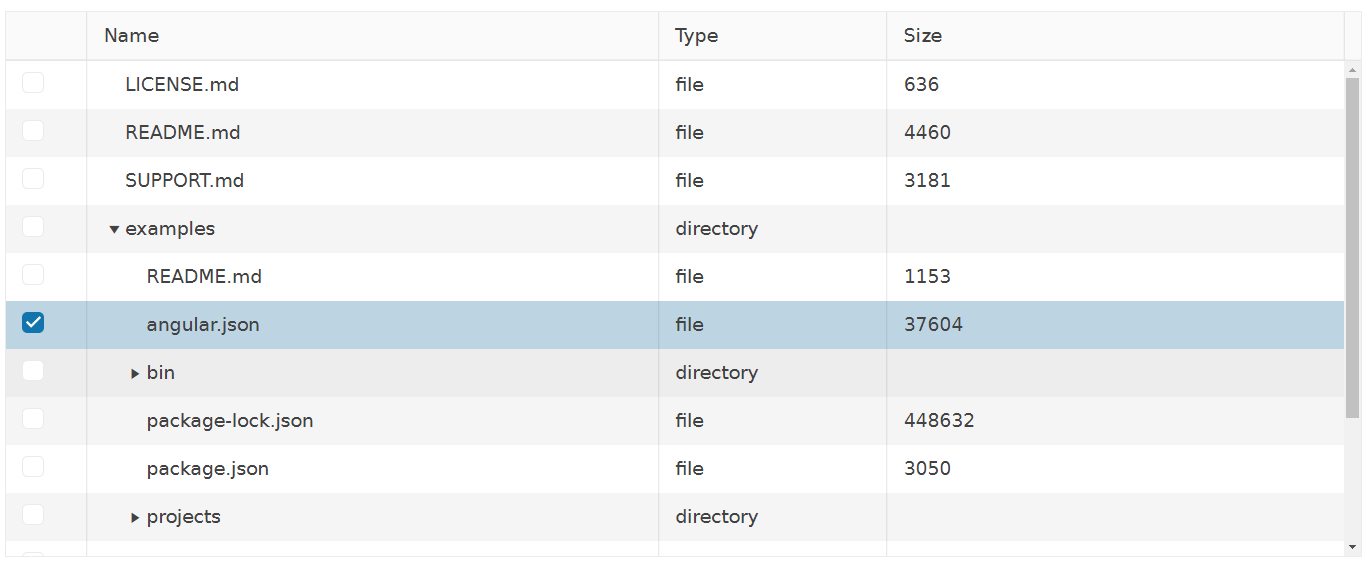
(Screenshot was taken from one of your own examples here: https://www.telerik.com/kendo-angular-ui/components/treelist/selection/#toc-checkbox-selection-of-child-rows)
Sadly i am not able to switch to the TreeView at this point in time, due to some conflicts this would create concerning my requirements for apearance and features of the application. Thats why i have the following question for you:
Would you consider adding this feature of showing indeterminate states to the CheckboxColumnComponent that is used in the TreeList Component in the future? Or do you have any advice on how to achieve this look similar to checkboxes from the TreeView in the TreeList?
Thank you in advance and best regards
F.Jung