

Bug report
Reproduction of the problem
(bug report only)
1. Run this example: https://blazorrepl.telerik.com/cUaBGOOZ34pkp6wB57
2. Inspect the MultiSelect’s input.
3. Click within the component’s input area, to open its popup.
The issue is also reproducible in the other dropdown components: https://blazorrepl.telerik.com/GUurGmvw32oPqGYu03
Current behavior
(optional)
When the dropdown opens, an aria-controls attribute is applied to the MultiSelect’s input. Its value does not match any existing DOM element.
Expected/desired behavior
The value of the aria-controls attribute should point at an existing element (e.g., the popup’s list element: https://www.telerik.com/blazor-ui/documentation/components/multiselect/accessibility/wai-aria-support#multiselect-wrapping-element ). But in this case the MultiSelect is not bound to data and a list element is not rendered in the popup.
Environment
- Kendo/Telerik version: 14.1.0
- jQuery version:
- Browser: [all ]
I was hoping to use the new AllowCustom feature to let users name a few areas, save those names in the backend and later show them as preselected when the user comes back so they don't have to retype the names every time they do an operation. But alas, the AllowCustom seems to only allow preselecting from what's in the Data list of values.
So code like below doesn't actually show a chip for Rome even though it's preselected. There is a workaround of setting the Data property to a list that contains the custom values I need preselected, but it feels clumsy and with the custom values I feel Multiselect should also check the selected values list for chips to render.
<TelerikMultiSelect
   @bind-Value="@SelectedCities"
   TItem="string" TValue="string"
   AllowCustom="true"
   Width="400px">
</TelerikMultiSelect>

<span>Selected: @SelectedCities.Count</span>

@code {
    private List<string> SelectedCities { get; set; } = new() {"Rome"};
}
Here are some details on the issue I am referring to:
- The problem only occurs when there is at least one item selected.
- If the focus is on the chip/selected item, you can properly navigate back to the previous input with Shift+Tab.
- If the focus is on the input, though, then you cannot use Shift+Tab to navigate back to the previous input/focusable element.
Reproduction: https://blazorrepl.telerik.com/GJkdbBvJ44uuG3fF40.

The OnBlur event does not fire after removing an item wehn using TagMode="@MultiSelectTagMode.Single"
I used this snippet in the Blazor REPL to reproduce the issue:
<p>@OnBlurMessage</p>
<TelerikMultiSelect Data="@Countries"
                    @bind-Value="@SelectedCountries"
                    TagMode="@MultiSelectTagMode.Single"
                    Placeholder="Enter Balkan country, e.g., Bulgaria"
                    Width="350px"
                    ClearButton="true"
                    AutoClose="false"
                    OnBlur="OnBlurHandler">
</TelerikMultiSelect>

@code {
    private List<string> Countries { get; set; } = new List<string>();

    private List<string> SelectedCountries { get; set; } = new List<string>();
    string OnBlurMessage {get; set;} = "";
    int i;

    protected override void OnInitialized()
    {
        Countries.Add("Albania");
        Countries.Add("Bosnia & Herzegovina");
        Countries.Add("Bulgaria");
        Countries.Add("Croatia");
        Countries.Add("Kosovo");
        Countries.Add("North Macedonia");
        Countries.Add("Montenegro");
        Countries.Add("Serbia");
        Countries.Add("Slovenia");
        base.OnInitialized();
    }

    void OnBlurHandler()
    {
        OnBlurMessage = $"OnBlurHandler touched {++i} times";
    }
}
Steps to reproduce:
- Select an item from the list then click out of the control. Note that the comments shows "OnBlurHandler touched 1 times".
- Click the x for the "1 item(s) selected" tag then click outside of the control. Note that the comment still shows "OnBlurHander touched 1 times".
- Click into the control then outside of control. Note that the comment is updated to show "OnBlurHandler touched 2 times".
The OnBlur event should fire after step 2.
Attached is a short video clip of what I see.

By design, the filter should be cleared when the user blurs the component. The filter is currently persisted and this is not correct.
Reproducible in the filtering demo.
When I click on the CheckBox's label, "Select All," the dropdown closes. While if I click the TelerikCheckBox itself, it remains open.
===
TELERIK EDIT
Please use the built-in Select All functionality of the MultiSelect. It doesn't exhibit the described problem.
For other scenarios that require a checkbox in the HeaderTemplate, Possible workarounds include:
- Wrap the clickable UI in the MultiSelect HeaderTemplate in an element with a tabindex attribute: https://blazorrepl.telerik.com/mfOlnvFk40G8PElJ33
- Cancel the MultiSelect OnClose event conditionally: https://blazorrepl.telerik.com/QpYvxvla44M3nsdp57
I have set a small size to the MultiSelect. I noticed that the Summary Tag that contains the "1 more selected" text does not change - its size always remains the same regardless of the component size.
Reproduction: https://blazorrepl.telerik.com/cxFvPxvh58SMoekS04.
The Roundness setting of the MultiSelect also does not affect the summary tag.
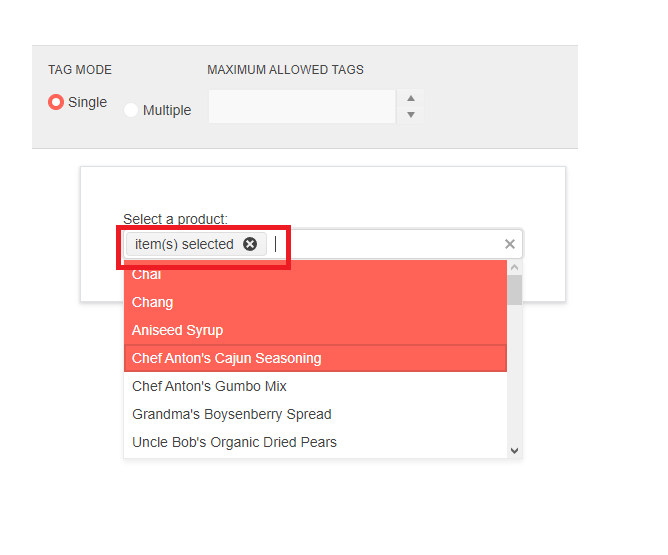
When AutoClose is set to false and you select more than one item, then only the first one will be highlighted in the popup. Items are selected and present in the input but are visually highlighted.
Reproduction
1. Run this REPL sample2. Select more than one item from the drop-down
3. Only the first selected item is highlighted as such
4. Video example
Current
Not all selected items are highlighted, which does not match the Input.
Expected
All selected items in the drop-down should be highlighted.
Testing this Select All Checkbox sample in Safari produces a different result compared to other browsers.
Click on the CheckBox in the MultiSelect Header Template closes the popup in Safari. In other browsers (e.g. Chrome, Firefox) the popup remains open after checking the SelectAll CheckBox.
To reproduce:
- Use the Local Data code snippet
- Open the popup
- Scroll down
- Close the popup
- Open the popup again
- Blank space will be rendered above the visible items.
Description
In Firefox, there are occasions in which multiple items remain focused (k-focus class is not removed from the blurred item)
Reproduction (if bug)
- Create a multiselect and set AutoClose="false".
- Open the component and select a few items.
- Close the component.
- Open the component and select a new item.
- Two items have the k-focus class.
Second related case:
- Create a multiselect and set AutoClose="false".
- Open the component and navigate up and down with the keyboard arrows.
- Select an item.
- The last focused item with the arrows is focused as well as the newly selected item.
Expected (if bug)
Only one item should have the k-focus class at a time.
Browser (if bug)
Firefox
Broken Telerik UI for Blazor version (if bug)
3.5.0

Hi,
I would like checkbox support including the check all checkbox on the multiselect component like: https://docs.telerik.com/devtools/aspnet-ajax/controls/combobox/functionality/checkbox-support
The url below shows how to create custom checkboxes in the multiselect component but adding a check all checkbox in the headertemplate does not update the multiselect popup
When re-visiting the input when it has options selected as badges, using keyboard;
- to move between badges it say 'blank' (see: Multiselect options read as blank by AT [WCAG 1.3.1 level A] (telerik.com))
- does not tell you what you have already selected (if you don't tab to input and just use up or down it will read the options)
- adding and removing items the user is not informed how many options have been selected
First visit of options in drop down, using keyboard:
- each option is read as 'blank' in screen reader
- number of options not read out
I would like to have the ability to refresh the Multiselect Popup.
Currently, if the AutoClose="false" feature is applied and the items are programmatically selected, you cannot display them as selected while the Popup is opened. You need to close it first to accordingly update the selected items collection in it.
In the MultiSelect Component you have Item, Footer, and Header Template sub components. I see no way of providing a template for the selected items. This would be a very nice feature to have.
My specific use case it that I would like to add a tool tip to the selected tags.
Thanks