

The RadEditor Add Link dialog uses HTML tables for layout, but the tables are exposed with data-table semantics.
The dialog contains:
- An outer reControlsLayout table
- A nested reConfirmCancelButtonsTblLight table for the action buttons
- Hidden <caption>, <thead>, and <th> elements intended to describe the tables
- No role="presentation" or role="none" on the layout tables
Because these tables are used to arrange form fields and buttons rather than display tabular data, screen readers and automated accessibility tools may interpret them as data tables. The hidden headers are removed from the accessibility tree and do not provide useful table semantics. The nested table may also result in redundant or confusing table announcements.
This causes WCAG 2.1 accessibility findings related to table semantics, including F49 and F91 under Section 508.
After upgrade from
<package id="Telerik.Licensing" version="1.6.16" targetFramework="net472" />
<package id="Telerik.UI.for.AspNet.Ajax.Net462" version="2025.3.825" targetFramework="net472" />
to
<package id="Telerik.Licensing" version="1.6.40" targetFramework="net472" />
<package id="Telerik.UI.for.AspNet.Ajax.Net462" version="2026.1.225" targetFramework="net472" />
we started experiencing the following error:
1. Add editor with ToolbarMode="RibbonBarShowOnFocus", no code-behind is required
        <telerik:RadEditor ID="Editor" runat="server" Width="100%"
            ToolbarMode="RibbonBarShowOnFocus">
        </telerik:RadEditor>
2. Open page, editor is empty and "Design" tab is active
3. Click on "Html" tab. Important: don't click on the editor content area while "Design" tab is active!
4. Paste some html, e.g.
<p>Your third Quarter Dining Rewards are Ready!</p>
5. Click to "Design" tab. Content is not rendered, editor is broken.
6. Find error in console
ScriptResource.axd?d=SIX1nT3k5ctYiH_Z5iBDXSZnshOXvXkzvSku5HLBqZlwfCmxfuwQE-bsvfCtuJcU8Kf5mMmqIz4_-haUfplj_Y2fBjNYHTB6sDwvO7dqA9dlR0fcUTx4578VpqHDjGrfk4WQ4Qs5nyG4zIAFDPwYjQ2&t=7fbf35ab:1 Uncaught TypeError: Cannot read properties of null (reading 'commonAncestorContainer')
at Object.getState (ScriptResource.axd?d=SIX1nT3k5ctYiH_Z5iBDXSZnshOXvXkzvSku5HLBqZlwfCmxfuwQE-bsvfCtuJcU8Kf5mMmqIz4_-haUfplj_Y2fBjNYHTB6sDwvO7dqA9dlR0fcUTx4578VpqHDjGrfk4WQ4Qs5nyG4zIAFDPwYjQ2&t=7fbf35ab:1:143451)
at Object.getToolState (ScriptResource.axd?d=SIX1nT3k5ctYiH_Z5iBDXSZnshOXvXkzvSku5HLBqZlwfCmxfuwQE-bsvfCtuJcU8Kf5mMmqIz4_-haUfplj_Y2fBjNYHTB6sDwvO7dqA9dlR0fcUTx4578VpqHDjGrfk4WQ4Qs5nyG4zIAFDPwYjQ2&t=7fbf35ab:2:7097)
at Object.setRibbonBarToolState (ScriptResource.axd?d=SIX1nT3k5ctYiH_Z5iBDXSZnshOXvXkzvSku5HLBqZlwfCmxfuwQE-bsvfCtuJcU8Kf5mMmqIz4_-haUfplj_Y2fBjNYHTB6sDwvO7dqA9dlR0fcUTx4578VpqHDjGrfk4WQ4Qs5nyG4zIAFDPwYjQ2&t=7fbf35ab:3:124809)
at Object._onEditorSelectionChange (ScriptResource.axd?d=SIX1nT3k5ctYiH_Z5iBDXSZnshOXvXkzvSku5HLBqZlwfCmxfuwQE-bsvfCtuJcU8Kf5mMmqIz4_-haUfplj_Y2fBjNYHTB6sDwvO7dqA9dlR0fcUTx4578VpqHDjGrfk4WQ4Qs5nyG4zIAFDPwYjQ2&t=7fbf35ab:3:124488)
at Array.<anonymous> (MsAjaxJs?v=D6VN0fHlwFSIWjbVzi6mZyE9Ls-4LNrSSYVGRU46XF81:1:2148)
at MsAjaxJs?v=D6VN0fHlwFSIWjbVzi6mZyE9Ls-4LNrSSYVGRU46XF81:1:50368
at Object.raiseEvent (ScriptResource.axd?d=TDVjdgRbdvNAY3tnbizUcIjfDUXiq5ixpnBN0VcDALLSiZ3CMr6-87hfvIaN_0cz2j3vISyRnNQUUXuS5a7lBoLr1EhUzo3XC7p-5gq6HdUFDfDXoZF6FnTKoxdUmGE70&t=7fbf35ab:3:34795)
at Function.callBaseMethod (MsAjaxJs?v=D6VN0fHlwFSIWjbVzi6mZyE9Ls-4LNrSSYVGRU46XF81:1:8931)
at Object.raiseEvent (ScriptResource.axd?d=SIX1nT3k5ctYiH_Z5iBDXSZnshOXvXkzvSku5HLBqZlwfCmxfuwQE-bsvfCtuJcU8Kf5mMmqIz4_-haUfplj_Y2fBjNYHTB6sDwvO7dqA9dlR0fcUTx4578VpqHDjGrfk4WQ4Qs5nyG4zIAFDPwYjQ2&t=7fbf35ab:1:326487)
at Object.set_html (ScriptResource.axd?d=SIX1nT3k5ctYiH_Z5iBDXSZnshOXvXkzvSku5HLBqZlwfCmxfuwQE-bsvfCtuJcU8Kf5mMmqIz4_-haUfplj_Y2fBjNYHTB6sDwvO7dqA9dlR0fcUTx4578VpqHDjGrfk4WQ4Qs5nyG4zIAFDPwYjQ2&t=7fbf35ab:2:26992)
This is a production issue so any quick fixes/workarounds will be greatly appreciated.

With JAWS
Paragraph Style button menu
Font Name button menu
Real Font button menu
Zoom button menu
With NVDA
Paragraph Style sub menu
Font Name sub menu
Real Font sub menu
Zoom sub menu
Using Alt+down arrow to expand the select option menu, using the arrow keys to navigate down the menu nothing is announced although you can visually see the focus highlight in the menu.
This is the same for the two screen readers JAWS and NVDA. Same result when testing on Edge and Chrome browsers.
Other menu options or expandable sections are having a similar issue for:
Paste Options
Foreground Color
Background Color
Paint Stripper
Insert Symbol
Insert Table
Module Manager this one is empty when it expands
Thank you.
The InsertLink light dialog has a typo in the for attribute of the URL label, causing a case mismatch with the input's id. This results in accessibility tools like Wave and SortSite reporting the URL textbox as an unlabeled control.
Steps to Reproduce
1. Add a RadEditor with EnableAriaSupport="true" to a page
2. Ensure the InsertLink tool is enabled (it is by default)
3. Click the InsertLink toolbar button to open the dialog
4. Run an accessibility audit using Wave, SortSite, or inspect the DOM
Expected Behavior
The label's for attribute should match the input's id attribute exactly, allowing accessibility tools to correctly associate the label with the input.
Actual Behavior
• Label has for="LinkURL" (uppercase "URL")
• Input has id="LinkUrl" (mixed case "Url")
Since HTML for/id matching is case-sensitive, the label is not properly associated with the input control.
Affected File
InsertLink.ascx
When RadEditor switches to HTML mode, a `<textarea>` with class `reTextArea` is dynamically created. This textarea lacks proper accessibility attributes, causing WCAG accessibility tools (e.g., Wave) to flag it as an unlabeled form control.
## Steps to Reproduce
1. Create a RadEditor with `EnableAriaSupport="true"`
2. Switch to HTML mode
3. Run Wave or similar accessibility checker
4. Observe the textarea is flagged as "missing form label"
## Expected Behavior
When `EnableAriaSupport` is enabled, the HTML mode textarea should have:
- `aria-label` attribute to identify its purpose
- `aria-hidden="true"` when in Design mode (hidden state)
## Fix
Added ARIA attributes in `_getHtmlModeTextarea()` and toggle `aria-hidden` in `_showTextArea()` based on `EnableAriaSupport` setting.
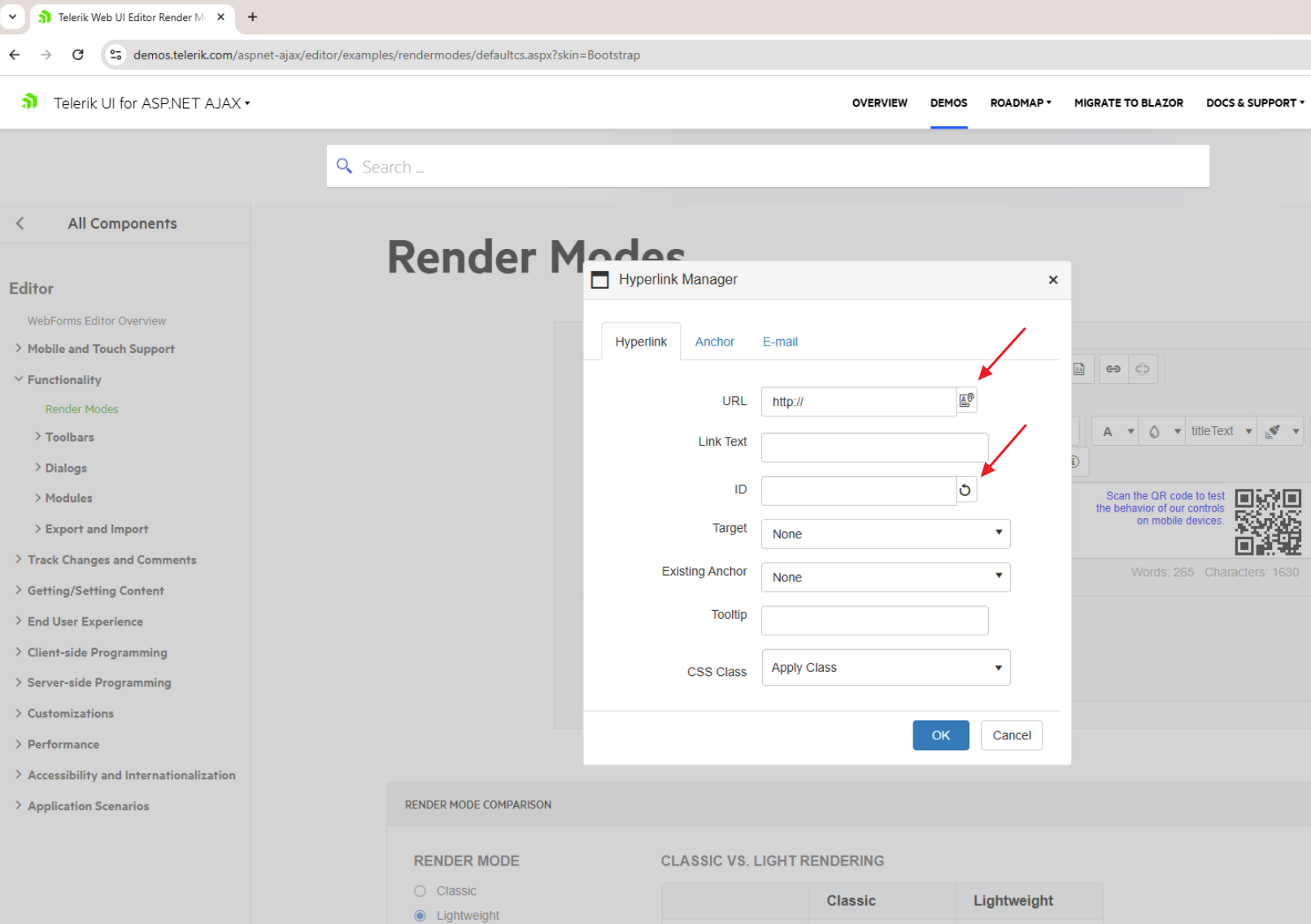
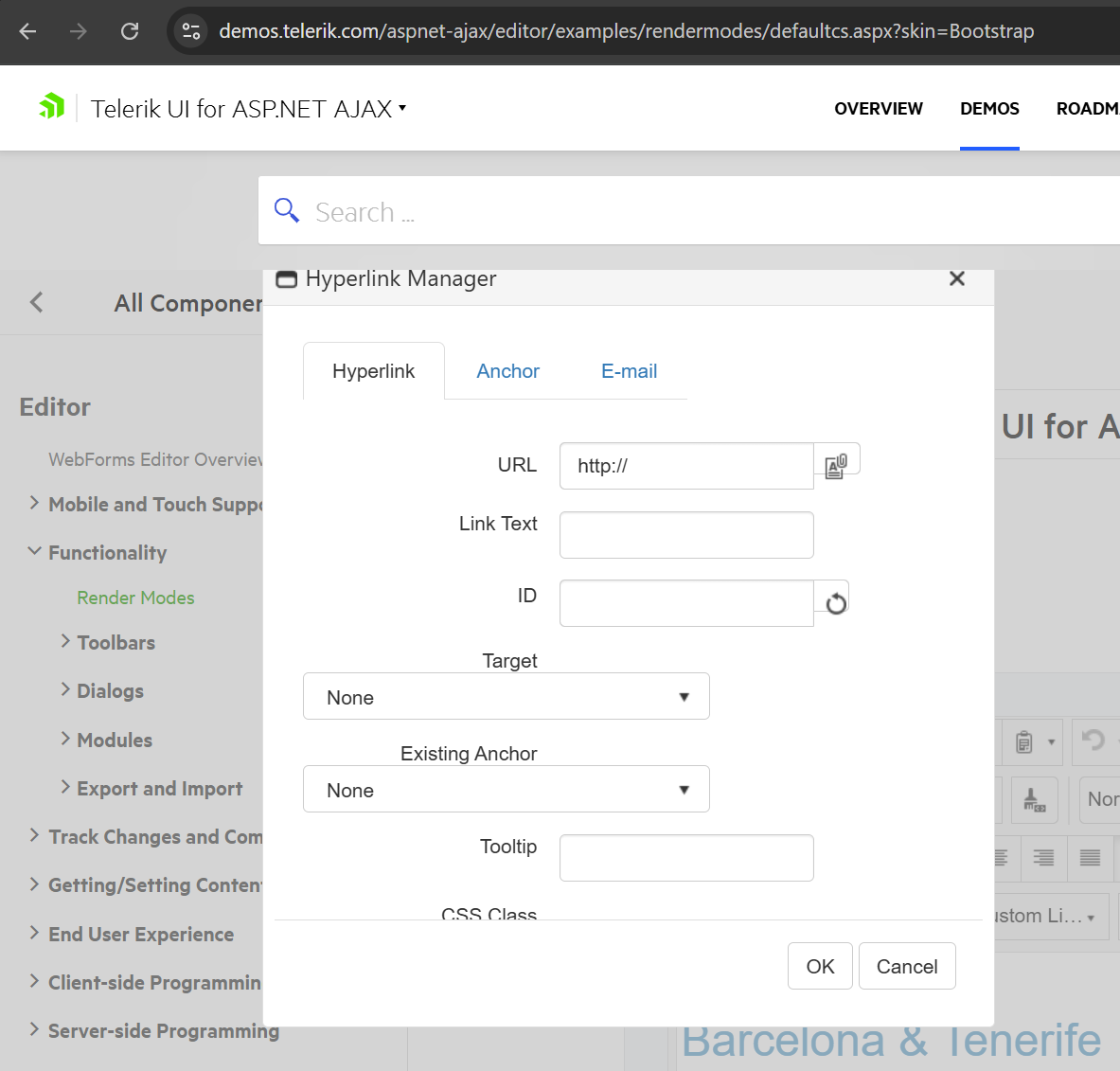
The sizes of the Document Manager & Generate ID buttons in the Hyperlink Manager dialog in Lightweight don't look correct - maybe they should be the same height as the textbox?
.png)
Problem
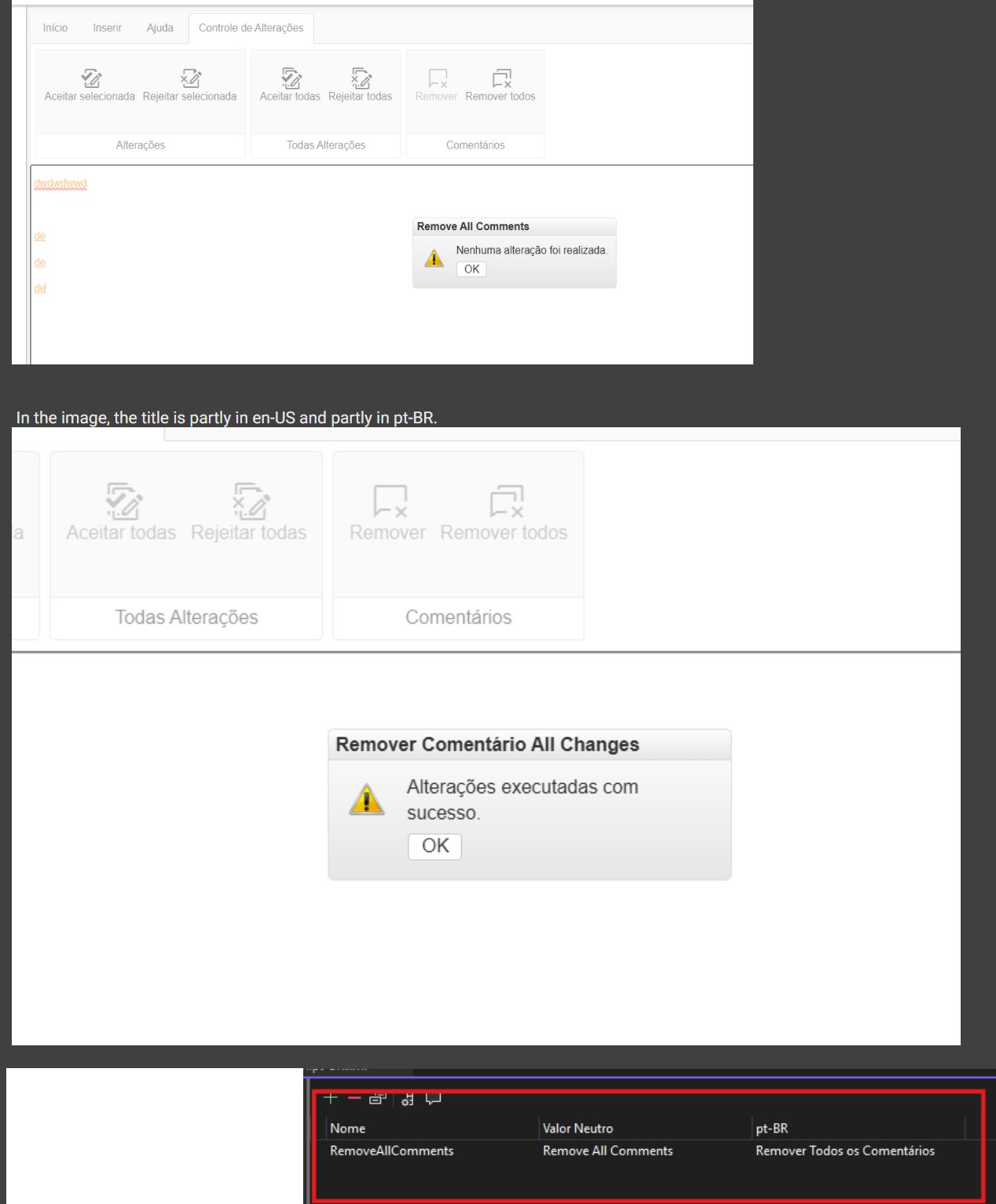
When using RadEditor with Track Changes and Comments features enabled and a non-English language setting (e.g., Language="pt-BR"), the confirmation and result dialog titles for bulk operations display mixed language content.
Affected dialogs:
- Remove All Changes
- Remove All Comments
- Accept All Changes
- Reject All Changes
Example of incorrect behavior:
- Expected title: "Remover Todas as Alterações" (Portuguese)
- Actual title: "Remover Comentário All Changes" (mixed Portuguese + English)
Steps to Reproduce
- Configure RadEditor with EnableTrackChanges="true" and EnableComments="true"
- Set Language="pt-BR" (or any non-English language)
- Add some track changes or comments to the content
- Click on "Remove All Comments" or use any bulk track changes operation
- Confirm the action by clicking OK
- Observe the dialog title in the result alert
Steps to reproduce:
1. Enable the PdfExportFilter filter
2. Open the page with RadEditor in the browser
3. Insert a table element
4. Select the Table in the Node Inspector and apply a width of 500px
5. Switch to HTML mode and you'll notice that the width attribute/inline style has gone
Dear support,
we've recently updated to the Telerik version 2025.4.1210.462 and are experiencing issues with the (relatively) new RadEditor filter EditorFilters.StripCssExpressions. In particular, setting the RadEditor.Content and rendering the RadEditor object drastically tanks performance in certain situations.
We're aware of the web.config setting to increase the Telerik.RegexMatchTimeout, but for a 79KiB content to be rendered basically instantaneously with the previously mentioned filter being explicitly disabled to take 23+ seconds to render if the filter is enabled is quite shocking to me.
Please find a simple sample page (including the content-value) attached.
We'd really like to use the new security features of the RadEditor, but given this performance impact, we'll be unable to ship this feature as-is.
(Off-topic: We're currently evaluating to re-enable the EditorFilters.StripJavaScriptUris which removed our base64-encoded images in the November release of Telerik, but got fixed with the December release.)
Thanks in advance for investigating this issue and I'll be awaiting your feedback.
Kind regards
Hi,
We need to add an aria-label attribute to the RadEditor toolbar link buttons to match the title attribute text. I have been successful using JQuery on other controls to improve accessibility, but this one is not working. It appears because the link button is not rendered since is a pseudo element using the ::before. I have been unable to inject the attribute on page load.
The issue is for screen readers the editor buttons are not announced when using the arrow key navigation which is called virtual mode. The buttons do announce when using the tab key which is called forms mode.
If this can be a bug fix it would benefit everyone, otherwise, if you have a code suggestions that is helpful. Image attached.
Thank you.

- In Design mode, select all text (Ctrl + A) and delete it.
- Switch to HTML mode.
- Switch back to Design mode.
- Press Ctrl + Z (Undo).
- The first Ctrl + Z has no effect; the deleted text is restored only after pressing Ctrl + Z a second time.
Steps to Reproduce
- Open a page containing RadEditor with some content in it
- In Design mode, select all text (Ctrl+A)
- Delete the selected text
- Switch to HTML mode
- Switch back to Design mode
- Press Ctrl+Z (Undo) a couple of times.
- A JavaScript error is thrown in the browser console
- The undo operation fails to restore the deleted content
- Error occurs in _updateBrowserRangeStart method when calling this.range.setStart(e, t)
Expected Result
- The undo operation should work without errors
- The previously deleted text should be restored
- No JavaScript errors should appear in the console

When using RadEditor with the StripDomEventAttributes content filter enabled, script execution can still occur when switching from HTML to Design mode.
Certain HTML and SVG elements containing attributes such as onload, onclick, or href/to values that start with javascript: are not fully sanitized before the editor’s content is rendered in Design view. As a result, embedded script code can run during the mode transition even though the anti-script filter is active.
Reproduction steps:
Add a RadEditor with the default filters:
<telerik:RadEditor runat="server" ID="RadEditor1"
ContentFilters="DefaultFilters,StripDomEventAttributes">
</telerik:RadEditor>
- Load the page.
- Switch the editor to HTML mode.
- Paste any of the following samples (look below)
- Switch to Design view
- Watch alerts
<svg/onload=alert(1)><svg>
<svg
onload=alert(1)><svg> # newline char
<svg	onload=alert(1)><svg> # tab char
<svgonload=alert(1)><svg> # new page char (0xc)
video link:- https://jam.dev/c/1516e16f-1f7c-4e89-8b19-368edabf5703
I have observed that when we're in the widget > selecting a cell from the table > clicking on Cell Properties > The top row design is not inherited.
video link:- https://jam.dev/c/ba52bff1-7459-44d6-a647-d3eb5cea07f3.
video link:- https://jam.dev/c/88c17904-c758-47ab-949c-d29b4775dc6d
If you click in the table (not the editor) and select Cell Properties > the wizard will display (highlight) the cell you selected in the table is it expected that when selecting table properties it always default to the left side first box but when selecting cell properties it will show the current cell which we are in.
video link:- https://jam.dev/c/c1cdf56c-53ab-4218-8774-65907b3efd6d