

The committed RadSpreadsheetRibbon_style.xaml renders the AI group unconditionally:
<telerikRibbon:RadRibbonGroup Header="AI">
Workaround:
private void HideAIButton()
{
    var aiButton = this.spreadsheetRibbon
        .ChildrenOfType<RadRibbonButton>()
        .FirstOrDefault(b => b.Text == "AI Tools");
    if (aiButton == null)
    {
        return;
    }

    var aiGroup = aiButton.ParentOfType<RadRibbonGroup>();
    if (aiGroup != null)
    {
        aiGroup.Visibility = Visibility.Collapsed;
    }
    else
    {
        aiButton.Visibility = Visibility.Collapsed;
    }
}
Steps to reproduce:
1. Open Word 2016 or later. Create a new blank document. Type any text. **File → Save As** → `original.docx`.2. Verify mode 15: rename `original.docx` to `.zip`, open `word/settings.xml`, confirm `<w:compatSetting w:name="compatibilityMode" ... w:val="15"/>`. Rename back to `.docx`.
3. Open Telerik's WPF Demos sample in Microsoft Store (RichTextBox demo). Open `original.docx`.
4. Without making any edit, click **Save** (or File → Save As) → `roundtrip.docx`.
5. Rename `roundtrip.docx` to `.zip` and open `word/settings.xml`. The value is now `<w:compatSetting w:name="compatibilityMode" ... w:val="14"/>`.

Since the last update, we receive often the following exception from our users log. I don't know exactly how to reproduce, but I know that when it happens, the user tries to click anywhere in the document and each time the exception is thrown. The users need to close and reopen the document to make it work again.
System.NullReferenceException: Object reference not set to an instance of an object. at Telerik.Windows.Documents.UI.DocumentPresenterBase.CaretPosition_PositionChanged(Object sender, EventArgs e) at Telerik.Windows.Documents.DocumentPosition.MoveToPosition(DocumentPosition newPosition) at Telerik.Windows.Documents.Selection.MouseSelectionHandler.UpdateSelectionAndCaretPosition() at Telerik.Windows.Documents.Selection.MouseSelectionHandler.RegisterDocumentMouseMove(Point position, SourceType source) at Telerik.Windows.Documents.UI.DocumentPresenterBase.HandleMouseMoveOnPosition(Point position, SourceType source) at Telerik.Windows.Documents.UI.DocumentPresenterBase.Owner_MouseMove(Object sender, MouseEventArgs e) at System.Windows.EventRoute.InvokeHandlersImpl(Object source, RoutedEventArgs args, Boolean reRaised) at System.Windows.UIElement.RaiseEventImpl(DependencyObject sender, RoutedEventArgs args) at System.Windows.Input.InputManager.ProcessStagingArea() at System.Windows.Input.MouseDevice.Synchronize() at System.Windows.Input.MouseDevice.PostProcessInput(Object sender, ProcessInputEventArgs e) at System.Windows.Input.InputManager.ProcessStagingArea() at System.Windows.Interop.HwndMouseInputProvider.ReportInput(IntPtr hwnd, InputMode mode, Int32 timestamp, RawMouseActions actions, Int32 x, Int32 y, Int32 wheel) at System.Windows.Interop.HwndMouseInputProvider.FilterMessage(IntPtr hwnd, WindowMessage msg, IntPtr wParam, IntPtr lParam, Boolean& handled) at System.Windows.Interop.HwndSource.InputFilterMessage(IntPtr hwnd, Int32 msg, IntPtr wParam, IntPtr lParam, Boolean& handled) at MS.Win32.HwndWrapper.WndProc(IntPtr hwnd, Int32 msg, IntPtr wParam, IntPtr lParam, Boolean& handled) at System.Windows.Threading.ExceptionWrapper.InternalRealCall(Delegate callback, Object args, Int32 numArgs) at System.Windows.Threading.ExceptionWrapper.TryCatchWhen(Object source, Delegate callback, Object args, Int32 numArgs, Delegate catchHandler)
We also had this case when we try programatically to move the caret (seems to be the same end result exception):
System.NullReferenceException: Object reference not set to an instance of an object.
at Telerik.Windows.Documents.UI.DocumentPresenterBase.CaretPosition_PositionChanged(Object sender, EventArgs e)
at Telerik.Windows.Documents.DocumentPosition.MoveToDocumentStart()
at Telerik.Windows.Documents.DocumentPosition.MoveToFirstPositionInDocument()
Can we have a floating Label on a RadComboBox and a RadMultiColumnComboBox, same as a WatermarkTextBox?
It is quite annoying to have on a same form a WatermarkTextBox and Combo boxes as they appearance are so different.

The new API can be similar to the ExceptionRaised event of RadFileDialogs.
Hi Team,
I have set up SSO and it's great so far. I have a feature request that would make it even better, and solve many large enterprise needs, is to have a way to integrate SCIM based license provisioning as well.
Right now, you still do need to manage licensed users on the Manage Licensed Users portal. A License Holder or License Manager needs to add a Developer to the account and assign them a license.
With SCIM integration, we could better manage the users and licensing on a larger scale, with automation and oversight on the enterprise-managed SSO identity.
Thank you,
Kevin

Windows 11
VS 2022
UI for WPF (2024 Q4)
.NET 8
Binaries.NoXaml\WPF80\Telerik.Windows.Controls.RichTextBox.dll (2024.4.1213.80)
I can create a docx file with Word that results in a null reference exception at
| Name | Value | Type | |
|---|---|---|---|
| StackTrace | " at Telerik.Windows.Documents.Layout.ParagraphLayoutBox.ArrangeOverride(SizeF finalSize) in Telerik.Windows.Documents.Layout\\ParagraphLayoutBox.cs:line 1174" | string |
Since this exception is in a threadpool that is doing layout, the exception cannot be caught and is not recoverable.
It is easy to reproduce (see attached file). First create a Word doc with a large image that is anchored. Then add a bookmark. Removing either the bookmark or the "square" text wrapping removes the exception.
The code to load the document and display it is very simple:
   private string? LoadDocx(
      string path)
   {
      string? msg = null;
      try
      {
         using var instream = File.OpenRead(path);

         var openXmlRadDocProvider =
            new Telerik.Windows.Documents.FormatProviders.OpenXml.Docx.DocxFormatProvider();

         var raddoc = openXmlRadDocProvider.Import(instream);
         RadRtb.Document = raddoc;
      }
      catch (Exception ex)
      {
         msg = ex.Message;
      }

      return msg;
   }
"RadRtb" is a "RadRichTextBox". This method returns fine. The exception happens later in a non-UI threadpool thread.
While I don't expect the component to correctly render EVERY Word document, I do expect it to not exception on a valid document. There must be a better way to handle this.

Dear Support-Team,
We have an issue with a translation on the spreadsheet print preview.
It shows there in the dropdown for the scaling several Netherland translations on a German system.
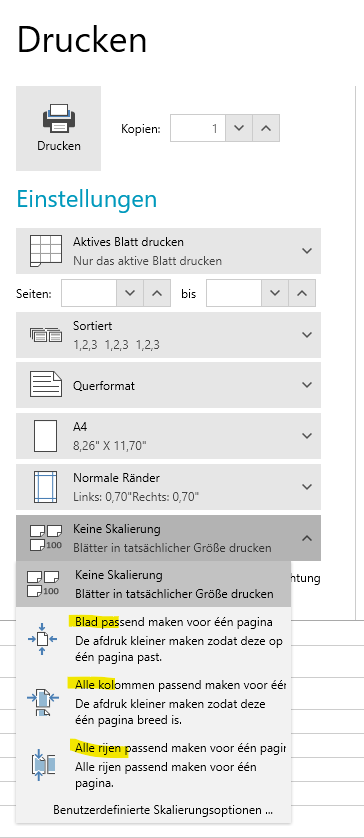
The text should be like:
1. Blatt für eine Seite anpassen
Den Ausdruck verkleinern, damit er auf eine Seite passt.
2. Alle Spalten passen auf eine Seite
Den Ausdruck verkleinern, so dass er eine Seite breit ist.
3. Alle Zeilen in eine Seite einpassen
Den Ausdruck verkleiner, so dass alle Zeilen auf eine Seite passen
Could there be a fix for this issue?
Kind regards,
Anna
The dialog and the watermark stating that no license is found are displayed, even when the license key is installed properly. This happens in addin projects, like Excel VSTO Add-in.
To workaround this use the TelerikLicensing.Register method to install your license script key.
public MyWpfUserControl()
{
    TelerikLicensing.Register("your-script-key");
    InitializeComponent();
}
Currently SvgImage does not support the following inner animation:
<svg xmlns="http://www.w3.org/2000/svg"
className="linesBox"
viewBox="0 0 4325 2626"
width="1200"
height="800"
>
<path
d="m 2806,792.50001 -13.5,16.5 -33,10 -19.5,6.5 -17,15.5 -19,1 -9,16 -29.5,-4.70812 -34,18.70812 -37.5,16 -1.5,18 -20.5,8"
id="path60"
fill="none"
stroke="blue"
stroke-dasharray="20 10"
stroke-dashoffset="0"
stroke-width="4">
<animate attributeName="stroke-dashoffset"
from="0" to="30"
dur="3s"
repeatCount="indefinite"/>
</path>
</svg>
Add support for the rest : 'translate', 'scale', 'skewx', 'skewy'
Are there any plans to release a Visual Studio 2022 theme for WPF? The Winforms UI has this theme, and I would like to have it for WPF as well.
Are there other themes on the roadmap that you could share?
Thanks!
--Darren
** Fixed with Telerik.Licensing 1.4.16 **
The build performance with new license validation (2025) is very poor. 2025 version takes about 5 sec. extra time to build. For small projects it takes 10x longer.
Test environment:
- Default WPF project created from template.
- Only one change: Nuget Reference in .csproj
- .NET 8
- Visual Studio 17.13.
Build times depending on the Version of Telerik Nuget:
<PackageReference Include="Telerik.Windows.Controls.Navigation.for.Wpf" Version="2025.1.211" />
11:25:47:071 Build started at 11:25...
11:25:47:189 1>------ Build started: Project: TelerikBuildTest, Configuration: Debug Any CPU ------
11:25:51:748 1>[Telerik and Kendo UI Licensing]
11:25:51:748 1> Telerik and Kendo UI License Key found at: C:\Users\...\AppData\Roaming\Telerik\telerik-license.txt (UserDirectory)
11:25:51:748 1> License issued at 2025-03-16 to e**********@....
11:25:51:748 1>[Telerik and Kendo UI Licensing]
11:25:51:748 1> Valid Telerik UI for WPF license found.
11:25:52:743 1>[Telerik and Kendo UI Licensing]
11:25:52:743 1> Telerik and Kendo UI License Key found at: C:\Users\...\AppData\Roaming\Telerik\telerik-license.txt (UserDirectory)
11:25:52:743 1> License issued at 2025-03-16 to e**********@...
11:25:52:743 1>[Telerik and Kendo UI Licensing]
11:25:52:743 1> Valid Telerik UI for WPF license found.
11:25:52:815 1>TelerikBuildTest -> C:\Users\....\source\repos\TelerikBuildTest\TelerikBuildTest\bin\Debug\net8.0-windows\TelerikBuildTest.dll
11:25:52:828 ========== Build: 1 succeeded, 0 failed, 0 up-to-date, 0 skipped ==========
11:25:52:828 ========== Build completed at 11:25 and took 05,892 seconds ==========
<PackageReference Include="Telerik.Windows.Controls.Navigation.for.Wpf" Version="2024.4.1213" />
11:26:33:405 Build started at 11:26...
11:26:33:581 1>------ Build started: Project: TelerikBuildTest, Configuration: Debug Any CPU ------
11:26:33:953 1>TelerikBuildTest -> C:\Users\...\source\repos\TelerikBuildTest\TelerikBuildTest\bin\Debug\net8.0-windows\TelerikBuildTest.dll
11:26:33:960 ========== Build: 1 succeeded, 0 failed, 0 up-to-date, 0 skipped ==========
11:26:33:960 ========== Build completed at 11:26 and took 00,633 seconds ==========
A compilation error occurs in a project that doesn't use any Telerik code, but it references a class library which installs the Telerik.Licensing NuGet package.
The error message from the class library project is the following:
C:\WINDOWS\Microsoft.NET\Framework\v4.0.30319\Microsoft.WinFx.targets(268,9): error MC1000: Unknown build error, 'Cannot resolve dependency to assembly 'Telerik.Licensing.Runtime, Version=1.4.6.0, Culture=neutral, PublicKeyToken=keyhere' because it has not been preloaded. When using the ReflectionOnly APIs, dependent assemblies must be pre-loaded or loaded on demand through the ReflectionOnlyAssemblyResolve event.'
To workaround this, you can add assembly references to the Telerik dlls in the main project (including Telerik.Licensing.Runtime), instead of using NuGet packages.
Alternatively, you can install the Telerik.Licensing NuGet package also in the class library.
<ItemGroup>
	<PackageReference Include="Telerik.Licensing" Version="1.4.*" />
</ItemGroup>
Note that with this approach you will see a message in the output that no license is installed, even if you have one. However, for now (versions from 1.4.6 to 1.4.12, which is the latest at the moment of writting this post), the error won't apply any compile or runtime restrictions on the UI or the functionality.