

Hi,
I have a question regarding RadGridView. When I edit a cell in GridView and then click on a button (outside of gridview) immediately (i.e I don't click on another cell to exit edit mode), the Gridview is still edit mode. Please refer to the short video named "Without Using EndEdit()" to easily understand my point here.
In order to exit the edit mode, I try the following code:
    Private Sub CustomGridView_LostFocus(sender As Object, e As EventArgs) Handles Me.LostFocus
        Me.EndEdit()
    End Sub
With this code, the gridview does exit the edit mode when I click on another button. But there is a problem with this method is that afterwards, I cannot edit the cell anymore. Please refer to the short video named "Using EndEdit()" to better understand the problem.
So my question here is, is there any way that I can exit edit mode when clicking on another button right after editing a cell?
Thank you for your help.
Best regards,
Tran
.jpg)
We got an issue with the Winforms grid view component while displaying a negative TimeSpan.

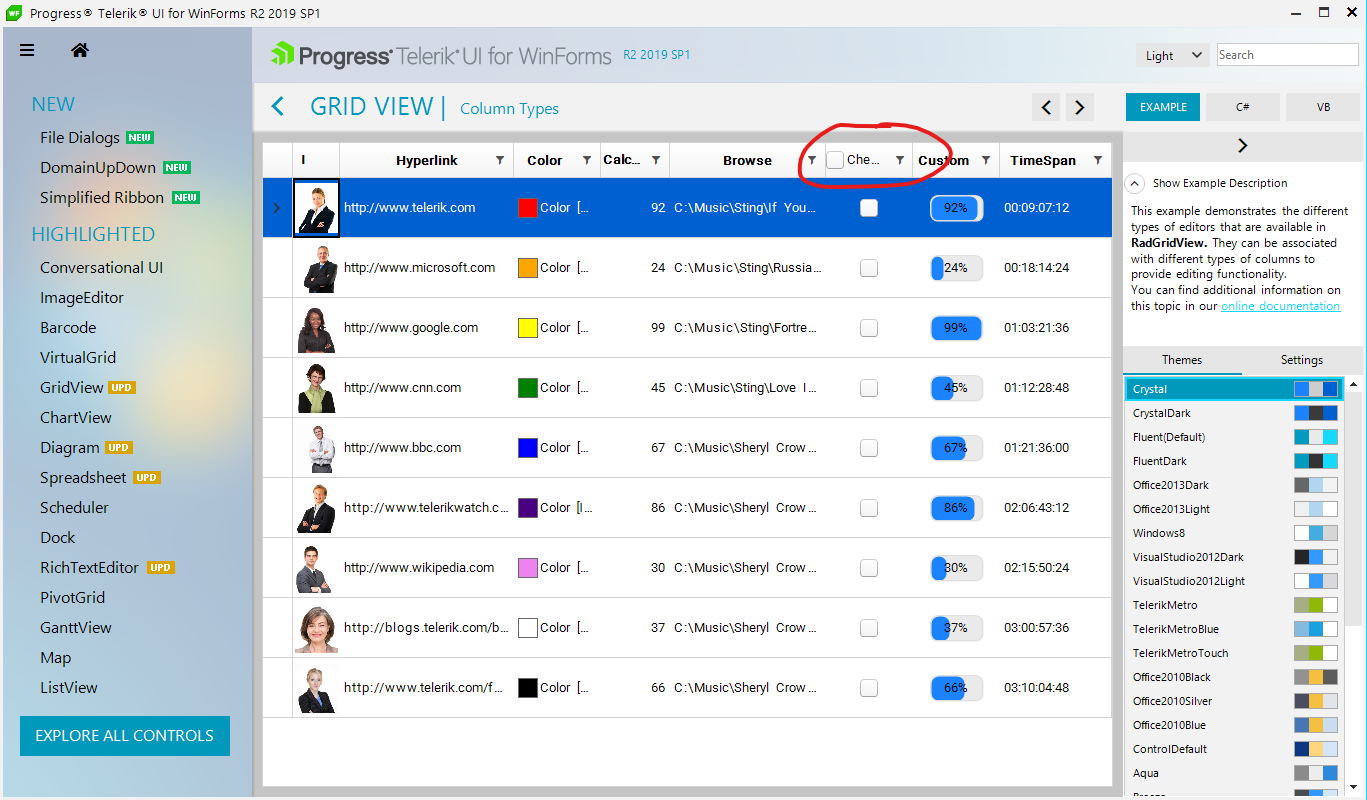
When you have a checkbox column in the grid and group by a certain column, you should have the possibility to check-all rows inside a group without the necessity of expanding the group and checking each separate row.
The group row should have a checkbox as well. When you toggle it, all data rows or nested groups should also be toggled. The parent group should also be adjusted correctly.
Workaround: The following knowledge base article demonstrates a sample approach how to extend the default group row and add a checkbox. However, it would be necessary to modify and extend it in a way to cover the cases with nested groups:
https://www.telerik.com/support/kb/winforms/details/check-all-functionality-in-group-rows
Steps to reproduce:
1. Bind the grid to BindingList
2. Call BestFitColumns method in form's constructor
3. Use Fluent/Crystal theme
4. Rebind the grid by setting DataSource=null
5. Exception is thrown
Stack trace:
en Telerik.WinControls.UI.BestFitHelper.SetColumnWidth(GridViewColumn column, Single desiredWidth)
   en Telerik.WinControls.UI.BestFitHelper.BestFitColumnCore(GridViewColumn column, BestFitColumnMode mode)
   en Telerik.WinControls.UI.BestFitHelper.ProcessRequests()
   en Telerik.WinControls.UI.GridTableElement.UpdateAll()
   en Telerik.WinControls.UI.GridTableElement.UpdateViewCore(Object sender, DataViewChangedEventArgs args)
   en Telerik.WinControls.UI.GridTableElement.UpdateView(Object sender, DataViewChangedEventArgs args)
   en Telerik.WinControls.UI.GridTableElement.ProcessTemplateEvent(GridViewEvent eventData)
   en Telerik.WinControls.UI.GridTableElement.Telerik.WinControls.UI.IGridViewEventListener.ProcessEvent(GridViewEvent eventData)
   en Telerik.WinControls.UI.GridViewEventProcessEntity.ProcessCollection(GridViewEvent gridEvent, PriorityWeakReferenceList list, GridEventProcessMode processMode)
   en Telerik.WinControls.UI.GridViewEventProcessEntity.ProcessEvent(GridViewEvent gridEvent)
   en Telerik.WinControls.UI.GridViewSynchronizationService.NotifyListeners(GridViewEvent gridEvent)
   en Telerik.WinControls.UI.GridViewSynchronizationService.FlushEvents()
   en Telerik.WinControls.UI.GridViewSynchronizationService.DispatchEvent(GridViewEvent gridEvent)
   en Telerik.WinControls.UI.GridViewSynchronizationService.DispatchEvent(GridViewTemplate template, GridViewEvent eventData, Boolean postUI)
   en Telerik.WinControls.UI.GridViewTemplate.DispatchEvent(GridViewEvent gridEvent, Boolean postUI)
   en Telerik.WinControls.UI.GridViewTemplate.DispatchDataViewChangedEvent(Object sender, DataViewChangedEventArgs args)
   en Telerik.WinControls.UI.GridViewTemplate.OnViewChanged(Object sender, DataViewChangedEventArgs e)
   en Telerik.WinControls.UI.MasterGridViewTemplate.OnViewChanged(Object sender, DataViewChangedEventArgs e)
   en Telerik.WinControls.UI.GridViewTemplate.CollectionView_CollectionChanged(Object sender, NotifyCollectionChangedEventArgs e)
   en Telerik.WinControls.Data.RadCollectionView`1.OnCollectionChanged(NotifyCollectionChangedEventArgs args)
   en Telerik.WinControls.Data.RadDataView`1.RebuildData(Boolean notify)
   en Telerik.WinControls.Data.RadDataView`1.RefreshOverride()
   en Telerik.WinControls.Data.RadDataView`1.ProcessCollectionChanged(NotifyCollectionChangedEventArgs args)
   en Telerik.WinControls.Data.RadCollectionView`1.source_CollectionChanged(Object sender, NotifyCollectionChangedEventArgs e)
   en Telerik.WinControls.Data.NotifyCollectionChangedEventHandler.Invoke(Object sender, NotifyCollectionChangedEventArgs e)
   en Telerik.WinControls.Data.RadListSource`1.OnCollectionChanged(NotifyCollectionChangedEventArgs e)
   en Telerik.WinControls.Data.RadListSource`1.EndUpdate(Boolean notifyUpdates)
   en Telerik.WinControls.Data.RadListSource`1.Initialize()
   en Telerik.WinControls.Data.RadListSource`1.Bind(Object dataSource, String dataMember)
   en Telerik.WinControls.Data.RadListSource`1.set_DataSource(Object value)
   en Telerik.WinControls.UI.GridViewTemplate.set_DataSource(Object value)
   en Telerik.WinControls.UI.RadGridView.set_DataSource(Object value)
Dear Support team,
Our Application issue: While running application in assistive mode and having a grid with large number of columns, Narrator/JAWS starts reading each Column Value as "DbNull"
while User is Tabbing through selected Row. (Please see attach Video for better understanding.)
I also created a sample Program:
1. Build Win Form app having a RadGridView. [Sample Attached in 1514161]
2. Start Win 10 Narrator App
3. Run App from Step #1 [Note: Please do not Resize Main Form yet]
4. Start Tabbing from Grid selected Row. Narrator does not read/speak Cell Values.
5. Now Close & Run Application again and Maximize Window. Repeat Step #4. Narrator reads/speak Cell Values as expected.
It seems reads all values fine until they are visible, and once you continue tabbing and horizontal scrolling happens and then stops reading.
Please advice. A Fix for it would be a great help!
Looking forward to hear back!
Thanks and Regards,
Vivek
Sr. .Net Developer
You can also note it in demo application with this settings:


- Filter the column "code" to show only "(Blanks)"
- Hit the "Save Layout" button to save the layout into a string
- Hit the "Load Layout" button. The row is gone
To reproduce, rebind the grid to a data table on button click and show grid's search row.
public RadForm1()
{
InitializeComponent();
this.radGridView1.AllowSearchRow = true;
}
private void RadButton1_Click()
{
DataTable dt = this.GetData();
this.radGridView1.DataSource = dt;
}
private DataTable GetData()
{
DataTable data = new DataTable();
for (int i = 0; i < 5; i++)
{
data.Columns.Add("Column " + i, typeof(int));
data.Columns.Add("Column " + i + 1, typeof(string));
data.Columns.Add("Column " + i + 2, typeof(string));
}
for (int k = 0; k < 5000; k++)
{
object[] parameters = new object[15];
for (int i = 0; i < 15; i += 3)
{
parameters[i] = k;
parameters[i + 1] = "Text " + i;
parameters[i + 2] = "Text " + i + 1;
}
data.Rows.Add(parameters);
}
return data;
}
When we have column groups with equal names, the Spread Export is not exporting the groups correctly. This will lead to incorrectly merged cells.
A possible workaround is to assure that all column groups have different strings for their Text property.
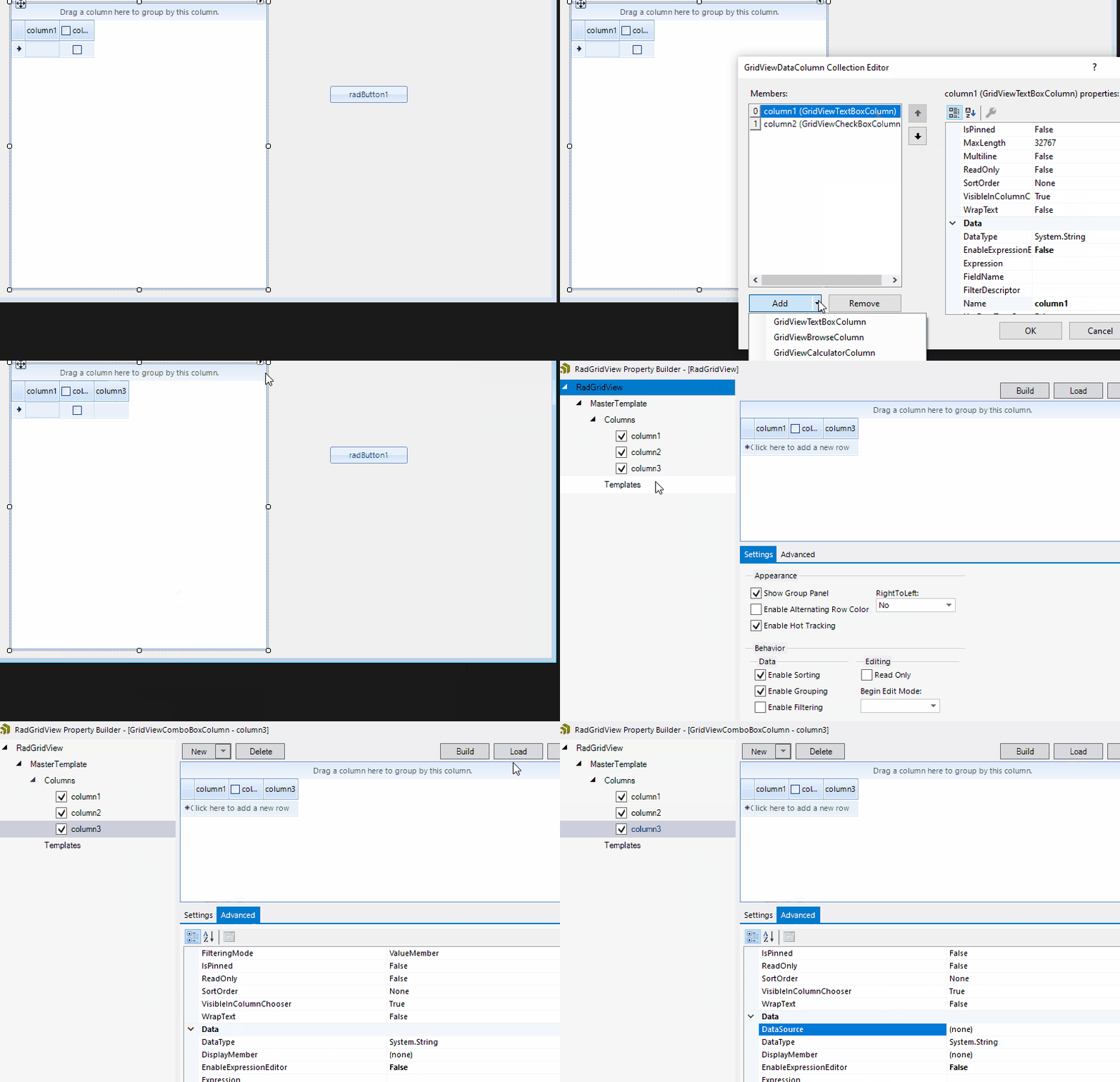
ComboBox column DataSource property is not visible in the Designer MS Property Builder when the previously selected node was RadGridView.

Class GridViewCellInfoCollection does not implement any generic interfaces.
Run the attached sample project on a monitor with 100% DPI scaling. Then, try moving the form to the second monitor with 150% DPI scaling. You will notice that the following error occurs:
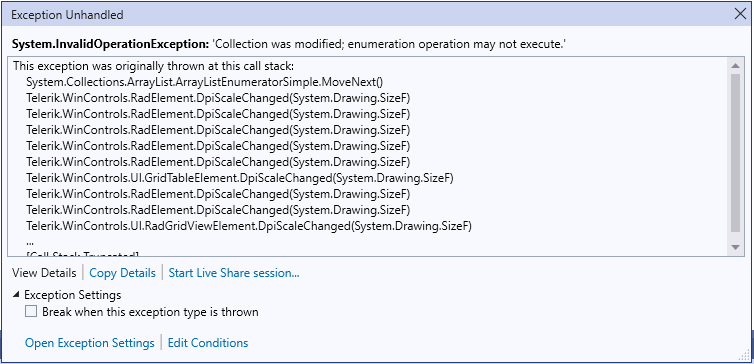
Workaround: instead of using a RadTextBoxControlElement in the custom cell, feel free to use a RadTextBoxElement. However, please have in mind that RadTextBoxElement hosts the MS TextBox and using controls in grid cells may slow down the scrolling and will cause visual glitches as they do not support clipping.
ArgumentOutOfRangeException is thrown when the control is auto-sized (AutoSize = true) and we try to select all (MultiSelect = true with CellSelect) rows by clicking and moving the mouse.
As a workaround, we could set the MaximumSize property of the RadGridView.
this.radGridView1.MaximumSize = new Size(1000,1000);
GridViewCellInfo offers Style property which allows you to customize the style for the cells defined at the data cell's level: https://docs.telerik.com/devtools/winforms/controls/gridview/cells/formating-examples/style-property
This functionality should work for the header cells as well like this:
            GridViewCellInfo cell = this.radGridView1.MasterView.TableHeaderRow.Cells[0];
            cell.Style.CustomizeFill = true;
            cell.Style.GradientStyle = GradientStyles.Solid;
            cell.Style.BackColor = System.Drawing.Color.FromArgb(162, 215, 255);
Steps to reproduce:
1. Bind the grid and enable the search row
2. Enter some search text
3. Delete records from the applied DataSource collection. It may be necessary to perform the delete operation several times before the error occurs.
The error can be reproduced with the following code snippet:
    Dim dt As New DataTable
    Sub New()

        InitializeComponent()

        dt.Columns.Add("Id", GetType(Integer))
        dt.Columns.Add("Name", GetType(String))
        For index = 1 To 10000
            dt.Rows.Add(index, Guid.NewGuid.ToString())

        Next
        Me.RadGridView1.DataSource = dt
        Me.RadGridView1.AutoSizeColumnsMode = Telerik.WinControls.UI.GridViewAutoSizeColumnsMode.Fill

        Me.RadGridView1.AllowSearchRow = True

    End Sub

    Private Sub RadButton1_Click(sender As Object, e As EventArgs) Handles RadButton1.Click
        For index = 1 To 50
            dt.Rows.RemoveAt(0)
        Next
    End Sub
There is a sample project attached as well and its result is illustrated in the gif file.
Stack trace:
   at Telerik.WinControls.UI.MasterGridViewTemplate.set_CurrentRow(GridViewRowInfo value)
   at Telerik.WinControls.UI.RadGridView.set_CurrentRow(GridViewRowInfo value)
   at Telerik.WinControls.UI.GridViewSearchRowInfo.SetCurrent(GridSearchResultCellInfo cell)
   at Telerik.WinControls.UI.GridViewSearchRowInfo.SetCurrent(GridSearchResultCellInfo cell, Boolean checkInvokeRequired)
   at Telerik.WinControls.UI.GridViewSearchRowInfo.SelectNextSearchResult()
   at Telerik.WinControls.UI.GridViewSearchRowInfo.Search(String criteria)
   at Telerik.WinControls.UI.GridViewSearchRowInfo.Telerik.WinControls.UI.IGridViewEventListener.PostProcessEvent(GridViewEvent eventData)
   at Telerik.WinControls.UI.GridViewEventProcessEntity.ProcessCollection(GridViewEvent gridEvent, PriorityWeakReferenceList list, GridEventProcessMode processMode)
   at Telerik.WinControls.UI.GridViewSynchronizationService.NotifyListeners(GridViewEvent gridEvent)
   at Telerik.WinControls.UI.GridViewSynchronizationService.FlushEvents()
   at Telerik.WinControls.UI.GridViewSynchronizationService.DispatchEvent(GridViewEvent gridEvent)
   at Telerik.WinControls.UI.GridViewSynchronizationService.DispatchEvent(GridViewTemplate template, GridViewEvent eventData, Boolean postUI)
   at Telerik.WinControls.UI.GridViewRowCollection.DispatchDataViewChangedEvent(DataViewChangedEventArgs args, GridEventType type)
   at Telerik.WinControls.UI.GridViewRowCollection.ListSource_CollectionChanged(Object sender, NotifyCollectionChangedEventArgs e)
   at Telerik.WinControls.Data.NotifyCollectionChangedEventHandler.Invoke(Object sender, NotifyCollectionChangedEventArgs e)
   at Telerik.WinControls.Data.RadListSource`1.OnCollectionChanged(NotifyCollectionChangedEventArgs e)
   at Telerik.WinControls.Data.RadListSource`1.RemoveItem(Int32 index)
   at Telerik.WinControls.Data.RadListSource`1.currencyManager_ListChanged(Object sender, ListChangedEventArgs e)
   at System.Windows.Forms.CurrencyManager.OnListChanged(ListChangedEventArgs e)
   at System.Windows.Forms.CurrencyManager.List_ListChanged(Object sender, ListChangedEventArgs e)
   at System.Windows.Forms.BindingSource.OnListChanged(ListChangedEventArgs e)
   at System.Windows.Forms.BindingSource.InnerList_ListChanged(Object sender, ListChangedEventArgs e)
   at System.ComponentModel.BindingList`1.OnListChanged(ListChangedEventArgs e)
   at System.ComponentModel.BindingList`1.FireListChanged(ListChangedType type, Int32 index)
   at System.ComponentModel.BindingList`1.RemoveItem(Int32 index)
   at System.Collections.ObjectModel.Collection`1.Remove(T item)
   at System.Collections.ObjectModel.Collection`1.System.Collections.IList.Remove(Object value)
   at System.Windows.Forms.BindingSource.Remove(Object value)