Unplanned
Last Updated: 18 Nov 2026 08:01 by ADMIN
Olivier
Created on: 16 Nov 2026 23:46
Type: Feature Request
1
Support displaying Figma Styles

Currently, when syncing a Figma library with Telerik ThemeBuilder using the official Figma plugin, the import focuses primarily on Figma Variables (colors, metrics/numbers), while Figma Styles (such as Text Styles) are not visibly exposed and manageable within the ThemeBuilder UI.

As a result, teams cannot inspect, verify, or map their imported Figma Styles directly inside ThemeBuilder like other tokens.

Describe the solution you'd like

Enhance the ThemeBuilder interface so that:

  1. Imported styles are clearly visible and organized in dedicated sections inside ThemeBuilder (similar to how Figma Colors and Figma Metrics are displayed), showing their exact names and resolved CSS properties (font-family, font-size, font-weight, line-height, etc.).

  2. Tokens/Variables linked inside Figma Styles are preserved (e.g., a Text Style referencing a font-size metric variable maintains that reference upon import).

Why is this important?

In Figma, composite properties like typography scales are still natively managed as Figma Styles (often backed by Figma Variables). Being able to view and use these imported styles directly inside ThemeBuilder is essential to establish Figma as a true single source of truth.

Secondly, Quid of others Styles (color, effect...)?

1 comment
ADMIN
Nick Iliev
Posted on: 18 Nov 2026 08:01
          

 Hi Olivier,

 Thank you for the detailed request.

 Exporting Figma Styles is already supported by the ThemeBuilder plugin for Figma, including Text (Typography), Color, and Effect Styles:

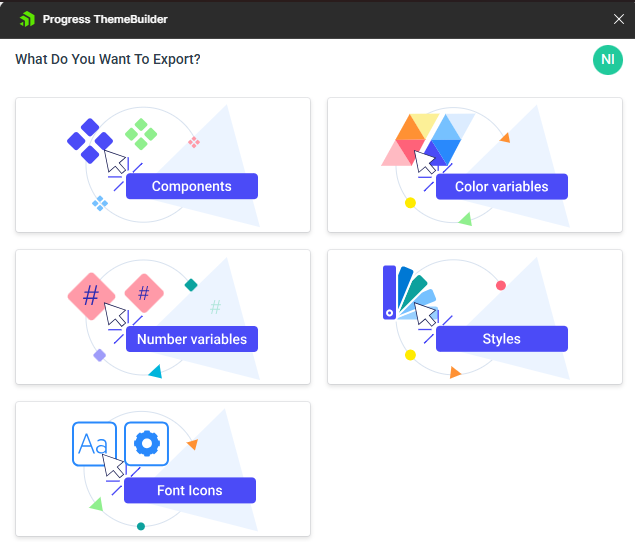
  1. On the plugin start screen, select Styles (Screenshot 1).

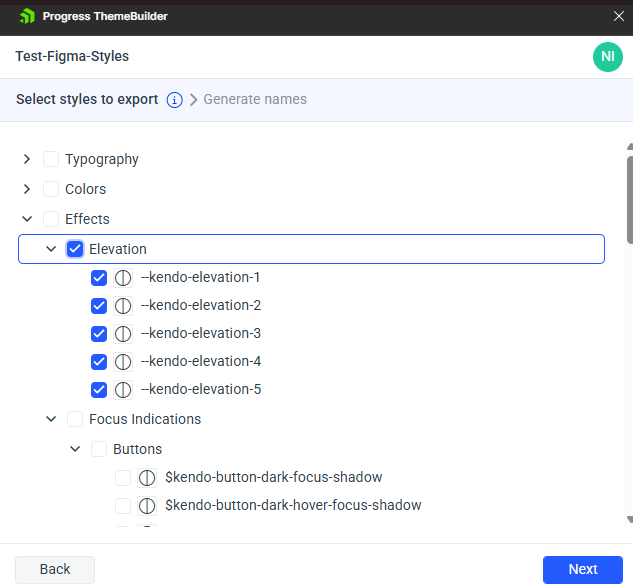
  2. Select the target ThemeBuilder project. The plugin lists the styles from the current Figma file, grouped as Typography, Colors, and Effects and following your Figma folder structure. Check the styles to export (Screenshots 2), click Next, review the generated names, and export.

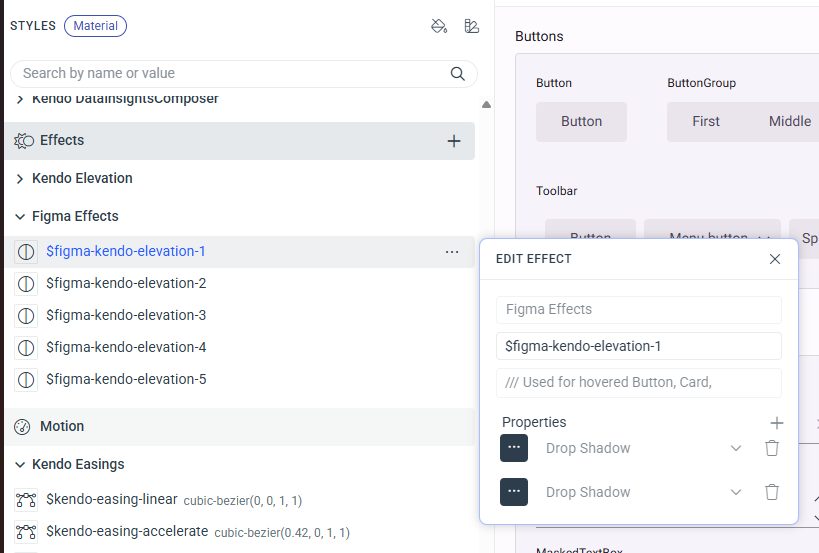
  3. In ThemeBuilder, the styles appear in the Styles pane in dedicated groups: Figma Typography, Figma Colors, and Figma Effects (Screenshot 3). Hovering a style shows its original Figma name, and clicking it opens a read-only dialog with its properties, for example font family, weight, size, and line height for typography, or the shadow layers for effects.

 More details are available in the Exporting Styles article. Styles must be exported from the Figma file that defines them. Styles consumed from a linked library cannot be exported from another file, so run the export in the library file itself.


 Variables linked inside Styles

ThemeBuilder does not currently support variables linked inside Figma Styles. The plugin exports only the hardcoded (resolved) values of a style. For example, if a Text Style's font size is bound to a number variable, or a shadow color in an Effect Style is bound to a color variable, ThemeBuilder imports the resulting value, such as 16px or the color code, and not a reference to the variable. This applies to Typography, Color, and Effect Styles. As a result, when a linked variable changes in Figma, or you switch its mode, the imported style does not update automatically.

Until this is supported, re-export the affected styles after changing the linked variables in Figma. The plugin lists the styles whose values changed, so you can update only those. Preserving variable links inside Styles is a valid request. We have logged it for evaluation and will update this item when we have more information.

If some of your styles do not appear in the plugin's style list, please let us know whether they come from a linked library. That will help us investigate.


Regards,
Nick Iliev
Progress Telerik

Love the Telerik and Kendo UI products and believe more people should try them? Invite a fellow developer to become a Progress customer and each of you can get a $50 Amazon gift voucher.