If you select valid values for a multi-value parameter and then deselect them manually in List_View, the last rendered report remains and there is no warning for invalid parameter values and the Preview button is not disabled. The problem occurs only in List_View for the multivalue parameter editors.
If you deselect the values with 'clear selection' the proper warning gets displayed.
We pass Report Parameters as Strings and later convert them to Floats in the Report. This works fine on our production systems in Switzerland but fails on dev machines that use different system locales.


1. Open report in the EUD.
2. Click "Export Template".
3. Select the open report and click "Next" and "Finish" to complete the wizard. The newly created template is visible in the User Templates as expected.
4. Click "Export Template".
5. Select the open report and click "Next" and "Finish" to complete the wizard. Warning is shown that this template exists. https://gyazo.com/91cac78640a551411c67df4abaecce78
6. Click "Yes" so that the template is replaced.
Observed: Error "Template build failed" https://gyazo.com/6ea75f7fba0674679a3c4df8ba73c307.
This works fine for viewing reports, and it also is fine if I'm only using tables in the designer. However, if I try to use a PictureBox in the designer, I get an error that the PictureBox can't be displayed. It still works when I preview the report, but the editor ends up in a broken state.
From my debugging, it looks like rendering the PictureBox in the designer is trying to connect to the various data sources defined for the report. I don't understand why, since it's just a URL for an image.
When the Name of a Report Parameter is changed, all references to it should be automatically change.
Hello,
I am working on Blazor reporting project and I have described the situation already in this post:
https://www.telerik.com/forums/report-viewer-and-web-designer-in-blazor#zGr6FO2mDEmkfLWIP_T_9A
To sum it up:
Please add .NET 5 js/css isolation to Blazor ReportViewer which will allow:
- usage of more report viewers with different report engine services during the application lifetime (current design requires to load js/css globally from single report engine service and the js cannot be unloaded because it is not isolated in a module)
- simpler usage of the viewer which should just require to set ServiceUrl and the js/css would be managed by the component itself

As HtmlTextBox item supports only a limited number of HTML tags and CSS attributes, it cannot be used for rendering a richly-formatted text. The solution can be to use a WebBrowser control (https://msdn.microsoft.com/en-us/library/system.windows.forms.webbrowser.aspx) in a user function to render HTML to a bitmap and display it in a PictureBox item as described in this KB article: http://www.telerik.com/support/kb/reporting/details/how-to-render-any-html-tags-in-reports

Let us know if you think providing such functionality out-of-the-box would be beneficial for your reports.

Leave here a comment with your thoughts on this subject or vote for this feature.


Would like my custom report resolver to implement async calls, so need
public async Task<ReportSource>Resolve(stringreport) supported in IReportResolver
Thanks!
Example:
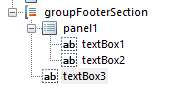
One panel contains two textboxes which both have property Docking set to 'Top'. If the first textbox expands when rendering as a result of overflowing content and property CanGrow set to 'True', the next textbox seems to be correctly positioned, but any item position below the panel with Docking set to 'Top' will be incorrectly positioned.

Error: Can not resolve assembly from Telerik.ReportViewer.Wpf.Design.Resources.Telerik.Windows.Data.dll
Error: System.ArgumentException: The path is not of a legal form.at System.IO.Path.NewNormalizePath(String path, Int32 maxPathLength, Boolean expandShortPaths)at System.IO.Path.NormalizePath(String path, Boolean fullCheck, Int32 maxPathLength, Boolean expandShortPaths)at System.IO.Path.GetFullPathInternal(String path)at System.Reflection.AssemblyName.GetAssemblyName(String assemblyFile)at Telerik.ReportViewer.Wpf.Design.Resources.GetResourceAssemblyName(ITracer tracer, String asmName)
Error: System.NullReferenceException: Object reference not set to an instance of an object.at Telerik.ReportViewer.Wpf.Design.ItemTemplateWizard.CheckTelerikWpfReferences()at Telerik.ReportViewer.Wpf.Design.ItemTemplateWizard.RunStartedCore(Dictionary`2 replacementsDictionary)
window.jQuery = jquery;
For example, removing the above lines results in the error '$.throttle is not a function' in the 'continuous scroll' mode of the viewer. The workaround is to use the 'single page' mode.
The application is published as a single-file application on Linux. Here is the stack trace of the error:
[21:52:53 ERR] Value cannot be null. (Parameter 'path1')
System.ArgumentNullException: Value cannot be null. (Parameter 'path1')
   at System.IO.Path.Combine(String path1, String path2)
   at Telerik.Reporting.Configuration.JsonConfigurationProvider.LoadConfiguration()
   at Telerik.Reporting.Configuration.JsonConfigurationProvider.InstantiateProvider()
   at System.Lazy`1.ViaFactory(LazyThreadSafetyMode mode)
   at System.Lazy`1.ExecutionAndPublication(LazyHelper executionAndPublication, Boolean useDefaultConstructor)
   at System.Lazy`1.CreateValue()
   at System.Lazy`1.get_Value()
   at Telerik.Reporting.Configuration.JsonConfigurationProvider.get_Instance()
   at Telerik.Reporting.Configuration.TelerikConfigurationManager.GetConfigurationProvider()
   at Telerik.Reporting.Configuration.TelerikConfigurationManager.get_ConfigurationProvider()
   at Telerik.Reporting.Configuration.TelerikConfigurationManager.GetReportingSection()
   at Telerik.Reporting.Configuration.ReportingConfiguration.get_Default()
   at Telerik.Reporting.Processing.RenderingExtensionManager.get_RenderingExtensions()
   at Telerik.Reporting.Processing.ReportProcessor.GetExtensionInfoCore(String name)
   at Telerik.Reporting.Processing.ReportProcessor.GetExtensionInfo(String format)
   at Telerik.Reporting.Processing.ReportProcessor.ProcessAndRender(String format, ReportSource reportSource, Hashtable deviceInfo, IRenderingContext renderingContext, CreateStream createStreamCallback)
   at Telerik.Reporting.Processing.ReportProcessor.ProcessAndRenderStateless(String format, ReportSource reportSource, Hashtable deviceInfo, IRenderingContext renderingContext, CreateStream createStreamCallback)
   at Telerik.Reporting.Processing.ReportProcessor.RenderReport(String format, ReportSource reportSource, Hashtable deviceInfo, CancellationToken cancellationToken)
   at Telerik.Reporting.Processing.ReportProcessor.RenderReport(String format, ReportSource reportSource, Hashtable deviceInfo)
   at HaliburtonSoftware.Reporting.Generation.GenerationProcessor.CreateReport(InstanceReportSource reportSource, String fileName, ReportFormat reportFormat)
   at HaliburtonSoftware.Reporting.Generation.GenerationProcessor.ProcessReport(String culture, String reportName, ReportFormat reportFormat, String fileName, IList`1 parameters, Hashtable deviceInfo)
I also had lots of issues trying to get the application version information of a single-file application and had to revert to using an environmental variable in the container.

Hi Team,

While exporting the report displayed in the web report viewer to CSV, we are exporting the textbox name as header value. Which leads to a problem while exporting a dynamic value whose control name is decided at run time. Please provide an option to assign and export value assigned at runtime.

Details of the issue are discussed in below link. Please have a look over the comment raised on 25th Sept 2014 by Perry.
http://www.telerik.com/forums/exports-to-csv-contains-header-as-textbox-name

Thanks
When printing large runs of multi page documents (production work orders where each job is 5 pages and we are printing 100 jobs), to support stapling options on the printers.
All office products support this and PDF programs.
I reported this behavior earlier in a support ticket over two years ago but since it has not been addressed, I would try this approach.

If an AreaSeries has the LineType set to LineTypes.Smooth, the graph series may become misleading or incorrect. Consider the attached screenshot (withoutsettings.png) showing a simple 10 point chart. Looking at the chart, you would assume that between 11:06 and 11:07, the response time was below 0. However the test values indicate that the values never were below 0. This makes the chart  misleading and incorrect. It then makes the chart unreliable to the end user, thus unusable. The quick workaround is to set the LineType=straight but since you support a smooth linetype, it should be correct. Another, more serious, instance in the chart where (using smooth LineType) is where the series line will cross the  x axis point (a timeline chart) more than 1 time which is actually a timeline chart violation. (attached file AreaSmooth2.png) .
Hi,
it would be great to have the ability to style every aspect of the report elements with style rules and with and external stylesheet.
For example a graph can take a long time to be styled correctly.
Stefano
Now you can do it by grouping several options, but what i want is to hide one by one.